https://github.com/smellydelli/prowl.nvim
Lightning-fast access to your nvim buffers with single-key jumps. just press ;q to jump to buffer 'q', ;w for 'w', and so on.
https://github.com/smellydelli/prowl.nvim
buffer-management buffers lazyvim neovim neovim-plugin nvim nvim-plugin
Last synced: 3 months ago
JSON representation
Lightning-fast access to your nvim buffers with single-key jumps. just press ;q to jump to buffer 'q', ;w for 'w', and so on.
- Host: GitHub
- URL: https://github.com/smellydelli/prowl.nvim
- Owner: smellydelli
- License: gpl-2.0
- Created: 2025-08-21T20:09:01.000Z (9 months ago)
- Default Branch: main
- Last Pushed: 2025-09-09T20:23:24.000Z (9 months ago)
- Last Synced: 2025-10-11T07:59:22.253Z (8 months ago)
- Topics: buffer-management, buffers, lazyvim, neovim, neovim-plugin, nvim, nvim-plugin
- Language: Lua
- Homepage:
- Size: 16.6 KB
- Stars: 2
- Watchers: 0
- Forks: 0
- Open Issues: 0
-
Metadata Files:
- Readme: README.md
- License: LICENSE
Awesome Lists containing this project
README
# prowl.nvim - stealthy buffer navigation for Neovim
## 🐈 Introduction
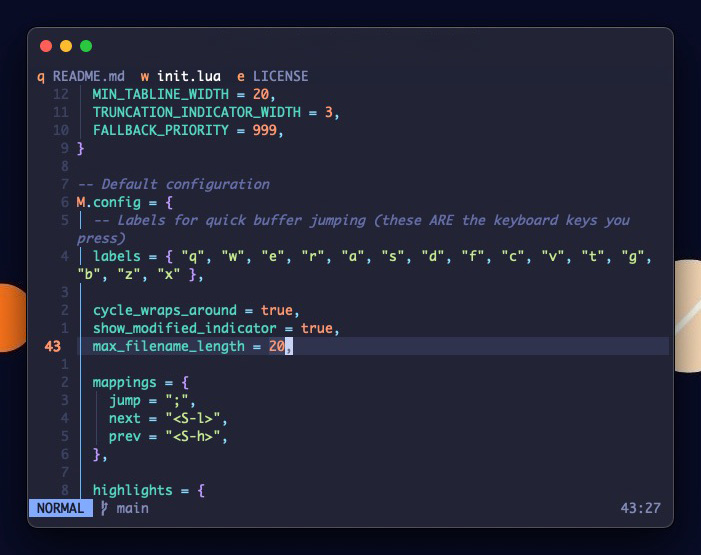
Prowl gives you lightning-fast access to your buffers with single-key jumps. No fuzzy finder popup, no buffer lists to scroll through - just press `;q` to jump to buffer 'q', `;w` for 'w', and so on.
- **Jump**: `;a` → instantly switch to buffer 'a'
- **Close**: `;A` → close buffer 'a' (uppercase)
- **Close all others**: `;!` → close everything except current buffer
- **Cycle**: `Shift+L`/`Shift+H` → move through buffers
## ✨ Features
- **🎯 Instant Buffer Access** - Single keypress jumping with no popups or delays
- **✋ Customisable Labels** - Configure your own easy access key labels
- **⚡ Highly Performant** - Extensive caching, lookup tables, and memory optimisations
- **🧠 Logical Buffer Management** - New buffers appear right, older ones shift left naturally
- **🎨 Themeable** - Customise colours to match your colourscheme
## 📦 Lazyvim installation
```lua
{
"smellydelli/prowl.nvim",
name = "prowl",
opts = {},
}
```
## ⚙️ Default configuration
The labels are chosen based on which keys are easiest to reach for me, and buffers are populated in the same order. The default theme works well with Tokyonight.
```lua
{
labels = { "q", "w", "e", "r", "a", "s", "d", "f", "c", "v", "t", "g", "b", "z", "x" },
cycle_wraps_around = true,
show_modified_indicator = true,
max_filename_length = 20,
mappings = {
jump = ";",
next = "",
prev = "",
},
highlights = {
bar = { fg = "#ffffff", bg = "#1f2335" },
active_tab = { fg = "#ffffff", bg = "#1f2335" },
active_label = { fg = "#ff9e64", bg = "#1f2335", bold = false },
active_tab_modified = { fg = "#ffffff", bg = "#1f2335" },
active_label_modified = { fg = "#ff9e64", bg = "#1f2335", bold = false },
inactive_tab = { fg = "#828BB8", bg = "#1f2335" },
inactive_label = { fg = "#ff9e64", bg = "#1f2335", bold = false },
inactive_tab_modified = { fg = "#828BB8", bg = "#1f2335" },
inactive_label_modified = { fg = "#ff9e64", bg = "#1f2335", bold = false },
truncation = { fg = "#ff9e64", bg = "#1f2335" },
},
}
```
## 💡 Inspiration
Inspired by [https://github.com/iofq/dart.nvim](https://github.com/iofq/dart.nvim).
Prowl will remain barebones simple, so try their plugin if you need more features.