https://github.com/smiletrl/micro_ecommerce
an ecommerce application with micro service infrastructure
https://github.com/smiletrl/micro_ecommerce
ecommerce golang grpc istio kubernetes micro-service minikube mongodb postgressql rocketmq
Last synced: 5 months ago
JSON representation
an ecommerce application with micro service infrastructure
- Host: GitHub
- URL: https://github.com/smiletrl/micro_ecommerce
- Owner: smiletrl
- License: mit
- Created: 2021-02-11T10:26:28.000Z (over 5 years ago)
- Default Branch: master
- Last Pushed: 2021-07-12T01:14:09.000Z (almost 5 years ago)
- Last Synced: 2024-11-17T04:45:18.601Z (over 1 year ago)
- Topics: ecommerce, golang, grpc, istio, kubernetes, micro-service, minikube, mongodb, postgressql, rocketmq
- Language: Go
- Homepage:
- Size: 10.5 MB
- Stars: 6
- Watchers: 2
- Forks: 3
- Open Issues: 0
-
Metadata Files:
- Readme: README.md
- License: LICENSE
Awesome Lists containing this project
README
# Micro service ecommerce
An ecommerce application with micro service infrastructure
-------------------------
- [Reference](#reference)
- [Technical Stack](#technical-stack)
- [Background](#background)
- [Alternative](#alternative)
- [UI Result](#ui-result)
- [Services](#services)
- [Local Installment, development & deployment](#local-installment-development--deployment)
- [Project Structure](#project-structure)
- [Distributed Transaction](#distributed-transaction)
- [Paid Service](#paid-service)
-------------------------
### Reference
- [Go Standard Layout](https://github.com/golang-standards/project-layout)
- [Micro Service Concept](https://docs.microsoft.com/en-us/azure/service-fabric/service-fabric-overview-microservices)
### Technical Stack
- [Golang >= 1.14](https://golang.org/)
- [PostgreSQL](https://www.postgresql.org/)
- [MongoDB](https://www.mongodb.com/)
- [Redis](https://redis.io/)
- [gRPC](https://github.com/grpc/grpc-go)
- [MiniKube](https://minikube.sigs.k8s.io/docs/start/)
- [Kubernetes](https://kubernetes.io/)
- [Istio](https://istio.io/)
- [Terraform](https://www.terraform.io/)
- [RocketMQ](https://rocketmq.apache.org/)
### Background
This project shows a simple ecommerce app running based on micro service architecture. It could run in a local environment with miniKube for local development. The primary language is Golang for these micro services. Kubernetes & istio are used for service register & discovery.
Ideally, each service would have its own database. In this project, one database, especially postgresSQL will be shared among a few services. But each service will only have access to its own tables.
For people who are new, but interested in micro service, this project is supposed to provide basic usage for items:
- Kubernetes & Istio for service register, discovery and more micro service features.
- gRPC for sync communication between micro services to provide low latency internal service response.
- RocketMQ for async communication to decouple services to focus on individual service development.
- Terraform configuration for local development & deployment. It's supposed to be easily to be migrated to an online cloud environment, such as AWS.
Note: The main purpose of this project is for micro service architecture demonstration. While different service configuration and code in this project might be a good sample start, every technology will need optimization in real production environments to fit in different project needs, and ecommerce requirements.
### Alternative
There're alternative framework solutions, which bring both advantage and disadvantage.
- [Go kit](https://github.com/go-kit/kit)
- [Go micro](https://github.com/asim/go-micro)
### UI Result
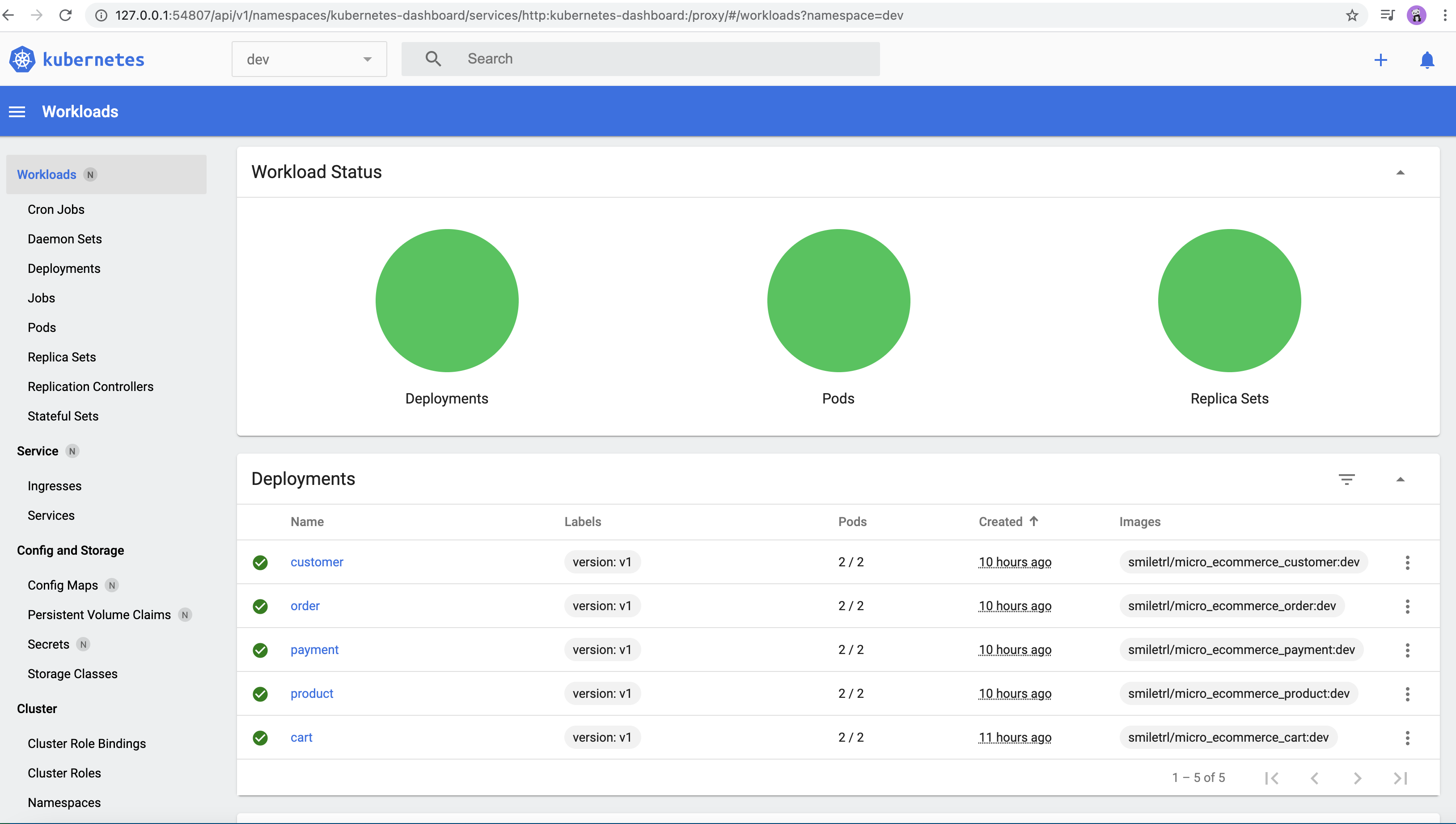
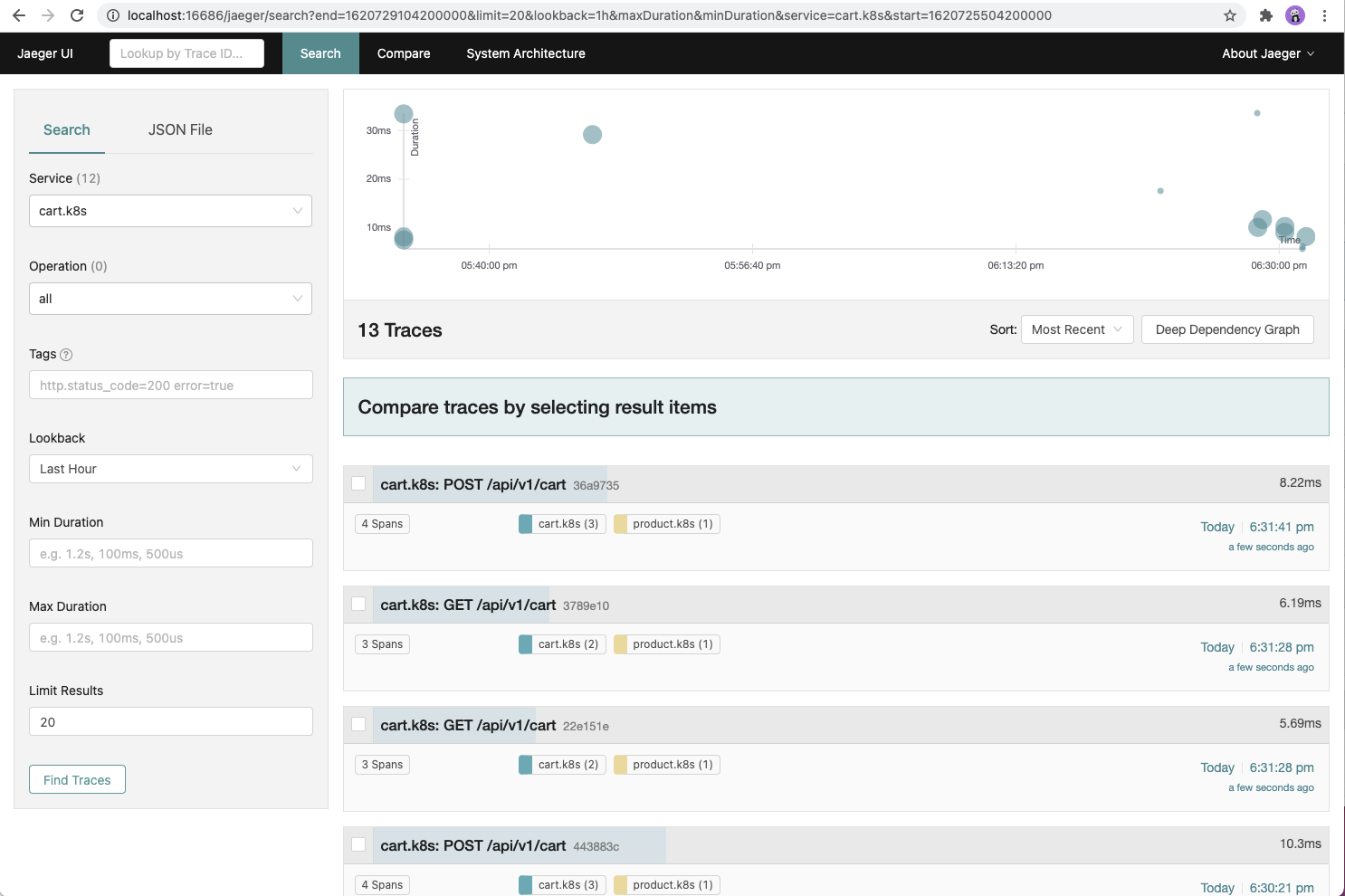
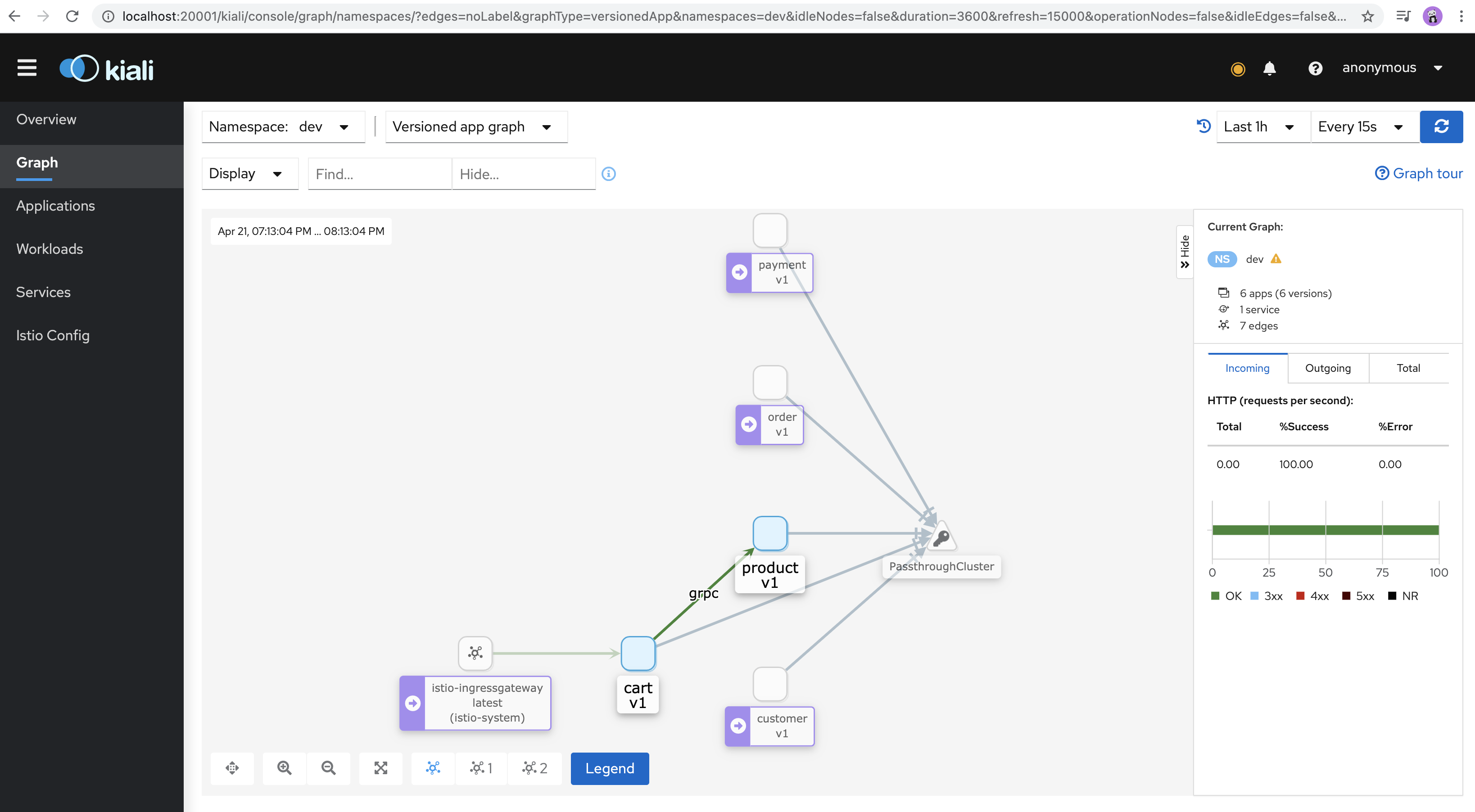
After installment of this project in local, try sending a few sample api requests
```
curl -X GET http://127.0.0.1/api/v1/cart_item
curl -X POST http://127.0.0.1/api/v1/cart_item
```
Then the UI result may look like
Kubernetes UI
Jaeger UI
Kiali UI
### Services
Services include following at this moment. Different service might use different database & different language. Right now, Golang is the only language, but python, nodejs or vuejs might be picked for other service, such as analytical, frontend services.
Three databases are used at this moment, Redis, PostgresSQL, MongoDB.
Check below links for service details. These services are not real functional, but should provide a basic idea on the way.
- [Customer](https://github.com/smiletrl/micro_ecommerce/tree/master/service.customer), Golang & PostgreSQL
- [Cart](https://github.com/smiletrl/micro_ecommerce/tree/master/service.cart), Golang & Redis
- [Product](https://github.com/smiletrl/micro_ecommerce/tree/master/service.product) Golang & MongoDB & gRPC Server
- [Order](https://github.com/smiletrl/micro_ecommerce/tree/master/service.order), Golang
- [Payment](https://github.com/smiletrl/micro_ecommerce/tree/master/service.payment), Golang & RocketMQ
According to some big Chinese Companies(Alibaba, [Didi, 2018](https://developer.aliyun.com/article/664608)) reports, kafka could perform poorly when kafka topic numebr has increased above 256. This project is for ecommerce, which has pretty similar business logic like alibaba, so RocketMQ is picked for regular business logic process.
### Local Installment, development & deployment
- Install [Docker](https://www.docker.com/)
- Install [minikube](https://minikube.sigs.k8s.io/docs/start/) (minikube version: v1.19.0 in my mac). After successful installment, start it with command `minikube start` and enable tunnel with command `minilube tunnel` for load balance. Also, command `minikube dashboard` could be used to enable dashbaord to visiually view kubernetes service & configurations. If you have played with kubernetes before, you might have file `~/.kube/config` already. To make it simple, mv this config file with a different name before minikube installment, such as `mv ~/.kube/config ~/.kube/config-backup`.
- Install [Istio](https://istio.io/latest/docs/setup/getting-started/) (client version: 1.9.2 in my mac)
- Install [Terraform](https://www.terraform.io/) (Terraform v0.14.7 in my mac)
- Install [RocketMQ](https://rocketmq.apache.org/docs/quick-start/) (version 4.8.0 in my mac). Note, this version only work with JDK 1.8. Choose this jdk version [in mac](https://mkyong.com/java/how-to-set-java_home-environment-variable-on-mac-os-x/). If you want to use JDK1.9+, more adjustment is required. See [issue](https://github.com/apache/rocketmq/issues/2553). The two commands might also be required for installment `mkdir -p ~/store/commitlog/`, `mkdir -p ~/store/consumequeue/`.
- Install local postgresSQL with command `make db-start`. This will install a local postgresSQL version through docker.
- Create an account at docker.io(https://hub.docker.com/) if you don't have an account already. Create repositories, such as `docker.io/smiletrl/micro_ecommerce_customer` for customer service defined at this project. Replace `smiletrl` with your own account name. Create other repositories like customer services at hub.docker.com. Then try to replace `docker.io/smiletrl/micro_ecommerce_xxx` with `docker.io/{Your_account_name}/micro_ecommerce_xxx` at `/Mikefile`.
- Upload local services docker images to docker.io. For example, to upload cart service, run command `make build-cart`. Use similar strategy for other services to upload service docker image to docker.io. Some service might be missing in makefile for build, play with it and see how it works^.
- Copy content from `/infrastructure/local/envs/dev/terraform.tfvars.example` to `/infrastructure/local/envs/dev/terraform.tfvars`, and replace content `smiletrl` with your own docker hub account name in the tfvars file.
- Copy content from `/infrastructure/local/terraform.tfvars.example` to `/infrastructure/local/terraform.tfvars`. Run command `minikube ssh 'grep host.minikube.internal /etc/hosts | cut -f1'` to get minikube ssh instance ip for local host in your local machine. Then replace the ip_host value `"192.168.65.2"` with your own ip from minikube ssh instance in the new tfvars file.
- Replace ip value `192.168.65.2` from `/config/k8s.yaml` with your own IP from above step.
- After above components are set up and running, run command `make terraform`. For online environment, use aws s3 bucket or similar service for remote state. Here, we simply use local state file for local development. If all goes well, this command with terraform will deploy local services to local minikube. You may see these services & their pods in namespace `dev` in minikube dashboard, or through kubectl. To verify this is working, open `http://127.0.0.1/api/v1/cart_item` in your browser, if you see `succeed!` in the browser, you are successful!
- Local development can also happen without kubernetes. For example, run `STAGE=/Users/smiletrl/go/src/github.com/smiletrl/micro_ecommerce/config/local.yaml go run service.product/cmd/main.go` to start local product service. Replace `/Users/smiletrl/go/src/github.com/smiletrl/micro_ecommerce/config/local.yaml` with your local path to this local yaml file. Then the service is available at `http:127.0.0.1:1325`.
- After code changes in service cart, to deploy the change to local kubernetes, use command `make deploy-cart`. Use similar strategy to deploy other services to kubernetes.
### Project Structure
```
github.com/smiletrl/micro_service
|-- .github
|-- build
|-- config
| |-- github.yaml
| |-- k8s.yaml
| |-- local.yaml
| |-- prod.yaml
|-- infrastructure
| |-- local
| | |-- host.tf
| | |-- main.tf
| | |-- envs
| | | |-- dev
| | | | |-- cluster.tf
| | | | |-- gateway.yaml
| | | | |-- main.tf
| | | | |-- terraform.tfvars.example
| | | | |-- variables.tf
| | | | |-- virtual_services.yaml
| |-- online
| | |-- prod
| | |-- staging
|-- migrations
| |-- 2021xxxx.down.sql
| |-- 2021xxxx.up.sql
|-- pkg
| |-- auth
| |-- config
| |-- constants
| |-- context
| |-- entity
| |-- errors
| |-- healthcheck
| |-- jwt
| |-- migration
| |-- mongodb
| |-- postgresql
| |-- redis
| |-- rocketmq
| |-- test
|-- service.cart
|-- service.customer
|-- service.order
|-- service.payment
|-- service.product
|-- testdata
|-- vendor
|-- .gitignore
|-- database.yml
|-- go.mod
|-- go.sum
|-- Makefile
|-- README.md
```
## Distributed Transaction
This project doesn't add the distributed transaction support. But if you are interested, here're what we recommend:
For strong consistency scenarios, use [TCC approach](https://www.alibabacloud.com/blog/an-in-depth-analysis-of-distributed-transaction-solutions_597232). For eventual consistency scenarios, consider RocketMQ message.
RocketMQ has supported transaction message natively, which saves big effort to do transaction message.
For example, once order has paid successfully, we need to do a bunch of things:
```
------- One TCC transaction -----
1. Change payment service state
2. Change order service state
3. Change product sku stock
------ Subscribe to roceketmq message if (1,2,3) succeeds ----
4. Add credit to customer
5. Add commission to referer
6. Send notification to staff
...
```
In above process, (1,2,3) can be implemented within TCC one transaction because they need strong consistency. One failed change will break the bussiness, and they need to be just one transaction.
(4,5,6) can be implemented with RocketMQ message. Even one step has failed, it doesn't affect the business flow. With RocketMQ retry and dead-letter-queue, we can finally solve possible issues, and get to the eventual consistency.
If tcc transaction (1,2,3) has failed, then we won't send rocketmq message. Otherwise, the rocketmq message will be sent out. This flow can be within one RocketMQ transaction message, so we can guarantee (1,2,3) and rocketmq message to be within one transaction.
This TCC framework https://github.com/opentrx/seata-golang is suggested.
## Paid Service
We offer paid service for ecommerce application development. [Get in touch](mailto:smiletrl@yahoo.com) if you want to talk ^