https://github.com/snipe/slacktunes
App to push your currently playing iTunes song to a Slack channel
https://github.com/snipe/slacktunes
Last synced: 3 months ago
JSON representation
App to push your currently playing iTunes song to a Slack channel
- Host: GitHub
- URL: https://github.com/snipe/slacktunes
- Owner: snipe
- Created: 2018-05-31T03:13:07.000Z (about 8 years ago)
- Default Branch: master
- Last Pushed: 2018-05-31T08:50:45.000Z (about 8 years ago)
- Last Synced: 2025-06-08T03:25:09.384Z (about 1 year ago)
- Language: JavaScript
- Size: 171 KB
- Stars: 0
- Watchers: 2
- Forks: 0
- Open Issues: 1
-
Metadata Files:
- Readme: README.md
Awesome Lists containing this project
README
# Slacktunes
:musical_note: Send what you're playing on iTunes to Slack.
This project is a continuation of the awesome [Playing](https://github.com/uiureo/playing) project by [@uiureo](https://github.com/uiureo).
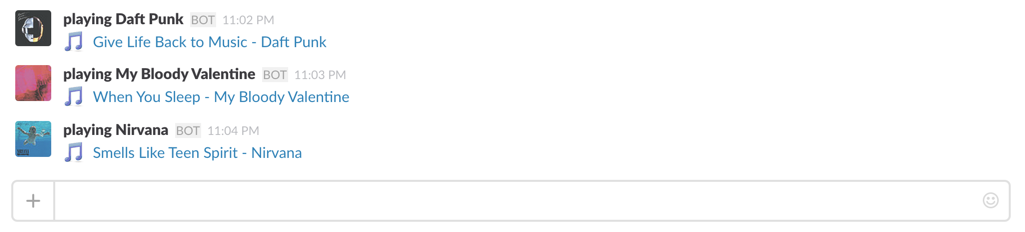
Currently works only in OSX/MacOS, but I'm working on a Windows version.
## Installation
Download the latest version of zip from here and launch it.
https://github.com/snipe/playing/releases
## Usage
Add an Incoming Webhook and get a Webhook URL.
https://slack.com/services/new/incoming-webhook
Launch settings menu from the menubar and paste it to the form.
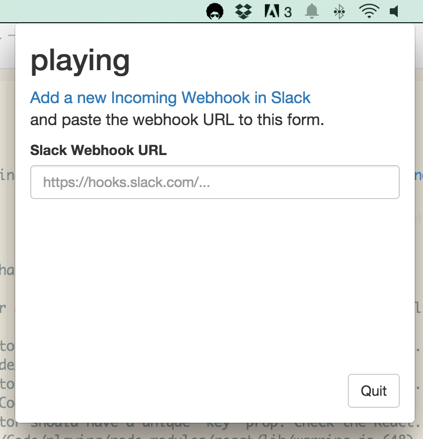
Your current track will be pushed into a slack channel of your choosing.
## License
ISC
## Building
This is only for developers who want to work on this project. Regular users should not do any of this.
This project is packaged using electron-packager. (For a great snapshot of how to get your environment set up for electron-packager and run your first build, [check out this tutorial](https://www.christianengvall.se/electron-packager-tutorial/).)
Electron Packager is a command line tool and Node.js library that bundles Electron-based application source code with a renamed Electron executable and supporting files into folders ready for distribution.
This is a messy process fraught with perils, but if you're packaging from a MacOS computer *for* Windows, you'll need homebrew and wine installed. (Good luck with that. Yeesh.)
Install all of the node libraries locally, so we can build the package:
```
npm install
```
### MacOS:
```
electron-packager . Slacktunes --platform=darwin --arch=x64 --icon=./Icon.icns --prune=true --out=release-builds --overwrite
```
### Windows - NOT WORKING:
You'll need both wine and mono to build windows releases on a Mac.
```
electron-packager . Slacktunes --overwrite --platform=win32 --arch=ia32 --prune=true --out=release-builds --version-string.CompanyName=Grokability --version-string.FileDescription=Grokabilty --version-string.ProductName="Slacktunes"
```
This will create a directory with all of the generated .dll files and an .exe file. In order to actually ship this though, you'll need to run `electron-installer-windows` after renaming the Windows directory in `release-builds` to `SlacktunesWindows ` (due to a bug in Squirrel.Windows.)
```
electron-installer-windows --src release-builds/SlacktunesWindows/ --dest dist/installers/ --config windows-config.json
```
Now go for a walk. No, seriously. This will take approximately nine billion years to complete.
This process could potentially be made less miserable with electron-forge, but my first attempts at using it resulting in black-holing about 5 hours of my life.
## Thanks
Many thanks go to [@uiureo](https://github.com/uiureo) for starting this project years ago.