https://github.com/soda480/list2term
A lightweight tool to mirror and dynamically update a Python list in your terminal, with built-in support for concurrent output (asyncio / threading / multiprocessing).
https://github.com/soda480/list2term
asyncio multiprocessing pybuilder python terminal
Last synced: 2 months ago
JSON representation
A lightweight tool to mirror and dynamically update a Python list in your terminal, with built-in support for concurrent output (asyncio / threading / multiprocessing).
- Host: GitHub
- URL: https://github.com/soda480/list2term
- Owner: soda480
- License: apache-2.0
- Created: 2022-09-27T23:12:51.000Z (over 3 years ago)
- Default Branch: main
- Last Pushed: 2026-01-22T00:51:51.000Z (5 months ago)
- Last Synced: 2026-01-22T14:17:53.536Z (5 months ago)
- Topics: asyncio, multiprocessing, pybuilder, python, terminal
- Language: Python
- Homepage:
- Size: 2.18 MB
- Stars: 3
- Watchers: 1
- Forks: 0
- Open Issues: 0
-
Metadata Files:
- Readme: README.md
- License: LICENSE
Awesome Lists containing this project
README
[](https://github.com/soda480/list2term/actions/workflows/ci.yml)

[](https://badge.fury.io/py/list2term)
# list2term
A lightweight tool to mirror and dynamically update a Python list in your terminal, with built-in support for concurrent output (asyncio / threading / multiprocessing).
## Why use `list2term`?
- **Live list reflection**: keep a list’s contents in sync with your terminal display — updates, additions, or removals are reflected in place.
- **Minimal dependencies**: not a full TUI framework—just what you need to display and update lists.
- **Concurrency-aware**: includes helpers for safely displaying progress or status messages from `asyncio` tasks, `multiprocessing.Pool` workers or threads.
- **TTY-aware fallback**: detects when output isn’t a terminal (e.g. piped logs) and disables interactive behavior gracefully.
- **Thread safety**: all public mutating operations are serialized with a re-entrant lock, ensuring atomic updates to internal state and terminal output when called from multiple threads.
## Installation
```bash
pip install list2term
```
## Key Concepts & API
Lines — main class
list2term revolves around the Lines class, a subclass of collections.UserList, which you use to represent and display a list in the terminal.
Constructor signature (default values shown):
```
Lines(
data=None,
size=None,
lookup=None,
show_index=True,
show_x_axis=True,
max_chars=None,
use_color=True,
y_axis_labels=None,
x_axis=None)
```
**Parameters**
| Parameter | Description |
| ------------- | ---------------------------------------------------------------------------------------------------------------------------------- |
| `data` | The initial list or iterable containing the items to display and sync with the terminal. |
| `size` | Integer specifying the initial length of the list. When provided, the list is pre-populated with empty strings. Use this when you know the desired list size but not the initial values. |
| `lookup` | A list of unique string identifiers used to route messages from concurrent workers to specific lines. Each identifier in the lookup list corresponds to one line in the display (default: `None`). |
| `show_index` | Boolean flag to display line indices or labels on the left side of each line (default: `True`). |
| `show_x_axis` | Boolean flag to display an X-axis ruler above the data for reference (default: `True`). |
| `max_chars` | Maximum character width allowed per line; text exceeding this limit is truncated and suffixed with `...` (default: 150). |
| `use_color` | Boolean flag to apply terminal color styling to line indices and labels (default: `True`). |
| `y_axis_labels` | A list of custom labels to display on the Y-axis (left side), replacing default numeric indices. Must match the length of `data`. Labels are right-justified before each line (default: `None`, uses numeric indices). |
| `x_axis` | A string or list of strings to display as X-axis ruler(s) above the data. Accepts a single string for one line or a list for multiple lines. If not provided, a default numbered ruler is auto-generated (default: `None`). |
Internally, `Lines` is backed by its `.data` attribute (like any UserList). You can mutate it:
```
lines[index] = "new value"
lines.append("another")
lines.pop(2)
```
These updates automatically refresh the terminal.
**Concurrent Workers & Message Routing**
When running tasks concurrently (via `asyncio` or `multiprocessing.Pool`), you often want each worker to report status lines. list2term supports that via:
`Lines.write(...)` — accepts strings in the form "{identifier}->{message}". The identifier is looked up in lookup to decide which line to update.
Multiprocessing helpers — the package offers `pool_map` and other abstractions in `list2term.multiprocessing` to simplify running functions in parallel and routing their messages.
Your worker functions must accept a logging object (e.g. `LinesQueue`) and use logger.write(...) to send messages back.
## Examples
### Display list - [example1](https://github.com/soda480/list2term/blob/main/docs/examples/example1.py)
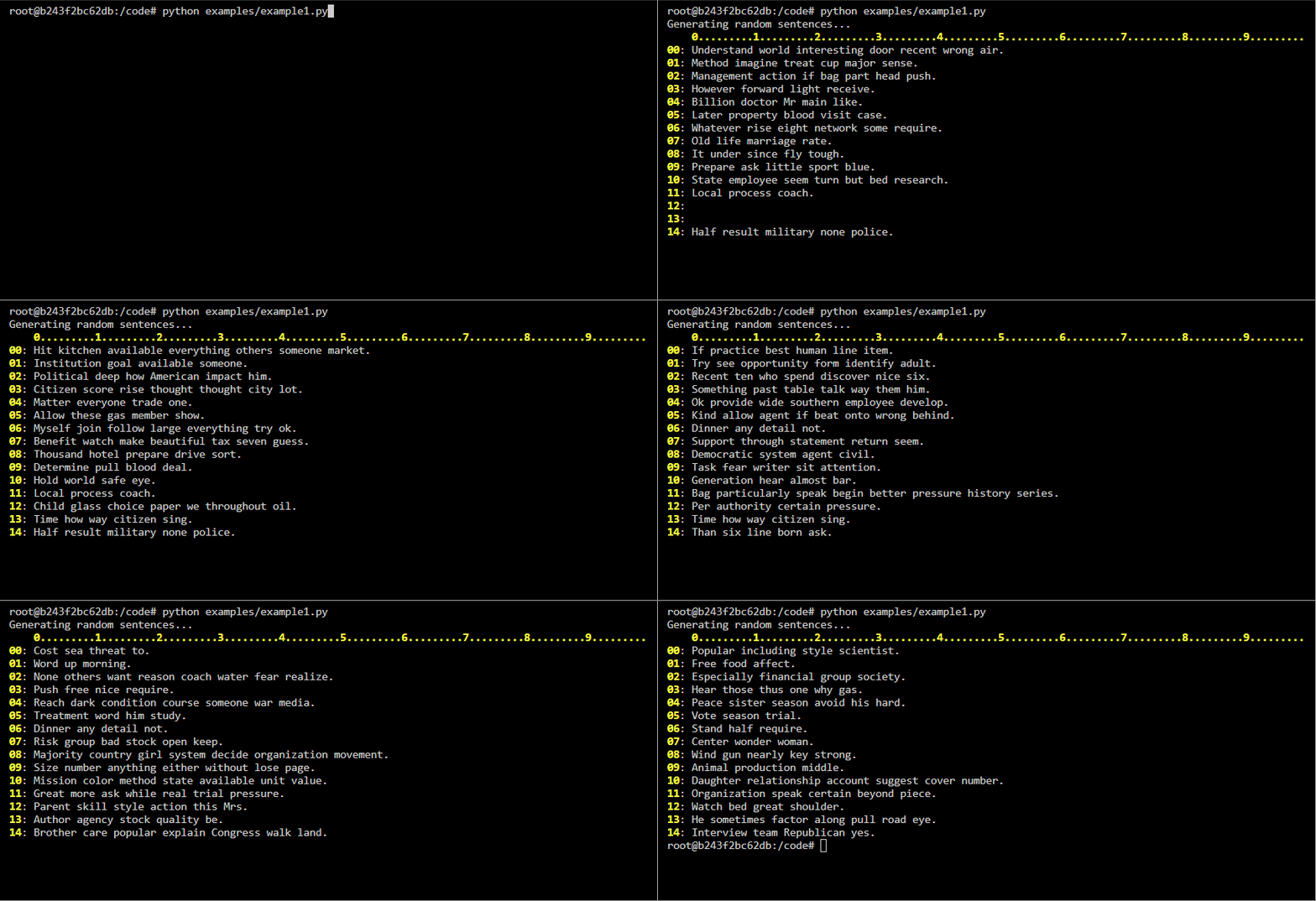
Start with a list of 15 items containing random sentences, then update sentences at random indexes. As items in the list are updated the respective line in the terminal is updated to show the current contents of the list.
Code
```Python
import time
import random
from faker import Faker
from list2term import Lines
def main():
print('Generating random sentences...')
docgen = Faker()
with Lines(size=15, show_x_axis=True, max_chars=100) as lines:
for _ in range(200):
index = random.randint(0, len(lines) - 1)
lines[index] = docgen.sentence()
time.sleep(.05)
if __name__ == '__main__':
main()
```
### Display list of dynamic size - [example2](https://github.com/soda480/list2term/blob/main/docs/examples/example2.py)
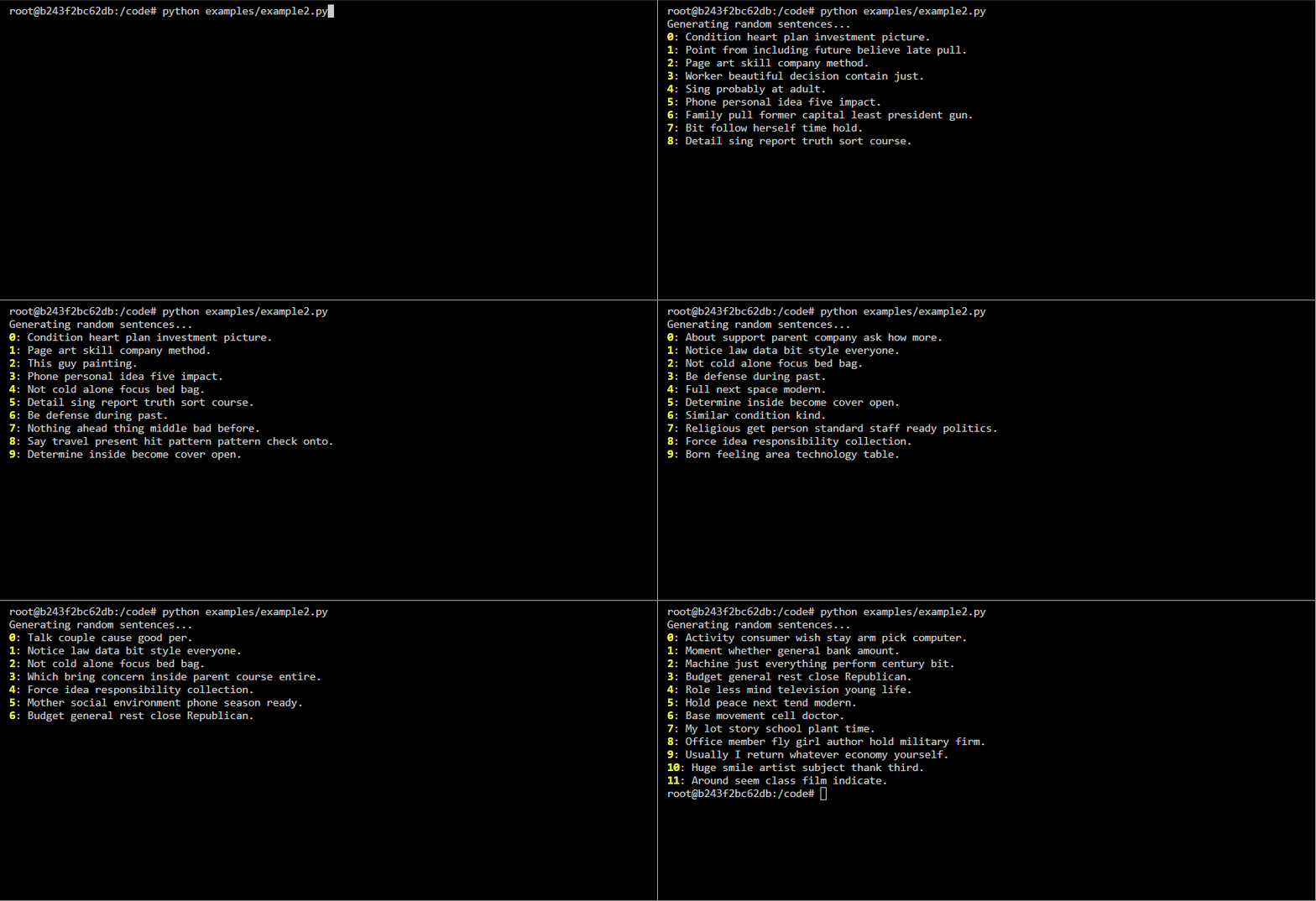
Start with a list of 10 items containing random sentences, then add sentences to the list, update existing sentences or remove items from the list at random indexes. As items in the list are added, updated, and removed the respective line in the terminal is updated to show the current contents of the list.
Code
```Python
import time
import random
from faker import Faker
from list2term import Lines
def main():
print('Generating random sentences...')
docgen = Faker()
with Lines(data=[''] * 10, max_chars=100) as lines:
for _ in range(100):
index = random.randint(0, len(lines) - 1)
lines[index] = docgen.sentence()
for _ in range(100):
update = ['update'] * 18
append = ['append'] * 18
pop = ['pop'] * 14
clear = ['clear']
choice = random.choice(append + pop + clear + update)
if choice == 'pop':
if len(lines) > 0:
index = random.randint(0, len(lines) - 1)
lines.pop(index)
elif choice == 'append':
lines.append(docgen.sentence())
elif choice == 'update':
if len(lines) > 0:
index = random.randint(0, len(lines) - 1)
lines[index] = docgen.sentence()
else:
if len(lines) > 0:
lines.pop()
if len(lines) > 0:
lines.pop()
time.sleep(.1)
if __name__ == '__main__':
main()
```
### Display messages from `asyncio` processes - [example3](https://github.com/soda480/list2term/blob/main/docs/examples/example3.py)
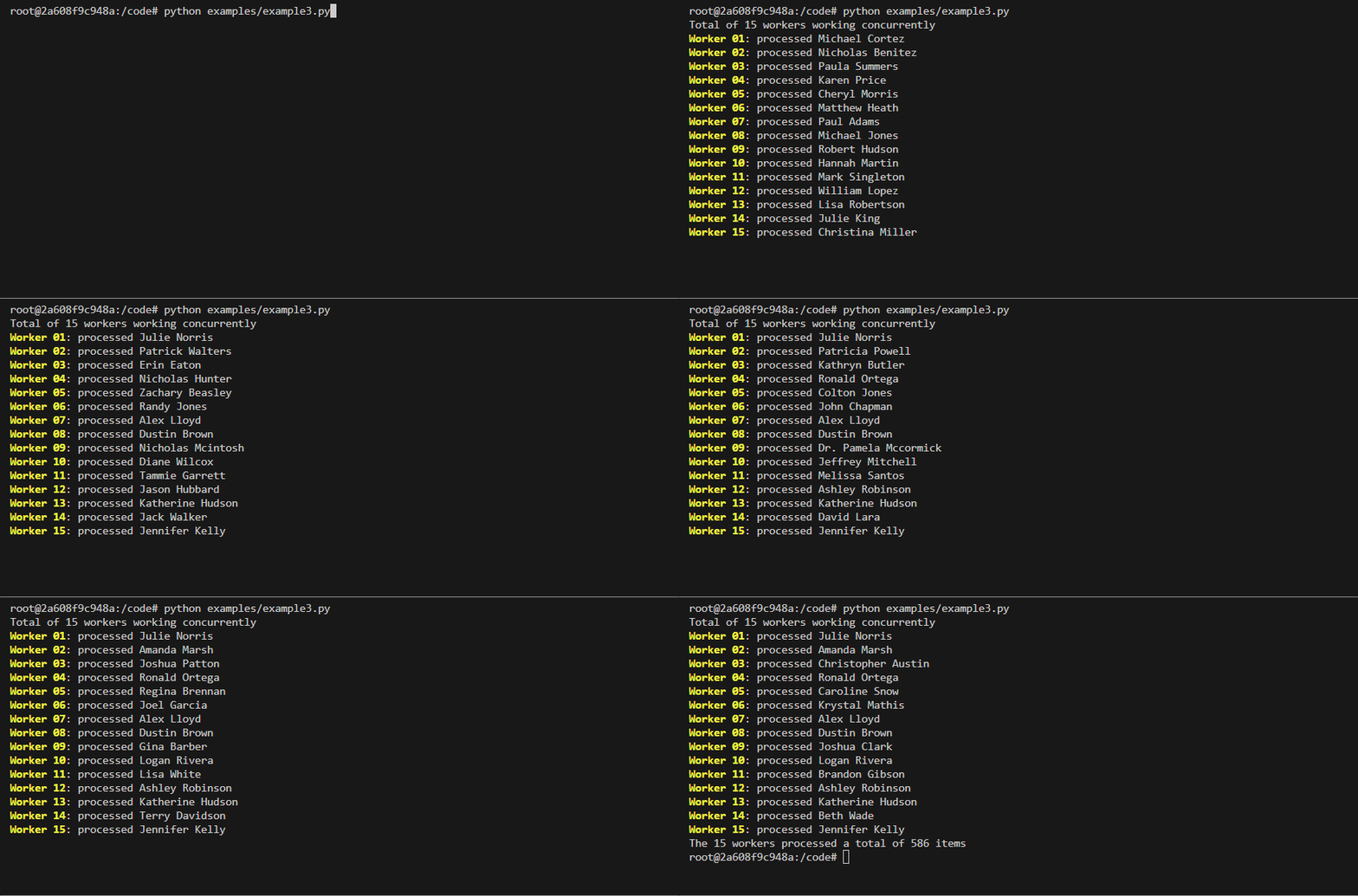
This example demonstrates how `list2term` can be used to display messages from asyncio processes to the terminal. Each item of the list represents a asnycio process.
Code
```Python
import asyncio
import random
from faker import Faker
from list2term import Lines
async def do_work(worker, lines):
total = random.randint(10, 65)
for _ in range(total):
# mimic an IO-bound process
await asyncio.sleep(random.choice([.05, .1, .025]))
lines[worker] = f'processed {Faker().name()}'
return total
async def run(workers):
y_axis_labels = [f'Worker {str(i + 1).zfill(len(str(workers)))}' for i in range(workers)]
with Lines(size=workers, y_axis_labels=y_axis_labels) as lines:
return await asyncio.gather(*(do_work(worker, lines) for worker in range(workers)))
def main():
workers = 15
print(f'Total of {workers} workers working concurrently')
results = asyncio.run(run(workers))
print(f'The {workers} workers processed a total of {sum(results)} items')
if __name__ == '__main__':
main()
```
### Display messages from multiprocessing pool processes - [example4](https://github.com/soda480/list2term/blob/main/docs/examples/example4.py)
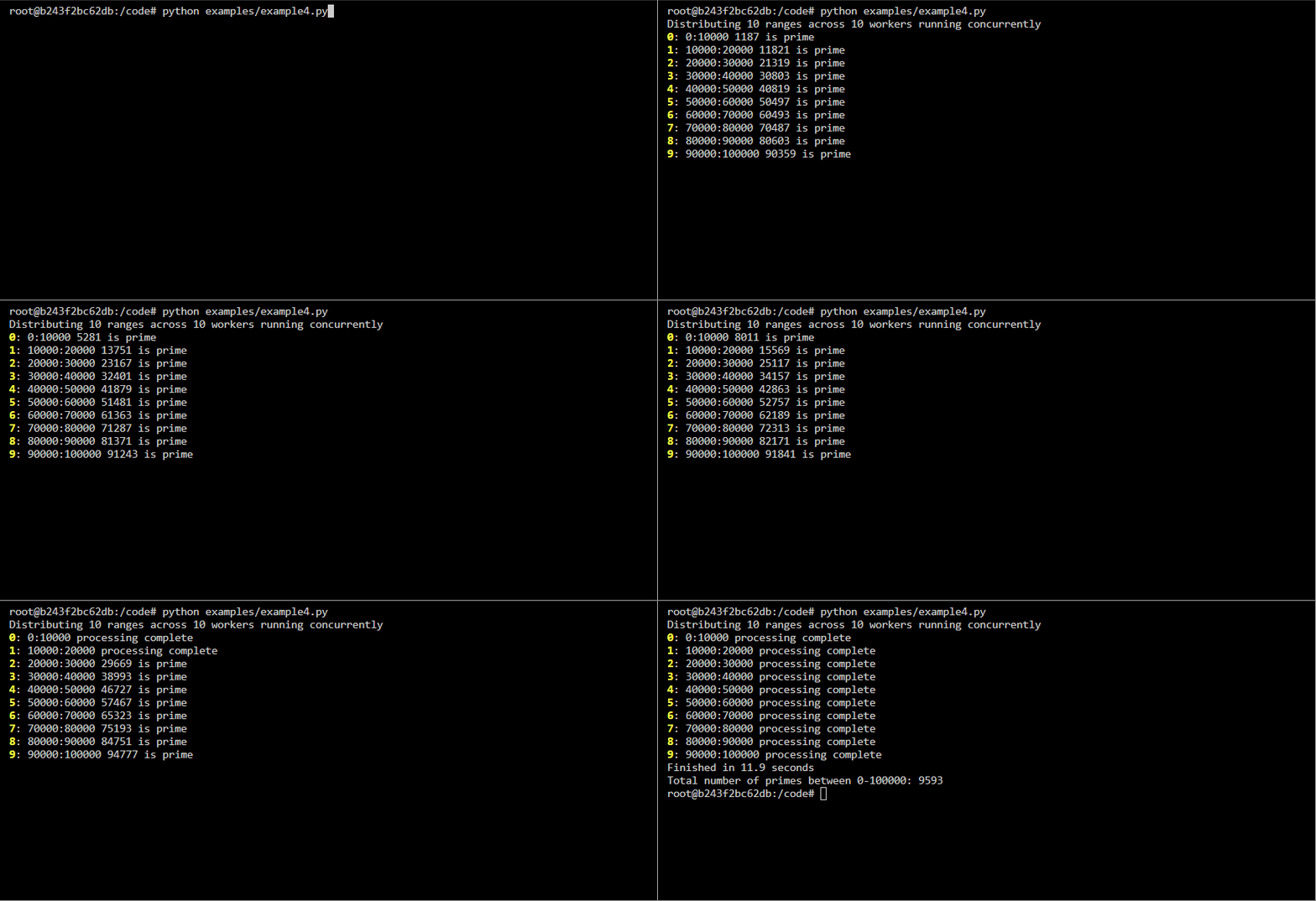
This example demonstrates how `list2term` can be used to display messages from processes executing in a [multiprocessing Pool](https://docs.python.org/3/library/multiprocessing.html#using-a-pool-of-workers). Each item of the list represents a background process. The `list2term.multiprocessing` module contains a `pool_map` method that fully abstracts the required multiprocessing constructs, you simply pass it the function to execute, an iterable of arguments to pass each process, and an optional instance of `Lines`. The method will execute the functions asynchronously, update the terminal lines accordingly and return a multiprocessing.pool.AsyncResult object. Each line in the terminal represents a background worker process.
If you do not wish to use the abstraction, the `list2term.multiprocessing` module contains helper classes that facilitates communication between the worker processes and the main process; the `QueueManager` provide a way to create a `LinesQueue` queue which can be shared between different processes. Refer to [example4b](https://github.com/soda480/list2term/blob/main/examples/example4b.py) for how the helper methods can be used.
**Note** the function being executed must accept a `LinesQueue` object that is used to write messages via its `write` method, this is the mechanism for how messages are sent from the worker processes to the main process, it is the main process that is displaying the messages to the terminal. The messages must be written using the format `{identifier}->{message}`, where {identifier} is a string that uniquely identifies a process, defined via the lookup argument to `Lines`.
Code
```Python
import time
from list2term import Lines
from list2term.multiprocessing import pool_map
from list2term.multiprocessing import CONCURRENCY
def is_prime(num):
if num == 1:
return False
for i in range(2, num):
if (num % i) == 0:
return False
else:
return True
def count_primes(start, stop, logger):
worker_id = f'{start}:{stop}'
primes = 0
for number in range(start, stop):
if is_prime(number):
primes += 1
logger.write(f'{worker_id}->{worker_id} {number} is prime')
logger.write(f'{worker_id}->{worker_id} processing complete')
return primes
def main(number):
step = int(number / CONCURRENCY)
print(f"Distributing {int(number / step)} ranges across {CONCURRENCY} workers running concurrently")
iterable = [(index, index + step) for index in range(0, number, step)]
lookup = [':'.join(map(str, item)) for item in iterable]
# print to screen with lines context
results = pool_map(count_primes, iterable, context=Lines(lookup=lookup))
return sum(results.get())
if __name__ == '__main__':
start = time.perf_counter()
number = 100_000
result = main(number)
stop = time.perf_counter()
print(f"Finished in {round(stop - start, 2)} seconds\nTotal number of primes between 0-{number}: {result}")
```
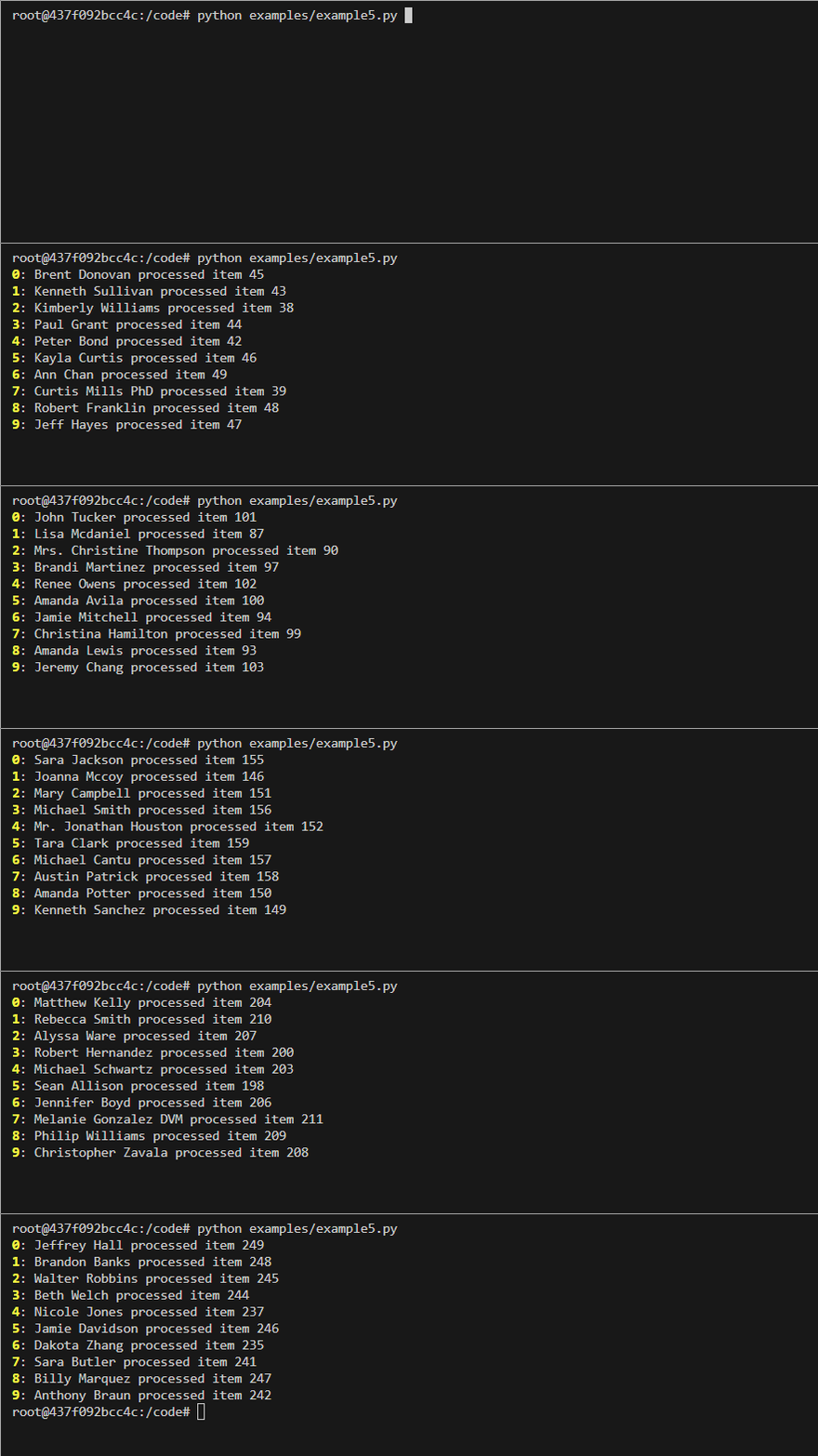
### Displaying messages from threads - [example5](https://github.com/soda480/list2term/blob/main/docs/examples/example5.py)
Code
```Python
import time
import random
import threading
from faker import Faker
from concurrent.futures import ThreadPoolExecutor
from list2term import Lines
def process_item(item, lines):
thread_name = threading.current_thread().name
lines.write(f'{Faker().name()} processed item {item}', line_id=thread_name)
seconds = random.uniform(.04, .3)
time.sleep(seconds)
return seconds
def main():
items = 500
num_threads = 10
with ThreadPoolExecutor(max_workers=num_threads, thread_name_prefix='thread') as executor:
lookup = [f'thread_{index}' for index in range(num_threads)]
with Lines(lookup=lookup) as lines:
futures = [executor.submit(process_item, item, lines) for item in range(items)]
return [future.result() for future in futures]
if __name__ == "__main__":
main()
```
### Other examples
A Conway [Game-Of-Life](https://github.com/soda480/game-of-life) implementation that uses `list2term` to display game to the terminal.
## Caveats & Notes
* Best for small to medium lists — `list2term` is optimized for relatively compact lists (e.g. dozens to low hundreds of lines). Very large lists (> thousands) may overwhelm the terminal.
* Printable elements — items must be convertible to str.
* Non-TTY fallback — if the terminal output is not a TTY (e.g. piped to a file), interactive updates are disabled automatically.
* Worker message format — when using concurrency, messages must either follow the pattern `"{identifier}->{message}"` so that `Lines.write()` can route updates to the correct line. Or pass in `lines_id` argument to `Lines.write()`.
## Development
Clone the repository and ensure the latest version of Docker is installed on your development server.
Build the Docker image:
```sh
docker image build \
-t list2term:latest .
```
Run the Docker container:
```sh
docker container run \
--rm \
-it \
-v $PWD:/code \
list2term:latest \
bash
```
Execute the dev pipeline:
```sh
make dev
```