https://github.com/soda480/mpgitleaks
A Python script that wraps the gitleaks tool to enable scanning of multiple repositories in parallel
https://github.com/soda480/mpgitleaks
docker gitleaks multiprocessing pybuilder python terminal
Last synced: over 1 year ago
JSON representation
A Python script that wraps the gitleaks tool to enable scanning of multiple repositories in parallel
- Host: GitHub
- URL: https://github.com/soda480/mpgitleaks
- Owner: soda480
- License: apache-2.0
- Created: 2021-07-02T03:42:01.000Z (about 5 years ago)
- Default Branch: main
- Last Pushed: 2022-06-21T17:57:37.000Z (about 4 years ago)
- Last Synced: 2025-02-05T17:24:15.468Z (over 1 year ago)
- Topics: docker, gitleaks, multiprocessing, pybuilder, python, terminal
- Language: Python
- Homepage:
- Size: 631 KB
- Stars: 8
- Watchers: 2
- Forks: 4
- Open Issues: 0
-
Metadata Files:
- Readme: README.md
- License: LICENSE
Awesome Lists containing this project
README
# mpgitleaks
[](https://github.com/soda480/mpgitleaks/actions/workflows/main.yml)
[](https://app.codiga.io/public/project/24885/mpgitleaks/dashboard)
[](https://radon.readthedocs.io/en/latest/api.html#module-radon.complexity)
[](https://pypi.org/project/bandit/)
[](https://www.python.org/downloads/)
A Python script that wraps the [gitleaks](https://github.com/zricethezav/gitleaks) tool to enable scanning of multiple repositories in parallel.
The motivation behind writing this script was:
* implement workaround for `gitleaks` intermittent failures when cloning very large repositories
* implement ability to scan multiple repostiories in parallel
* implement ability to scan repositories for a user, a specified organization or read from a file
**Notes**:
* the script uses https to clone the repos
* you must set the `USERNAME` and `PASSWORD` environment variables - this credential needs to have access to the repos being scanned
* if using `--file` then https clone urls must be supplied in the file
* the maximum number of background processes (workers) that will be started is `35`
* if the number of repos to process is less than the maximum number of workers
* the script will start one worker per repository
* if the number of repos to process is greater than the maximum number of workers
* the repos will be added to a thread-safe queue and processed by all the workers
* the Docker container must run with a bind mount to the working directory in order to access logs/reports
* the repos will be cloned to the `./scans/clones` folder in the working directory
* the reports will be written to the `./scans/reports/` folder in the working directory
* a summary report will be written to `mpgitleaks.csv`
## Usage
```bash
usage: mpgitleaks [-h] [--file FILENAME] [--user] [--org ORG] [--exclude EXCLUDE] [--include INCLUDE] [--size SIZE] [--log]
A Python script that wraps the gitleaks tool to enable scanning of multiple repositories in parallel
optional arguments:
-h, --help show this help message and exit
--file FILENAME scan repos contained in the specified file
--user scan repos for the authenticated GitHub user where user is owner or collaborator
--org ORG scan repos for the specified GitHub organization
--exclude EXCLUDE a regex to match name of repos to exclude from scanning
--include INCLUDE a regex to match name of repos to include in scanning
--size SIZE scan repos less than specified size (in KB)
--log log messages to log file
```
## Execution
Set the required environment variables:
```bash
export USERNAME='--username--'
export PASSWORD='--password-or-token--'
```
If using `--user` or `--org` options and GitHub instance is not `api.github.com`:
```bash
export GH_BASE_URL='--api-address-to-github-instance--'
```
Execute the Docker container:
```bash
docker container run \
--rm \
-it \
-e http_proxy \
-e https_proxy \
-e GH_BASE_URL \
-e USERNAME \
-e PASSWORD \
-v $PWD:/opt/mpgitleaks \
soda480/mpgitleaks:latest \
[MPGITLEAKS OPTIONS]
```
**Note**: the `http[s]_proxy` environment variables are only required if executing behind a proxy server
### Examples
Scan all repos contained in the file `repos.txt` but exclude the repos that match the specified regex, an example of a `repos.txt` can be found [here](https://raw.githubusercontent.com/soda480/mpgitleaks/master/examples/repos.txt):
```bash
mpgitleaks --file 'repos.txt' --exclude 'soda480/mplogp'
```
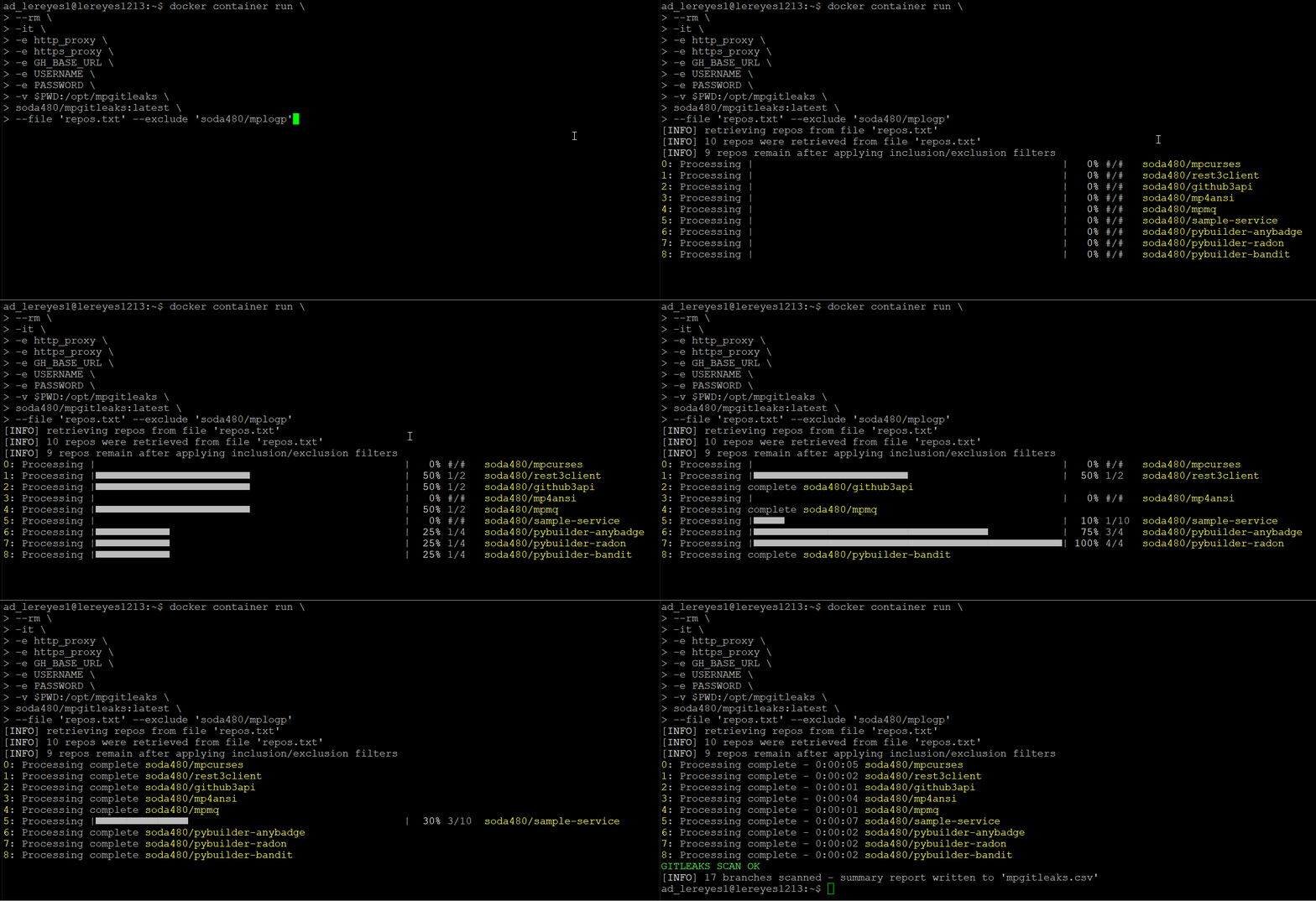
Scan all repos for the authenticated user but exclude the repos that match the specified regex:
```bash
mpgitleaks --user --exclude 'intel|edgexfoundry|soda480/openhack'
```
Scan all repos in the specified organization but only include the repos that match the specified regex:
```bash
mpgitleaks --org 'myorg' --include '.*-go'
```
## Development
Clone the repository and ensure the latest version of Docker is installed on your development server.
Build the Docker image:
```bash
docker image build \
--target build \
--build-arg http_proxy \
--build-arg https_proxy \
-t \
mpgitleaks:latest .
```
Run the Docker container:
```bash
docker container run \
--rm \
-it \
-e http_proxy \
-e https_proxy \
-v $PWD:/code \
mpgitleaks:latest \
/bin/bash
```
Build application:
```bash
pyb -X
```