https://github.com/soda480/pypbars
Provides a convenient way to display progress bars for concurrent asyncio or multiprocessing Pool processes to the terminal.
https://github.com/soda480/pypbars
asynchronous asyncio docker multiprocessing progress-bar pybuilder-example python terminal
Last synced: 11 months ago
JSON representation
Provides a convenient way to display progress bars for concurrent asyncio or multiprocessing Pool processes to the terminal.
- Host: GitHub
- URL: https://github.com/soda480/pypbars
- Owner: soda480
- Created: 2022-06-26T20:08:57.000Z (about 4 years ago)
- Default Branch: main
- Last Pushed: 2024-09-20T20:03:01.000Z (almost 2 years ago)
- Last Synced: 2025-07-10T16:31:15.684Z (about 1 year ago)
- Topics: asynchronous, asyncio, docker, multiprocessing, progress-bar, pybuilder-example, python, terminal
- Language: Python
- Homepage:
- Size: 2.23 MB
- Stars: 2
- Watchers: 1
- Forks: 1
- Open Issues: 0
-
Metadata Files:
- Readme: README.md
Awesome Lists containing this project
README
# pypbars
[](https://github.com/soda480/pypbars/actions/workflows/main.yml)
[](https://pybuilder.io/)
[](https://pypi.org/project/bandit/)
[](https://badge.fury.io/py/pypbars)
[](https://www.python.org/downloads/)
The `pypbars` module provides a convenient way to display progress bars for concurrent [asyncio](https://docs.python.org/3/library/asyncio.html) or [multiprocessing Pool](https://docs.python.org/3/library/multiprocessing.html#multiprocessing.pool.Pool) processes. The `pypbars` class is a subclass of [list2term](https://pypi.org/project/list2term/) that displays a list to the terminal, and uses [progress1bar](https://pypi.org/project/progress1bar/) to render the progress bar.
### Installation
```bash
pip install pypbars
```
#### [example1 - ProgressBars with asyncio](https://github.com/soda480/pypbars/blob/main/examples/example1.py)
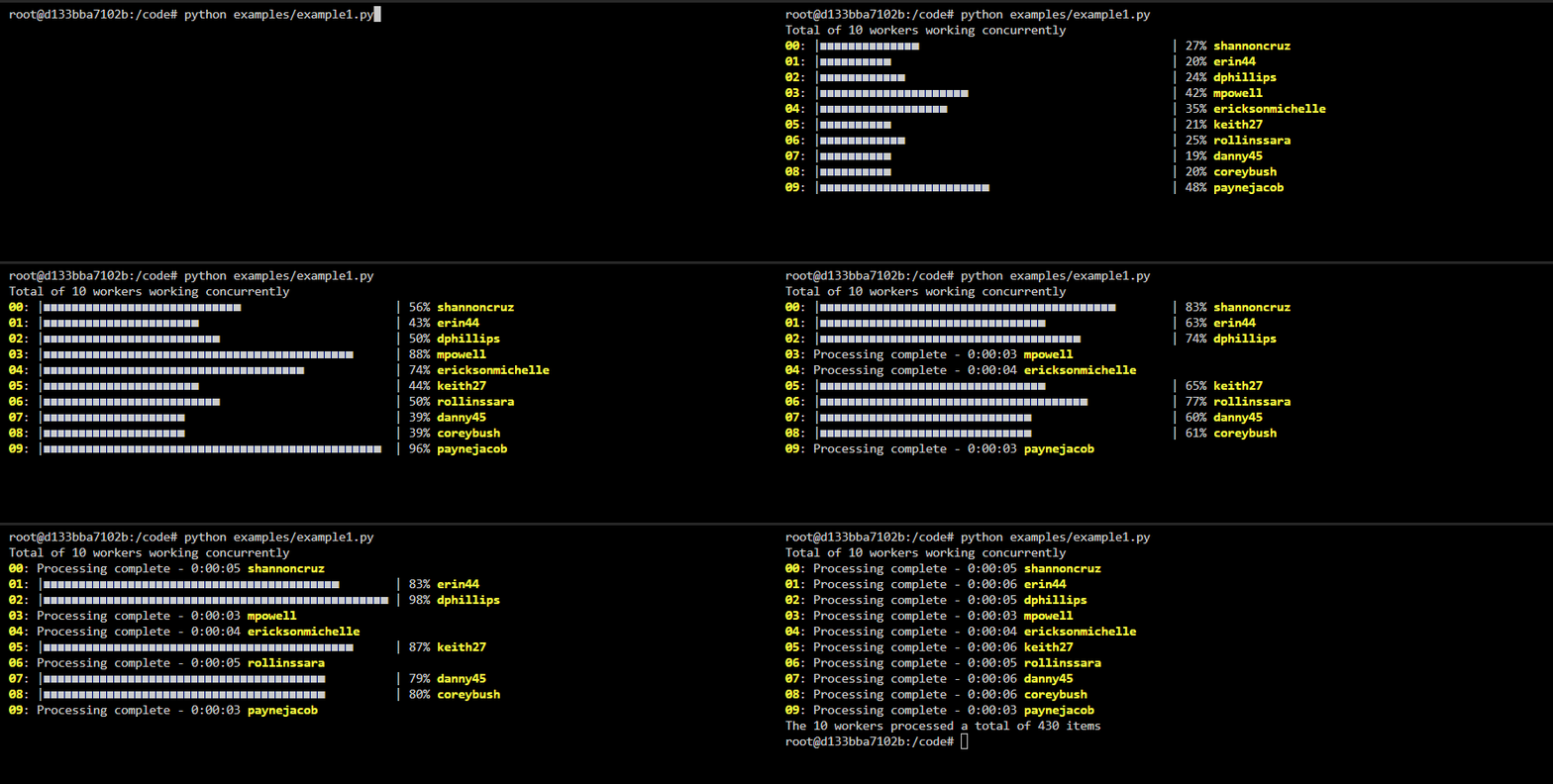
Create `ProgressBars` using a lookup list containing unique values, these identifiers will be used to get the index of the appropriate `ProgressBar` to be updated. The convention is for the function to include `logger.write` calls containing the identifier and a message for when and how the respective progress bar should be updated. In this example the default `regex` dict is used but the caller can specify their own, so long as it contains regular expressions for how to detect when `total`, `count` and optional `alias` are set.
Code
```Python
import asyncio
import random
from faker import Faker
from pypbars import ProgressBars
async def do_work(worker, logger=None):
logger.write(f'{worker}->worker is {worker}')
total = random.randint(10, 65)
logger.write(f'{worker}->processing total of {total} items')
for count in range(total):
# mimic an IO-bound process
await asyncio.sleep(.1)
logger.write(f'{worker}->processed {count}')
return total
async def run(workers):
with ProgressBars(lookup=workers, show_prefix=False, show_fraction=False) as logger:
doers = (do_work(worker, logger=logger) for worker in workers)
return await asyncio.gather(*doers)
def main():
workers = [Faker().user_name() for _ in range(10)]
print(f'Total of {len(workers)} workers working concurrently')
results = asyncio.run(run(workers))
print(f'The {len(workers)} workers processed a total of {sum(results)} items')
if __name__ == '__main__':
main()
```
#### [example2 - ProgressBars with multiprocessing Pool](https://github.com/soda480/pypbars/blob/main/examples/example2.py)
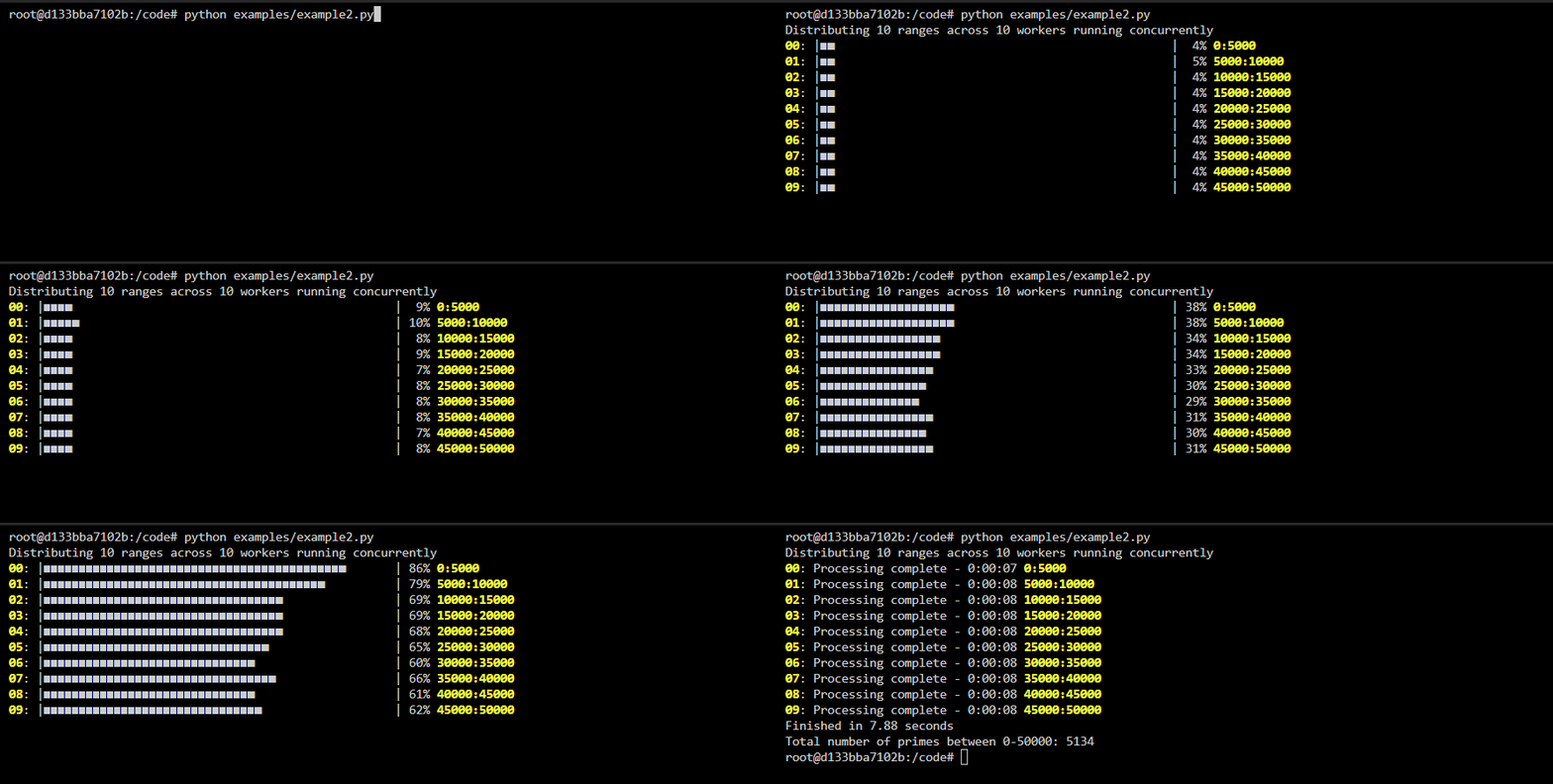
This example demonstrates how `pypbars` can be used to display progress bars from processes executing in a [multiprocessing Pool](https://docs.python.org/3/library/multiprocessing.html#using-a-pool-of-workers). The `list2term.multiprocessing` module contains a `pool_map` method that fully abstracts the required multiprocessing constructs, you simply pass it the function to execute, an iterable containing the arguments to pass each process, and an instance of `ProgressBars`. The method will execute the functions asynchronously, update the progress bars accordingly and return a multiprocessing.pool.AsyncResult object. Each progress bar in the terminal represents a background worker process.
If you do not wish to use the abstraction, the `list2term.multiprocessing` module contains helper classes that facilitate communication between the worker processes and the main process; the `QueueManager` provide a way to create a `LinesQueue` queue which can be shared between different processes. Refer to [example2b](https://github.com/soda480/pypbars/blob/main/examples/example2b.py) for how the helper methods can be used.
**Note** the function being executed must accept a `LinesQueue` object that is used to write messages via its `write` method, this is the mechanism for how messages are sent from the worker processes to the main process, it is the main process that is displaying the messages to the terminal. The messages must be written using the format `{identifier}->{message}`, where {identifier} is a string that uniquely identifies a process, defined via the lookup argument to `ProgressBars`.
Code
```Python
import time
from pypbars import ProgressBars
from list2term.multiprocessing import pool_map
from list2term.multiprocessing import CONCURRENCY
def is_prime(num):
if num == 1:
return False
for i in range(2, num):
if (num % i) == 0:
return False
else:
return True
def count_primes(start, stop, logger):
workerid = f'{start}:{stop}'
logger.write(f'{workerid}->worker is {workerid}')
logger.write(f'{workerid}->processing total of {stop - start} items')
primes = 0
for number in range(start, stop):
if is_prime(number):
primes += 1
logger.write(f'{workerid}->processed {number}')
logger.write(f'{workerid}->{workerid} processing complete')
return primes
def main(number):
step = int(number / CONCURRENCY)
iterable = [(index, index + step) for index in range(0, number, step)]
lookup = [':'.join(map(str, item)) for item in iterable]
progress_bars = ProgressBars(lookup=lookup, show_prefix=False, show_fraction=False, use_color=True)
# print to screen with progress bars context
results = pool_map(count_primes, iterable, context=progress_bars)
# print to screen without progress bars context
# results = pool_map(count_primes, iterable)
# do not print to screen
# results = pool_map(count_primes, iterable, print_status=False)
return sum(results.get())
if __name__ == '__main__':
start = time.perf_counter()
number = 50_000
result = main(number)
stop = time.perf_counter()
print(f"Finished in {round(stop - start, 2)} seconds\nTotal number of primes between 0-{number}: {result}")
```
#### [example3 - resettable ProgressBars with multiprocessing Pool and Queue](https://github.com/soda480/pypbars/blob/main/examples/example3.py)
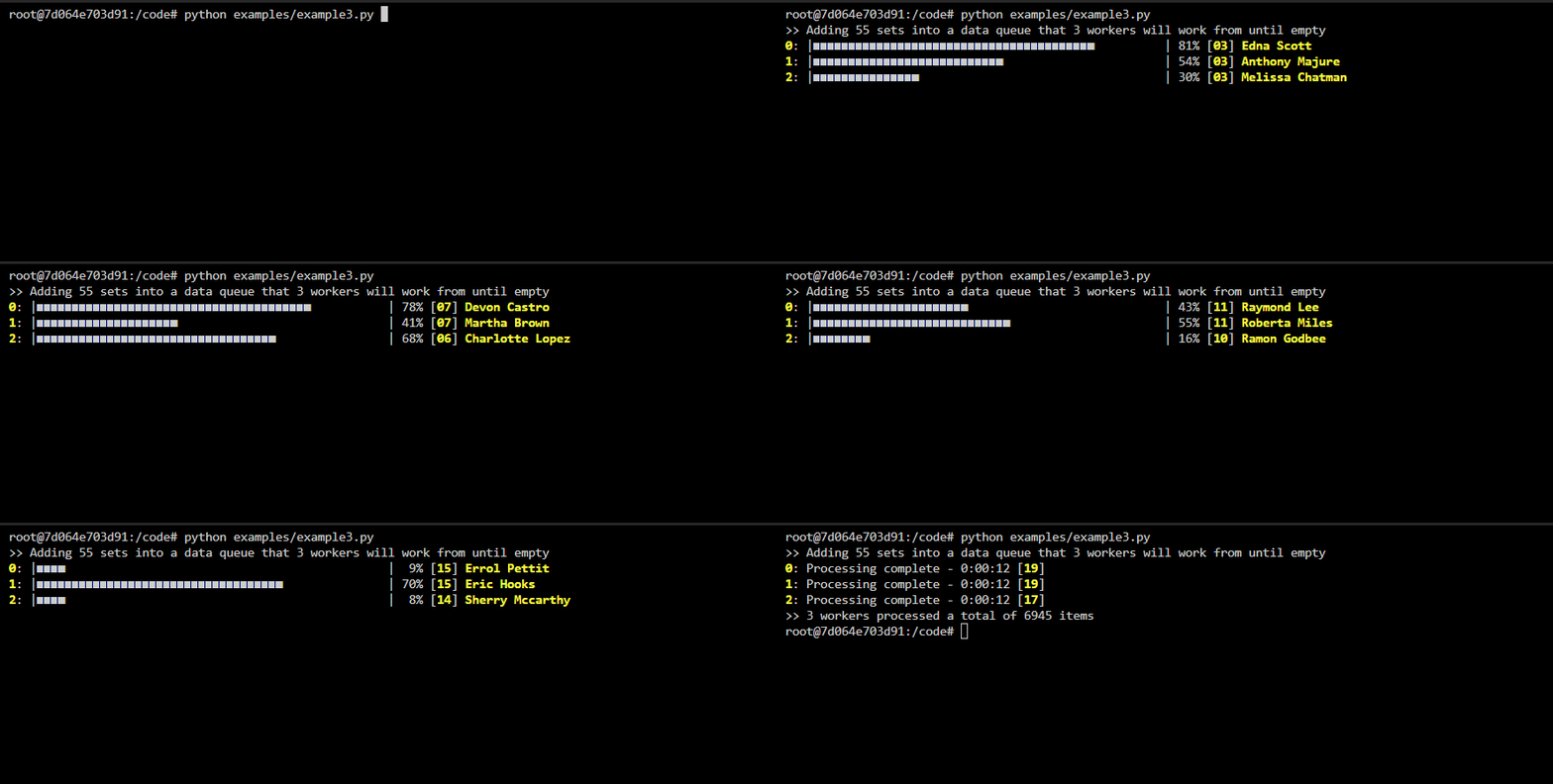
This example demonstrates how `pypbars` can be used to display progress bars from a small set processes executing in a [multiprocessing Pool](https://docs.python.org/3/library/multiprocessing.html#using-a-pool-of-workers) working on large amount of data defined in a shared work Queue. The workers will pop off the work from work queue and process it until there is no more work left in the work Queue. Since the workers are working on multiple sets the ProgressBar is reset everytime a worker begins work on a new set. The ProgressBar maintains the number of iterations it has completed.
Code
```Python
import time, random, logging
from multiprocessing import Queue
from queue import Empty
import names
from faker import Faker
from multiprocessing import Pool
from multiprocessing import get_context
from multiprocessing import cpu_count
from list2term.multiprocessing import LinesQueue
from list2term.multiprocessing import QueueManager
from queue import Empty
from pypbars import ProgressBars
logger = logging.getLogger(__name__)
def prepare_queue(queue):
for _ in range(55):
queue.put({'total': random.randint(100, 150)})
def do_work(worker_id, total, logger):
logger.write(f'{worker_id}->worker is {names.get_full_name()}')
logger.write(f'{worker_id}->processing total of {total} items')
for index in range(total):
# simulate work by sleeping
time.sleep(random.choice([.001, .003, .008]))
logger.write(f'{worker_id}->processed {index}')
return total
def run_q(worker_id, queue, logger):
result = 0
while True:
try:
total = queue.get(timeout=1)['total']
result += do_work(worker_id, total, logger)
logger.write(f'{worker_id}->reset')
except Empty:
break
return result
def main(processes):
QueueManager.register('LinesQueue', LinesQueue)
QueueManager.register('Queue', Queue)
with QueueManager() as manager:
queue = manager.LinesQueue(ctx=get_context())
data_queue = manager.Queue()
prepare_queue(data_queue)
with Pool(processes) as pool:
print(f">> Adding {data_queue.qsize()} sets into a data queue that {processes} workers will work from until empty")
process_data = [(Faker().name(), data_queue, queue) for index in range(processes)]
results = pool.starmap_async(run_q, process_data)
lookup = [f'{data[0]}' for data in process_data]
with ProgressBars(lookup=lookup, show_prefix=False, show_fraction=False, use_color=True, show_duration=True, clear_alias=True) as lines:
while True:
try:
item = queue.get(timeout=.1)
if item.endswith('->reset'):
index, message = lines.get_index_message(item)
lines[index].reset(clear_alias=False)
else:
lines.write(item)
except Empty:
if results.ready():
for index, _ in enumerate(lines):
lines[index].complete = True
break
return sum(results.get())
if __name__ == '__main__':
processes = 3
results = main(processes)
print(f">> {processes} workers processed a total of {results} items")
```
### Development
Clone the repository and ensure the latest version of Docker is installed on your development server.
Build the Docker image:
```sh
docker image build \
-t pypbars:latest .
```
Run the Docker container:
```sh
docker container run \
--rm \
-it \
-v $PWD:/code \
pypbars:latest \
bash
```
Execute the build:
```sh
pyb -X
```