https://github.com/soderlind/vscode-phpcbf
PHP Code Beautifier and Fixer for Visual Studio Code
https://github.com/soderlind/vscode-phpcbf
Last synced: 10 months ago
JSON representation
PHP Code Beautifier and Fixer for Visual Studio Code
- Host: GitHub
- URL: https://github.com/soderlind/vscode-phpcbf
- Owner: soderlind
- License: gpl-3.0
- Created: 2018-01-02T21:50:39.000Z (over 8 years ago)
- Default Branch: master
- Last Pushed: 2020-12-05T14:17:03.000Z (over 5 years ago)
- Last Synced: 2025-08-16T06:58:31.800Z (10 months ago)
- Language: JavaScript
- Homepage: https://marketplace.visualstudio.com/items?itemName=persoderlind.vscode-phpcbf
- Size: 155 KB
- Stars: 28
- Watchers: 6
- Forks: 10
- Open Issues: 28
-
Metadata Files:
- Readme: README.md
- Changelog: CHANGELOG.md
- License: LICENSE.txt
Awesome Lists containing this project
README
# PHP Code Beautifier and Fixer for Visual Studio Code
This extension provides the PHP Code Beautifier and Fixer (`phpcbf`) command for Visual Studio Code.
`phpcbf` is the lesser known sibling of `phpcs` ([PHP_CodeSniffer](https://github.com/squizlabs/PHP_CodeSniffer)). `phpcbf` will try to fix and beautify your code according to a [coding standard](#coding-standards).
## Preview
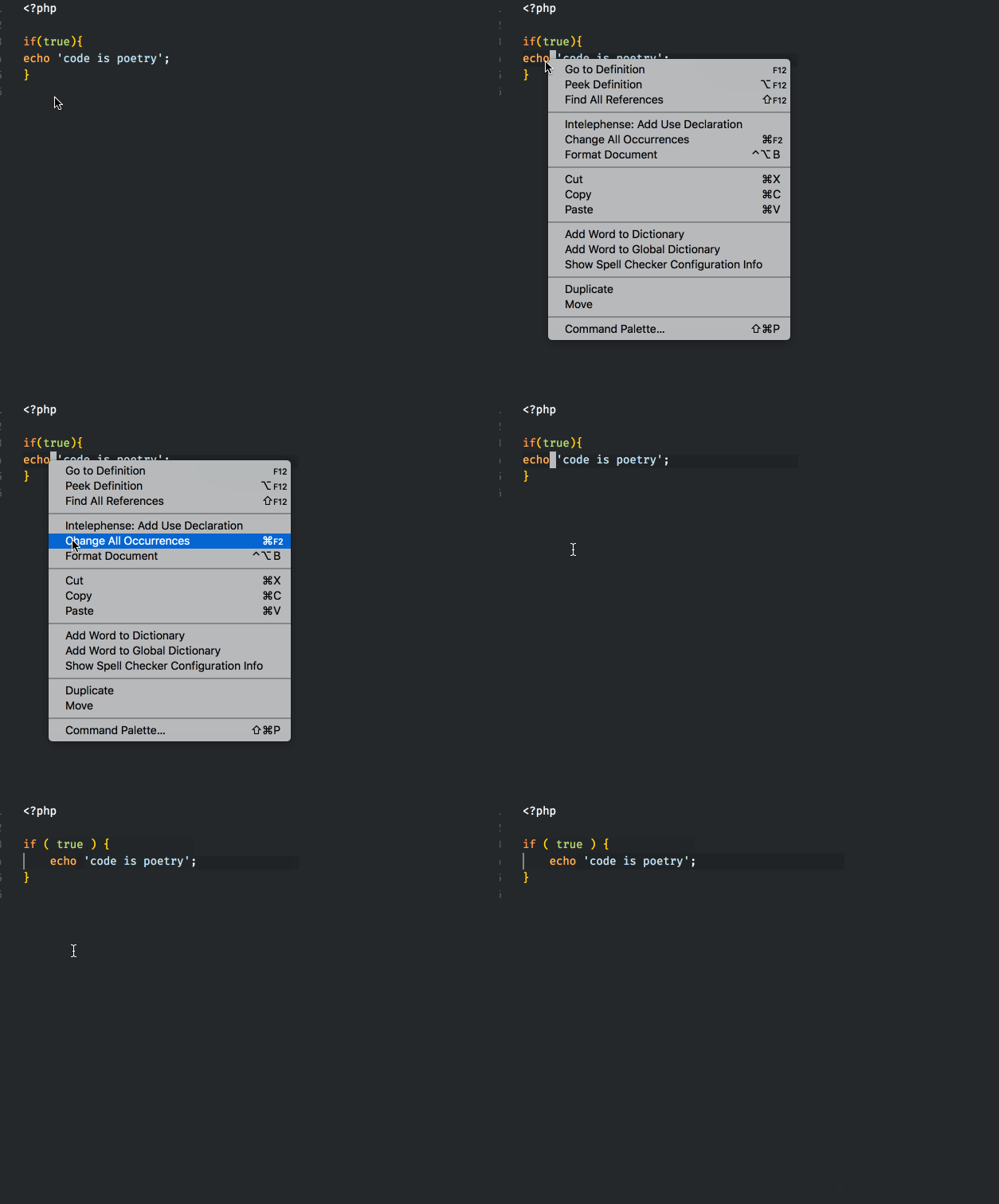
> 
>
> ###### right mouse-click, in context menu, select 'Format Document'. Here using the `WordPress-Core` standard. You can also enable formatting on save.
## Requirements
phpcbf must be installed. phpcbf is installed when you [install phpcs](https://github.com/squizlabs/PHP_CodeSniffer#installation).
> I recommend phpcs version 3.2.2 or later.
A quick install is using [composer](https://getcomposer.org/). After [installing composer](https://getcomposer.org/doc/00-intro.md#installation-linux-unix-osx), in your workspace root, run the following command:
`composer require "squizlabs/php_codesniffer=*"`
## Extension Settings
This extension has the following settings:
* `phpcbf.enable`: [ Optional | Default: `true` ] enable/disable this extension.
* `phpcbf.executablePath`: [ **Required** | Default: `phpcbf` ] Can be:
* `${workspaceRoot}/vendor/bin/phpcbf`
* `./vendor/bin/phpcbf`
* `~/.composer/vendor/bin/phpcbf`
* `phpcbf.bat`
* `/usr/local/bin/phpcbf`
* etc
* `phpcbf.documentFormattingProvider`: [ Optional | Default: `true` ] Register PHP document formatting provider, right mouse-click context menu, select 'Format Document'
* `phpcbf.onsave`: [ Optional | Default: `false` ]. Format on save. `"editor.formatOnSave": true` will override this setting.
* `phpcbf.debug`: [ Optional | Default: `false` ]. Write phpcbf stdout to the console.
* `phpcbf.standard`: [ Optional | Default: `null` ]. The [coding standard](#coding-standards).
The default settings are
```json
{
"phpcbf.enable": true,
"phpcbf.executablePath": "phpcbf",
"phpcbf.documentFormattingProvider": true,
"phpcbf.onsave": false,
"phpcbf.standard": null
}
```
In a multi-root project, settings can be saved in `.vscode/settings.json`
## Coding standards
### null
When set to `null`, phpcbf will use, if it's set, the `default_standard`, otherwise fallback to `Pear`. You set the default standard using `phpcs`, eg:
phpcs --config-set default_standard PSR2
### Available standards
By default, the following standards are available: `PEAR`, `Zend`, `PSR2`, `MySource`, `Squiz` and `PSR1`
### Additional standards
If you add a standard to phpcs, it will be available for phpcbf. Some popular standards are: [Drupal](https://github.com/klausi/coder), [WordPress](https://github.com/WordPress-Coding-Standards/WordPress-Coding-Standards), [Yii2](https://github.com/yiisoft/yii2-coding-standards), [Magento](https://github.com/magento/marketplace-eqp) and [Symfony](https://github.com/djoos/Symfony-coding-standard).
### Rules file
You can also point to a [phpcs.xml rules file](https://github.com/squizlabs/PHP_CodeSniffer/wiki/Annotated-ruleset.xml), eg: `"phpcbf.standard": "/file/path/phpcs.xml"`
## Known Issues
None, but this is my first vscode extension, you're warned :)
## Release Notes
Please see the [changelog](https://marketplace.visualstudio.com/items/persoderlind.vscode-phpcbf/changelog).
## Credits
I learned a lot reading the code of, and borrowing code from [PHP CS Fixer for Visual Studio Code](https://github.com/junstyle/vscode-php-cs-fixer).
# Copyright and License
PHP Code Beautifier and Fixer for Visual Studio Code is copyright 2018 Per Soderlind
PHP Code Beautifier and Fixer for Visual Studio Code is free software: you can redistribute it and/or modify it under the terms of the GNU General Public License as published by the Free Software Foundation, either version 2 of the License, or (at your option) any later version.
PHP Code Beautifier and Fixer for Visual Studio Code is distributed in the hope that it will be useful, but WITHOUT ANY WARRANTY; without even the implied warranty of MERCHANTABILITY or FITNESS FOR A PARTICULAR PURPOSE. See the GNU General Public License for more details.
You should have received a copy of the GNU Lesser General Public License along with the Extension. If not, see http://www.gnu.org/licenses/.