https://github.com/soimy/atlasify
GPU friendly assets packer using max-rects algorithm
https://github.com/soimy/atlasify
font maxrects packer texturepacker truetype vector-graphics
Last synced: 6 months ago
JSON representation
GPU friendly assets packer using max-rects algorithm
- Host: GitHub
- URL: https://github.com/soimy/atlasify
- Owner: soimy
- License: mit
- Created: 2019-05-17T03:26:23.000Z (about 7 years ago)
- Default Branch: master
- Last Pushed: 2025-10-01T03:49:15.000Z (10 months ago)
- Last Synced: 2025-10-05T05:25:45.140Z (10 months ago)
- Topics: font, maxrects, packer, texturepacker, truetype, vector-graphics
- Language: TypeScript
- Homepage: https://atlasify.nanoo.app
- Size: 25.1 MB
- Stars: 33
- Watchers: 2
- Forks: 5
- Open Issues: 25
-
Metadata Files:
- Readme: README.md
- Changelog: CHANGELOG.md
- License: LICENSE
Awesome Lists containing this project
README
# 


## What is Atlasify
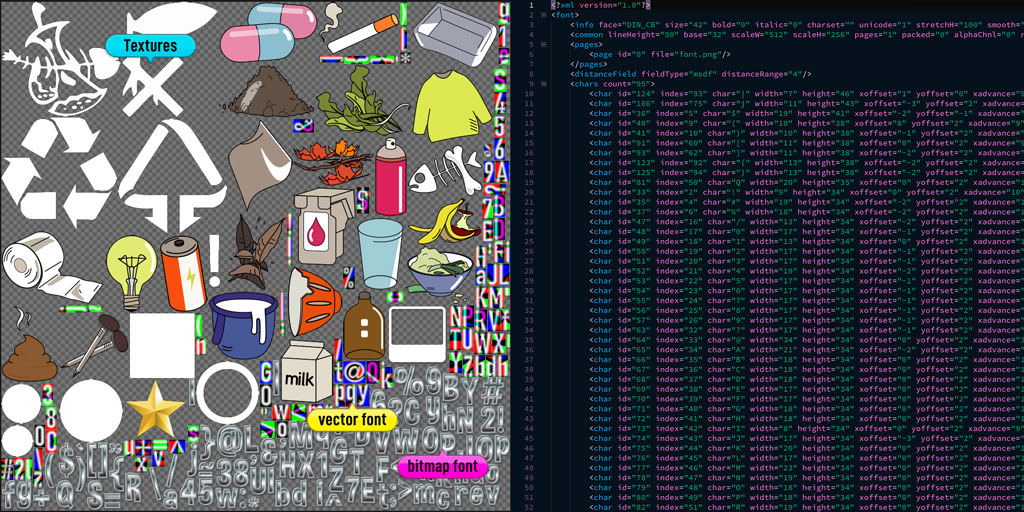
Atlasify is an open-source app designed to pack graphical assets like
- sprite images
- textures
- Bitmap fonts
- True-type fonts
- Vector graphics (SVG)
into a single/several GPU friendly texture atlas to reduce draw call, and a spritesheet catalog `json\xml` to locate those assets.
## Why Atlasify
Yes, there are many excellent packing tools like Texture packer etc. already. But the goal of Atlasify is being able to managing, generating and packing all kinds of graphical assets like above into a single atlas in one application.
Together with proper render pipeline, this will be a perfect solution for rendering GPU accelerated vector and true-type text on any game engine.
And most of all, it will be **free and open source**.
## The architecture
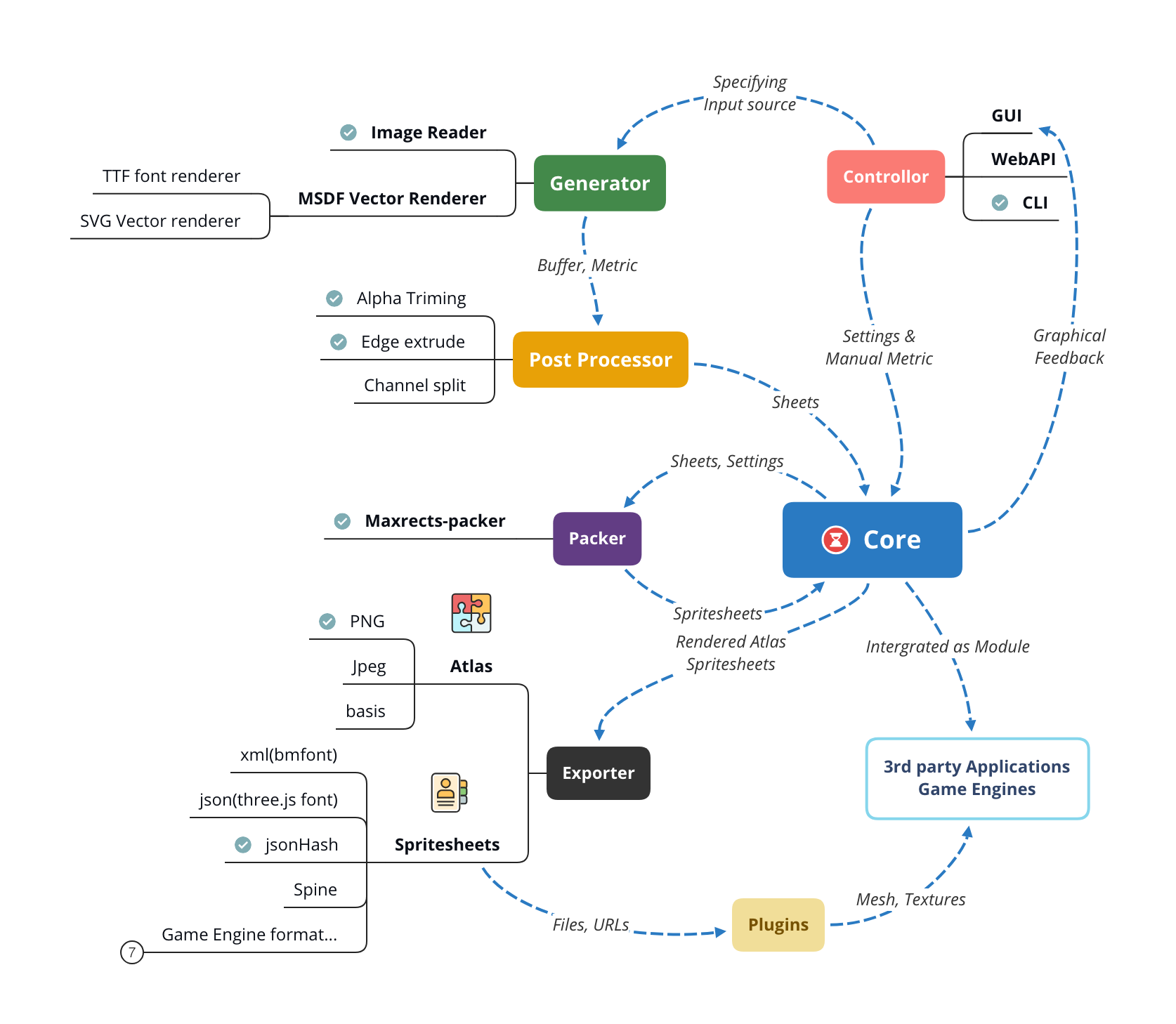
> Proposal Map, modules marked as ☑️ is implemented.
Atlasify's pipeline contain these kinds of modules:
### Controller
Controllers get input assets and settings from user, and start the whole packing process. Controllers will have the following forms:
- **GUI** Of cause! Will be Electron based, cross-platform, separated module. (Working in progress)
- **WebAPI** More accessible from the internet. (Planned)
- **CLI** Command-line interface for terminal user & CI automation. (Implemented)
### Generators
Reading different input data and generate Array of `Buffer` & `Metric` for the core controller. `Buffer`containing image data and `Metric` containing sizing & spacing of the `Buffer`. Currently scheduled generators:
- PNG/Jpeg image reader Through file I/O & [Jimp](https://github.com/oliver-moran/jimp)
- Multi-signed distance field font renderer [msdf-bmfont-xml](https://github.com/soimy/msdf-bmfont-xml)
> `msdf-bmfont-xml` will be depreciated when Atlasify is finished. I'm planning to rewrite msdf generator as a separate module using Rust.
### Post-Processor
Store `Buffer` & `Metric` as `Sheet` object and do the following manipulation based on settings:
- TrimAlpha
- Extrude edge pixels
- Split/Composite ARGB channels
- Rotation
### Core
[Core module](https://github.com/soimy/atlasify) to control the whole pipeline:
1. Aquire settings from front-end(CLI, GUI)
2. Store array of `Buffer` & `Metric` from generator;
3. Doing `Buffer` post-processing like `TrimAlpha` & `Extrude Edge`;
4. Calling Packer to process the `Metric` and composing the `Buffer` onto the atlas;
5. Generate the `spritesheet`data object;
6. Calling the Exporter to compile the `spritesheet` onto different templates;
### Packer
Atlasify uses [maxrects-packer](https://github.com/soimy/maxrects-packer) to calculate sheets position & rotation on the atlas using Maximum Rectangle Algorithm (Same as TexturePacker).
### Exporter
Almost every game engine has it's own data structure to represent the spritesheets, Exporters use [mustache.js](http://mustache.github.com/) template system, so it's highly customizable through modifying `mst` template files. Atlasify supports these types out-of-the-box:
- bmfont/xml
- json (font)
- jsonHash (TexturePacker)
- jsonArray (TexturePacker)
- Cocos2d
- Phaser3
- Spine
- Starling
- UIKit
- Unreal
### Engine plugins
Atlasify extends the "standard" TexturePacker data structure to better utilize the power of GPU accelerated asset rendering like `multi-channel` & `multi-page`, and most importantly, MSDF (multi-signed distance field) based vector object. Many game engine don't support these feature yet, so it's important to implement plugins as separated modules for them. (Coming soon)
---
## Installation
For now only CLI controller and core module is implemented. In order to reduce package size, GUI will be a [separate Repo](https://github.com/soimy/atlasify-gui) and platform dependent installer will be publish in the Release section of [Main Repo](https://github.com/soimy/atlasify)
To install the CLI, run the following command in terminal:
```bash
npm i -g atlasify
```
## Usage (CLI)
```console
$ atlasify --help
Usage: cli [options]
CLI tools to packing and compositing image files into atlas using MaxRects packing algorithm
Options:
-V, --version output the version number
-o, --output output atlas filename (Default: sprite.png)
--load load saved project atl file
-m, --size ouput texture atlas size (Default: 2048,2048)
-p, --padding padding between images (Default: 0)
-b, --border space to atlas edge (Default: 0)
-a, --auto-size shrink atlas to the smallest possible square (Default: false)
-t, --pot atlas size shall be power of 2 (Default: false)
-s, --square atlas size shall be square (Default: false)
-r, --rot allow 90-degree rotation while packing (Default: false)
--trim [n] remove surrounding transparent pixels with optional tolerence [n] (Default: false)
--extrude extrude edge pixels (Default: 0)
--debug draw debug gizmo on atlas (Default: false)
--instant instant packing is quicker and skip sorting (Default: false)
--seperate-folder Seperate bin based on folder (Default: false)
--group-folder Group bin based on folder (Default: false)
--save Save configuration for reuse (Default: false)
-h, --help output usage information
```
> Important: Atlasify is in **VERY EARLY STAGE**, any interface or API might change
Examples: Packing all assets inside `./assets/actor` folder into an autosize atlas with max-size 1024x1024, trim image alpha and extrude 1px on edge pixels, 2px padding and save to `sprite.png` & save project file for later reuse.
```console
$ atlasify -o sprite.png -ast -p 2 -m 1024,1024 --extrude 1 --trim --save ./assets/actor
Saved atlas: sprite.png
Saved spritesheet: sprite.json
Saved configuration: sprite.atl
```
Examples: Load previous project files and add all assets inside `./assets/ui` folder into the same atlas with same settings except no edge pixel extrude and no trim alpha.
```console
$ atlasify --load ./sprite.atl --extrude 0 --no-trim ./assets/ui
Loading project file: ./sprite.atl
Load completed
Saved atlas: sprite.png
Saved spritesheet: sprite.json
Saved configuration: sprite.atl
```
## Module quick start
```javascript
import { Atlasify, Option } from "atlasify";
const opts = new Options("sprite.png", 1024, 1024);
opts.extrude = 1;
opts.trimAlpha = true;
imageFiles = [
"a.png",
"b.png",
"c.jpg"
]
const packer = new Atlasify(opts);
packer.addURLs(imageFiles).then(result => {
// Do your fileIO with results
});
```
Please refer to `./bin/cli.js` & test files(WIP) for further examples.
## API Reference
- [Atlasify](https://soimy.github.io/atlasify/docs/classes/Atlasify)
- [Sheet](https://soimy.github.io/atlasify/docs/classes/Sheet)
- [Exporter](https://soimy.github.io/atlasify/docs/classes/Exporter)