https://github.com/soitora/plex-guid-grabber
Grab the GUID of a Plex entry on demand
https://github.com/soitora/plex-guid-grabber
Last synced: 10 months ago
JSON representation
Grab the GUID of a Plex entry on demand
- Host: GitHub
- URL: https://github.com/soitora/plex-guid-grabber
- Owner: Soitora
- License: mpl-2.0
- Created: 2025-01-27T07:59:00.000Z (over 1 year ago)
- Default Branch: main
- Last Pushed: 2025-02-09T22:18:45.000Z (over 1 year ago)
- Last Synced: 2025-03-28T04:42:00.585Z (about 1 year ago)
- Language: JavaScript
- Homepage: https://soitora.com/Plex-GUID-Grabber/
- Size: 680 KB
- Stars: 3
- Watchers: 1
- Forks: 0
- Open Issues: 0
-
Metadata Files:
- Readme: README.md
- Funding: .github/FUNDING.yml
- License: LICENSE
Awesome Lists containing this project
README

    Script to assist in grabbing the GUID for use in PlexAniSync, specifically, for contribution to the custom mappings project.


    Also check out PlexAniSync-Mapping-Assistant to help you map shows for the custom mappings project.


Table of Contents
Features
-
Copy Plex GUID: Easily copy the GUID of Plex entries for use in other applications. -
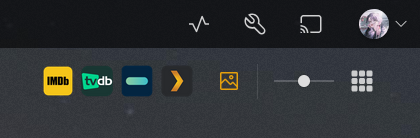
Open External Links: Quickly open related entries on IMDb, TMDB, TVDB, MusicBrainz, AniDB, and YouTube. -
User-Friendly Interface: Buttons are added directly to the Plex interface for easy access. -
Compatibility: Works with movies, shows, episodes, albums, and artists.
Installation
- Install a Userscript manager like Violentmonkey or Tampermonkey.
- Click on the following link to install the script: Plex GUID Grabber.
Configuration
To customize the script's behavior, you can modify these settings in your userscript manager:
- Open your userscript manager:
- For Violentmonkey: Click the extension icon → Manage → Find "Plex GUID Grabber" → Settings → Values
- For Tampermonkey: Click the extension icon → Dashboard → Find "Plex GUID Grabber" → Edit → Storage
- Available settings:
-
SOCIAL_BUTTON_SEPARATION: Set totrue(default) to separate social media buttons to the left side, orfalseto keep all buttons on the right -
USE_SOCIAL_BUTTONS: Set totrue(default) to show social media buttons (IMDb, TMDB, etc.), orfalseto only show the GUID button -
USE_PAS: Set totrueto enable PlexAniSync support -
TMDB_API_READ_ACCESS_TOKEN: Your TMDB Read Access Token -
TMDB_LANGUAGE: Set the language for TMDB API requests, default isen-US -
TVDB_API_KEY: Your TVDB V4 API key -
TVDB_SUBSCRIBER_PIN: Your TVDB Subscriber PIN -
TVDB_LANGUAGE: Set the language for TVDB API requests, default iseng
-
PlexAniSync Support
The script includes support for generating YAML mappings for PlexAniSync. To enable this feature, ensure the following settings are configured:
-
USE_PAS: Set totrueto enable PlexAniSync support -
TMDB_API_READ_ACCESS_TOKEN: Your TMDB Read Access Token
- Find your "Read Access Token" here: TMDB API Settings
- Find your "Read Access Token" here: TMDB API Settings
-
TVDB_API_KEY: Your TVDB V4 API key
- Get your API key here: TVDB Dashboard
- Or here: TVDB API Information
- Get your API key here: TVDB Dashboard
-
TVDB_SUBSCRIBER_PIN(optional): Your TVDB Subscriber PIN
- Find your Subscriber PIN in your TVDB account settings: TVDB Subscription
- Find your Subscriber PIN in your TVDB account settings: TVDB Subscription
Refresh your Plex page to see the new YAML copy buttons. Once enabled, you'll see additional buttons for copying TMDB and TVDB YAML mappings directly to your clipboard, ready to use with PlexAniSync.
Usage
Once installed, the script will add buttons to the top-right of your screen inside movies/series. If it doesn't, check that the URL matches what this script uses.
Repositories
Issues
If you have any issues, please open a new issue in the Issues section of the GitHub repository.
Credits
Thank you to all the people who have contributed!
License
Copyright © 2025 SoitoraThis Source Code Form is subject to the terms of the Mozilla Public
License, v. 2.0. If a copy of the MPL was not distributed with this
file, You can obtain one at http://mozilla.org/MPL/2.0/.