https://github.com/soklet/toystore-app
An example Soklet application which demonstrates how to build a robust production system.
https://github.com/soklet/toystore-app
example soklet
Last synced: 4 months ago
JSON representation
An example Soklet application which demonstrates how to build a robust production system.
- Host: GitHub
- URL: https://github.com/soklet/toystore-app
- Owner: soklet
- License: apache-2.0
- Created: 2023-07-05T12:38:04.000Z (almost 3 years ago)
- Default Branch: main
- Last Pushed: 2026-01-16T21:28:59.000Z (5 months ago)
- Last Synced: 2026-01-17T10:19:11.452Z (5 months ago)
- Topics: example, soklet
- Language: Java
- Homepage: https://www.soklet.com/docs/toy-store-app
- Size: 9.41 MB
- Stars: 0
- Watchers: 1
- Forks: 1
- Open Issues: 0
-
Metadata Files:
- Readme: README.md
- License: LICENSE
Awesome Lists containing this project
README

### Soklet Toy Store App
This app showcases how you might build a real production backend using [Soklet](https://www.soklet.com) (a virtual-threaded Java HTTP + SSE server with zero dependencies).
Feature highlights include:
* Authentication (PBKDF2 using HMAC-SHA512 for password hashing, Ed25519 keypair for digital signatures)
* Role-based authorization
* Dependency injection via [Google Guice](https://github.com/google/guice)
* Relational database integration via [Pyranid](https://www.pyranid.com)
* Context-awareness via [ScopedValue (JEP 506)](https://openjdk.org/jeps/506)
* Internationalization via [Lokalized](https://www.lokalized.com) and the JDK
* JSON requests/responses via [Gson](https://github.com/google/gson)
* Logging via [SLF4J](https://slf4j.org/) / [Logback](https://logback.qos.ch/)
* Automated unit and integration tests via [JUnit](https://junit.org)
* Ability to run in [Docker](https://www.docker.com/)
The app also includes a web frontend which makes it easy to kick the tires:
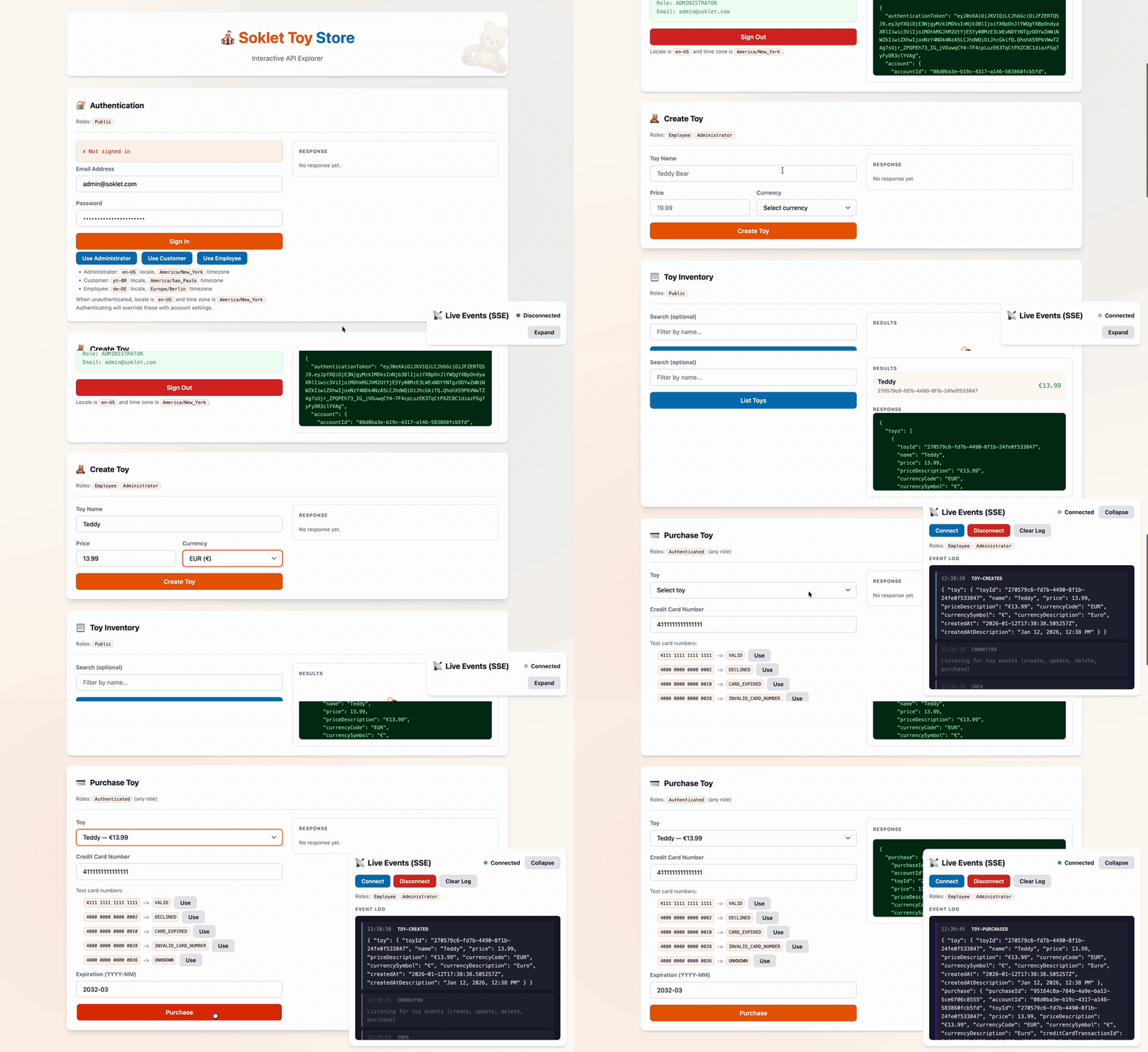
If you'd like fewer moving parts, [a single-file "barebones" example is also available](https://github.com/soklet/barebones-app).
**Note: this README provides a high-level overview of the Toy Store App.**
**For details, please refer to the official documentation at [https://www.soklet.com/docs/toystore-app](https://www.soklet.com/docs/toystore-app).**
### Build and Run
First, clone the Git repository and set your working directory.
```shell
% git clone git@github.com:soklet/toystore-app.git
% cd toystore-app
```
#### With Docker
This is the easiest way to run the Toy Store App. You don't need anything on your machine other than [Docker](https://www.docker.com). The app will run in its own sandboxed Java 25 Docker Container.
[The Dockerfile is viewable here](https://github.com/soklet/toystore-app/blob/main/docker/Dockerfile) if you are curious about how it works.
You likely will want to have your app run inside of a Docker Container using this approach in your real deployment environment.
##### **Build**
```shell
% docker build . --file docker/Dockerfile --tag soklet/toystore
```
##### **Run**
```shell
# Press Ctrl+C to stop the interactive container session
% docker run -e TOYSTORE_ENVIRONMENT="local" -p 8080:8080 -p 8081:8081 soklet/toystore
```
##### **Test**
```shell
% curl -i 'http://localhost:8080/'
HTTP/1.1 200 OK
Content-Length: 13
Content-Type: text/plain; charset=UTF-8
Date: Sun, 21 Mar 2024 16:19:01 GMT
Hello, world!
```
#### Without Docker
The Toy Store App requires [Apache Maven](https://maven.apache.org/) (you can skip Maven if you prefer to run directly through your IDE) and JDK 25+. If you need a JDK, [Amazon Corretto](https://aws.amazon.com/corretto/) is a free-to-use-commercially, production-ready distribution of [OpenJDK](https://openjdk.org/) that includes long-term support.
##### **Build**
```shell
% mvn compile
```
##### **Run**
```shell
% TOYSTORE_ENVIRONMENT="local" MAVEN_OPTS="--sun-misc-unsafe-memory-access=allow --enable-native-access=ALL-UNNAMED --add-opens java.base/java.time=ALL-UNNAMED --add-opens java.base/java.util=ALL-UNNAMED --add-opens java.base/java.lang=ALL-UNNAMED" mvn -e exec:java -Dexec.mainClass="com.soklet.toystore.App"
```
### API Demonstration
Here we demonstrate how a client might interact with the Toy Store App.
#### Authenticate
Given an email address and password, return account information and an authentication token (here, a [JWT](#jwt-handling)).
We specify `Accept-Language` and `Time-Zone` headers so the server knows how to provide "friendly" localized descriptions in the unauthenticated response.
```shell
% curl -i -X POST 'http://localhost:8080/accounts/authenticate' \
-d '{"emailAddress": "admin@soklet.com", "password": "administrator-password"}' \
-H "Accept-Language: en-US" \
-H "Time-Zone: America/New_York"
HTTP/1.1 200 OK
Content-Length: 640
Content-Type: application/json;charset=UTF-8
Date: Sun, 09 Jun 2024 13:25:27 GMT
{
"authenticationToken": "eyJhbG...c76fxc",
"account": {
"accountId": "08d0ba3e-b19c-4317-a146-583860fcb5fd",
"roleId": "ADMINISTRATOR",
"name": "Example Administrator",
"emailAddress": "admin@soklet.com",
"timeZone": "America/New_York",
"timeZoneDescription": "Eastern Time",
"locale": "en-US",
"localeDescription": "English (United States)",
"createdAt": "2024-06-09T13:25:27.038870Z",
"createdAtDescription": "Jun 9, 2024, 9:25 AM"
}
}
```
#### Create Toy
Now that we have an authentication token, add a toy to our database.
Because the server knows which account is making the request, the data in the response is formatted according to the account's preferred locale and timezone (here, `en-US` and `America/New_York`).
```shell
# Note: price is a string instead of a JSON number (float)
# to support exact arbitrary-precision decimals
% curl -i -X POST 'http://localhost:8080/toys' \
-d '{"name": "Test", "price": "1234.5", "currency": "GBP"}' \
-H "Authorization: Bearer eyJhbG...c76fxc"
HTTP/1.1 200 OK
Content-Length: 351
Content-Type: application/json;charset=UTF-8
Date: Sun, 09 Jun 2024 13:44:26 GMT
{
"toy": {
"toyId": "9bd5ea4d-ebd1-47f7-a8b4-0531b8655e5d",
"name": "Test",
"price": 1234.50,
"priceDescription": "£1,234.50",
"currencyCode": "GBP",
"currencySymbol": "£",
"currencyDescription": "British Pound",
"createdAt": "2024-06-09T13:44:26.388364Z",
"createdAtDescription": "Jun 9, 2024, 9:44 AM"
}
}
```
#### Purchase Toy
Let's purchase the toy that was just added.
```shell
% curl -i -X POST 'http://localhost:8080/toys/9bd5ea4d-ebd1-47f7-a8b4-0531b8655e5d/purchase' \
-d '{"creditCardNumber": "4111111111111111", "creditCardExpiration": "2028-03"}' \
-H "Authorization: Bearer eyJhbG...c76fxc"
HTTP/1.1 200 OK
Content-Length: 523
Content-Type: application/json;charset=UTF-8
Date: Sun, 09 Jun 2024 14:12:08 GMT
{
"purchase": {
"purchaseId": "9bd5ea4d-ebd1-47f7-a8b4-0531b8655e5d",
"accountId": "08d0ba3e-b19c-4317-a146-583860fcb5fd",
"toyId": "9bd5ea4d-ebd1-47f7-a8b4-0531b8655e5d",
"price": 1234.50,
"priceDescription": "£1,234.50",
"currencyCode": "GBP",
"currencySymbol": "£",
"currencyDescription": "British Pound",
"creditCardTransactionId": "72534075-d572-49fd-ae48-6c9644136e70",
"createdAt": "2024-06-09T14:12:08.100101Z",
"createdAtDescription": "Jun 9, 2024, 10:12 AM"
}
}
```
#### Internationalization (i18n)
Unauthenticated requests use `Accept-Language` and `Time-Zone` headers; authenticated requests use the account's locale and time zone. The example below assumes the account is configured for `pt-BR` (Brazilian Portuguese) and `America/Sao_Paulo` (São Paulo time, UTC-03:00).
```shell
% curl -i -X POST 'http://localhost:8080/toys' \
-d '{"name": "Bola de futebol", "price": "50", "currency": "BRL"}' \
-H "Authorization: Bearer eyJhbG...c76fxc"
HTTP/1.1 200 OK
Content-Length: 362
Content-Type: application/json;charset=UTF-8
Date: Sun, 09 Jun 2024 14:03:49 GMT
{
"toy": {
"toyId": "3c7c179a-a824-4026-b00c-811710192ff2",
"name": "Bola de futebol",
"price": 50.00,
"priceDescription": "R$ 50,00",
"currencyCode": "BRL",
"currencySymbol": "R$",
"currencyDescription": "Real brasileiro",
"createdAt": "2024-06-09T14:03:49.748571Z",
"createdAtDescription": "9 de jun. de 2024 11:03"
}
}
```
Error messages are localized as well. Here we supply a negative `price` and forget to specify a `currency`.
```shell
% curl -i -X POST 'http://localhost:8080/toys' \
-d '{"name": "Bola de futebol", "price": "-50"}' \
-H "Authorization: Bearer eyJhbG...c76fxc"
HTTP/1.1 422 Unprocessable Content
Content-Length: 261
Content-Type: application/json;charset=UTF-8
Date: Sun, 09 Jun 2024 14:45:17 GMT
{
"summary": "O preço não pode ser negativo. A moeda é obrigatória.",
"generalErrors": [],
"fieldErrors": {
"price": [
"O preço não pode ser negativo."
],
"currency": [
"A moeda é obrigatória."
]
},
"metadata": {}
}
```
#### Server-Sent Events
Clients can listen on `/toys/event-source` for toy-related Server-Sent Events.
Note that the standard Toy Store plumbing - authentication/authorization, transactions, etc. - automatically applies as you would expect for SSE Event Sources.
Server-Sent Events, per spec, do not support custom headers, so we mint a short-lived SSE access token that is safe to pass to our _Event Source Method_ as a query parameter (this mitigates replay attacks that would be possible if we were to pass the long-lived Access Token instead).
First, we ask for a short-lived, cryptographically-signed SSE access token for the authenticated account:
```shell
% curl -i -X POST 'http://localhost:8080/accounts/sse-access-token' \
-H "Authorization: Bearer eyJhbG...c76fxc"
HTTP/1.1 200 OK
Content-Length: 351
Content-Type: application/json;charset=UTF-8
Date: Sun, 09 Jun 2024 13:44:26 GMT
{
"accessToken": "eyJ...KDA"
}
```
In-browser, you'd use a standard JS [`Event Source`](https://html.spec.whatwg.org/multipage/server-sent-events.html#eventsource) to subscribe to Server-Sent Events.
Here, we use `netcat` to listen from the console:
```shell
% echo -ne 'GET /toys/event-source?sse-access-token=eyJ...KDA HTTP/1.1\r\nHost: localhost\r\n\r\n' | netcat localhost 8081
HTTP/1.1 200 OK
Content-Type: text/event-stream; charset=UTF-8
Cache-Control: no-cache
Cache-Control: no-transform
Connection: keep-alive
X-Accel-Buffering: no
Date: Fri, 12 Dec 2025 22:19:01 GMT
:
event: toy-purchased
data: {
data: "toy": {
data: "toyId": "036bd776-3ad2-4b0b-9f58-63aff05946aa",
data: "name": "teddy",
data: "price": 10.25,
data: "priceDescription": "£ 10,25",
data: "currencyCode": "GBP",
data: "currencySymbol": "£",
data: "currencyDescription": "Libra esterlina",
data: "createdAt": "2025-12-12T22:19:00.421502Z",
data: "createdAtDescription": "12 de dez. de 2025 19:19"
data: },
data: "purchase": {
data: "purchaseId": "036bd776-3ad2-4b0b-9f58-63aff05946aa",
data: "accountId": "08d0ba3e-b19c-4317-a146-583860fcb5fd",
data: "toyId": "036bd776-3ad2-4b0b-9f58-63aff05946aa",
data: "price": 10.25,
data: "priceDescription": "£ 10,25",
data: "currencyCode": "GBP",
data: "currencySymbol": "£",
data: "currencyDescription": "Libra esterlina",
data: "creditCardTransactionId": "b86de979-d080-496c-9df8-116e401b4379",
data: "createdAt": "2025-12-12T22:19:35.679794Z",
data: "createdAtDescription": "12 de dez. de 2025 19:19"
data: }
data: }
```
### Learning More
Please refer to the official Soklet website [https://www.soklet.com](https://www.soklet.com) for detailed documentation.
The Toy Store App has its own dedicated section at [https://www.soklet.com/docs/toystore-app](https://www.soklet.com/docs/toystore-app).