https://github.com/solaoi/lycoris
Real-time speech recognition & AI-powered note-taking app for macOS with offline/online modes, multilingual transcription, and Japanese translation support.
https://github.com/solaoi/lycoris
macos mcp mcp-client openai screenshot speech-recognition speech-to-text style-bert-vits2 voice-recognition vosk whisper
Last synced: 3 months ago
JSON representation
Real-time speech recognition & AI-powered note-taking app for macOS with offline/online modes, multilingual transcription, and Japanese translation support.
- Host: GitHub
- URL: https://github.com/solaoi/lycoris
- Owner: solaoi
- License: mit
- Created: 2022-09-17T10:12:45.000Z (almost 4 years ago)
- Default Branch: main
- Last Pushed: 2025-05-05T09:10:17.000Z (about 1 year ago)
- Last Synced: 2025-05-05T09:58:06.230Z (about 1 year ago)
- Topics: macos, mcp, mcp-client, openai, screenshot, speech-recognition, speech-to-text, style-bert-vits2, voice-recognition, vosk, whisper
- Language: TypeScript
- Homepage: https://solaoi.github.io/lycoris/
- Size: 44.5 MB
- Stars: 38
- Watchers: 4
- Forks: 1
- Open Issues: 2
-
Metadata Files:
- Readme: README.md
- License: LICENSE
- Security: SECURITY.md
Awesome Lists containing this project
README

# Real-time Speech Recognition & AI Note-taking App
[](https://github.com/solaoi/lycoris/blob/main/LICENSE)
[](https://github.com/solaoi/lycoris/releases)
[](https://github.com/sponsors/solaoi)
[](https://solaoi.fanbox.cc/)

**Lycoris** is a feature-rich, user-friendly app for macOS, designed to enhance your note-taking experience with real-time speech recognition, transcription, and translation capabilities. With offline and online modes, Lycoris balances flexibility with privacy.
> ⚠️ **Note**: Currently, Lycoris is optimized for Japanese users. While it aims to support transcription and translation in 19 languages in the future, the current version may have limited functionality in other languages.


-d9d9d9)


## Table of Contents
- [✨ Key Features](#-key-features)
- [💻 System Requirements](#-system-requirements)
- [⚙️ Installation](#-installation)
- [🚀 Usage Guide](#-usage-guide)
- [🙌 Support & Contributions](#-support--contributions)
- [👥 Contributors](#-contributors)
- [📈 Star History](#-star-history)
## ✨ Key Features

- 🎙️ **Real-time Speech Recognition**:
- **Offline Mode**:
- **Vosk for Real-time Transcription**: Lycoris uses **Vosk** to quickly generate initial real-time transcriptions, which are then refined using **Whisper** for enhanced accuracy and detail.
- **Whisper for Detailed Transcription**: The primary transcription model for offline mode, **Whisper** delivers high-quality, multi-language transcription. For Japanese-only use cases, **Kotoba-Whisper** is available as an alternative for optimized Japanese transcription.
- **Online Mode**:
- **OpenAI Whisper API**: For users seeking cloud-based transcription, Lycoris integrates with the **OpenAI Whisper API**, allowing for high-quality transcriptions with cloud resources.
- **AmiVoice API**: Additionally, users can choose **amiVoice** for specialized Japanese transcription via API key.
- 🌐 **Advanced Translation**:
- **Whisper + FuguMT**: Supports translation from **18 languages into Japanese**. Whisper transcribes any of the 18 languages into English, and **FuguMT** then translates the English transcription into Japanese, ensuring high accuracy.
- **Kotoba-Whisper-Bilingual**: Specialized for direct bi-directional translation between Japanese and English.
- 📄 **Flexible Note-Taking with Markdown Support**: Notes support **Markdown formatting**, allowing for organized and visually enhanced note-taking.
- 💬 **Contextual Speech Suggestions**:
- **Sentiment-Based Suggestions**: Generate contextual responses in Neutral, Positive, and Negative tones with just a click.
- **Text-to-Speech Capabilities**: Use **Style-BERT-VITS2 JP-Extra** to convert suggested responses into natural-sounding speech.
- 🤖 **Real-Time ChatGPT Integration**:
- Interact with transcriptions or summaries in real-time using ChatGPT for tasks like summarization and contextual insights. This feature helps streamline discussions or capture essential points without losing context.
- 📶 **Offline & Online Modes**: Fully functional offline with local models to ensure privacy; online mode available with API integration for cloud-based services like OpenAI Whisper API.
## 💻 System Requirements
- **Operating System**: macOS 14 Sonoma or later.
- **Processor**: Compatible with Apple Silicon (M1, M2, M3) and Intel processors.
- **Memory**: Minimum 8GB RAM recommended for optimal performance.
## ⚙️ Installation
1. **Download**: Obtain the latest version of Lycoris from the [GitHub Releases page](https://github.com/solaoi/lycoris/releases).
- **For Intel processors**: Download the `.dmg` file ending in `x64.dmg`.
- **For Apple Silicon processors**: Download the `.dmg` file ending in `aarch64.dmg`.
- *Note*: Only the version number in the file name changes with each release.
2. **Install**: After downloading the `.dmg` file, double-click it to open. You’ll see the Lycoris application and the Applications folder. Simply drag the Lycoris app into the Applications folder.
3. **Permissions**: On first launch, grant necessary permissions for microphone and screen recording as prompted.
## 🚀 Usage Guide
1. **Download Language Packs**:
- Open the app and go to settings (⚙️).
- Download language packs for speech recognition as needed.
2. **Configure API Key** (for online features):
- In settings, enter your API keys for services like amiVoice or OpenAI Whisper API to enable extended transcription and AI features.
3. **Create a Note**:
- Click "Add Note" next to the search bar.
- Set the speaker’s language, transcription method, and audio source.
- Click "Start Recording" to begin capturing notes in real time!
- With OpenAI’s online feature, you can also receive **sentiment-based response suggestions** (Neutral, Positive, Negative) for discussions, and use **real-time ChatGPT integration** to summarize or discuss the transcribed content directly.
## 🙌 Support & Contributions
Lycoris is available for free on BOOTH to reach a wide audience. Download the appropriate version for your macOS processor:
- **For Apple Silicon users**: [Download on BOOTH](https://booth.pm/ja/items/4675430)
- **For Intel users**: [Download on BOOTH](https://solaoi.booth.pm/items/4669259)
If you’d like to support further development:
- **For Japanese users**: Contributions are welcome via [Fanbox](https://solaoi.fanbox.cc/) or by making a voluntary purchase on BOOTH.
- **For international users**: You can support Lycoris by becoming a sponsor on [GitHub Sponsors](https://github.com/sponsors/solaoi).
Whether you’re a developer interested in contributing or a user wanting to support this project, every contribution helps Lycoris grow and improve for all!
## 👥 Contributors
## 📈 Star History
[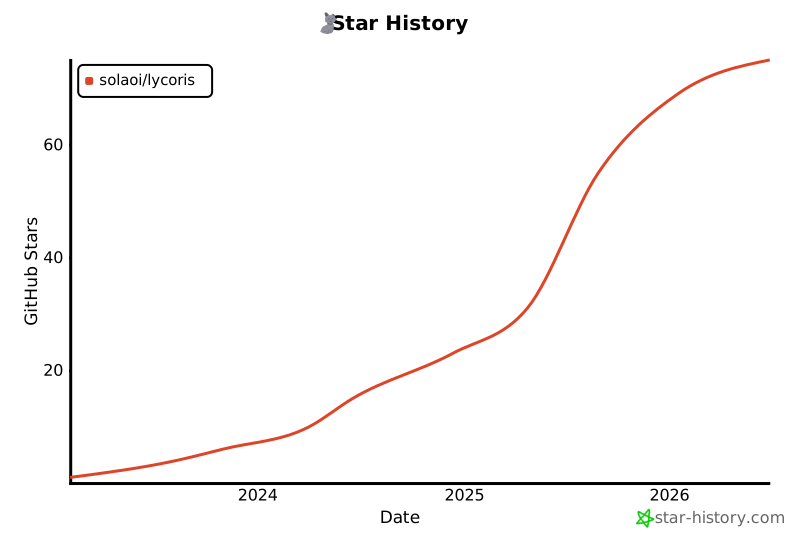](https://star-history.com/#solaoi/lycoris&Date)
Your support keeps Lycoris accessible and continually improving. Thank you for helping us make smarter, AI-powered note-taking a reality! 📒✨

