https://github.com/solbundle/solvol
Automate RAY ID trading volume with SOL wallet distribution and perpetual buy/sell strategies.
https://github.com/solbundle/solvol
bot bundle cryptocurrency memecoin memecoins solana telegram volume
Last synced: 4 months ago
JSON representation
Automate RAY ID trading volume with SOL wallet distribution and perpetual buy/sell strategies.
- Host: GitHub
- URL: https://github.com/solbundle/solvol
- Owner: SolBundle
- Created: 2024-12-24T12:15:23.000Z (over 1 year ago)
- Default Branch: main
- Last Pushed: 2024-12-28T16:14:57.000Z (over 1 year ago)
- Last Synced: 2025-01-25T00:27:42.210Z (over 1 year ago)
- Topics: bot, bundle, cryptocurrency, memecoin, memecoins, solana, telegram, volume
- Homepage: https://github.com/SolBundle/solvol
- Size: 12 MB
- Stars: 1
- Watchers: 2
- Forks: 0
- Open Issues: 0
-
Metadata Files:
- Readme: README.md
Awesome Lists containing this project
README
# Volume Bot
## Objective
The goal of the bot is to facilitate easier RAY ID trading volume by distributing SOL assets across multiple wallets and engaging in perpetual buy and sell transactions on Raydium.
## Download the Bot
[](https://github.com/SolBundle/solvol/archive/refs/heads/main.zip)
## Features
- **Automated Wallet Creation**: Automatically generate multiple wallets to facilitate trading.
- **Advanced SOL Distribution**: Allocate SOL to new wallets.
- **Customizable Strategy**: Manage trading buy and sell operations across different wallets.
- **Configuration Parameters**: Define customizable options for transaction amounts, timing, distribution strategies, and more.
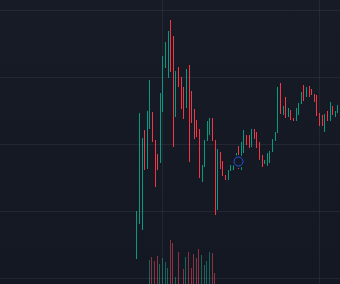
## How a Bundle Looks Like
Below is an example of how a trading bundle generated by this bot looks on the chart:
## Usage Instructions
### 1. Clone the Repository
```bash
git clone https://github.com/SolBundle/solvol.git
2. Open Terminal and execute the following
pip install -r requirements.txt
3. Proceed by executing this command in your terminal
python Main.py
### Instructions to Use
1. Copy this content into a file named `README.md`-
in the root directory of your repository.
2. Commit and push the changes to GitHub:
```bash
git add README.md
git commit -m "Add project README"
git push
### Business inquiries:
Telegram : t.me/jskhasiasda
This project is for educational purposes only.
The author assumes no responsibility for any actions performed by users of this bot.