https://github.com/solentlabs/har-capture
Capture and sanitize HAR (HTTP Archive) files with deep PII removal. Perfect for support diagnostics, security reviews, and test fixtures.
https://github.com/solentlabs/har-capture
bug-reports devtools har http-archive pii playwright privacy python sanitization security support-tools zero-dependencies
Last synced: 4 months ago
JSON representation
Capture and sanitize HAR (HTTP Archive) files with deep PII removal. Perfect for support diagnostics, security reviews, and test fixtures.
- Host: GitHub
- URL: https://github.com/solentlabs/har-capture
- Owner: solentlabs
- License: mit
- Created: 2026-01-29T22:33:25.000Z (6 months ago)
- Default Branch: main
- Last Pushed: 2026-03-29T14:42:07.000Z (4 months ago)
- Last Synced: 2026-03-29T16:41:59.993Z (4 months ago)
- Topics: bug-reports, devtools, har, http-archive, pii, playwright, privacy, python, sanitization, security, support-tools, zero-dependencies
- Language: Python
- Homepage: https://solentlabs.io/har-capture
- Size: 655 KB
- Stars: 3
- Watchers: 0
- Forks: 0
- Open Issues: 0
-
Metadata Files:
- Readme: README.md
- Changelog: CHANGELOG.md
- Contributing: CONTRIBUTING.md
- License: LICENSE
- Code of conduct: CODE_OF_CONDUCT.md
- Security: SECURITY.md
Awesome Lists containing this project
README
# har-capture
[](https://pypi.org/project/har-capture/)
[](https://pypi.org/project/har-capture/)
[](https://codecov.io/gh/solentlabs/har-capture)
[](https://opensource.org/licenses/MIT)
[](https://claude.ai)
Capture and sanitize [HAR (HTTP Archive)](https://w3c.github.io/web-performance/specs/HAR/Overview.html) files with deep PII removal. Perfect for support diagnostics, security reviews, and test fixtures.
## Quick Start
Windows
1. Install Python from the [Microsoft Store](https://apps.microsoft.com/detail/9NRWMJP3717K) or [python.org](https://www.python.org/downloads/)
1. Open PowerShell and run:
```bash
pip install har-capture[full]
python -m har_capture https://example.com
```
macOS / Linux
```bash
pip install har-capture[full]
har-capture https://example.com
```
Already have a HAR file?
```bash
pip install har-capture
har-capture sanitize myfile.har
```
______________________________________________________________________
## Why har-capture?
Chrome DevTools now sanitizes cookies and auth headers, but HAR files contain **much more sensitive data**: IP addresses, MAC addresses, emails, passwords in form bodies, serial numbers, device names, WiFi credentials, session tokens, and API keys.
**How har-capture compares:**
| Feature | har-capture | DevTools | Google/Cloudflare |
| ------------------------------------- | ----------- | -------- | ----------------- |
| Deep sanitization (IPs, MACs, emails) | ✅ | ❌ | ❌ |
| Correlation-preserving hashes | ✅ | ❌ | ❌ |
| Interactive review | ✅ | ❌ | Varies |
| Custom patterns | ✅ | ❌ | Limited |
| Local + CLI automation | ✅ | No CLI | Varies |
**Key benefits:**
- **Zero dependencies** - Core sanitization uses only Python stdlib
- **Format-preserving hashes** - Track the same device across requests without exposing real values
- **One-command workflow** - Capture, sanitize, and compress in a single step
[See detailed comparison with all tools →](docs/COMPARISON.md)
______________________________________________________________________
## See It In Action
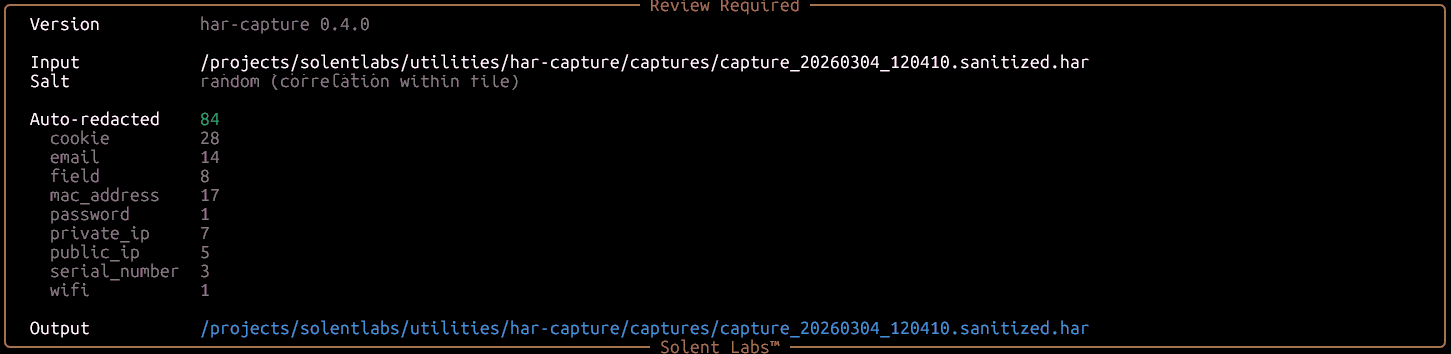
**1. Sanitization report** — 84 values auto-redacted across 9 PII categories:
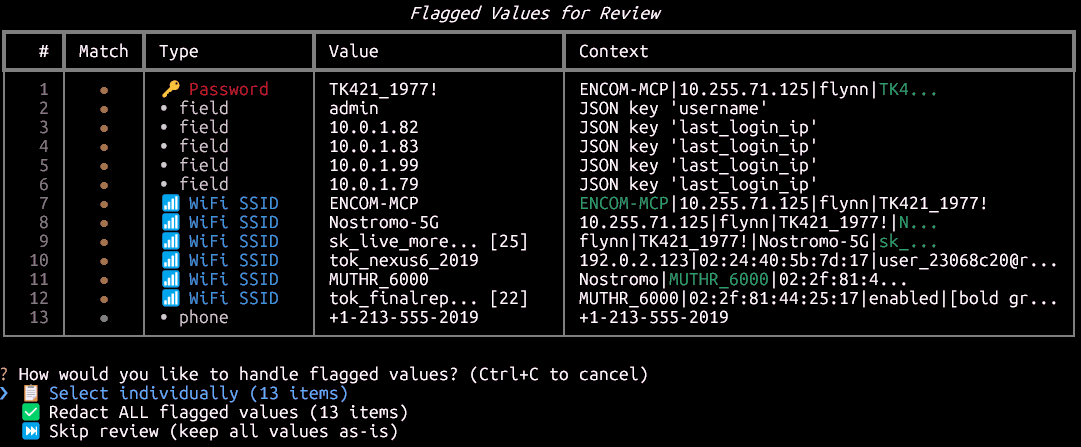
**2. Flagged values for review** — passwords, fields, WiFi SSIDs, and phone numbers detected automatically:
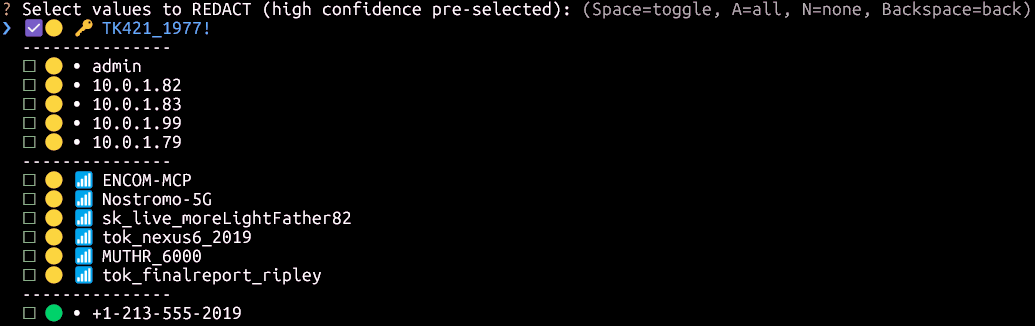
**3. Interactive redaction picker** — high-confidence items pre-selected, you choose the rest:
______________________________________________________________________
## Installation
```bash
# Core only (sanitization - zero dependencies)
pip install har-capture
# With browser capture support
pip install har-capture[capture]
playwright install chromium
# Full installation (recommended)
pip install har-capture[full]
```
______________________________________________________________________
## Usage
### Command Line
```bash
# Capture and sanitize (interactive review always enabled)
har-capture https://example.com
# Sanitize existing HAR
har-capture sanitize capture.har
# Validate for PII leaks
har-capture validate capture.har
```
[Full CLI reference →](docs/CLI_REFERENCE.md)
### Python API
```python
from har_capture.sanitization import sanitize_html, sanitize_har_file
from har_capture.sanitization.report import HeuristicMode
# Sanitize HTML (correlation-preserving by default)
clean_html = sanitize_html(raw_html)
# Sanitize with consistent salt (correlate across captures)
clean_html = sanitize_html(raw_html, salt="my-secret-key")
# Enable heuristic detection for WiFi, SSIDs, device names
clean_html = sanitize_html(raw_html, heuristics=HeuristicMode.REDACT)
# Sanitize HAR file
sanitize_har_file("capture.har") # → capture.sanitized.har
# Custom patterns (e.g., modem serials, customer IDs)
custom = {"patterns": {"modem_sn": {"regex": r"SN[0-9]{10}", "replacement_prefix": "MODEM"}}}
sanitize_har_file("capture.har", custom_patterns=custom)
```
______________________________________________________________________
## Documentation
- **[Comparison with Other Tools](docs/COMPARISON.md)** - DevTools, Google, Cloudflare, Edgio
- **[Correlation-Preserving Redaction](docs/CORRELATION.md)** - How format-preserving hashing works
- **[PII Categories](docs/PII_CATEGORIES.md)** - What gets sanitized
- **[Custom Patterns](docs/CUSTOM_PATTERNS.md)** - Add organization-specific patterns
- **[CLI Reference](docs/CLI_REFERENCE.md)** - Detailed command documentation
- **[Interactive Sanitization](docs/INTERACTIVE_SANITIZATION.md)** - Review edge cases manually
______________________________________________________________________
## Use Cases
- **Support diagnostics** - Users submit sanitized HAR files without exposing credentials
- **Security review** - Validate HAR files for PII leaks before sharing
- **Test fixtures** - Generate reproducible traffic captures
- **Modem debugging** - Capture router/modem traffic with sensitive data removed
______________________________________________________________________
## What Gets Sanitized
| Category | Examples | Output |
| --------------- | --------------------- | ---------------------------------------------------- |
| **Network** | IPs, MACs | `192.168.1.1` → `10.255.42.17` |
| **Personal** | Emails, phones | `user@example.com` → `user_a1b2@redacted.invalid` |
| **Credentials** | Passwords, tokens | `password=secret` → `password=PASS_a1b2c3d4` |
| **Device** | Serials, WiFi, SSIDs | `SN123456` → `SERIAL_a1b2c3d4` |
| **HTTP** | Auth headers, cookies | `Cookie: session=xyz` → `Cookie: session=TOKEN_a1b2` |
[See complete PII categories list →](docs/PII_CATEGORIES.md)
______________________________________________________________________
## Platform Support
| Component | Windows | macOS | Linux |
| ------------ | ------- | ----- | ----- |
| Sanitization | ✅ | ✅ | ✅ |
| Validation | ✅ | ✅ | ✅ |
| CLI | ✅ | ✅ | ✅ |
| Capture | ✅ | ✅ | ✅ |
______________________________________________________________________
## Contributing
Contributions welcome! See [CONTRIBUTING.md](CONTRIBUTING.md) for guidelines.
______________________________________________________________________
## License
MIT License - see [LICENSE](LICENSE) for details.