https://github.com/solr-cool/solr-forward-authentication-plugin
A simple forward authentication plugin for Solr
https://github.com/solr-cool/solr-forward-authentication-plugin
authentication search solr solr-plugin
Last synced: 6 months ago
JSON representation
A simple forward authentication plugin for Solr
- Host: GitHub
- URL: https://github.com/solr-cool/solr-forward-authentication-plugin
- Owner: solr-cool
- License: apache-2.0
- Created: 2021-11-24T18:32:54.000Z (over 4 years ago)
- Default Branch: main
- Last Pushed: 2023-07-24T05:21:08.000Z (almost 3 years ago)
- Last Synced: 2025-07-22T13:52:15.869Z (12 months ago)
- Topics: authentication, search, solr, solr-plugin
- Language: Java
- Homepage:
- Size: 72.3 KB
- Stars: 4
- Watchers: 1
- Forks: 0
- Open Issues: 7
-
Metadata Files:
- Readme: README.md
- License: LICENSE
Awesome Lists containing this project
README
# Solr Forward Authentication Plugin
[](https://github.com/solr-cool/solr-forward-authentication-plugin/actions/workflows/ci.yaml)
[](https://search.maven.org/artifact/cool.solr/solr-forward-authentication-plugin/)
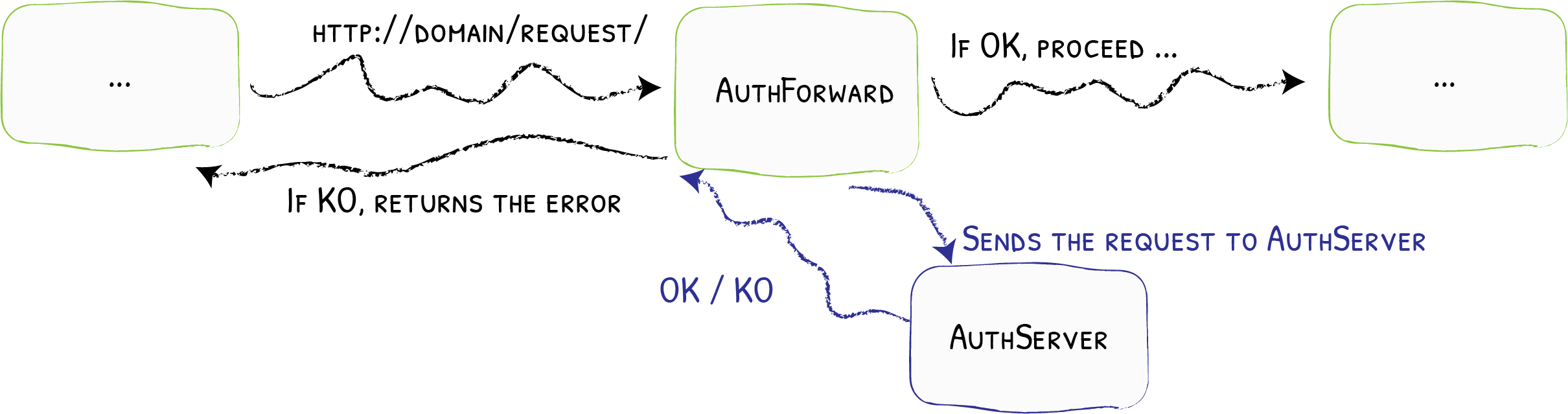
A simple forward authentication plugin for Solr. _Forward authentication_ moves
the authentication process out of Solr into a reverse proxy like
[Traefik](https://doc.traefik.io/traefik/middlewares/http/forwardauth/) or
[Nginx](https://docs.nginx.com/nginx/admin-guide/security-controls/configuring-subrequest-authentication/) running in front of Solr.
After authentication, the authenticated user is sent to Solr via a HTTP header.
This plugins lets Solr accept this header and set the authenticated user
accordingly.
## How to use the plugin
> Before using the plugin, please be familiar with
> [Solr authentication and authorization](https://solr.apache.org/guide/8_11/authentication-and-authorization-plugins.html).
To use the plugin, drop the
[release jar](https://github.com/solr-cool/solr-forward-authentication-plugin/releases)
into the [library directory of your Solr installation](https://solr.apache.org/guide/8_11/libs.html).
### Configure authentication & authorization
To activate authentication & authorization, place a `security.json`
in your Zookeeper root.
To activate forward __authentication__ in Solr, use the
`ForwardAuthPlugin` class as authentication class.
> The `httpUserHeader` is an optional configuration.
```json
{
"authentication": {
"class": "cool.solr.security.ForwardAuthPlugin",
"httpUserHeader": "X-Forwarded-User"
},
"authorization": {
"class": "cool.solr.security.DefaultRuleBasedAuthorizationPlugin",
"defaultRole": "admin",
"permissions": [
{
"name": "all",
"role": "admin"
}
]
}
}
```
For __authorization__, the `DefaultRuleBasedAuthorizationPlugin` extends
the [`RuleBasedAuthorizationPlugin`](https://solr.apache.org/guide/8_11/rule-based-authorization-plugin.html#example-for-rulebasedauthorizationplugin-and-basicauth) by assigning
users without an explicit `user-role` mapping a `defaultRole`.
### Example
The [`examples`](examples/) folder contains a simple Docker Compose ensemble.
From inside the directory, launch the Solr/Zookeeper ensemble:
```shell
$ docker-compose up
# Test connectivity (should return 200 OK)
$ curl -s "http://localhost:8983/api/node/system" | jq .security
{
"tls": false
}
# Activate security
$ docker exec -it solr solr zk cp file:/opt/solr/server/solr/security.json zk:/security.json -z zookeeper:2181
# Test security (should return no data as we are not authorized)
$ curl "http://localhost:8983/api/node/system"
# Fake forward authentication (should return 200)
$ curl -sH "X-Forwarded-User: alice" "http://localhost:8983/api/node/system" \
| jq .security
{
"authenticationPlugin": "cool.solr.security.ForwardAuthPlugin",
"authorizationPlugin": "cool.solr.security.DefaultRuleBasedAuthorizationPlugin",
"username": "alice",
"roles": [
"admin"
],
"tls": false
}
```
## Building the project
This should install the current version into your local repository
$ ./mvn clean verify
## License
This project is licensed under the [Apache License, Version 2](http://www.apache.org/licenses/LICENSE-2.0.html).