https://github.com/solus-project/brisk-menu
An efficient menu for the MATE Desktop
https://github.com/solus-project/brisk-menu
gui launcher mate-desktop menu solus
Last synced: about 1 year ago
JSON representation
An efficient menu for the MATE Desktop
- Host: GitHub
- URL: https://github.com/solus-project/brisk-menu
- Owner: solus-project
- License: gpl-2.0
- Created: 2016-12-10T13:59:28.000Z (over 9 years ago)
- Default Branch: master
- Last Pushed: 2019-04-29T16:32:06.000Z (about 7 years ago)
- Last Synced: 2025-03-29T03:31:57.552Z (over 1 year ago)
- Topics: gui, launcher, mate-desktop, menu, solus
- Language: C
- Homepage:
- Size: 1.27 MB
- Stars: 139
- Watchers: 13
- Forks: 23
- Open Issues: 34
-
Metadata Files:
- Readme: README.md
- License: LICENSE
- Authors: AUTHORS
Awesome Lists containing this project
README
brisk-menu
==========
[](https://scan.coverity.com/projects/solus-project-brisk-menu) [](https://opensource.org/licenses/GPL-2.0)
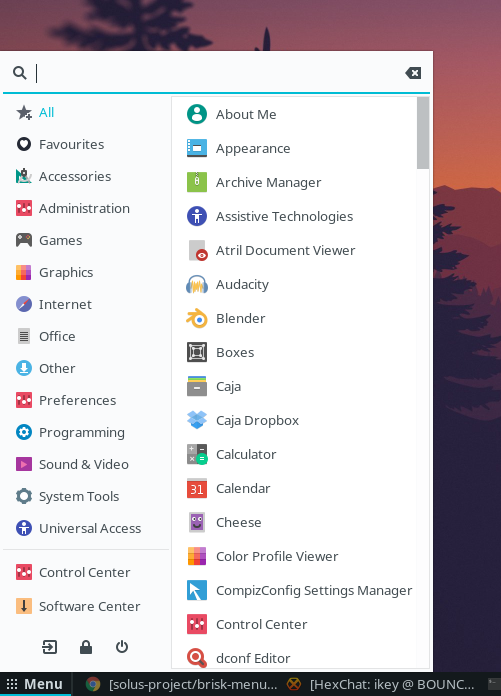
brisk-menu is a modern and efficient menu designed to improve the MATE Desktop Environment with modern, first-class options.
The purpose of this project is to provide a usable menu as seen in other desktops without the bloat and performance issues.
brisk-menu is **distro-agnostic** and the reporting of portability issues is encouraged.
brisk-menu is a **collaborative** project between [Solus](https://solus-project.com/) and [Ubuntu MATE](https://ubuntu-mate.org/)
 
Features
--------
- Keyboard centric (mice welcome too, of course)
- Hotkey support (defaults to Super, configurable in gsettings)
- Stupid-fast
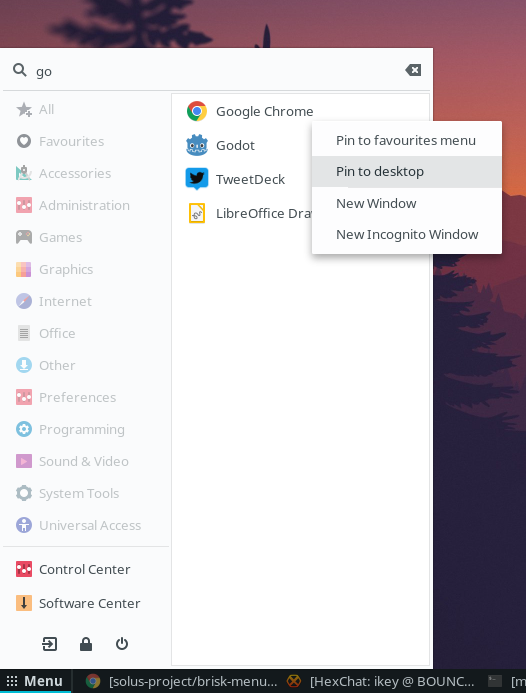
- Efficient, useful searching with prioritised listings
- Modular backend design split from the frontend, allowing new backends in future
(hint: the frontend is not tied to `.desktop` files)
- Context menus for `.desktop` actions (incognito mode, etc.)
- Pin shortcuts to the `Favourites` backend and directly to the desktop using the context menu (unpin too!)
- Configurable label (hide/text)
- Automatically adapt to vertical panels
- Automatically reload
- Filter via categories
- Session/screensaver controls
- Drag & drop support for launchers
- Sidebar launcher support
- GTK3 + CSS styling options
- Fully correct `X11` WM integration (grab policy and window types)
- Not Python.
**Planned**
These planned features will be implemented in the future:
- Settings UI to control further visual aspects (labels/icons/options)
- Improved styling for the window edge + search entry.
More will be added.
Building Brisk Menu
-------------------
**Requirements:**
* GTK 3.18 or greater
* GTK 3.18 build of Mate 1.16 or greater
* **Modern** `meson` (`0.40.x`+) and `ninja` (Ubuntu users should use xenial-backports)
**Build Process:**
```bash
meson --buildtype plain build --prefix=/usr
ninja -C build -j$(($(getconf _NPROCESSORS_ONLN)+1))
sudo ninja -C build install
````
**Development on Solus:**
```bash
meson build --buildtype debugoptimized --prefix=/usr --sysconfdir=/etc --libdir=/usr/lib64 --libexecdir=/usr/lib64/brisk-menu
ninja -C build -j$(($(getconf _NPROCESSORS_ONLN)+1))
sudo ninja -C build install
```
License
--------
Copyright © 2016-2018 Brisk Menu Developers
`brisk-menu` is available under the terms of the `GPL-2.0` license.
The `brisk_system-log-out-symbolic.svg` icon is a copy of `application-exit-symbolic.svg`
to use within Brisk.
This icon is copyright © Sam Hewitt, from the [Paper Icons](https://github.com/snwh/paper-icon-theme) theme, available
under the terms of the [CC-BY-SA-4.0 license](https://creativecommons.org/licenses/by-sa/4.0/).