https://github.com/solutionforest/filament-translate-field
Filament Translate Field is a library for Filament CMS that simplifies managing multiple translatable fields in different languages.
https://github.com/solutionforest/filament-translate-field
Last synced: about 2 months ago
JSON representation
Filament Translate Field is a library for Filament CMS that simplifies managing multiple translatable fields in different languages.
- Host: GitHub
- URL: https://github.com/solutionforest/filament-translate-field
- Owner: solutionforest
- License: mit
- Created: 2024-01-03T09:25:14.000Z (over 2 years ago)
- Default Branch: 3.x
- Last Pushed: 2026-04-22T10:05:50.000Z (about 2 months ago)
- Last Synced: 2026-04-22T12:12:39.401Z (about 2 months ago)
- Language: PHP
- Size: 213 KB
- Stars: 47
- Watchers: 3
- Forks: 17
- Open Issues: 7
-
Metadata Files:
- Readme: README.md
- Changelog: CHANGELOG.md
- License: LICENSE.md
Awesome Lists containing this project
README
# Filament Translate Field
[](https://packagist.org/packages/solution-forest/filament-translate-field)
[](https://packagist.org/packages/solution-forest/filament-translate-field)
Filament Translate Field is a library for Filament CMS that simplifies managing multiple translatable fields in different languages.

## Installation
| Filament Version | Filament Translate Field Version |
| ---------------- | -------------------------------- |
| v3.x | v0.x – v1.x |
| v4.x | v2.x |
| v5.x | v3.x |
You can install the package via composer:
```bash
composer require solution-forest/filament-translate-field
```
Publish the assets:
```bash
php artisan filament:assets
```
```bash
php artisan optimize
```
## Important
- There's a conflict with the Translatable trait in the [filament/spatie-laravel-translatable-plugin](https://filamentphp.com/plugins/filament-spatie-translatable) when used on the EditPage. Avoid using Translatable while editing.
## Configuration:
- Define translatable fields in your model using a translatable package (e.g., "spatie/laravel-translatable" or "dimsav/laravel-translatable").
- Configure translatable fields in the model's _$translatable_ property.
## Setup
For version before 1.x.x
Adding the plugin to a panel
To add a plugin to a panel, you must include it in the configuration file using the plugin() method:
```php
use SolutionForest\FilamentTranslateField\FilamentTranslateFieldPlugin;
public function panel(Panel $panel): Panel
{
return $panel
// ...
->plugin(FilamentTranslateFieldPlugin::make());
}
```
Setting the default translatable locales
To set up the locales that can be used to translate content, you can pass an array of locales to the `defaultLocales()` plugin method:
```php
use SolutionForest\FilamentTranslateField\FilamentTranslateFieldPlugin;
public function panel(Panel $panel): Panel
{
return $panel
// ...
->plugin(
FilamentTranslateFieldPlugin::make()
->defaultLocales(['en', 'es', 'fr']),
);
}
```
For version equal or after 1.x.x
Setting the default translatable locales
Since the plugin after 1.x.x is a standalone plugin, which does not need to be related to Filament Panel, so you need to globally set it up in the config file or use the boot method in `AppServiceProvider`.
To set up the locales that can be used to translate content, you can pass an array of locales to the `defaultLocales()` plugin method:
```php
use SolutionForest\FilamentTranslateField\Facades\FilamentTranslateField;
class AppServiceProvider extends ServiceProvider
{
public function boot(): void
{
FilamentTranslateField::defaultLocales(['en', 'es', 'fr']);
}
}
```
Or, you can publish configuration file `config/filament-translate-field.php` and add default locales on `locales`:
```php
return [
'locales' => ['en', 'es', 'fr'],
];
```
## Usage
### Form component
By using the `Translate` component, you can easily configure your [form fields](https://filamentphp.com/docs/3.x/forms/fields/getting-started) to support multiple languages and provide translations for each locale.
```php
use Filament\Forms\Components\TextInput;
use Filament\Forms\Components\Textarea;
use Filament\Forms\Components\RichEditor;
use SolutionForest\FilamentTranslateField\Forms\Component\Translate;
Translate::make()
->schema([
// Your form fields here
])
```
#### Setting the translatable locales for a particular fields
By default, the translatable locales can be set globally for all translate form component in the plugin configuration. Alternatively, you can customize the translatable locales for a particular resource by overriding the `locales()` method in `Translate` class:
```php
use SolutionForest\FilamentTranslateField\Forms\Component\Translate;
Translate::make()->locales(['en', 'es'])
```
#### Label
##### Setting the translatable label for a particular field
You have the flexibility to customize the translate label for each field in each locale. You can use the `fieldTranslatableLabel()` method to provide custom labels based on the field instance and the current locale.
```php
use SolutionForest\FilamentTranslateField\Forms\Component\Translate;
Translate::make()
->schema([
// Fields
])
->fieldTranslatableLabel(fn ($field, $locale) => __($field->getName(), locale: $locale))
```
##### Adding prefix/suffix locale label to the field
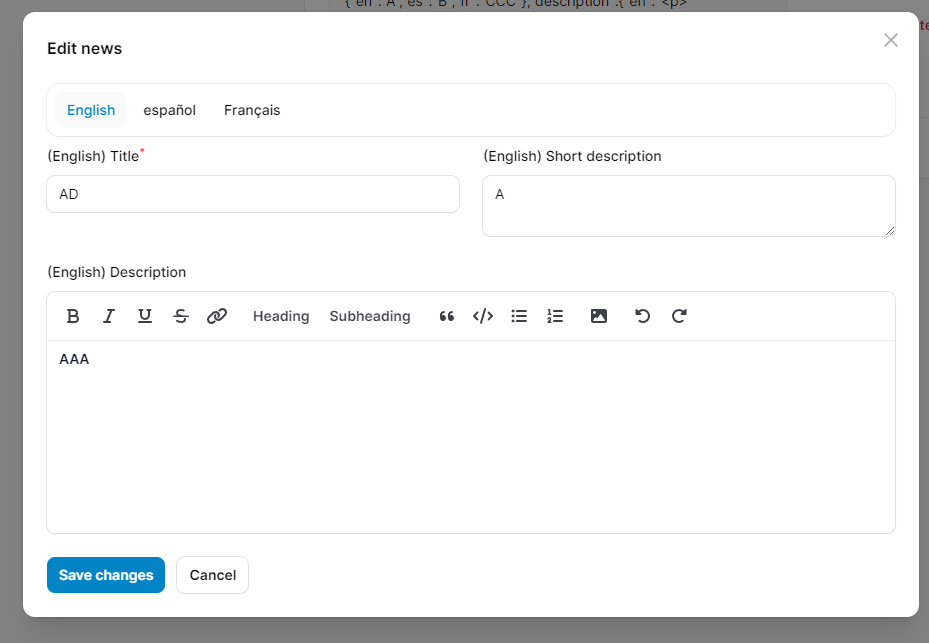
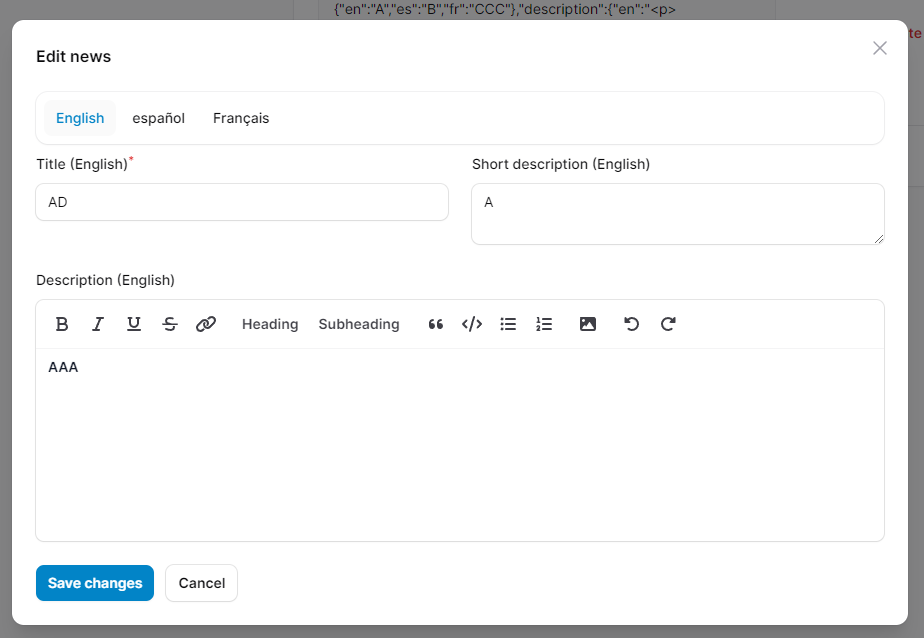
If you simply want to add a prefix or suffix locale label to the form field, you can use the `prefixLocaleLabel()` or `suffixLocaleLabel()` method. This makes it easier for users to identify the language associated with each field.
```php
use SolutionForest\FilamentTranslateField\Forms\Component\Translate;
Translate::make()
->schema([
// Fields
])
->prefixLocaleLabel()
->suffixLocaleLabel()
```
> `prefixLocaleLabel:
>
> 
> `suffixLocaleLabel`:
>
> 
#### Setting the locale display name
By default, the prefix/suffix locale display name is generated by locale code and enclosed in parentheses, "()". You may customize this using the `preformLocaleLabelUsing()` method:
```php
use SolutionForest\FilamentTranslateField\Forms\Component\Translate;
Translate::make()
->preformLocaleLabelUsing(fn (string $locale, string $label) => "[{$label}]");
```
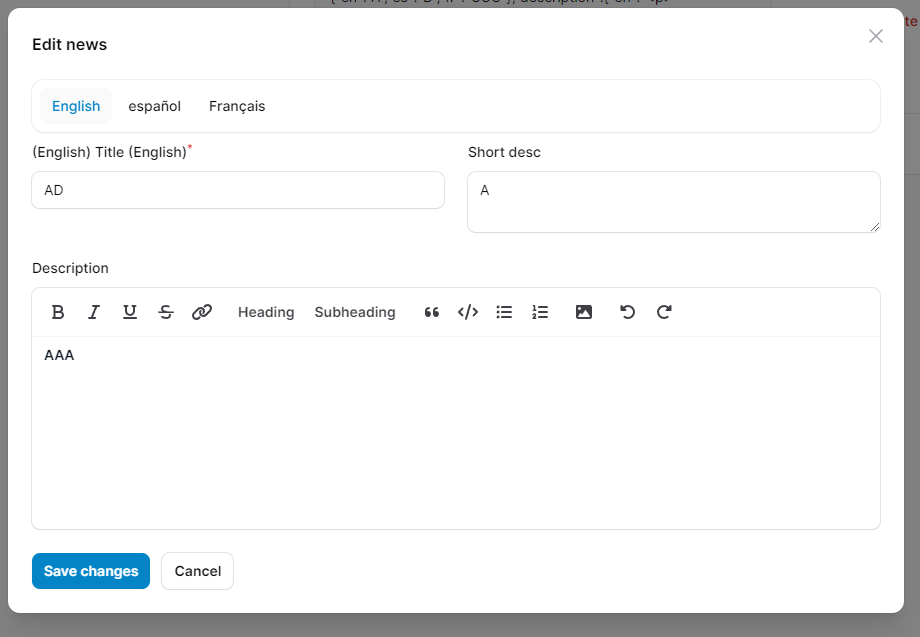
#### Injecting the current form field
Additionally, if you need to access the current form field instance, you can inject the `$field` parameter into the callback functions. This allows you to perform specific actions or conditions based on the field being processed.
```php
use Filament\Forms\Components\Component;
use SolutionForest\FilamentTranslateField\Forms\Component\Translate;
Translate::make()
// ...
->prefixLocaleLabel(function(Component $field) {
// need return boolean value
return $field->getName() == 'title';
})
->suffixLocaleLabel(function(Component $field) {
// need return boolean value
return $field->getName() == 'title';
})
```
### Adding action
You may add actions before each container of children components using the `actions()` method:
```php
use Filament\Forms\Components\Actions\Action;
use SolutionForest\FilamentTranslateField\Forms\Component\Translate;
Translate::make()
->actions([
Action::make('fillDumpTitle')
])
```
> _If have multiple `Translate` components and have action in each component, please add id to `Translate` component by `id()` method_
#### Injecting the locale on current child container
If you wish to access the locale that have been passed to the action, define an `$arguments` parameter and get the value of `locale` from `$arguments`:
```php
use Filament\Forms\Components\Actions\Action;
use SolutionForest\FilamentTranslateField\Forms\Component\Translate;
Translate::make()
->actions([
Action::make('fillDumpTitle')
->action(function (array $arguments) {
$locale = $arguments['locale'];
// ...
})
])
```
### Injecting the locale to form field
If you wish to access the current locale instance for the field, define a `$locale` parameter:
```php
use Filament\Forms\Components\TextInput;
use SolutionForest\FilamentTranslateField\Forms\Component\Translate;
Translate::make()
->schema(fn (string $locale) => [TextInput::make('title')->required($locale == 'en')])
```
### Removing the styled container
By default, translate component and their content are wrapped in a container styled as a card. You may remove the styled container using `contained()`:
```php
use SolutionForest\FilamentTranslateField\Forms\Component\Translate;
Translate::make()
->contained(false)
```
### Exclude
The `exclude` feature allows you to specify fields that you don't want to be included in the translation process. This can be useful for fields that contain dynamic content or that shouldn't be translated into other languages.
```php
use SolutionForest\FilamentTranslateField\Forms\Component\Translate;
Translate::make([
Forms\Components\TextInput::make('title'),
Forms\Components\TextInput::make('description'),
])
->exclude(['description'])
```
Without exclude
```json
{
"title": {
"en": "Dump",
"es": "Dump",
"fr": "Dump"
},
"description": {
"en": null,
"es": null,
"fr": null
}
}
```
With Exclude
```json
{
"title": {
"en": "Dump",
"es": "Dump",
"fr": "Dump"
},
"description": null
}
```
## Publishing Views
To publish the views, use:
```bash
php artisan vendor:publish --provider="SolutionForest\\FilamentTranslateField\\FilamentTranslateFieldServiceProvider" --tag="filament-translate-field-views"
```
## Publishing Configuration file
To publish the configuration file, use:
```bash
php artisan vendor:publish --provider="SolutionForest\\FilamentTranslateField\\FilamentTranslateFieldServiceProvider" --tag="filament-translate-field-config"
```
## Example
### Demo
https://github.com/solutionforest/filament-translate-field/assets/68525320/b088d632-2df5-4594-b91c-56b708425e41
### Sample Code
In Filament panel:
```php
use SolutionForest\FilamentTranslateField\FilamentTranslateFieldPlugin;
public function panel(Panel $panel): Panel
{
return $panel
// ...
->plugin(FilamentTranslateFieldPlugin::make()
->defaultLocales(['en', 'es', 'fr'])
);
}
```
In app/Filament/Resources/NewsResource.php:
```php
use Filament\Forms;
use Filament\Forms\Components\TextInput;
use Filament\Forms\Components\Textarea;
use Filament\Forms\Components\RichEditor;
use Filament\Resources\Resource;
use SolutionForest\FilamentTranslateField\Forms\Component\Translate;
class NewsResource extends Resource
{
// ...
public static function form(Form $form): Form
{
return $form
->schema([
Translate::make()
->columnSpanFull()
->columns(2)
->schema([
TextInput::make('title')->required(),
Textarea::make('short_desc'),
RichEditor::make('description')->columnSpanFull(),
])
->fieldTranslatableLabel(fn ($field, $locale) => __($field->getName(), locale: $locale))
->actions([
Forms\Components\Actions\Action::make('test')
->label("Fill dump title")
->visible(fn ($arguments) => $arguments['locale'] == 'en')
->action(function ($set, $arguments) {
$locale = $arguments['locale'] ?? null;
if (! $locale) {
return;
}
$set("title.$locale", fake()->text(50));
})
]),
]);
}
public static function table(Table $table): Table
{
return $table
->columns([
Tables\Columns\ColumnGroup::make('Data')
->columns([
Tables\Columns\TextColumn::make('title')
->getStateUsing(fn ($record) => new HtmlString(collect($record->title)
->map(fn ($state, $locale) => <<
$locale
$state
Html)
->implode(''))),
Tables\Columns\TextColumn::make('short_desc')
->getStateUsing(fn ($record) => new HtmlString(collect($record->short_desc)
->map(fn ($state, $locale) => <<
$locale
$state
Html)
->implode(''))),
Tables\Columns\TextColumn::make('description')
->getStateUsing(fn ($record) => new HtmlString(collect($record->description)
->map(fn ($state, $locale) => <<
$locale
$state
Html)
->implode(''))),
]),
])
->actions([
Tables\Actions\EditAction::make(),
Tables\Actions\DeleteAction::make(),
]);
}
// ...
}
```
In app/Models/News.php:
```php
use Illuminate\Database\Eloquent\Model;
use Spatie\Translatable\HasTranslations;
class News extends Model
{
use HasTranslations;
// ...
protected $guarded = ['id'];
public $translatable = ['title', 'short_desc', 'description'];
public $casts = [
'title' => 'json',
'short_desc' => 'json',
'description' => 'json',
];
// ...
}
```
In resources/lang/en.json:
```json
{
"title": "Title",
"short_desc": "Short description",
"description": "Description"
}
```
In resources/lang/es.json:
```json
{
"title": "Título",
"short_desc": "Breve descripción",
"description": "Descripción"
}
```
In resources/lang/fr.json:
```json
{
"title": "Titre",
"short_desc": "Brève description",
"description": "Description"
}
```
In the given example, when you save the model, the data will be stored in the following format:
```json
{
"id": 1,
"title": {
"en": "Dump",
"es": "Dump",
"fr": "Dump"
},
"short_desc": {
"en": null,
"es": null,
"fr": null
},
"description": {
"en": null,
"es": null,
"fr": null
}
}
```
## Testing
```bash
composer test
```
## Changelog
See the [CHANGELOG](CHANGELOG.md) for more information on what has changed recently.
## Contributing
See [CONTRIBUTING](.github/CONTRIBUTING.md) for details.
## Security Vulnerabilities
If you discover any security related issues, please email info+package@solutionforest.net instead of using the issue tracker.
## Credits
- [Carly]
- [All Contributors](../../contributors)
## License
Filament Tree is open-sourced software licensed under the [MIT license](LICENSE.md).

## About Solution Forest
[Solution Forest](https://solutionforest.com) Web development agency based in Hong Kong. We help customers to solve their problems. We Love Open Sources.
We have built a collection of best-in-class products:
- [InspireCMS](https://inspirecms.net): A full-featured Laravel CMS with everything you need out of the box. Build smarter, ship faster with our complete content management solution.
- [Filaletter](https://filaletter.solutionforest.net): Filaletter - Filament Newsletter Plugin
- [Website CMS Management](https://filamentphp.com/plugins/solution-forest-cms-website): A hands-on Filament CMS plugin for those who prefer more manual control over their website content management.