https://github.com/someok/history-search-multi-word
由于原作者删库跑路,故备份一份
https://github.com/someok/history-search-multi-word
omz omz-plugin zsh
Last synced: about 2 months ago
JSON representation
由于原作者删库跑路,故备份一份
- Host: GitHub
- URL: https://github.com/someok/history-search-multi-word
- Owner: someok
- License: other
- Created: 2021-11-18T12:52:27.000Z (over 4 years ago)
- Default Branch: master
- Last Pushed: 2021-11-18T13:11:08.000Z (over 4 years ago)
- Last Synced: 2025-12-10T04:57:41.837Z (6 months ago)
- Topics: omz, omz-plugin, zsh
- Language: Shell
- Homepage:
- Size: 207 KB
- Stars: 0
- Watchers: 1
- Forks: 1
- Open Issues: 0
-
Metadata Files:
- Readme: README.md
- Changelog: history-search-multi-word
- License: LICENSE
Awesome Lists containing this project
README
由于 [原作者](https://github.com/zdharma/history-search-multi-word) [删库跑路](https://hk.v2ex.com/t/811747) 了,所以将其最后版本备份了一份。
---
[](./LICENSE)
[](./LICENSE)

[](https://www.paypal.me/ZdharmaInitiative)
[](https://www.patreon.com/psprint)
You can request a feature when donating, even fancy or advanced ones get implemented this way. [There are
reports](DONATIONS.md) about what is being done with the money received.
# Introduction
Binds `Ctrl-R` to a widget that searches for multiple keywords in `AND` fashion.
In other words, you can enter multiple words, and history entries that match
all of them will be found. The entries are syntax highlighted.
Video – view on [asciinema](https://asciinema.org/a/88954). You can resize the video by pressing `Ctrl-+` or `Cmd-+`.
[](https://asciinema.org/a/88954)
HSMW has feature called **context viewing** – see all occurrences of a command together
with surrounding commands:
[](https://asciinema.org/a/155704)
Set:
```zsh
zstyle :plugin:history-search-multi-word reset-prompt-protect 1
```
to be able to use `zle reset-prompt` in your e.g. `sched` calls, in presence of
`zdharma/fast-syntax-highlighting`, `zsh-users/zsh-syntax-highlighting`,
`zsh-users/zsh-autosuggestions` and other plugins that hook up into Zshell by
overloading Zle widgets. You could e.g. use `sched` in following way:
```zsh
PROMPT=%B%F{yellow}%D{%H:%M:%S}%B%b%f
schedprompt() {
zle && zle reset-prompt
sched +1 schedprompt
}
zmodload -i zsh/sched
schedprompt
```
to refresh the clock in prompt every second. The `reset-prompt-protect` zstyle
needs to be set to 1 for correct cooperation with HSMW. Or, you could use `zle
.reset-prompt` (i.e. with the dot in front) to call the original, not
overloaded (by F-Sy-H, zsh-autosuggestsions, etc.) `reset-prompt` widget.
# News
* 14-07-2020
- If an `[…]` string will occur in the search query, it'll be interpreted as
pattern. So that it's possible to enter as the search query e.g.: `print
["a-zA-Z0-9_-]` or `print [^[:alpha:]]`, etc.
* 28-10-2019
- `^` – if first – matches beginning of the command's string, $ – if last –
its end. So that it's possible to enter `'^ls'` and have only commands
starting with `ls` matched.
* 25-05-2018
- Hash holding paths that shouldn't be grepped (globbed) – blacklist for slow disks, mounts, etc.:
```zsh
typeset -gA FAST_BLIST_PATTERNS
FAST_BLIST_PATTERNS[/mount/nfs1/*]=1
FAST_BLIST_PATTERNS[/mount/disk2/*]=1
```
* 13-06-2017
- Canceling search doesn't clear entered query. Change to previous behavior via:
```zsh
zstyle ":plugin:history-search-multi-word" clear-on-cancel "yes"
```
* 12-04-2017
- Page size can be relative to screen height, e.g.:
```zsh
zstyle ":history-search-multi-word" page-size "LINES/4"
```
* 05-04-2017
- 17% performance optimization
* 27-01-2017
- Input-driven case-sensivity of search – if your query contains capital latin letters, search will be case-sensitive
* 12-11-2016
- HSMW can now show context of selected history entry! Just hit `Ctrl-K`, [video](https://asciinema.org/a/92516)
- More performance optimizations
* 31-10-2016
- Newlines do not disturb the parser anymore, and are also highlighted with a dark color – [video](https://asciinema.org/a/91159)
* 27-10-2016
- New optimizations – **30%** speed up of syntax highlighting!
- Architectural change – syntax highlighting is now computed rarely, so any possible performance problems are now solved, in advance!
* 24-10-2016
- Workaround for Zsh versions like 5.0.2 has been added – **Ctrl-V** and **ESC** cancel search. On such Zsh
versions Ctrl-C might not work. Fully problem-free Zsh version will be the upcoming 5.3, where
I have together with Zsh Hackers fully fixed the Ctrl-C issue.
* 22-10-2016
- Search process has been optimized by 20%! History sizes like 100000 are now supported.
- Active history entry can be `underline`, `standout` (i.e. inverse video), `bold`, `bg=blue`, etc. with
the new Zstyle `:plugin:history-search-multi-word / active` (see Zstyles section) – [video](https://asciinema.org/a/90214).
* 16-10-2016
- More optimizations of syntax highlighting (40% in total for the two days) – new video above.
* 15-10-2016
- The compact, already optimized (by me) [zsh-syntax-highlighting](https://github.com/zsh-users/zsh-syntax-highlighting) part has been further optimized by 21%!
Also, more tokens are highlighted – variable expressions like `"${(@)var[1,3]}"` (when quoted).
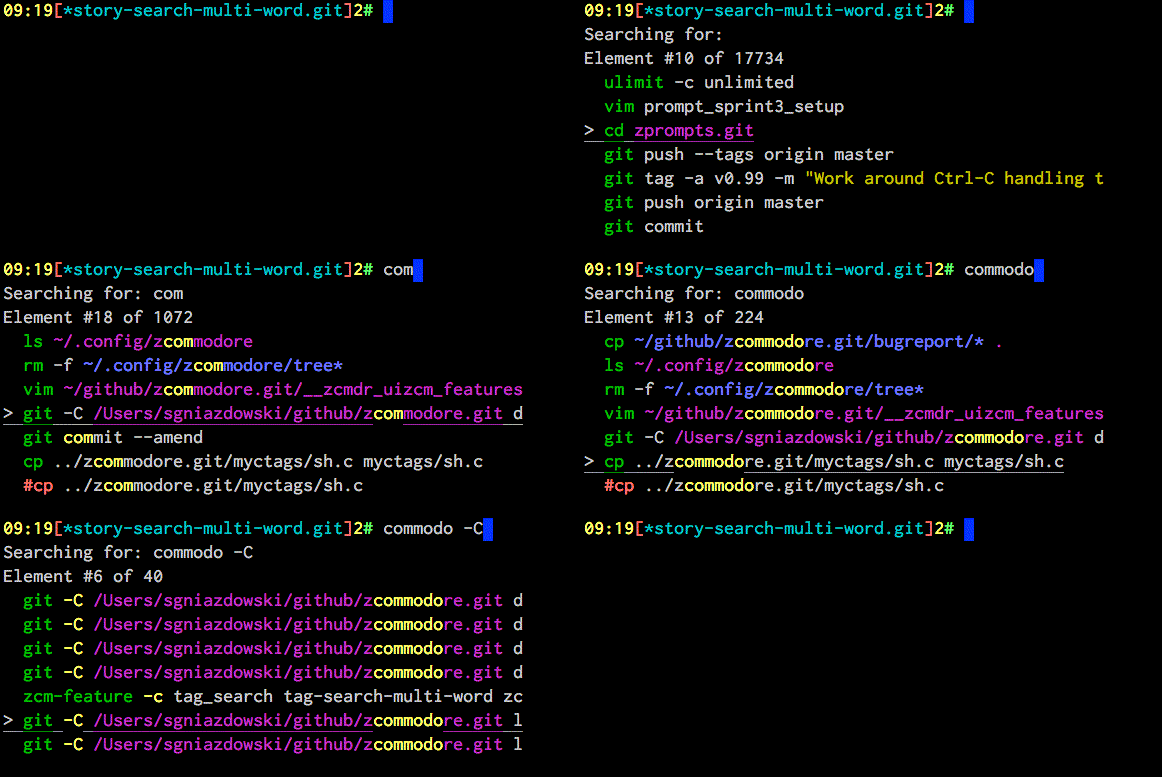
* 11-10-2016
- Syntax highlighting of history – adapted, fine crafted, **small** part of [zsh-syntax-highlighting](https://github.com/zsh-users/zsh-syntax-highlighting)
to color what `hsmw` shows:
* 20-09-2016
- Keys Page Up and Page Down work and page-wise move along history. Also, `Ctrl-P`, `Ctrl-N`
move to previous and next entries.
* 19-09-2016
- Better immunity to [zsh-autosuggestions](https://github.com/zsh-users/zsh-autosuggestions)
and [zsh-syntax-highlighting](https://github.com/zsh-users/zsh-syntax-highlighting) – home,
end, left and right cursor keys now work smoothly.
* 25-05-2016
- Cooperation with
[zsh-autosuggestions](https://github.com/zsh-users/zsh-autosuggestions)
plugin
- Configuration option to set page size, example use:
```zsh
zstyle ":history-search-multi-word" page-size "5"
```
# Installation
**The plugin is "standalone"**, which means that only sourcing it is needed. So to
install, unpack `history-search-multi-word` somewhere and add
```zsh
source {where-hsmw-is}/history-search-multi-word.plugin.zsh
```
to `zshrc`.
If using a plugin manager, then `Zplugin` is recommended, but you can use any
other too, and also install with `Oh My Zsh` (by copying directory to
`~/.oh-my-zsh/custom/plugins`).
### [Zplugin](https://github.com/zdharma/zplugin)
Add `zplugin load zdharma/history-search-multi-word` to your `.zshrc` file.
Zplugin will handle cloning the plugin for you automatically the next time you
start zsh.
### Antigen
Add `antigen bundle zdharma/history-search-multi-word` to your `.zshrc` file.
Antigen will handle cloning the plugin for you automatically the next time you
start zsh. You can also add the plugin to a running zsh with `antigen bundle
zdharma/history-search-multi-word` for testing before adding it to your
`.zshrc`.
### Oh-My-Zsh
1. `cd ~/.oh-my-zsh/custom/plugins`
2. `git clone git@github.com:zdharma/history-search-multi-word.git`
3. Add `history-search-multi-word` to your plugin list
### Zgen
Add `zgen load zdharma/history-search-multi-word` to your .zshrc file in the same
place you're doing your other `zgen load` calls in.
### Arch Linux
1. Install [`zsh-history-search-multi-word-git`](https://aur.archlinux.org/packages/zsh-history-search-multi-word-git/) from the [AUR](https://wiki.archlinux.org/index.php/Arch_User_Repository).
2. Add the following to your `.zshrc`:
```sh
source /usr/share/zsh/plugins/history-search-multi-word/history-search-multi-word.plugin.zsh
```
3. Start a new terminal session
# Customizing
## Zstyles
```zsh
zstyle ":history-search-multi-word" page-size "8" # Number of entries to show (default is $LINES/3)
zstyle ":history-search-multi-word" highlight-color "fg=yellow,bold" # Color in which to highlight matched, searched text (default bg=17 on 256-color terminals)
zstyle ":plugin:history-search-multi-word" synhl "yes" # Whether to perform syntax highlighting (default true)
zstyle ":plugin:history-search-multi-word" active "underline" # Effect on active history entry. Try: standout, bold, bg=blue (default underline)
zstyle ":plugin:history-search-multi-word" check-paths "yes" # Whether to check paths for existence and mark with magenta (default true)
zstyle ":plugin:history-search-multi-word" clear-on-cancel "no" # Whether pressing Ctrl-C or ESC should clear entered query
```
## Syntax highlighting
Syntax highlighting is customized via `HSMW_HIGHLIGHT_STYLES` associative array.
It has keys like `reserved-word`, `alias`, `command`, `path`, etc. which are assigned
with strings like `fg=blue,bold`, to configure how given elements are to be
colored. If you assign this array before or after loading `hsmw` you will change the defaults. Complete list
of available keys is [at the beginning](https://github.com/zdharma/history-search-multi-word/blob/master/hsmw-highlight#L34-L62)
of `hsmw-highlight` file. Example `~/.zshrc` addition that sets `path` key –
paths that exist will be highlighted with background magenta, foreground white, bold:
```zsh
typeset -gA HSMW_HIGHLIGHT_STYLES
HSMW_HIGHLIGHT_STYLES[path]="bg=magenta,fg=white,bold"
```
Following code will enable coloring of options of form "-o" and "--option", with cyan:
```zsh
typeset -gA HSMW_HIGHLIGHT_STYLES
HSMW_HIGHLIGHT_STYLES[single-hyphen-option]="fg=cyan"
HSMW_HIGHLIGHT_STYLES[double-hyphen-option]="fg=cyan"
```
Following code will use 256 colors to highlight command separators (like ";" or "&&"):
```zsh
HSMW_HIGHLIGHT_STYLES[commandseparator]="fg=241,bg=17"
```
# IRC Channel
Channel `#zplugin@freenode` is a support place for all author's projects. Connect to:
[chat.freenode.net:6697](ircs://chat.freenode.net:6697/%23zplugin) (SSL) or [chat.freenode.net:6667](irc://chat.freenode.net:6667/%23zplugin)
and join #zplugin.
Following is a quick access via Webchat [](https://kiwiirc.com/client/chat.freenode.net:+6697/#zplugin)