https://github.com/sooink/ai-session-tidy
Clean up orphaned sessions from AI coding tools (Claude Code, Cursor) 🧹
https://github.com/sooink/ai-session-tidy
claude-code cleanup cli cursor git-worktree nodejs session typescript
Last synced: 6 months ago
JSON representation
Clean up orphaned sessions from AI coding tools (Claude Code, Cursor) 🧹
- Host: GitHub
- URL: https://github.com/sooink/ai-session-tidy
- Owner: sooink
- License: mit
- Created: 2026-01-23T01:52:58.000Z (6 months ago)
- Default Branch: main
- Last Pushed: 2026-01-23T07:21:25.000Z (6 months ago)
- Last Synced: 2026-01-23T19:32:00.691Z (6 months ago)
- Topics: claude-code, cleanup, cli, cursor, git-worktree, nodejs, session, typescript
- Language: TypeScript
- Homepage: https://www.npmjs.com/package/@sooink/ai-session-tidy
- Size: 332 KB
- Stars: 1
- Watchers: 0
- Forks: 0
- Open Issues: 0
-
Metadata Files:
- Readme: README.md
- License: LICENSE
Awesome Lists containing this project
README
# AI Session Tidy
**Clean up orphaned sessions from AI coding tools**
[](https://www.npmjs.com/package/@sooink/ai-session-tidy)
[](https://nodejs.org/)
[](https://github.com/sooink/ai-session-tidy)
[](https://opensource.org/licenses/MIT)
---
## The Problem
AI coding tools like **Claude Code** and **Cursor** store session data locally—conversation history, file snapshots, todos, and more.
When you delete, move, or rename a project, the session data becomes orphaned:
```
~/.claude/
├── projects/
│ ├── -Users-you-deleted-project/ # 👈 Project deleted last week
│ ├── -Users-you-temp-worktree/ # 👈 Worktree removed
│ └── -Users-you-renamed-project/ # 👈 Project renamed
├── todos/ # Orphaned todo files
└── file-history/ # Orphaned rewind snapshots
```
This becomes especially problematic with **git worktree workflows**, where branches are frequently created and removed—each leaving behind session data that accumulates quickly.
While Claude Code cleans up old sessions after 30 days, **Cursor has no automatic cleanup**. And even with Claude Code, you're left with orphaned data for up to a month. Manually cleaning up after each worktree removal is tedious.
**This tool detects orphaned sessions automatically and cleans them up.**
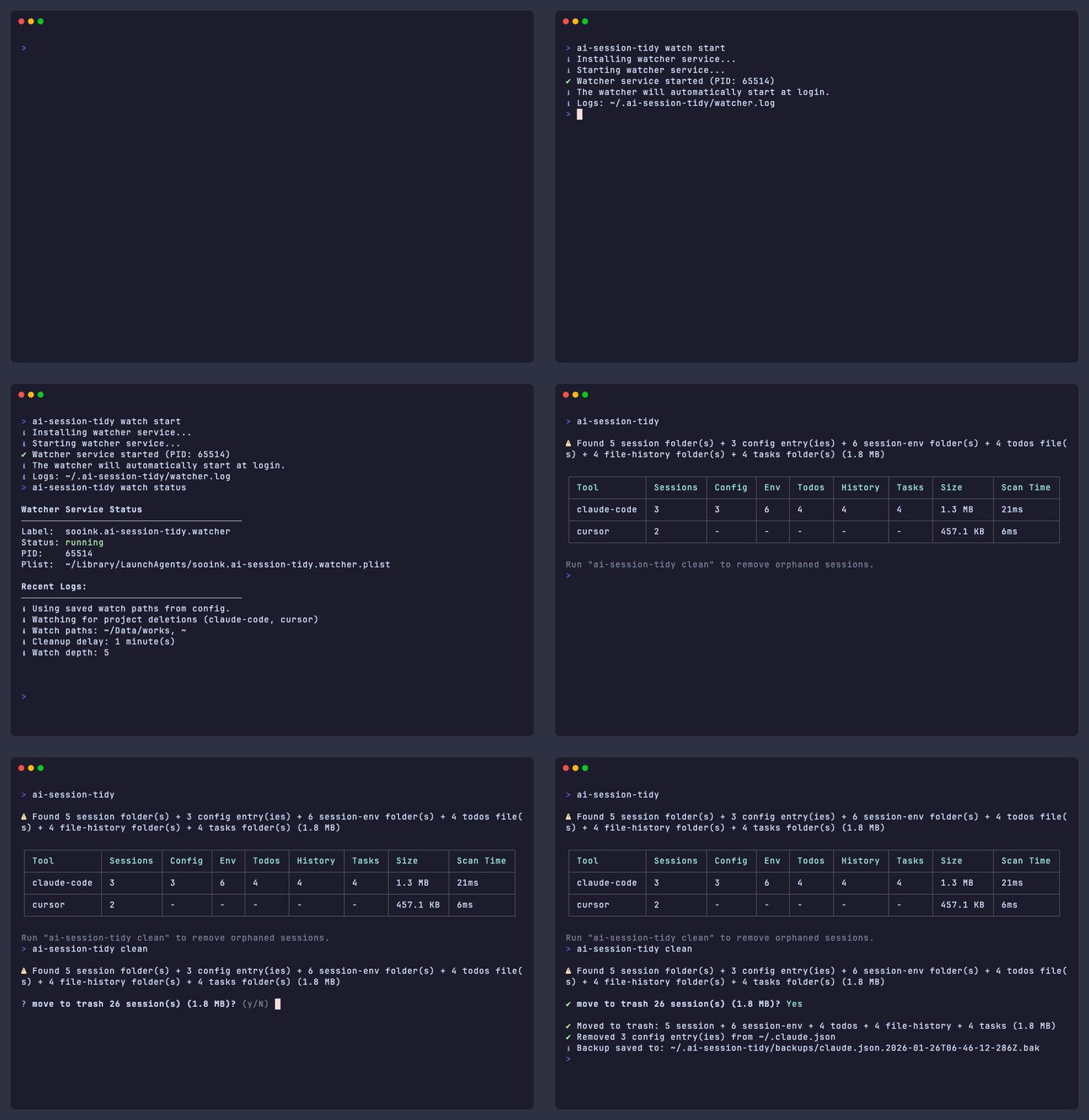
Just run `watch start` once—it monitors in the background and cleans up as projects are deleted.
## Quick Start
```bash
npm install -g @sooink/ai-session-tidy
# Automatic cleanup (recommended)
ai-session-tidy watch start
# Manual cleanup
ai-session-tidy # Scan for orphaned sessions
ai-session-tidy clean # Move to trash
```
## Use Cases
### Git Worktree Workflows
[Git worktrees](https://git-scm.com/docs/git-worktree) let you work on multiple branches simultaneously. But when you remove a worktree, session data persists.
```bash
git worktree add ../feature-branch feature
cd ../feature-branch && claude # Session data created
git worktree remove ../feature-branch
# ~/.claude/projects/-...-feature-branch/ still exists
```
**With watch mode**, cleanup is automatic:
```bash
ai-session-tidy watch start # Run once, auto-starts at login
git worktree remove ../feature # Watch detects → cleans after 5 min
```
### Multi-Agent Orchestration
[Modern AI workflows](https://www.anthropic.com/engineering/multi-agent-research-system) run multiple agents in parallel, each in isolated worktrees.
This multiplies session data accumulation. Watch mode keeps your system clean automatically.
## Supported Tools
| Tool | Status |
|------|--------|
| Claude Code | ✅ Supported |
| Cursor | ✅ Supported |
## Commands
### `scan` (default)
Find orphaned sessions without deleting. Running `ai-session-tidy` without a command is equivalent to `ai-session-tidy scan`.
```bash
ai-session-tidy # Basic scan
ai-session-tidy -v # Verbose output
ai-session-tidy --json # JSON output
```
Example output with -v
```
⚠ Found 2 session folder(s) + 1 config entry(ies) + 3 session-env folder(s) (156.2 MB)
┌─────────────┬──────────┬────────┬─────┬───────┬─────────┬──────────┬───────────┐
│ Tool │ Sessions │ Config │ Env │ Todos │ History │ Size │ Scan Time │
├─────────────┼──────────┼────────┼─────┼───────┼─────────┼──────────┼───────────┤
│ claude-code │ 2 │ 1 │ 3 │ - │ - │ 156.2 MB │ 45ms │
└─────────────┴──────────┴────────┴─────┴───────┴─────────┴──────────┴───────────┘
Session Folders:
[claude-code] deleted-project (128.5 MB)
→ /Users/you/deleted-project
Modified: 1/15/2025
[claude-code] old-worktree (27.7 MB)
→ /Users/you/old-worktree
Modified: 1/10/2025
Config Entries (~/.claude.json):
[config] deleted-project
→ /Users/you/deleted-project
Cost: $1.25 | Tokens: 150K in / 12K out
```
### `clean`
Remove orphaned sessions.
```bash
ai-session-tidy clean # Move to trash (with confirmation)
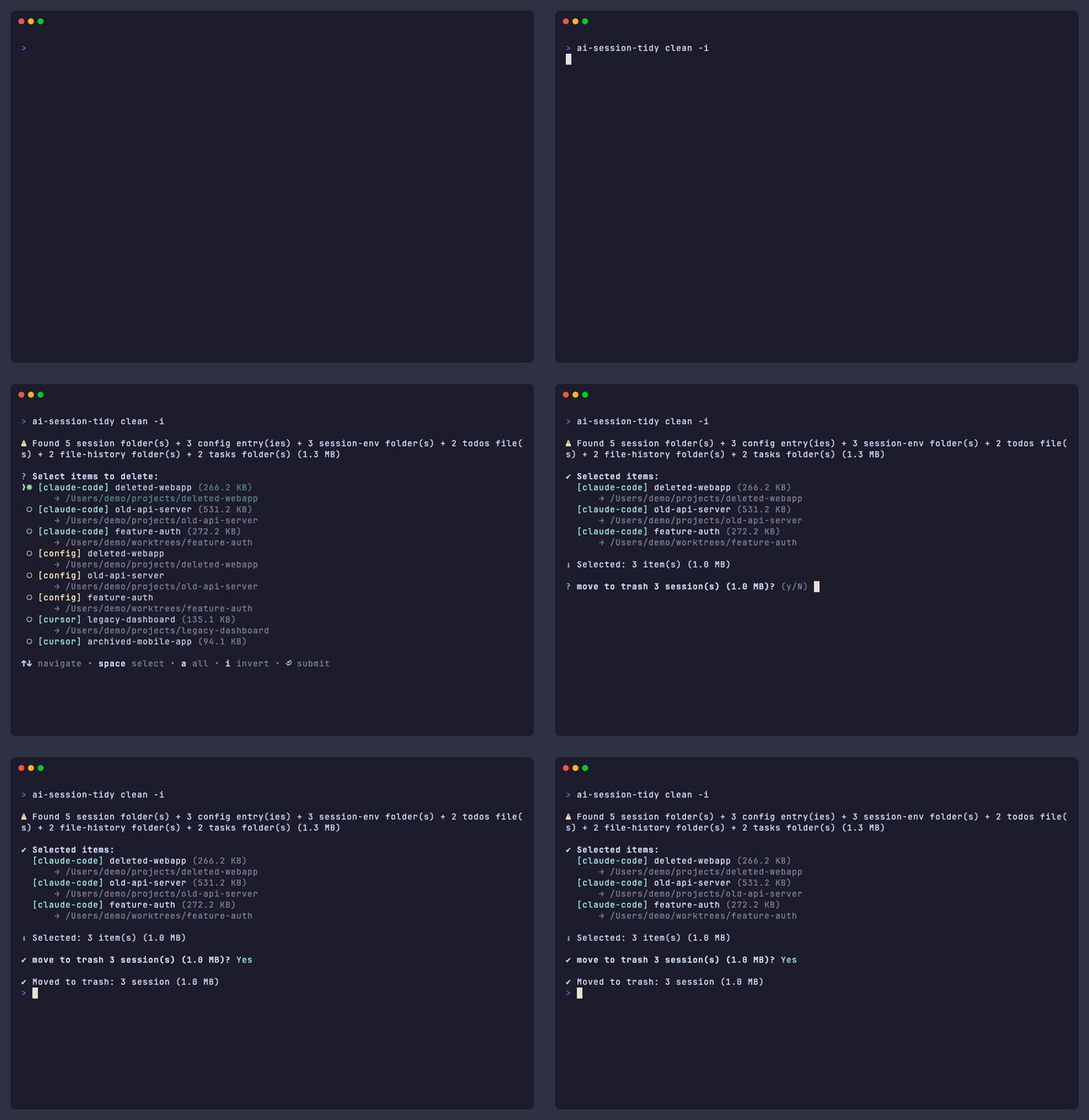
ai-session-tidy clean -i # Interactive selection (TTY only)
ai-session-tidy clean -f # Skip confirmation (required for scripts/CI)
ai-session-tidy clean -n # Dry-run (show what would be deleted)
```
### `watch`
Monitor and auto-clean.
```bash
ai-session-tidy watch # Foreground mode
ai-session-tidy watch start # Background daemon (auto-starts at login)
ai-session-tidy watch stop # Stop daemon
ai-session-tidy watch status # Check status
ai-session-tidy watch status -l # Show recent logs
```
### `config`
Manage settings.
```bash
ai-session-tidy config show # Show all settings
ai-session-tidy config path add ~/projects # Add watch path
ai-session-tidy config path list # List watch paths
ai-session-tidy config ignore add ~/backup # Add ignore path
ai-session-tidy config ignore list # List ignore paths
ai-session-tidy config delay 1 # Set cleanup delay (minutes)
ai-session-tidy config depth 5 # Set watch depth
ai-session-tidy config reset # Reset to defaults
```
> [!TIP]
> Hidden folders (`.git`, `.cache`, etc.) and macOS system folders (`Library`, `Music`, etc.) are automatically excluded from watching.
## What Gets Cleaned
### Claude Code
| Location | Description | Condition |
|----------|-------------|-----------|
| `~/.claude/projects/{path}/` | Session folders | Project deleted |
| `~/.claude.json` | Config entries | Project deleted |
| `~/.claude/session-env/{uuid}/` | Session environment | Empty folder |
| `~/.claude/todos/{uuid}-*.json` | Todo files | Session gone |
| `~/.claude/file-history/{uuid}/` | Rewind snapshots | Session gone |
### Cursor
| Location | Description | Condition |
|----------|-------------|-----------|
| `~/Library/.../workspaceStorage/{hash}/` | Workspace data | Project deleted |
## Safety
> [!NOTE]
> All operations are safe by default—nothing is permanently deleted without explicit action.
- **Scan is read-only** — `scan` never deletes anything
- **Trash first** — `clean` moves to trash (recoverable)
- **Confirmation required** — prompts before deletion unless `-f`
- **5-minute delay** — watch mode waits before cleanup (configurable)
## Development
```bash
git clone https://github.com/sooink/ai-session-tidy.git
cd ai-session-tidy
pnpm install
pnpm build
pnpm test
```