https://github.com/soorya-u/votex
An AI driven Stellar based Decentralized Voting Application which empowers communities to make decisions collectively with confidence.
https://github.com/soorya-u/votex
blockchain fastapi nextjs python react redis rust soroban stellar tailwindcss twilio typescript web3
Last synced: 2 months ago
JSON representation
An AI driven Stellar based Decentralized Voting Application which empowers communities to make decisions collectively with confidence.
- Host: GitHub
- URL: https://github.com/soorya-u/votex
- Owner: soorya-u
- Created: 2024-07-11T18:06:54.000Z (almost 2 years ago)
- Default Branch: main
- Last Pushed: 2025-09-07T17:06:44.000Z (10 months ago)
- Last Synced: 2025-10-08T07:12:28.594Z (9 months ago)
- Topics: blockchain, fastapi, nextjs, python, react, redis, rust, soroban, stellar, tailwindcss, twilio, typescript, web3
- Language: TypeScript
- Homepage: https://votex.soorya-u.dev
- Size: 32 MB
- Stars: 0
- Watchers: 1
- Forks: 1
- Open Issues: 5
-
Metadata Files:
- Readme: README.md
Awesome Lists containing this project
README

VoteX
An AI driven Stellar based Decentralized Voting Application which empowers communities to make decisions collectively with confidence.
View Demo
·
Report Bug
## About The Project
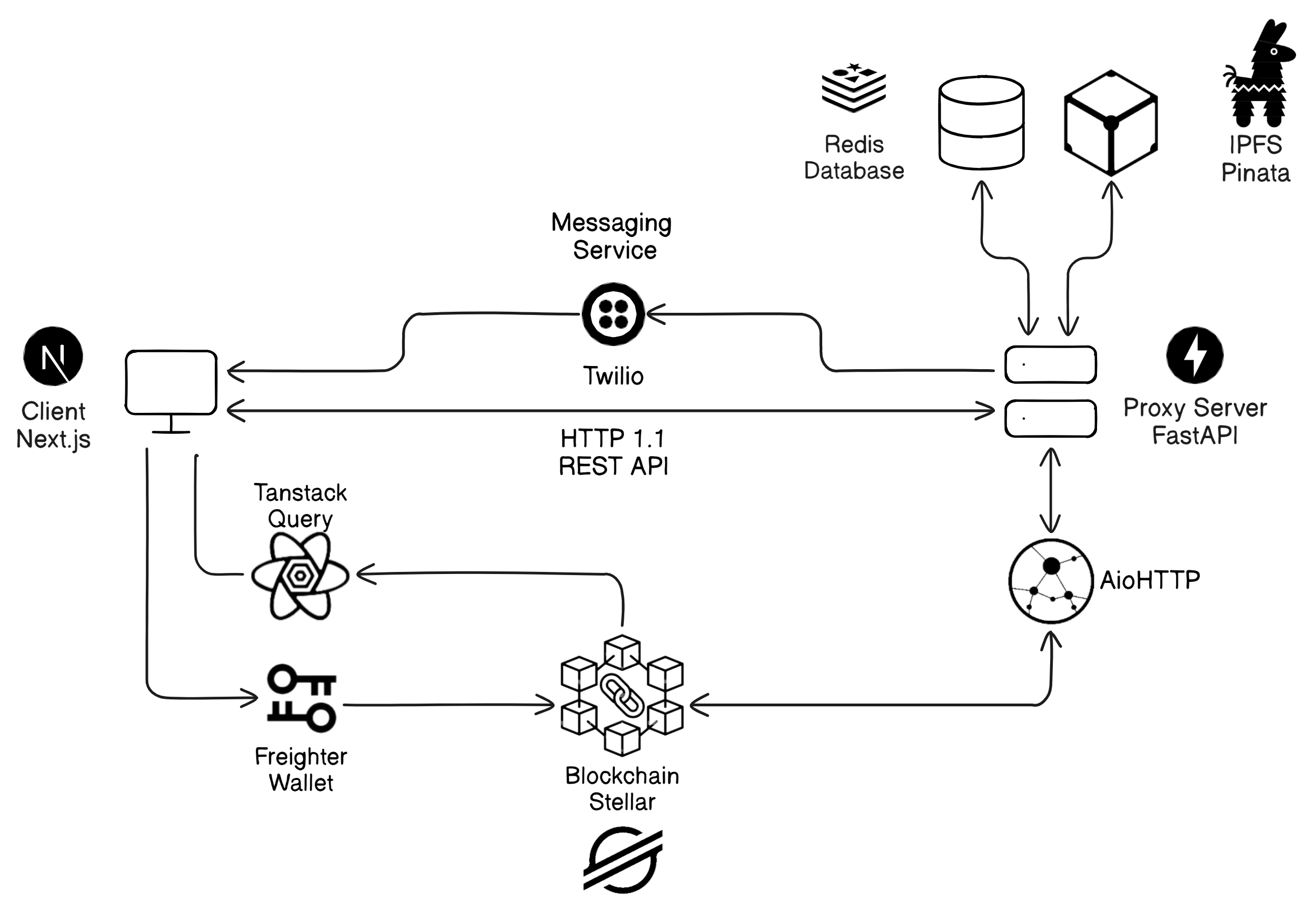
This project is a secure, AI-driven, decentralized voting application built on the Stellar blockchain with Soroban smart contracts to ensure transparency and immutability. The system leverages Next.js for the frontend, a Python-based proxy server, and Redis as the database.
### Key Features
- Decentralized & Secure – Built on Stellar blockchain with Soroban smart contracts for transparent voting.
- AI-Powered Authentication – Uses OCR for Aadhaar card recognition and face recognition models for enhanced security.
- Fast & Scalable – A Python proxy server optimizes API calls, and Redis ensures quick data access.
- User-Friendly Interface – A seamless Next.js frontend for an intuitive voting experience.
This system guarantees secure, verifiable, and tamper-proof elections with the power of AI and blockchain.
### Built With
#### Client
[![Typescript][typescript-badge]][typescript-url]
[![Next][nextjs-badge]][nextjs-url]
[![Tailwind][tailwind-badge]][tailwind-url]
#### Server
[![Python][python-badge]][python-url]
[![FastAPI][fastapi-badge]][fastapi-url]
#### Database & Services
[![Redis][redis-badge]][redis-url]
[![Twilio][twilio-badge]][twilio-url]
#### Web3
[![Rust][rust-badge]][rust-url]
[![Stellar][stellar-badge]][stellar-url]
[![Pinata][pinata-badge]][pinata-url]
## Architecture
## Getting Started
This is a set of instructions on how to set up your project locally.
To get a local copy up and running follow these simple example steps.
### Prerequisites
These are the softwares required to run the project.
#### Local Prerequisites
- [Node.js](https://nodejs.org/en/download)
- [Python](https://www.python.org/downloads/release/python-3124/)
- [Rust](https://www.rust-lang.org/tools/install)
- [Redis](https://redis.io/docs/latest/operate/oss_and_stack/install/archive/install-redis/)
#### Docker Prerequisites
- [Docker](https://docs.docker.com/get-started/get-docker/)
### Installation
#### Run Docker
1. Clone the repository
```sh
git clone https://github.com/soorya-u/votex.git
```
2. Install [Stellar CLI](https://developers.stellar.org/docs/tools/cli/install-cli)
3. Start the Stellar Service
```
docker compose up stellar --build
```
4. Create a new Local Network
```sh
stellar network add --rpc-url --network-passphrase
# for local network, rpc-url: `http://localhost:8000/soroban/rpc` and passphase: `"Standalone Network ; February 2017"`
```
- To check the health of Stellar, run
```sh
docker exec votex-stellar /opt/stellar/bin/health-check.sh
```
- To check the running processes in Stellar, run
```sh
docker exec votex-stellar supervisorctl status
```
- If any of the process is not running, run
```sh
docker exec votex-stellar supervisorctl start [friendbot, postgresql, ...]
```
5. Create a new Account using Stellar CLI
```sh
stellar keys generate --network --fund
```
6. Connect to Freighter Wallet by importing the account using the secret key
```sh
stellar keys show
```
7. Navigate to _web3_ Directory
```sh
cd web3
```
8. Run the Deploy Command with Username and Network Options as Parameters to get the Deployed Contract Address
```ps1
.\scripts\deploy.ps1 -Source -Network
```
```sh
./scripts/deploy.sh SOURCE= NETWORK=
```
9. Create `.env` at the root of the project and fill the required variables
```sh
# root .env
cp .env.example .env
```
10. Navigate to Client
```sh
cd client
```
11. Create `.env` and fill the required variables
```sh
cp .env.example .env.docker
```
12. Navigate to Server
```sh
cd server
```
13. Create `.env` and fill the required variables
```sh
cp .env.example .env.docker
```
14. Run the Client and Server Docker Images
```sh
# Starts up redis as well
docker compose up client server --build
```
#### Run Locally
1. Clone the repository
```sh
git clone https://github.com/soorya-u/votex.git
```
2. Install [Stellar CLI](https://developers.stellar.org/docs/tools/cli/install-cli)
3. Create a new Account using Stellar CLI
```
stellar keys generate --network testnet --fund
```
4. Navigate to _web3_ Directory
```sh
cd web3
```
5. Run the Deploy Command with Username and Network Options as Parameters to get the Deployed Contract Address
```ps1
.\scripts\deploy.ps1 -Source -Network testnet
```
```sh
./scripts/deploy.sh SOURCE= NETWORK=testnet
```
6. Connect to Freighter Wallet by importing the account using the secrets
```sh
stellar keys show
```
7. Retrieve API Keys from Pinata and Twilio
8. Navigate to Server
```sh
cd server
```
9. Create `.env` and fill the required variables
```sh
cp .env.example .env
```
10. Install all the required packages
```sh
poetry install
```
11. Run the FastAPI Server
```sh
poetry run fastapi dev src
```
12. Navigate to Client
```sh
cd client
```
13. Create `.env` and fill the required variables
```sh
cp .env.example .env
```
14. Install Dependencies
```sh
bun install
```
15. Run the Development Server
```sh
bun dev
```
## Roadmap
- [ ] Rasa Chatbot Integration
See the [open issues](https://github.com/soorya-u/votex/issues) for a full list of proposed features (and known issues).
[typescript-badge]: https://img.shields.io/badge/Typescript-3178C6?style=for-the-badge&logo=typescript&logoColor=white
[typescript-url]: https://www.typescriptlang.org/
[nextjs-badge]: https://img.shields.io/badge/Next.js-000000?style=for-the-badge&logo=nextdotjs&logoColor=white
[nextjs-url]: https://nextjs.org/
[tailwind-badge]: https://img.shields.io/badge/TailwindCSS-06B6D4?style=for-the-badge&logo=tailwindcss&logoColor=white
[tailwind-url]: https://tailwindcss.com/
[python-badge]: https://img.shields.io/badge/Python-3776AB?style=for-the-badge&logo=python&logoColor=white
[python-url]: https://python.org/
[fastapi-badge]: https://img.shields.io/badge/FastAPI-009688?style=for-the-badge&logo=fastapi&logoColor=white
[fastapi-url]: https://fastapi.tiangolo.com/
[redis-badge]: https://img.shields.io/badge/Redis-FF4438?style=for-the-badge&logo=redis&logoColor=white
[redis-url]: https://redis.io/
[twilio-badge]: https://img.shields.io/badge/Twilio-F22F46?style=for-the-badge&logo=twilio&logoColor=white
[twilio-url]: https://www.twilio.com/
[rust-badge]: https://img.shields.io/badge/Rust-B6400E?style=for-the-badge&logo=rust&logoColor=white
[rust-url]: https://www.rust-lang.org/
[stellar-badge]: https://img.shields.io/badge/Stellar-000000?style=for-the-badge&logo=stellar&logoColor=white
[stellar-url]: https://stellar.org/
[pinata-badge]: https://img.shields.io/badge/Pinata-6D3AC6?style=for-the-badge&logo=pinboard&logoColor=white
[pinata-url]: https://pinata.cloud/