https://github.com/soraxas/terminal-plot
A terminal plotter for tensorboard and csv
https://github.com/soraxas/terminal-plot
tensorboard terminal termplot tui
Last synced: 3 months ago
JSON representation
A terminal plotter for tensorboard and csv
- Host: GitHub
- URL: https://github.com/soraxas/terminal-plot
- Owner: soraxas
- License: mit
- Created: 2021-07-10T13:16:35.000Z (almost 5 years ago)
- Default Branch: master
- Last Pushed: 2024-07-20T14:56:59.000Z (almost 2 years ago)
- Last Synced: 2026-02-22T19:44:01.825Z (4 months ago)
- Topics: tensorboard, terminal, termplot, tui
- Language: Python
- Homepage: https://pypi.org/project/terminal-plot/
- Size: 363 KB
- Stars: 10
- Watchers: 1
- Forks: 2
- Open Issues: 1
-
Metadata Files:
- Readme: README.md
- License: LICENSE
Awesome Lists containing this project
README
# Terminal-plot for Tensorboard and CSV
[](https://pypi.org/project/terminal-plot/)
[](https://pypi.org/project/terminal-plot/)
[](https://github.com/soraxas/terminal-plot/commits/master)
[](https://github.com/psf/black)
[](https://github.com/soraxas/terminal-plot/blob/master/LICENSE)
A plotter for multiple different data source (e.g. tensorboard, csv), directly within your terminal. This is useful when you are training your neural network on a remote server, and you just want to quickly peek at the training curve without launching a tensorboard instance and mess with forwarding ports.
## Install
You can install the package published in PyPI with
```sh
$ pip install terminal-plot
# or install with matplotlib backend dependency
$ pip install terminal-plot[matplotlib-backend]
# or install with an isolated environment
# $ pipx install terminal-plot[matplotlib-backend]
```
## Autocomplete
You can use [`argcomplete`](https://kislyuk.github.io/argcomplete) to enable autocomplete for this script. For example, you can use the following for the fish shell:
```sh
register-python-argcomplete --shell fish termplot > ~/.config/fish/completions/termplot.fish
```
## Usage
```sh
$ termplot FOLDER/FILE
```
For example,
```sh
$ termplot ~/my_amazing_nn/runs
```
where `runs` is the folder that tensorboard had created.
Or, using csv as a data source:
```sh
$ termplot ~/my_stats/output.csv --csv
# use the -x flag to select which stat will be used as x-axis
# $ termplot ~/my_stats/output.csv --csv -x time
```
Or, using matplotlib as a plotting backend:
```sh
$ termplot ~/my_stats/output.csv --csv -m
```
# Example
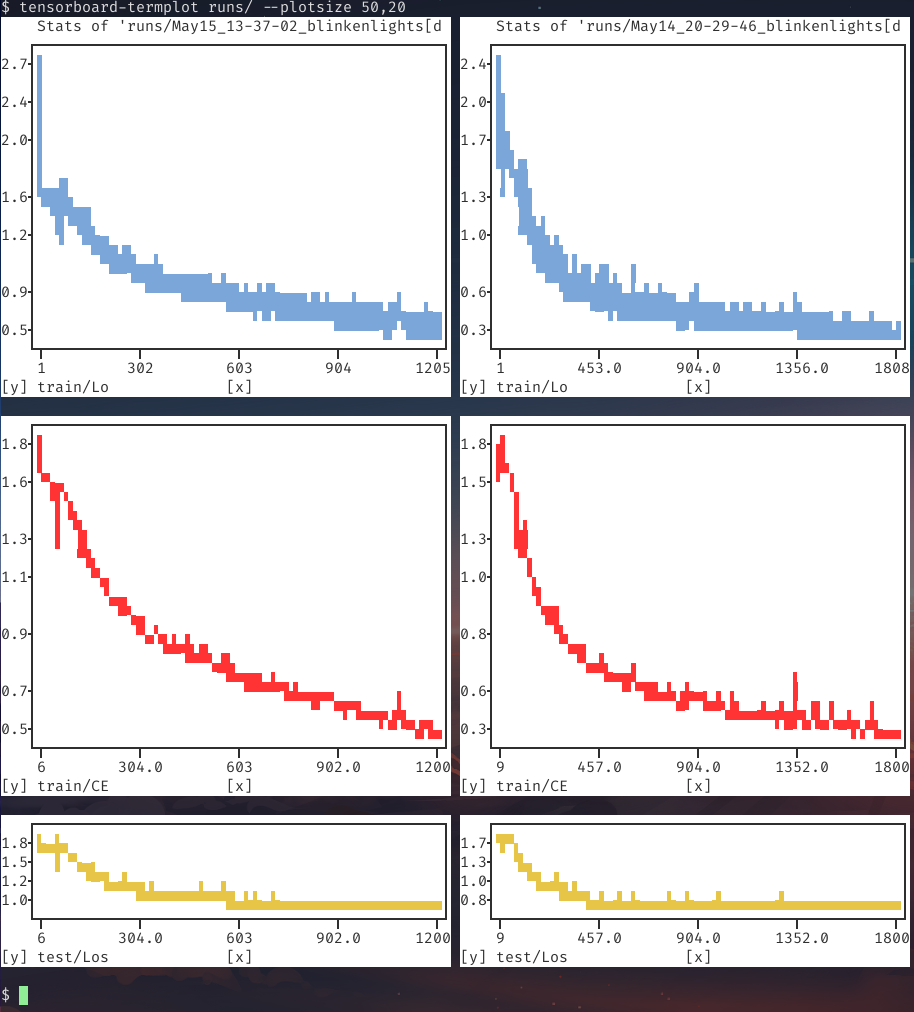
Running the executable on a tensorboard output folder:
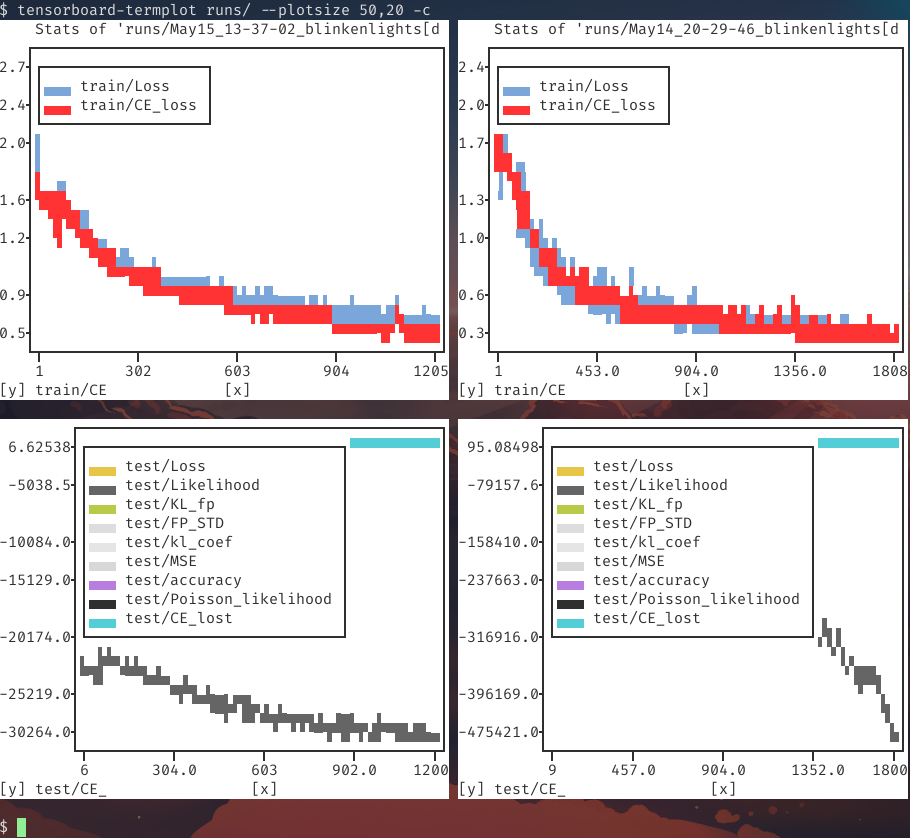
Or with the consolidated flag `-c/--consolidate` to combine multiple stats with a common prefix (most stats in the bottom figure had empty values):
# Help
```
$ termplot --help
usage: termplot [-h] [--version] [--debug]
[--backend {plotext,matplotlib,matplotlib-terminal}]
[--data-source {tensorboard,csv}] [-m] [--csv] [--latest]
[--plotsize WIDTH,HEIGHT] [-c] [--as-scatter]
[--canvas-color CANVAS_COLOR] [--axes-color AXES_COLOR]
[--ticks-color TICKS_COLOR] [--grid] [--colorless] [-d]
[--no-iter-color] [--force-label] [-f] [-n secs]
[-w keyword [keyword ...]] [-b keyword [keyword ...]]
[-x XAXIS_TYPE] [--xlog [row,col ...]] [--ylog [row,col ...]]
[--xsymlog [row,col ...]] [--ysymlog [row,col ...]]
[--xlim row,col=min,max [row,col=min,max ...]]
[--ylim row,col=min,max [row,col=min,max ...]]
[--as-raw-bytes] [-s [0-1]] [--smooth-poly-order poly-order]
[--terminal-width TERMINAL_WIDTH]
[--terminal-height TERMINAL_HEIGHT]
FOLDER
positional arguments:
FOLDER Source folder or file
optional arguments:
-h, --help show this help message and exit
--version show program's version number and exit
--debug
--backend {plotext,matplotlib,matplotlib-terminal}
Set the plotting backend
--data-source {tensorboard,csv}
Set the plotting data source
-m, --matplotlib Alias of --backend matplotlib
--csv Alias of --data-source csv
--latest, -l Monitor the given folder, and always plot the latest
modified. The given argument must be a folder if this
flag is set.
--plotsize WIDTH,HEIGHT
Manually set the size of each subplot, e.g., 50,20.
-c, --consolidate Consolidate based on prefix. If -cc is given,
everything will consolidated regardless of prefix
--as-scatter Plot as scatter (instead of line plot)
--canvas-color CANVAS_COLOR
set the color of the plot canvas (the area where the
data is plotted)
--axes-color AXES_COLOR
sets the background color of all the labels
surrounding the actual plot, i.e. the axes, axes
labels and ticks, title and legend, if present
--ticks-color TICKS_COLOR
sets the (full-ground) color of the axes ticks and of
the grid lines.
--grid Show grid.
--colorless Remove color.
-d, --dark-theme A collection of flags. If set, it is equivalent to
setting canvas-color and axes-color to black, and
setting ticks-color to red. Can be overwritten
individually.
--no-iter-color Stop iterating through different colors per plot.
--force-label Force showing label even for plot with one series.
-f, --follow Run in a loop to update display periodic.
-n secs, --interval secs
seconds to wait between updates
-w keyword [keyword ...], --whitelist keyword [keyword ...]
Keyword that the stat must contain for it to be
plotted, case sensitive.
-b keyword [keyword ...], --blacklist keyword [keyword ...]
Keyword that the stat must not contain for it to be
plotted, case sensitive.
-x XAXIS_TYPE, --xaxis-type XAXIS_TYPE
Set value type to be used for x-axis. Tensorboard only
supports 'step' or 'time' as x-axis.
--xlog [row,col ...] Set the list of subplots to use log scale in x-axis
--ylog [row,col ...] Set the list of subplots to use log scale in y-axis
--xsymlog [row,col ...]
Set the list of subplots to use symlog scale in x-axis
--ysymlog [row,col ...]
Set the list of subplots to use symlog scale in y-axis
--xlim row,col=min,max [row,col=min,max ...]
Set the list of xlim for the specified subplot.
--ylim row,col=min,max [row,col=min,max ...]
Set the list of ylim for the specified subplot.
--as-raw-bytes Writes the raw image bytes to stdout.
-s [0-1], --smooth [0-1]
A value from 0 to 1 as a smoothing factor.
--smooth-poly-order poly-order
Polynomial order for the savgol smoothing algorithm.
--terminal-width TERMINAL_WIDTH
Manually set the terminal width.
--terminal-height TERMINAL_HEIGHT
Manually set the terminal height.
```