https://github.com/sorrowfeng/qt-ant-design
Implementing Ant Design with Qt Widget
https://github.com/sorrowfeng/qt-ant-design
ant-design cpp gui qt widget
Last synced: about 1 month ago
JSON representation
Implementing Ant Design with Qt Widget
- Host: GitHub
- URL: https://github.com/sorrowfeng/qt-ant-design
- Owner: sorrowfeng
- License: mit
- Created: 2026-04-22T11:24:16.000Z (3 months ago)
- Default Branch: main
- Last Pushed: 2026-05-29T12:22:16.000Z (about 1 month ago)
- Last Synced: 2026-05-29T14:03:54.941Z (about 1 month ago)
- Topics: ant-design, cpp, gui, qt, widget
- Language: C++
- Homepage:
- Size: 8.1 MB
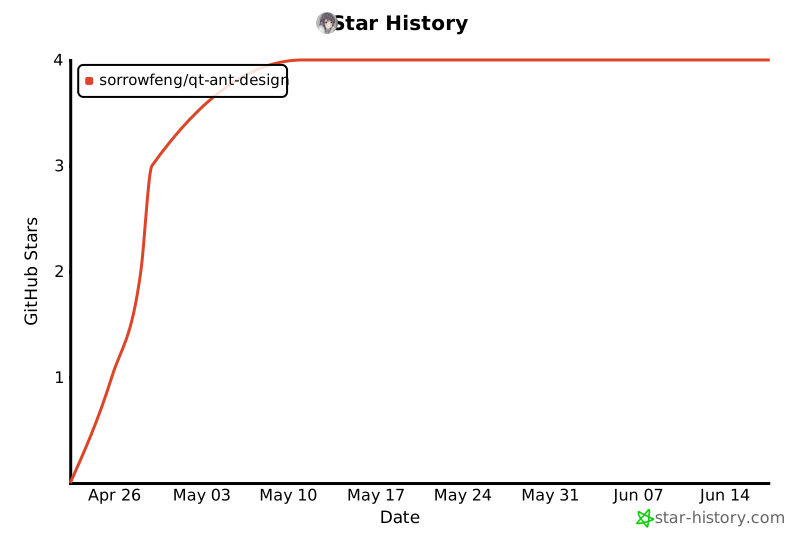
- Stars: 4
- Watchers: 0
- Forks: 1
- Open Issues: 0
-
Metadata Files:
- Readme: README.md
- License: LICENSE
- Agents: AGENTS.md
Awesome Lists containing this project
README
# qt-ant-design

[](LICENSE)
[](https://www.qt.io)
[](https://cmake.org)
[](https://en.cppreference.com)
[](https://github.com/sorrowfeng/qt-ant-design/releases)
[](https://github.com/sorrowfeng/qt-ant-design/stargazers)
[](https://github.com/sorrowfeng/qt-ant-design/commits/main)
[](https://deepwiki.com/sorrowfeng/qt-ant-design)
English | [简体中文](README.zh-CN.md)
`qt-ant-design` is a C++ component library built on Qt Widgets that auto-detects Qt 6 or Qt 5 at configure time and ports the Ant Design system to native desktop widgets.
Online documentation: [www.sorrowfeng.top/qt-ant-design](http://www.sorrowfeng.top/qt-ant-design/)
The project focuses on:
- Dynamic light / dark theme switching
- Faithful reproduction of Ant Design's interactions and state styles
- A maintainable desktop rendering stack built on `QPainter` / `QProxyStyle`
> Current implementation and visual-audit status are tracked in [docs/project-status.md](docs/project-status.md) and [docs/visual-audit.md](docs/visual-audit.md).
> Current version: `0.1.0`. Versioning and release steps are tracked in [docs/versioning.md](docs/versioning.md), and release notes are in [CHANGELOG.md](CHANGELOG.md).
> Issues and PRs are welcome: visual mismatches, missing interactions, Qt integration problems, documentation gaps, component fixes, tests, examples, and docs improvements are all appreciated.
## Showcase
| Light | Dark |
| --- | --- |
|  |  |
## Features
- Built on Qt Widgets — lightweight, easy to embed, and consumable as either a static or shared library in existing projects
- Built-in Design Token system with real-time light / dark theme switching
- `89` public components ported so far (full coverage of Ant Design's `70 / 70` standard components, plus `19` Qt / desktop extension components)
- `67` style-driven components are rendered through a `QProxyStyle` architecture
- The example app currently demos `89 / 89` public components, plus a standalone Ant Design homepage-style `Showcase`
- `AntIcon` bundles `831` official SVG resources from `@ant-design/icons-svg@4.4.2`
- Comparable standard components are tracked as visual-audit `Pass`; Qt-only desktop extensions are tracked as `Local Pass`
- Clean code structure — `core / styles / widgets / examples` layering keeps the project easy to extend
## Current Status
- Status snapshot: [docs/project-status.md](docs/project-status.md)
- Per-component reliability coverage: [docs/reliability-coverage.md](docs/reliability-coverage.md)
- Per-component performance optimization progress: [docs/performance-optimization.md](docs/performance-optimization.md)
- Visual audit matrix: [docs/visual-audit.md](docs/visual-audit.md)
- Online component/API reference: [www.sorrowfeng.top/qt-ant-design/components](http://www.sorrowfeng.top/qt-ant-design/components/)
- Local Chinese component/API reference: [docs/component-api-overview-cn.html](docs/component-api-overview-cn.html)
- Official icon inventory: [docs/ant-design-icons.md](docs/ant-design-icons.md)
- Current CTest entry count: `47`; latest full component reliability sweep: `37 / 37` passed on `2026-05-30`; targeted Qt5/Qt6 visual parity, visual-atlas scale-factor smoke, metric audit, real example page traversal/comparison, Windows High DPI scaling, and no-QSS guard checks passed on `2026-06-01`
## Recent Ant Design Parity Updates
The 2026-04-30 interaction and motion pass tightened several user-visible details:
- Popup feedback: `AntPopover`, `AntMessage`, and `AntNotification` now have more stable hover/close behavior, stronger elevation, and placement-aware enter/exit motion. `AntMessage` and `AntNotification` also scope their placement to the supplied anchor window: hidden anchors suppress premature popups, visible `AntWindow` anchors are tracked across move / resize / show / hide / state changes, and multiple windows keep their feedback stacks isolated. Passive overlays avoid stealing covered-control clicks: Message forwards its click, while Tooltip, Slider value bubbles, and Watermark are mouse-transparent.
- Popup shells: shared popup elevation now uses a softer multi-layer feather outside the panel body, so `AntDropdown`, `AntMenu`, selector popups, `AntColorPicker`, `AntDatePicker`, `AntTimePicker`, and `AntModal` keep AntD-like shadows in light and dark themes.
- Motion: `AntCarousel`, `AntTabs`, `AntSkeleton`, `AntSpin`, `AntInputNumber`, `AntSwitch`, and loading buttons now better match Ant Design timing, direction, and state feedback.
- Data interaction: `AntTransfer` now supports scrolling and header select-all correctly, while `AntTable` sorter clicks reorder rows instead of only changing the icon state.
- Input feedback: `AntPlainTextEdit` supports TextArea-style bottom-right resizing, and `AntSlider` shows a value bubble while dragging.
## Recent Desktop Window Updates
The 2026-05-07 `AntWindow` pass improved native desktop behavior and title-bar polish:
- Windows 11 Snap support for frameless windows: resize edges/corners, draggable title bar, maximize-button Snap Layout hover, edge snapping, and drag-to-restore.
- DWM-backed rounded corners, border/shadow integration, and a `cornerRadius` API for Windows builds while keeping platform-specific code behind Qt/Win32 guards.
- Windows 10 uses a no-caption native frame path plus a legacy rounded mask and a transparent software shadow host, so maximized/restored windows do not expose native title buttons and normal windows keep a lightweight Win11-like four-sided outer shadow that starts at the window edge with cleaner rounded corners before and after resize.
- Topmost toggles on visible Windows windows now use native `SetWindowPos` in place, avoiding the hide/show cycle that caused a visible flash.
- Title-bar pin and light/dark theme buttons use bundled official Ant Design icons, and every title-bar button can be shown or hidden through public APIs.
- The built-in theme button uses a captured-frame crossfade overlay so full-window light/dark switching feels continuous.
## Recent Qt API Compatibility Updates
The 2026-05-07 API pass improves use with Qt object trees and familiar Qt widget conventions:
- `AntInput`, `AntInputNumber`, `AntCheckBox`, `AntRadio`, `AntSlider`, `AntProgress`, and `AntStatusBar` expose more common Qt-style methods and signals; `AntInputNumber` defaults to integer display and enables QDoubleSpinBox-style decimal value/range/step behavior through `setDecimals()` or `setPrecision()`.
- `AntSelect` supports QComboBox-style item management, default first-item selection when an empty select receives data, plus option-style helpers such as `setOptionText`, `removeOption`, `optionData`, `findData`, `currentData`, `activated`, and highlighted signals.
- Qt layout behavior now follows native widget baselines: line-edit-like controls expand horizontally, combo-like selectors stay `Preferred/Fixed`, spin/date/time editors stay `Minimum/Fixed`, view widgets expand in both directions, and `AntTypography` mirrors `QLabel` height-for-width word wrapping.
- `AntTabs` clears default root layout margins on added content pages so tab panes do not double up with `AntCard` / `AntWidget` padding, while preserving explicitly customized margins; `AntTabs::useTabContentLayout()` can force zero margins when needed.
- `AntDatePicker` / `AntTimePicker` expose QDateEdit / QTimeEdit-style `date` / `time` aliases plus minimum / maximum range APIs.
- `AntList` / `AntListWidget` now cover common QListWidget-style flows: string item add/insert/find/sort, item text/icon/data/check state/flags, current row/item, selection mode, selected items, internal scrolling, `scrollToItem`, and item/current/selection signals. `AntTable` exposes `rows()`, `selectRow()`, `currentRowIndex()`, and row tooltips; `AntTree` exposes matching tree helper APIs.
- `AntMenu` now mirrors QWidget `QAction` additions, changes, removals, and trigger flow; `AntToolButton` / `AntToolBar` keep their inherited QAction behavior covered by tests.
- `AntTypography` defaults to vertical center alignment and exposes alignment, word-wrap, clear, and `setPixelSize()` controls; `setEnabled()` and `setDisabled()` stay synchronized with its disabled visual and interaction state.
- `AntDesign::configureHighDpi()` plus `AntDesign::initialize(&app)` provide the recommended startup path: Qt5 enables logical High DPI scaling and High DPI pixmaps before `QApplication`, then the library registers resources, bundled fonts, and the theme singleton after the app exists. `initialize()` also calls `configureHighDpi()` automatically when it is invoked before `QApplication`, but it still needs to be called again with the created app for fonts and theme setup.
- `AntRibbon` adds a lightweight Ribbon surface with pages, groups, balanced large/small actions, embedded Ant/Qt widgets, animated tab/collapse transitions, collapsed popup mode, and `AntWindow::setRibbon()` integration.
## Installation & Integration
### Requirements
- Qt `6.5+`
- CMake `3.16+`
- C++17
### Option 1: Add as a CMake subdirectory
```bash
git submodule add https://github.com/sorrowfeng/qt-ant-design.git third_party/qt-ant-design
git submodule update --init --recursive
```
```cmake
cmake_minimum_required(VERSION 3.16)
project(my-qt-app LANGUAGES CXX)
set(CMAKE_CXX_STANDARD 17)
set(CMAKE_CXX_STANDARD_REQUIRED ON)
find_package(QT NAMES Qt6 Qt5 REQUIRED COMPONENTS Core Widgets)
find_package(Qt${QT_VERSION_MAJOR} REQUIRED COMPONENTS Core Widgets)
add_subdirectory(third_party/qt-ant-design)
add_executable(my-qt-app main.cpp)
target_link_libraries(my-qt-app PRIVATE Qt${QT_VERSION_MAJOR}::Core Qt${QT_VERSION_MAJOR}::Widgets qt-ant-design)
```
### Option 2: Install and use the CMake package
```bash
cmake -S . -B build -DCMAKE_INSTALL_PREFIX=/path/to/install
cmake --build build --config Release
cmake --install build --config Release
```
Then point your consumer project at the install prefix:
```cmake
find_package(QT NAMES Qt6 Qt5 REQUIRED COMPONENTS Core Widgets Svg)
find_package(Qt${QT_VERSION_MAJOR} REQUIRED COMPONENTS Core Widgets Svg)
find_package(qt-ant-design CONFIG REQUIRED)
add_executable(my-qt-app main.cpp)
target_link_libraries(my-qt-app PRIVATE
qt-ant-design::qt-ant-design
)
```
Configure the consumer with `-DCMAKE_PREFIX_PATH=/path/to/install` if the prefix is not already on CMake's package search path.
On Windows you can also run the example app from the install directory directly:
```powershell
.\install\bin\qt-ant-design-example.exe
```
## Quick Start
```bash
git clone https://github.com/sorrowfeng/qt-ant-design.git
cd qt-ant-design
mkdir build && cd build
cmake .. -DCMAKE_PREFIX_PATH=/path/to/Qt
cmake --build .
```
Use `-DBUILD_SHARED_LIBS=ON` to build `qt-ant-design` as a shared library; omit it or set it to `OFF` for the default static build.
On Windows / multi-config generators, the recommended workflow is:
```powershell
cmake -S . -B build -DCMAKE_INSTALL_PREFIX=D:/Project/GitProject/qt-ant-design/install
cmake --build build --config Debug
cmake --install build --config Debug
.\install\bin\qt-ant-design-example.exe
```
### Your first `AntButton`
Call `AntDesign::configureHighDpi()` before creating `QApplication`, then call `AntDesign::initialize(&app)` once before creating Ant widgets. This keeps Qt5 and Qt6 layouts in Qt logical pixels on Windows at 100%, 125%, 150%, and other scale factors. If `initialize()` is called before `QApplication`, it will configure High DPI automatically and return; call it again after app creation to finish resource, font, and theme initialization.
```cpp
#include
#include
#include
#include "core/AntDesign.h"
#include "widgets/AntButton.h"
int main(int argc, char* argv[])
{
AntDesign::configureHighDpi();
QApplication app(argc, argv);
AntDesign::initialize(&app);
QWidget window;
auto* layout = new QVBoxLayout(&window);
auto* button = new AntButton("Primary");
button->setButtonType(Ant::ButtonType::Primary);
layout->addWidget(button);
window.resize(360, 200);
window.show();
return app.exec();
}
```
## Ported Components
Total public components implemented: `89`
`src/widgets` currently contains `109` `Ant*.h` headers: `89` public component headers, `19` Qt-style alias headers, and the internal non-installed popup helper `AntSelectPopup`.
Ant Design standard components are counted by the top-level directories under [`ant-design/ant-design`](https://github.com/ant-design/ant-design)'s `components/` directory, with `row / col` rolled into `grid`, `back-top` rolled into `float-button`, and `qrcode` treated as a compatibility alias for `qr-code` — yielding a baseline of `70` standard components.
### Qt-Style Aliases
Several components can also be included with Qt-style names when the Ant Design name is not a natural match: `AntLabel` → `AntTypography`, `AntLineEdit` → `AntInput`, `AntComboBox` → `AntSelect`, `AntSpinBox` / `AntDoubleSpinBox` → `AntInputNumber`, `AntPushButton` → `AntButton`, `AntProgressBar` → `AntProgress`, `AntCalendarWidget` → `AntCalendar`, `AntTabWidget` → `AntTabs`, `AntMainWindow` → `AntWindow`, plus list/table/tree view-style aliases.
For names that only differ by casing from Qt, the Qt casing is canonical: use `AntCheckBox` and `AntToolTip`.
| Category | Components | Rendering |
| --- | --- | --- |
| General | `AntButton` `AntFloatButton` `AntIcon` `AntTypography` | `QProxyStyle` |
| Navigation | `AntAnchor` `AntBreadcrumb` `AntDropdown` `AntMenu` `AntPagination` `AntSteps` `AntTabs` | Mixed (`QProxyStyle` / custom paint) |
| Data Entry | `AntAutoComplete` `AntCascader` `AntCheckBox` `AntColorPicker` `AntDatePicker` `AntDescriptions` `AntForm` `AntInput` `AntInputNumber` `AntMentions` `AntRadio` `AntRate` `AntSegmented` `AntSelect` `AntSlider` `AntSwitch` `AntTimePicker` `AntTransfer` `AntTreeSelect` `AntUpload` | Mixed (`QProxyStyle` / custom paint) |
| Feedback | `AntAlert` `AntDrawer` `AntMessage` `AntModal` `AntNotification` `AntPopconfirm` `AntPopover` `AntProgress` `AntResult` `AntSkeleton` `AntSpin` `AntToolTip` `AntTour` `AntWatermark` | Mixed (`QProxyStyle` / custom paint) |
| Data Display | `AntAvatar` `AntBadge` `AntCalendar` `AntCard` `AntCarousel` `AntCollapse` `AntEmpty` `AntImage` `AntList` `AntQRCode` `AntStatistic` `AntTable` `AntTag` `AntTimeline` `AntTree` | Mixed (`QProxyStyle` / custom paint) |
| Layout & Misc | `AntAffix` `AntApp` `AntConfigProvider` `AntDivider` `AntFlex` `AntGrid` `AntLayout` `AntMasonry` `AntSpace` `AntSplitter` `AntWidget` `AntWindow` | Mixed (`QProxyStyle` / custom paint / QObject helper) |
| Qt / Desktop Extensions | `AntDialog` `AntInputDialog` `AntDockManager` `AntDockWidget` `AntFileDialog` `AntLog` `AntMenuBar` `AntNav` `AntNavItem` `AntPlainTextEdit` `AntRibbon` `AntScrollArea` `AntScrollBar` `AntStackedWidget` `AntStatusBar` `AntToolBar` `AntToolButton` | Mixed (`QProxyStyle` / custom paint) |
### Component Screenshots
Light and dark thumbnails are generated from the example pages; interactive controls capture a representative open/active state where useful.
| Category | Component | Light | Dark |
| --- | --- | --- | --- |
| General | `AntButton` |  |
|  |
|
| General | `AntIcon` |  |
|  |
|
| General | `AntTypography` |  |
|  |
|
| Layout | `AntDivider` |  |
|  |
|
| Layout | `AntFlex` |  |
|  |
|
| Layout | `AntGrid` |  |
|  |
|
| Layout | `AntLayout` |  |
|  |
|
| Layout | `AntSpace` |  |
|  |
|
| Layout | `AntSplitter` |  |
|  |
|
| Navigation | `AntAffix` |  |
|  |
|
| Navigation | `AntAnchor` |  |
|  |
|
| Navigation | `AntBreadcrumb` |  |
|  |
|
| Navigation | `AntDropdown` |  |
|  |
|
| Navigation | `AntMenu` |  |
|  |
|
| Navigation | `AntPagination` |  |
|  |
|
| Navigation | `AntSteps` |  |
|  |
|
| Data Entry | `AntAutoComplete` |  |
|  |
|
| Data Entry | `AntCascader` |  |
|  |
|
| Data Entry | `AntCheckBox` |  |
|  |
|
| Data Entry | `AntColorPicker` |  |
|  |
|
| Data Entry | `AntDatePicker` |  |
|  |
|
| Data Entry | `AntForm` |  |
|  |
|
| Data Entry | `AntInput` |  |
|  |
|
| Data Entry | `AntInputNumber` |  |
|  |
|
| Data Entry | `AntMentions` |  |
|  |
|
| Data Entry | `AntRadio` |  |
|  |
|
| Data Entry | `AntRate` |  |
|  |
|
| Data Entry | `AntSelect` |  |
|  |
|
| Data Entry | `AntSlider` |  |
|  |
|
| Data Entry | `AntSwitch` |  |
|  |
|
| Data Entry | `AntTimePicker` |  |
|  |
|
| Data Entry | `AntTransfer` |  |
|  |
|
| Data Entry | `AntTreeSelect` |  |
|  |
|
| Data Entry | `AntUpload` |  |
|  |
|
| Data Display | `AntAvatar` |  |
|  |
|
| Data Display | `AntBadge` |  |
|  |
|
| Data Display | `AntCalendar` |  |
|  |
|
| Data Display | `AntCard` |  |
|  |
|
| Data Display | `AntCarousel` |  |
|  |
|
| Data Display | `AntCollapse` |  |
|  |
|
| Data Display | `AntDescriptions` |  |
|  |
|
| Data Display | `AntEmpty` |  |
|  |
|
| Data Display | `AntImage` |  |
|  |
|
| Data Display | `AntList` |  |
|  |
|
| Data Display | `AntPopover` |  |
|  |
|
| Data Display | `AntQRCode` |  |
|  |
|
| Data Display | `AntSegmented` |  |
|  |
|
| Data Display | `AntStatistic` |  |
|  |
|
| Data Display | `AntTable` |  |
|  |
|
| Data Display | `AntTabs` |  |
|  |
|
| Data Display | `AntTag` |  |
|  |
|
| Data Display | `AntTimeline` |  |
|  |
|
| Data Display | `AntToolTip` |  |
|  |
|
| Data Display | `AntTree` |  |
|  |
|
| Feedback | `AntAlert` |  |
|  |
|
| Feedback | `AntDrawer` |  |
|  |
|
| Feedback | `AntMessage` |  |
|  |
|
| Feedback | `AntModal` |  |
|  |
|
| Feedback | `AntNotification` |  |
|  |
|
| Feedback | `AntPopconfirm` |  |
|  |
|
| Feedback | `AntProgress` |  |
|  |
|
| Feedback | `AntResult` |  |
|  |
|
| Feedback | `AntSkeleton` |  |
|  |
|
| Feedback | `AntSpin` |  |
|  |
|
| Feedback | `AntTour` |  |
|  |
|
| Feedback | `AntWatermark` |  |
|  |
|
| Other | `AntApp` |  |
|  |
|
| Other | `AntConfigProvider` |  |
|  |
|
| Other | `AntFloatButton` |  |
|  |
|
| Qt Extensions | `AntDialog` |  |
|  |
|
| Qt Extensions | `AntInputDialog` |  |
|  |
|
| Qt Extensions | `AntWindow` |  |
|  |
|
| Qt Extensions | `AntWidget` |  |
|  |
|
| Qt Extensions | `AntScrollArea` |  |
|  |
|
| Qt Extensions | `AntScrollBar` |  |
|  |
|
| Qt Extensions | `AntStackedWidget` |  |
|  |
|
| Qt Extensions | `AntStatusBar` |  |
|  |
|
| Qt Extensions | `AntRibbon` |  |
|  |
|
| Qt Extensions | `AntMenuBar` |  |
|  |
|
| Qt Extensions | `AntToolBar` |  |
|  |
|
| Qt Extensions | `AntToolButton` |  |
|  |
|
| Qt Extensions | `AntDockWidget` |  |
|  |
|
| Qt Extensions | `AntFileDialog` |  |
|  |
|
| Qt Extensions | `AntPlainTextEdit` |  |
|  |
|
| Qt Extensions | `AntLog` |  |
|  |
|
| Qt Extensions | `AntNav` |  |
|  |
|
| Qt Extensions | `AntNavItem` |  |
|  |
|
| Qt Extensions | `AntMasonry` |  |
|  |
|
### Component Highlights
- `AntButton`: five types, three sizes, three shapes, `loading / danger / ghost / block`
- `AntIcon`: `831` official SVG icons, string-name API, `Outlined / Filled / TwoTone`, rotation, spin, custom paths
- `AntInput`: sizes, states, `addonBefore / addonAfter / allowClear / password`
- `AntInputNumber`: sizes, states, variants, prefix/suffix, QDoubleSpinBox-style decimals/precision, fine-grained step, optional control buttons
- `AntDescriptions`: title, extra, columns, bordered, vertical, custom value widgets
- `AntForm`: `AntForm / AntFormItem`, horizontal / vertical / inline layouts, label alignment, required marker, help and validation hints
- `AntEmpty`: default illustration, `simple` mode, description text, custom illustration size and extra action
- `AntDropdown`: `hover / click / contextMenu` triggers, placement, arrow, auto flip
- `AntSteps`: horizontal / vertical layout, current step, error state, click to switch, title / description / subtitle
- `AntSelect`: sizes, states, variants, `allowClear / loading / popup`, option text/data management
- `AntAlert`: `success / info / warning / error`, icon, description, closable, banner, custom action
- `AntModal`: mask, title, body, custom content, custom footer, confirm / cancel, centered or top-offset layout, and a soft outer shadow that fades before the dialog edge
- `AntResult`: status icons (success / error / warning / info), transparent icon background in dark mode, title, description, custom extra actions area
- `AntList`: `header / footer / bordered / split / size`; `AntListItem` supports `Meta` (avatar, title, description), `AntIcon` / image media, action areas, internal scrolling, and QListWidget-style text/data/selection helpers through the `AntListWidget` alias
- `AntStatistic`: numeric display, thousands separators, prefix / suffix, precision control
- `AntPopover`: title, body, action, click / hover triggers, placement, arrow
- `AntPopconfirm`: confirm title, description, confirm / cancel buttons, disabled state, placement, and a one-piece popup arrow surface
- `AntSkeleton`: moving `active` shimmer, avatar placeholder, title / paragraph configuration, rounded style, and `loading` toggle to swap in real content
- `AntToolTip`: common `placement`, arrow, color, delayed display, auto flip, and mouse-transparent passive display
- `AntSlider`: horizontal / vertical, `reverse / dots / included`, range, marks, drag value bubble above the active handle with a one-piece arrow surface that does not block pointer input
- `AntRibbon`: pages and groups for large/small actions, embedded Ant/Qt widgets, animated tab/collapse transitions, collapsed popup mode, and `AntWindow` top-area integration
- `AntSwitch`: `checked / loading / small / text`, click wave feedback
- `AntSpin`: `small / middle / large / percent / delay`, smoother high-frequency animation
- `AntDatePicker` / `AntTimePicker`: hand-painted popup pickers
- `AntMessage` / `AntNotification`: global feedback components with elevated surfaces, enter / exit motion, anchor-scoped `AntWindow` following, multi-window stack isolation, Message click-through to covered controls, and Notification progress bars for both auto-close countdowns and manually controlled download/task progress
- `AntCard` / `AntTag` / `AntBadge` / `AntAvatar`: common display components
- `AntMenu` / `AntTabs` / `AntBreadcrumb` / `AntPagination`: navigation components; `AntPagination` includes editable quick-jumper paging, and `AntTabs` includes tab-pane layout margin normalization helpers
- `AntTable`: data table with column sorting, row selection (checkbox / radio), programmatic row selection, row tooltips, pagination, loading state
- `AntTree`: tree control with expand / collapse, node selection, checkboxes, connector lines
- `AntUpload`: file upload supporting text list, picture list, and picture card modes
- `AntCascader`: cascading selector with multi-column popup, click / hover expansion
- `AntTreeSelect`: tree selector that renders a tree inside a dropdown
- `AntRate`: rating component with `count / value / allowHalf / allowClear / disabled / size`, hover scaling, selected-star scale pulse, left / right keyboard control
- `AntWidget`: base QWidget subclass that handles theme switching automatically
- `AntTypography`: theme-aware text component, Title (H1-H5) / Text / Paragraph, with type / decoration / copy / ellipsis / alignment / pixel-size support
- `AntWindow`: frameless window with custom title bar, pin / theme / minimize / maximize / close buttons, Windows 11 Snap support, softened Windows 10 outline/shadow handling, Windows 10/11 DWM border shadow, and a smooth theme transition overlay
- `AntDrawer`: sliding panel with Left / Right / Top / Bottom placement, animation, and mask
- `AntStatusBar`: status bar with left / right items, separators, message area, and size grip
- `AntScrollBar`: custom 8 px slim scrollbar with auto-hide and no arrow buttons
- `AntSegmented`: segmented control with value and index selection APIs, evenly distributed options, animated indicator, icon / disabled / tooltip support, and reliable full-track click hit testing
- `AntFloatButton`: floating action button — circle / square, Primary / Default, expandable Group, BackTop, Badge, click feedback, and unclipped elevation shadow
- `AntWatermark`: mouse-transparent watermark overlay with rotated tiled text, multi-line content, and customizable font / color / spacing / offset / angle
- `AntQRCode`: QR code display with embedded byte-mode + Reed-Solomon generator (no external dependency), default repository URL payload, editable regenerate example, status overlays (expired / loading / scanned), icon, no border
- `AntAffix`: pin helper — a QObject utility that watches the scroll container and auto-pins / un-pins while preserving layout
- `AntAutoComplete`: autocomplete input with popup suggestions and keyboard navigation
- `AntCalendar`: calendar panel with Day / Month / Year mode switching and date selection
- `AntCarousel`: carousel with autoplay, dot indicators, arrow buttons, previous / next slots, slide-click signals, animated slide transitions, and click-to-page
- `AntCollapse`: collapse panel / accordion with InOutCubic expand animation and accordion exclusivity
- `AntColorPicker`: inline color trigger with optional text, plus popup HS field + value slider + RGB / HSV inputs, preset and custom colors
- `AntImage`: image display with placeholder fallback and click-to-fullscreen preview
- `AntTransfer`: transfer component with two scrollable lists, header select-all, and batch movement
- `AntTour`: masked step-by-step guide with target highlighting, direct step launch, and Prev / Next / Finish
- `AntMentions`: `@` mentions input that pops suggestions on `@`
- `AntGrid` (Row/Col): 24-column grid with span / offset / gutter
- `AntFlex`: flex layout container with gap / wrap / vertical
- `AntMasonry`: masonry layout (shortest-column-first)
- `AntSplitter`: draggable splitter with theme-colored handle
- `AntAnchor`: scroll anchor navigation with active link highlighting
- `AntApp`: application wrapper providing message / modal / notification context
- `AntConfigProvider`: global configuration for theme / primary color / font size / border radius
- `AntToolButton`: QToolButton + QProxyStyle with dropdown arrow animation
- `AntMenuBar`: themed QMenuBar
- `AntToolBar`: themed QToolBar with floating shadow
- `AntDockWidget` / `AntDockManager`: themed dock panels with custom title bars, a custom splitter/tab dock tree, center tab placement, serialized splitter/tab/floating layout perspectives, draggable tab reordering, tab/title context menus, programmatic floating and dock feature APIs, toggleable center / edge drop guide squares (`setDropGuideEnabled()`), deterministic guided drop placement that does not rely on Qt's native dock layout, threshold-activated translucent drag previews, manager-owned floating dock windows with AntWindow-style Windows native frame / DWM rounded corners and shadow handling, double-click maximize / restore, and drag-back-to-layout support
- `AntDialog`: frameless QDialog replacement with an Ant token title bar, theme-aware child palettes, Ant scroll bars, close-button hover state, and a `contentWidget()` host for reusable dialog bodies
- `AntInputDialog`: QInputDialog replacement built on `AntDialog`, covering text, integer, double, and item selection modes with Ant inputs, configurable buttons/options, and changed/selected signals
- `AntScrollArea`: QScrollArea + AntScrollBar + touch gesture scrolling + optional mouse-drag scrolling that does not steal scrollbar drags
- `AntStackedWidget`: QStackedWidget-compatible page stack with Ant token background, border painting, and Outlined / Filled / Borderless variants
- `AntFileDialog`: fully custom Ant Design file dialog built on `AntDialog`, common places, a collapsed directory tree, file-list `QFileSystemModel` / `QTreeView` surfaces, Ant inputs/select/buttons, token-painted panels, and a scoped `QProxyStyle` for file views
- `AntPlainTextEdit`: multi-line text editor with 3 variants, TextArea-style resize grip, and a context menu
- `AntLog`: 5-level colored log output (Debug / Info / Success / Warning / Error) with timestamps
## Usage Examples
### AntButton
```cpp
#include "widgets/AntButton.h"
auto* primary = new AntButton("Save");
primary->setButtonType(Ant::ButtonType::Primary);
primary->setButtonSize(Ant::ButtonSize::Middle);
auto* danger = new AntButton("Delete");
danger->setDanger(true);
```
### AntInput
```cpp
#include "widgets/AntInput.h"
auto* input = new AntInput();
input->setPlaceholderText("Please enter a name");
input->setAllowClear(true);
input->setInputSize(Ant::InputSize::Large);
```
### AntCard
```cpp
#include "widgets/AntCard.h"
#include "widgets/AntTypography.h"
auto* card = new AntCard("User Profile");
card->setExtra("More");
card->setHoverable(true);
card->bodyLayout()->addWidget(new AntTypography("Card content"));
```
### Theme switching
```cpp
#include "core/AntTheme.h"
AntTheme::instance()->setThemeMode(Ant::ThemeMode::Dark);
```
For `QProxyStyle`-based components, `AntStyleBase::connectThemeUpdate()` now refreshes only widgets owned by the style instance or its local parent subtree, falling back to a global widget scan only when no local target can be resolved. The style path caches size hints before the theme mode changes, then runs `polish / onThemeUpdate / update`; `updateGeometry()` is issued only when themed metrics actually changed. `AntWindow`'s built-in theme button wraps the repaint in a captured-frame crossfade overlay so full-window light/dark switches stay visually continuous.
## Development Guide & Contributing
The project uses `AGENTS.md` as the AI collaboration spec and project sync document, tracking:
- Ported component list
- Visual audit checklist
- Current architectural conventions
- Example coverage
- Build and install instructions
The per-component visual audit tracker lives in `docs/visual-audit.md`.
When adding a new component, the recommended flow is:
1. Read the API and styles in [`ant-design/ant-design`](https://github.com/ant-design/ant-design) under `components//`
2. Add `src/widgets/Ant.h/.cpp`
3. If style decoupling is needed, add `src/styles/AntStyle.h/.cpp`
4. Add a demo page in `examples/ExampleWindow.cpp`
5. Update `AGENTS.md` and `README.md`
Issues and PRs are welcome.
## Star History
## Acknowledgements
- Thanks to Ant Design for the design system, component specs, and token foundation: [ant-design/ant-design](https://github.com/ant-design/ant-design)
- Thanks to ElaWidgetTools for Qt widget references: [Liniyous/ElaWidgetTools](https://github.com/Liniyous/ElaWidgetTools)
- Development note: 90%+ of this project was developed with Codex GPT-5.5; the rest was completed with Claude Code and Mimo v2.5 Pro.
## License
MIT License