https://github.com/sourcegraph/sourcegraph-datadog-service-map
https://github.com/sourcegraph/sourcegraph-datadog-service-map
Last synced: 12 months ago
JSON representation
- Host: GitHub
- URL: https://github.com/sourcegraph/sourcegraph-datadog-service-map
- Owner: sourcegraph
- Created: 2021-10-09T00:56:10.000Z (over 4 years ago)
- Default Branch: main
- Last Pushed: 2024-08-20T11:15:22.000Z (almost 2 years ago)
- Last Synced: 2025-07-03T14:18:07.126Z (12 months ago)
- Language: TypeScript
- Size: 523 KB
- Stars: 1
- Watchers: 4
- Forks: 2
- Open Issues: 1
-
Metadata Files:
- Readme: README.md
Awesome Lists containing this project
README
# Datadog Service Map Sourcegraph extension
## Overview
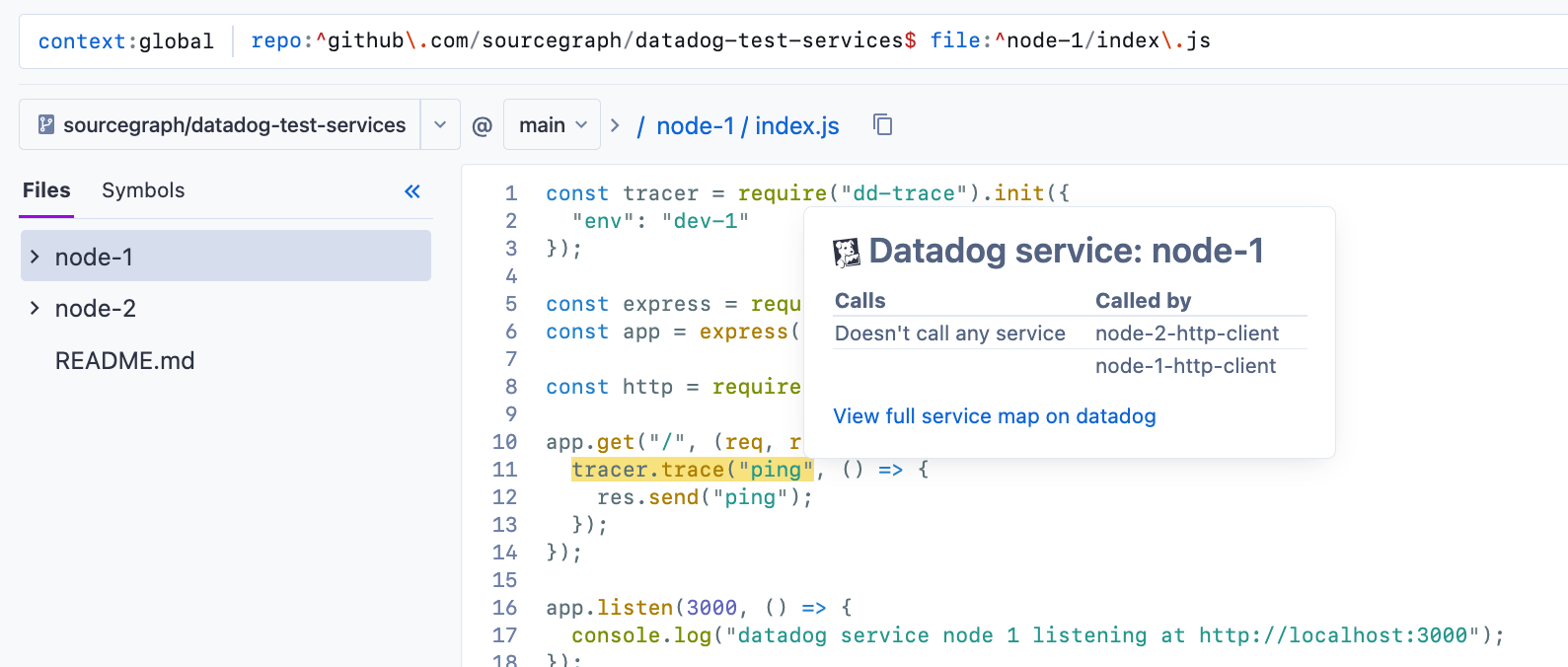
The Datadog Service Map Sourcegraph Extension brings the context of Datadog APM directly into your code, both on Sourcegraph and on your code host (via [the Sourcegraph Browser Extension](https://docs.sourcegraph.com/integration/browser_extension)).
* See which services call or are called by other services
* Go directly to the [Datadog APM Service Map](https://docs.datadoghq.com/tracing/visualization/services_map/) for your service
## Setup
### 1. Add configuration keys to the preferred Sourcegraph settings level
To enable this extension for everyone on your Sourcegraph instance, add these to your global settings `/site-admin/global-settings`.
To enable it for just users in your organization, add this to your organization settings `/organizations/orgName/settings`.
To enable it just for yourself, add these to your user settings `/user/username/settings`.
```json
"datadogServiceMap.apiKey": "DD_API_KEY",
"datadogServiceMap.applicationKey": "DD_APPLICATION_KEY",
"datadogServiceMap.env": "DD_SERVICE_MAP_ENVIRONMENT",
"datadogServiceMap.corsAnywhereUrl": "CORS_ANYWHERE_URL",
```
> If you don't have a CORS anywhere URL, you can use the Sourcegraph demo: `https://sourcegraph-demo-cors-anywhere.herokuapp.com`
### 2. Visit a code file with a service tracer call
Visit any code file with a service call and hover over the call, like:
```JS
app.get("/", (req, res) => {
tracer.trace("ping", () => {
res.send("ping");
});
});
```
Hovering over `tracer.trace("ping", ...` will display your tooltip with all called and calling services, as well as a link to go directly to the Datadog services map.
## Support
If you're a an individual Sourcegraph user, email support@sourcegraph.com.
If you're a Sourcegraph customer, use your existing support slack channel or email contact.