https://github.com/sourcehawk/aws-org-billing-dashboard
Dashboard and infrastructure for AWS organization cost and usage report
https://github.com/sourcehawk/aws-org-billing-dashboard
aws aws-cur aws-organizations grafana-dashboard iac terraform
Last synced: 5 months ago
JSON representation
Dashboard and infrastructure for AWS organization cost and usage report
- Host: GitHub
- URL: https://github.com/sourcehawk/aws-org-billing-dashboard
- Owner: sourcehawk
- License: mit
- Created: 2023-12-09T19:17:20.000Z (over 2 years ago)
- Default Branch: master
- Last Pushed: 2024-03-27T12:26:38.000Z (over 2 years ago)
- Last Synced: 2025-05-14T16:21:32.452Z (about 1 year ago)
- Topics: aws, aws-cur, aws-organizations, grafana-dashboard, iac, terraform
- Language: HCL
- Homepage:
- Size: 57.6 KB
- Stars: 3
- Watchers: 1
- Forks: 3
- Open Issues: 0
-
Metadata Files:
- Readme: README.md
- License: LICENSE
- Codeowners: .github/CODEOWNERS
Awesome Lists containing this project
README
## AWS Organization Billing Dashboard
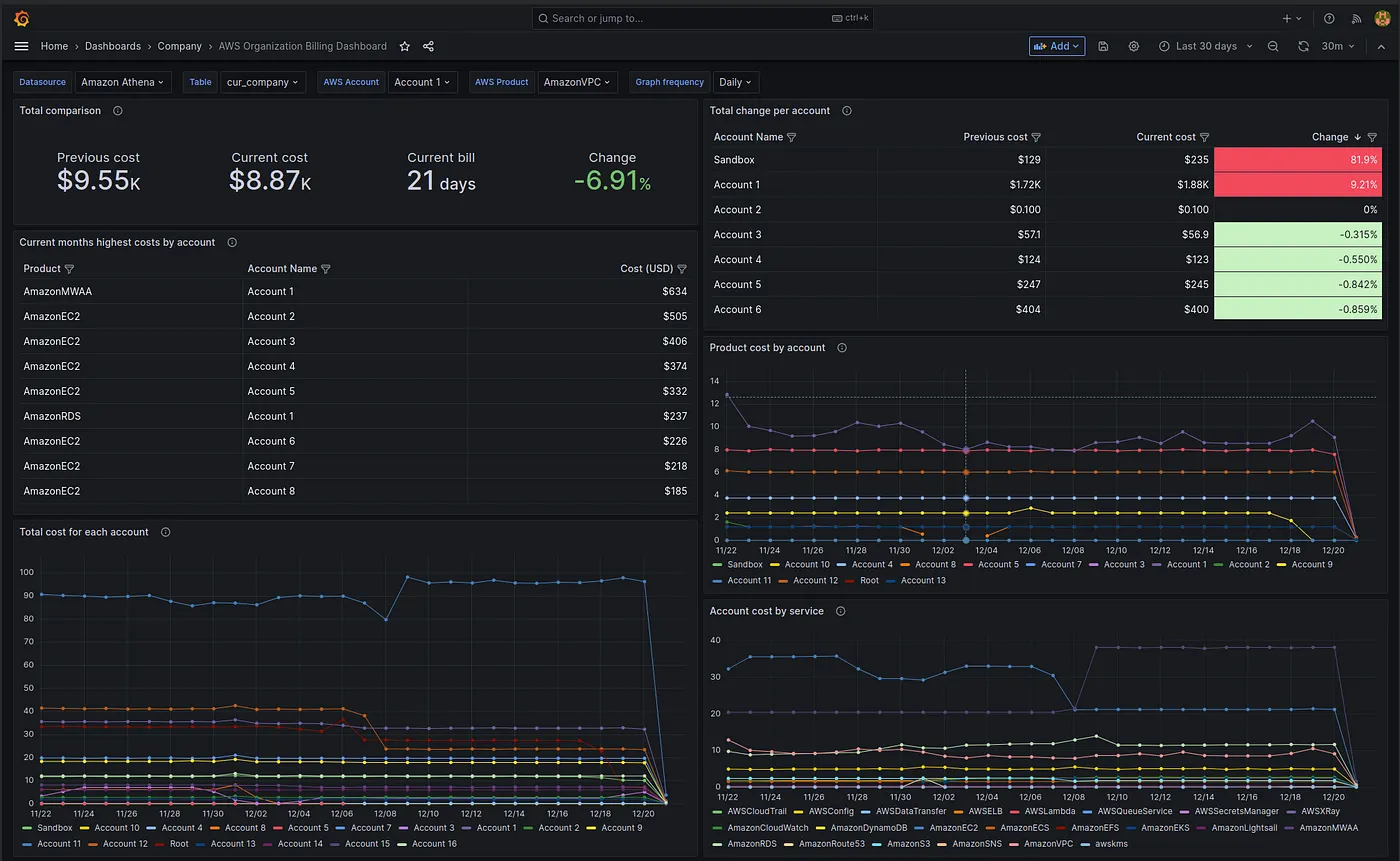
This project provides a dashboard and infrastructure for AWS organization cost and usage reports. It uses Terraform to provision the infrastructure and Helm to deploy the dashboard. Alternatively, you can import the dashboard and set the datasource manually.
Please note that some statistics in the dashboard will only be available once you have two months of billing reports.
### Project Structure
The project is organized into two main directories:
- `terraform/`: Contains Terraform modules for setting up the AWS infrastructure, including Glue Catalog Database, Glue Crawlers, and an S3 bucket for storing AWS Cost and Usage Reports (CUR). It also includes a Grafana workspace with an Athena data source for visualizing the CUR data.
- `charts/`: Contains Helm chart for deploying the dashboard and datasource.
### Requirements
To use this project, you will need the following:
| Requirement | Required | Description |
| ------------------------------------------------------- | -------- | ------------------------------------------------------------------- |
| [Terraform](https://www.terraform.io/downloads.html) | Yes | To deploy infrastructure |
| [AWS CLI](https://aws.amazon.com/cli/) | Yes | To use terraform with aws provider |
| [Helm](https://helm.sh/docs/intro/install/) | No | If you want to deploy the dashboard to Grafana hosted in Kubernetes |
| [asdf](https://asdf-vm.com/#/core-manage-asdf) | No | For managing versions of multiple runtime environments |
| [Kind](https://kind.sigs.k8s.io/docs/user/quick-start/) | No | For local Kubernetes cluster setup. |
| [kubectl](https://kubernetes.io/docs/tasks/tools/) | No | For interacting with Kubernetes clusters |
### Usage
To use this project, follow these steps:
1. Clone the repository.
2. Authorize with the AWS CLI against a "management account" in your organization. (Will not be able to retrieve org data unless management account)
3. Modify the `example.tfbackend` and `example.tfvars` in the [targets directory](targets/) to conform with your backend and target environment
- `terraform init -backend-config=targets/example.tfbackend`
- `terraform plan -var-file=targets/example.tfvars -out=tfplan`
- `terraform apply tfplan`
4. If you have Grafana deployed in Kubernetes, navigate to the `charts/` directory and deploy the dashboard using Helm with the appropriate values. Alternatively, if you have Grafana deployed by other means, you can set up the datasource manually using [this documentation](https://grafana.com/grafana/plugins/grafana-athena-datasource/?tab=overview) as a reference and import the dashboards from the Helm chart.
Please note that it may take up to 24 hours to receive your first report from AWS after deployment. Additionally, some statistics in the dashboard will only be available once you have two months of billing reports.
## License
This project is licensed under the MIT License - see the [LICENSE.md](LICENSE.md) file for details.