https://github.com/sourcehawk/plc-exporter
A prometheus exporter and dashboard provider for PLCs
https://github.com/sourcehawk/plc-exporter
grafana grafana-dashboard iot monitoring plc prometheus-exporter prometheus-metrics python3
Last synced: about 2 months ago
JSON representation
A prometheus exporter and dashboard provider for PLCs
- Host: GitHub
- URL: https://github.com/sourcehawk/plc-exporter
- Owner: sourcehawk
- License: other
- Created: 2025-05-05T14:49:15.000Z (about 1 year ago)
- Default Branch: master
- Last Pushed: 2025-05-05T16:24:39.000Z (about 1 year ago)
- Last Synced: 2025-07-11T15:31:33.658Z (12 months ago)
- Topics: grafana, grafana-dashboard, iot, monitoring, plc, prometheus-exporter, prometheus-metrics, python3
- Language: Python
- Homepage:
- Size: 207 KB
- Stars: 1
- Watchers: 1
- Forks: 0
- Open Issues: 0
-
Metadata Files:
- Readme: README.md
- License: LICENSE.txt
Awesome Lists containing this project
README
# PLC exporter
This is a simple metric exporter and dashboard provider for PLCs. It uses pymodbus to read variables from the PLC given a configuration file and exposes them as Prometheus metrics.
## Table of Contents
- [Running](#installation-and-running)
- [Configuration](#configuration)
- [Coils (Digital Output)](#coils-digital-output)
- [Discrete Inputs (Digital Input)](#discrete-inputs-digital-input)
- [Input Registers (Analog Input)](#input-registers-analog-input)
- [Holding Registers (Analog Output)](#holding-registers-analog-output)
- [Types](#types)
- [Metrics](#metrics)
- [Static metric naming](#static-metric-naming)
- [Dynamic metric naming](#dynamic-metric-naming)
- [Default metric labels](#default-metric-labels)
- [Dynamic metric sample](#dynamic-metric-sample)
- [Static metric sample](#static-metric-sample)
- [Grafana dashboard](#grafana-dashboard)
- [Development](#development)
- [Project setup](#project-setup)
- [Grafana dashboard and alert development](#grafana-dashboard-and-alert-development)
- [PLC access](#plc-access)
## Installation and running
Install the exporter using pip:
```bash
pip install plc_exporter
```
Run the exporter using the following command:
```bash
plc_exporter --config /path/to/config.yaml
```
The exporter is also available as a docker image:
```bash
docker pull ghcr.io/sourcehawk/plc-exporter:latest
```
To run the docker image, use the following command:
```bash
docker run \
--name myplc \
-p 9075:9075 \
-v ./examples/config.yaml:/config.yml \
ghcr.io/sourcehawk/plc-exporter:latest \
--config=/config.yml
```
## Configuration
The exporter is configured using a YAML file. See the [base config](./config.yml) for the structure.
### Coils (Digital Output)
| Parameter | Description | Allowed Values |
| ----------- | ---------------------------------------------------- | -------------------------------------------- |
| name | Descriptive name for the coil | Letters, numbers and underscores |
| description | Explanation of what the coil does | Any string |
| address | Address of the coil in hexadecimal or decimal format | hex `0x0000` to `0xFFFF` or int `0` to `255` |
| type | Data type of the input register value | `bool` |
### Discrete Inputs (Digital Input)
| Parameter | Description | Allowed Values |
| ----------- | ----------------------------------------------------- | -------------------------------------------- |
| name | Descriptive name for the discrete input | Letters, numbers and underscores |
| description | Explanation of the input's function | Any string |
| address | Address of the input in hexadecimal or decimal format | hex `0x0000` to `0xFFFF` or int `0` to `255` |
| type | Data type of the input register value | `bool` |
### Input Registers (Analog Input)
| Parameter | Description | Allowed Values |
| ----------- | -------------------------------------------------------- | -------------------------------------------- |
| name | Descriptive name for the input register | Letters, numbers and underscores |
| description | Explanation of the register's function | Any string |
| address | Address of the register in hexadecimal or decimal format | hex `0x0000` to `0xFFFF` or int `0` to `255` |
| type | Data type of the input register value (default `uint16`) | See types table |
| size | Number of bytes (chars) used (default 1) | 1 to 255 |
When `type` is set to `string`, the `size` parameter is used to specify the number of characters in the string.
### Holding Registers (Analog Output)
| Parameter | Description | Allowed Values |
| ----------- | ---------------------------------------------------------- | -------------------------------------------- |
| name | Descriptive name for the holding register | Letters, numbers and underscores |
| description | Explanation of the register's function | Any string |
| address | Address of the register in hexadecimal or decimal format | hex `0x0000` to `0xFFFF` or int `0` to `255` |
| type | Data type of the holding register value (default `uint16`) | See types table |
| size | Number of bytes (chars) used (default 2) | 1 to 255 |
When `type` is set to `string`, the `size` parameter is used to specify the number of characters in the string.
### Types
| Type | Description | Size (bytes) | Register count |
| ------- | --------------------- | -------------- | ------------------- |
| bool | Boolean | 1 | 1 |
| uint8 | Unsigned 8-bit int | 1 | 1 |
| int8 | Signed 8-bit int | 1 | 1 |
| uint16 | Unsigned 16-bit int | 2 | 1 |
| int16 | Signed 16-bit int | 2 | 1 |
| uint32 | Unsigned 32-bit int | 4 | 2 |
| int32 | Signed 32-bit int | 4 | 2 |
| uint64 | Unsigned 64-bit int | 8 | 4 |
| int64 | Signed 64-bit int | 8 | 4 |
| float16 | IEEE 754 16-bit float | 2 | 1 |
| float32 | IEEE 754 32-bit float | 4 | 2 |
| float64 | IEEE 754 64-bit float | 8 | 4 |
| char | ASCII character | 1 | 1 |
| string | ASCII string | User specified | Math.ceil(size / 2) |
## Metrics
The exporter can be configured in `static` or `dynamic` mode. In static mode, the metrics are named according to the `name` parameter in the configuration file. In dynamic mode, the metrics are named according to the register type and uniquely identified by the `name` label.
Which mode to use depends on the use case. If you are creating a dashboard that will be used for multiple devices, the dynamic mode is recommended. If you are creating a dashboard for a specific device, the static mode might be more convenient.
All metrics generated by the exporter are prefixed with the `namespace` parameter of the exporter configuration.
### Static metric naming
In static mode the metrics generated for all types except strings will be `{namespace}_{name}`. I.e if the namespace is `plc` and the name is `inner_temperature`, the metric will be `plc_inner_temperature`.
If the metric is a string, there will be multiple metrics with the same name but with a unique `index` label. The `index` is the position of the character in the string that is being built. Each of the generated metrics will have the value of the ASCII code of the character it represents. For example, if the name is `material` and the string is `TEST`, the metrics will be :
- `plc_material{index="0", value_type="ascii"}` with the value `84` (The ASCII code for `T`)
- `plc_material{index="1", value_type="ascii"}` with the value `69` (The ASCII code for `E`)
- `plc_material{index="2", value_type="ascii"}` with the value `83` (The ASCII code for `S`)
- `plc_material{index="3", value_type="ascii"}` with the value `84` (The ASCII code for `T`)
### Dynamic metric naming
In dynamic mode the metrics generated for all types will be `{namespace}_{register_type}`. I.e if the namespace is `plc` and the register type is `coils`, the metric will be `plc_coils`. If the metric was for `inner_temperature` of type `coils` and the namespace is `plc`, the metric will be `plc_coils{name="inner_temperature"}`.
### Default metric labels
All metrics have the following labels
- `plc`: Is set to the `identifier` parameter in the configuration file.
- `start_address`: The start address of the register in the PLC as a hexadecimal string
- `value_type`: The type of the value (See [Types table](#types)). **Note that strings and characters will have the type set to `ascii`**.
- `index`: The order (index) of the character in the string (0, 1, 2, ...). If not a string, this label is set to `None`.
- `register_type` (Always present in `static` metric layout. Available in `dynamic` metric layout for `read_time_ms` + `error_count` metrics): The type of register (`coil`, `discrete_input`, `input_register`, `holding_register`)
- `name` (In `dynamic` metric layout): The name of the metric as specified in the configuration file.
### Dynamic metric sample
Generated from [examples/config.yml](./examples/config.yml) with `metric_layout` set to `dynamic`.
NOTE: Removed the `read_time_ms` and `error_count` metrics for brevity.
```txt
# HELP plc_connection_up Connection status to the PLC
# TYPE plc_connection_up gauge
plc_connection_up{manufacturer="test",model="test-2000",plc="master"} 1.0
# HELP plc_coils Coils represent discrete outputs, which are binary values and are used to control physical devices like relays, motors, lights, or any output devices connected to the PLC.They can be read and written to.
# TYPE plc_coils gauge
plc_coils{index="None",manufacturer="test",model="test-2000",name="light_green",plc="master",start_address="0x0001",value_type="bool"} 1.0
plc_coils{index="None",manufacturer="test",model="test-2000",name="light_red",plc="master",start_address="0x0003",value_type="bool"} 0.0
plc_coils{index="None",manufacturer="test",model="test-2000",name="light_yellow",plc="master",start_address="0x0005",value_type="bool"} 0.0
plc_coils{index="None",manufacturer="test",model="test-2000",name="chamber_light_blue",plc="master",start_address="0x0007",value_type="bool"} 1.0
plc_coils{index="None",manufacturer="test",model="test-2000",name="chamber_light_purple",plc="master",start_address="0x0009",value_type="bool"} 1.0
plc_coils{index="None",manufacturer="test",model="test-2000",name="crane_motor_power",plc="master",start_address="0x000d",value_type="bool"} 1.0
plc_coils{index="None",manufacturer="test",model="test-2000",name="crane_motor_direction_left",plc="master",start_address="0x000e",value_type="bool"} 0.0
plc_coils{index="None",manufacturer="test",model="test-2000",name="crane_motor_direction_right",plc="master",start_address="0x000f",value_type="bool"} 1.0
# HELP plc_discrete_inputs Discrete inputs are binary values that represent the state of physical devices like sensors, switches, or any input devices connected to the PLC. They are read-only and cannot be written to.
# TYPE plc_discrete_inputs gauge
plc_discrete_inputs{index="None",manufacturer="test",model="test-2000",name="emergency_stop",plc="master",start_address="0x0004",value_type="bool"} 1.0
plc_discrete_inputs{index="None",manufacturer="test",model="test-2000",name="crane_lift_at_horizontal_max",plc="master",start_address="0x0005",value_type="bool"} 1.0
plc_discrete_inputs{index="None",manufacturer="test",model="test-2000",name="crane_lift_at_horizontal_min",plc="master",start_address="0x0006",value_type="bool"} 0.0
# HELP plc_input_registers Input registers are 16-bit registers that store numeric values. They are read-only and cannot be written to.
# TYPE plc_input_registers gauge
plc_input_registers{index="None",manufacturer="test",model="test-2000",name="temperature",plc="master",start_address="0x0001",value_type="uint16"} 254.0
plc_input_registers{index="0",manufacturer="test",model="test-2000",name="material_name",plc="master",start_address="0x0003",value_type="ascii"} 70.0
plc_input_registers{index="1",manufacturer="test",model="test-2000",name="material_name",plc="master",start_address="0x0003",value_type="ascii"} 101.0
plc_input_registers{index="None",manufacturer="test",model="test-2000",name="material_scalar",plc="master",start_address="0x0005",value_type="float32"} 3.14
# HELP plc_holding_registers Holding registers are 16-bit registers that store numeric values. They can be read and written to.
# TYPE plc_holding_registers gauge
plc_holding_registers{index="None",manufacturer="test",model="test-2000",name="target_temperature",plc="master",start_address="0x0001",value_type="uint16"} 870.0
plc_holding_registers{index="0",manufacturer="test",model="test-2000",name="test_string",plc="master",start_address="0x0003",value_type="ascii"} 84.0
plc_holding_registers{index="1",manufacturer="test",model="test-2000",name="test_string",plc="master",start_address="0x0003",value_type="ascii"} 69.0
plc_holding_registers{index="2",manufacturer="test",model="test-2000",name="test_string",plc="master",start_address="0x0004",value_type="ascii"} 83.0
plc_holding_registers{index="3",manufacturer="test",model="test-2000",name="test_string",plc="master",start_address="0x0004",value_type="ascii"} 84.0
```
### Static metric sample
Generated from [examples/config.yml](./examples/config.yml) with `metric_layout` set to `static`.
NOTE: Removed the `read_time_ms` and `error_count` metrics for brevity.
```txt
# HELP plc_connection_up Connection status to the PLC
# TYPE plc_connection_up gauge
plc_connection_up{manufacturer="test",model="test-2000",plc="master"} 1.0
# HELP plc_light_green Turns on the green light when enabled (1)
# TYPE plc_light_green gauge
plc_light_green{index="None",manufacturer="test",model="test-2000",plc="master",register_type="coils",start_address="0x0001",value_type="bool"} 1.0
# HELP plc_light_red Turns on the red light when enabled (1)
# TYPE plc_light_red gauge
plc_light_red{index="None",manufacturer="test",model="test-2000",plc="master",register_type="coils",start_address="0x0003",value_type="bool"} 0.0
# HELP plc_light_yellow Turns on the yellow light when enabled (1)
# TYPE plc_light_yellow gauge
plc_light_yellow{index="None",manufacturer="test",model="test-2000",plc="master",register_type="coils",start_address="0x0005",value_type="bool"} 0.0
# HELP plc_chamber_light_blue Turns on the blue chamber light when enabled (1)
# TYPE plc_chamber_light_blue gauge
plc_chamber_light_blue{index="None",manufacturer="test",model="test-2000",plc="master",register_type="coils",start_address="0x0007",value_type="bool"} 1.0
# HELP plc_chamber_light_purple Turns on the purple chamber light when enabled (1)
# TYPE plc_chamber_light_purple gauge
plc_chamber_light_purple{index="None",manufacturer="test",model="test-2000",plc="master",register_type="coils",start_address="0x0009",value_type="bool"} 1.0
# HELP plc_crane_motor_power Starts the crane motor when enabled (1)
# TYPE plc_crane_motor_power gauge
plc_crane_motor_power{index="None",manufacturer="test",model="test-2000",plc="master",register_type="coils",start_address="0x000d",value_type="bool"} 1.0
# HELP plc_crane_motor_direction_left Sets the crane motor direction to left when enabled (1)
# TYPE plc_crane_motor_direction_left gauge
plc_crane_motor_direction_left{index="None",manufacturer="test",model="test-2000",plc="master",register_type="coils",start_address="0x000e",value_type="bool"} 0.0
# HELP plc_crane_motor_direction_right Sets the crane motor direction to right when enabled (1)
# TYPE plc_crane_motor_direction_right gauge
plc_crane_motor_direction_right{index="None",manufacturer="test",model="test-2000",plc="master",register_type="coils",start_address="0x000f",value_type="bool"} 1.0
# HELP plc_emergency_stop Indicates if the emergency stop button is active
# TYPE plc_emergency_stop gauge
plc_emergency_stop{index="None",manufacturer="test",model="test-2000",plc="master",register_type="discrete_inputs",start_address="0x0004",value_type="bool"} 1.0
# HELP plc_crane_lift_at_horizontal_max Indicates if the crane is at the horizontal maximum position (right)
# TYPE plc_crane_lift_at_horizontal_max gauge
plc_crane_lift_at_horizontal_max{index="None",manufacturer="test",model="test-2000",plc="master",register_type="discrete_inputs",start_address="0x0005",value_type="bool"} 1.0
# HELP plc_crane_lift_at_horizontal_min Indicates if the crane is at the horizontal minimum position (left)
# TYPE plc_crane_lift_at_horizontal_min gauge
plc_crane_lift_at_horizontal_min{index="None",manufacturer="test",model="test-2000",plc="master",register_type="discrete_inputs",start_address="0x0006",value_type="bool"} 0.0
# HELP plc_temperature The temperature reported by the sensor
# TYPE plc_temperature gauge
plc_temperature{index="None",manufacturer="test",model="test-2000",plc="master",register_type="input_registers",start_address="0x0001",value_type="uint16"} 254.0
# HELP plc_material_name Testing string
# TYPE plc_material_name gauge
plc_material_name{index="0",manufacturer="test",model="test-2000",plc="master",register_type="input_registers",start_address="0x0003",value_type="ascii"} 70.0
plc_material_name{index="1",manufacturer="test",model="test-2000",plc="master",register_type="input_registers",start_address="0x0003",value_type="ascii"} 101.0
# HELP plc_material_scalar Testing float
# TYPE plc_material_scalar gauge
plc_material_scalar{index="None",manufacturer="test",model="test-2000",plc="master",register_type="input_registers",start_address="0x0005",value_type="float32"} 3.14
# HELP plc_target_temperature The target temperature to set the heating element to
# TYPE plc_target_temperature gauge
plc_target_temperature{index="None",manufacturer="test",model="test-2000",plc="master",register_type="holding_registers",start_address="0x0001",value_type="uint16"} 870.0
# HELP plc_test_string Testing string
# TYPE plc_test_string gauge
plc_test_string{index="0",manufacturer="test",model="test-2000",plc="master",register_type="holding_registers",start_address="0x0003",value_type="ascii"} 84.0
plc_test_string{index="1",manufacturer="test",model="test-2000",plc="master",register_type="holding_registers",start_address="0x0003",value_type="ascii"} 69.0
plc_test_string{index="2",manufacturer="test",model="test-2000",plc="master",register_type="holding_registers",start_address="0x0004",value_type="ascii"} 83.0
plc_test_string{index="3",manufacturer="test",model="test-2000",plc="master",register_type="holding_registers",start_address="0x0004",value_type="ascii"} 84.0
```
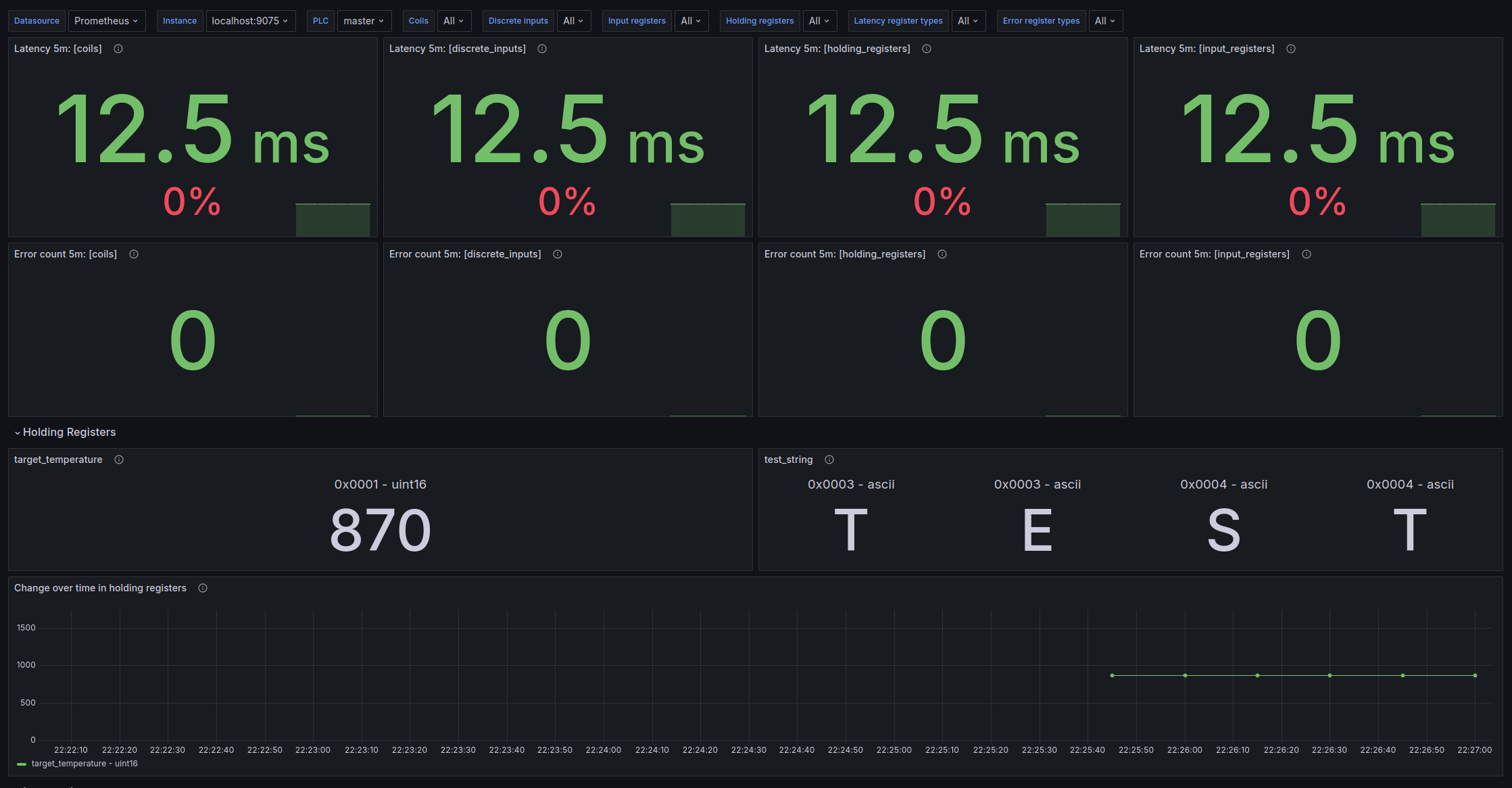
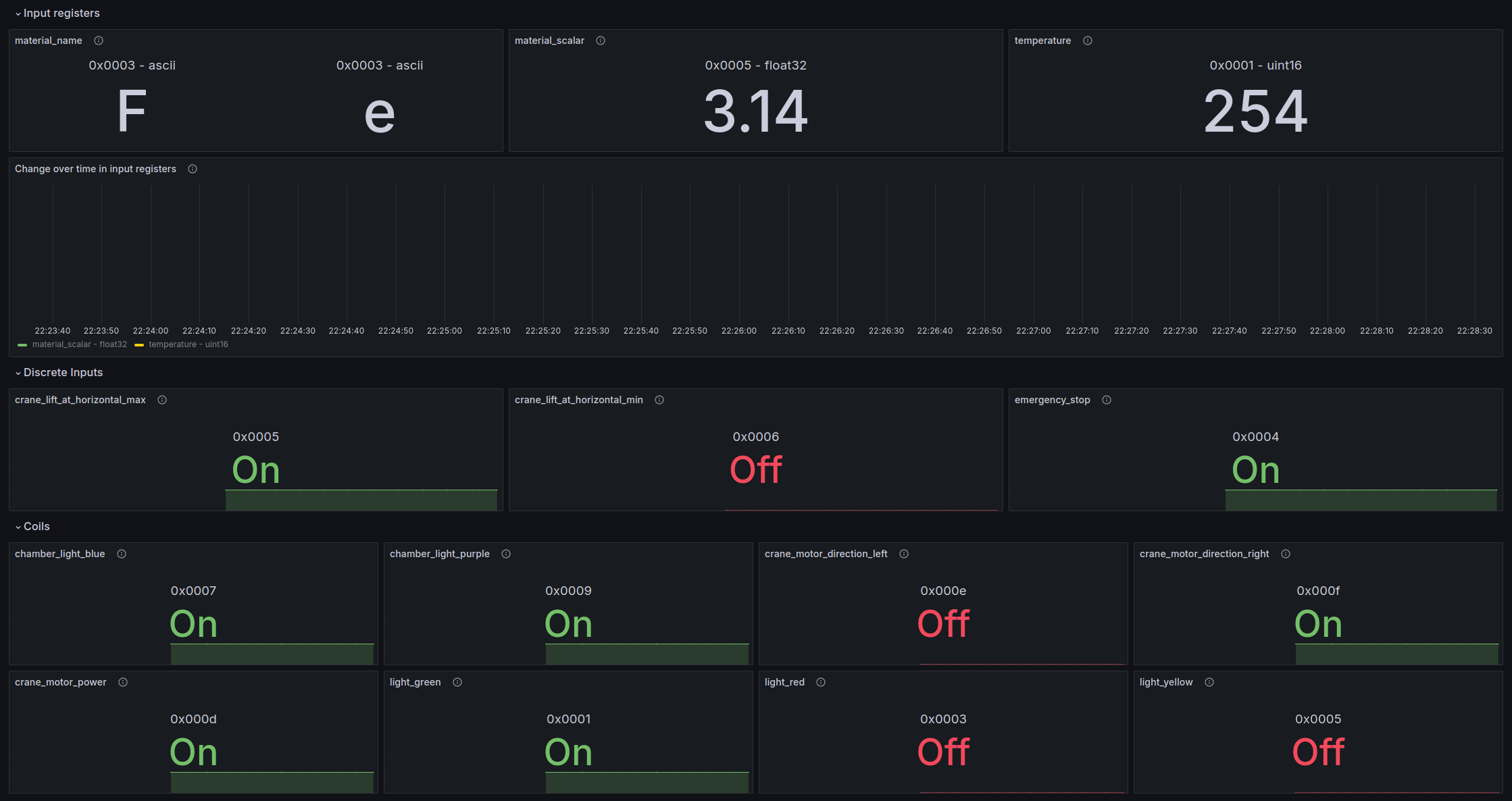
## Grafana dashboard
The exporter comes with a default dashboard which requires the following configuration:
- metric_layout: `dynamic`
- namespace: `plc`
The dashboard source can be found [here](dev/grafana/provisioning/dashboards/definitions/plc_exporter.json). You can copy the JSON file and import it into Grafana instance.
## Development
### Project setup
1. (Optional) Set up virtual environment
```bash
python3 -m venv venv
source venv/bin/activate
```
2. Install the exporter
```bash
pip install -e .
```
3. Run the exporter
```bash
plc_exporter --config /path/to/config.yaml
```
### Grafana dashboard and alert development
A generic PCL Grafana dashboard is included in the [dev/grafana](./dev/grafana/provisioning/dashboards/definitions/) directory.
To develop the dashboard, or to develop a new dashboard for a specific PLC configuration, you can use the docker-compose setup.
```bash
docker compose up --build
```
Note that to change the exporter configuration used, you can place your new configuration in the [examples directory](examples/) and change the command in the `plc_exporter` service in the `docker-compose.yml` file.
```yaml
plc_exporter:
hostname: plc-exporter
build:
context: .
dockerfile: Dockerfile
container_name: exporter
network_mode: host
# ports:
# - "9075:9075"
volumes:
- ./examples:/configs
command:
- --config=/configs/your-custom-config.yaml # <-- CHANGED THIS LINE
```
- Grafana will be available at [http://localhost:3000](http://localhost:3000) with the default credentials `admin:admin`.
- Prometheus will be available at [http://localhost:9090](http://localhost:9090).
- Alertmanager will be available at [http://localhost:9093](http://localhost:9093).
Note that while developing dashboards it is a good idea to save it regularly to a JSON file in the [dashboard definitions directory](./dev/grafana/provisioning/dashboards/definitions/). This way the dashboard wont get lost and can be version controlled and shared with others.
### PLC access
To access a PLC for development, you can use SSH tunneling to forward the PLC port to your local machine. This is done by adding a `LocalForward` line to your SSH config file (usually located at `~/.ssh/config`).
For example, if you want to access a PLC with IP `10.0.0.10` on port `502`, on a device you can add the following line to your SSH config file:
```txt
LocalForward 1502 10.0.0.10:502
```
Then you can develop your metrics by connecting to the PLC on port 1502 from your local machine (localhost).
```txt
Host some-remote-host
Hostname 168.0.0.10
User ubuntu
LocalForward 1502 10.0.0.10:502
```