https://github.com/spearwolf/signalize
A standalone library for signals and effects on the web
https://github.com/spearwolf/signalize
effects event-driven-programming events javascript microfrontends reactive signals
Last synced: over 1 year ago
JSON representation
A standalone library for signals and effects on the web
- Host: GitHub
- URL: https://github.com/spearwolf/signalize
- Owner: spearwolf
- License: apache-2.0
- Created: 2021-09-16T08:41:10.000Z (almost 5 years ago)
- Default Branch: main
- Last Pushed: 2025-03-21T07:56:47.000Z (over 1 year ago)
- Last Synced: 2025-03-21T08:01:35.226Z (over 1 year ago)
- Topics: effects, event-driven-programming, events, javascript, microfrontends, reactive, signals
- Language: TypeScript
- Homepage:
- Size: 31.3 MB
- Stars: 10
- Watchers: 2
- Forks: 1
- Open Issues: 0
-
Metadata Files:
- Readme: README.md
- Changelog: CHANGELOG.md
- License: LICENSE
- Code of conduct: CODE_OF_CONDUCT.md
Awesome Lists containing this project
- awesome - spearwolf/signalize - Write less state boilerplate, react more. (TypeScript)
README
# @spearwolf/signalize
signals and effects for all 📢

Image created in response to a request from spearwolf, using OpenAI's DALL-E, guided by ChatGPT.
---



`@spearwolf/signalize` is a javascript library for creating __signals__ and __effects__.
- a standalone javascript library that is framework agnostic
- without side-effects and targets `ES2022` based environments
- written in typescript v5 and uses the new [tc39 decorators](https://github.com/tc39/proposal-decorators) :rocket:
- however, it is optional and not necessary to use the decorators
# ⚙️ Install
```shell
npm install @spearwolf/signalize
```
Packaged as `ES2022` and exported as _unbundled_ ESM-only javascript modules.
Type definitions and source maps also included.
> [!NOTE]
> Since `v0.5` there is also a [CHANGELOG](https://github.com/spearwolf/signalize/blob/main/CHANGELOG.md) 🎉
> [!CAUTION]
> Since `v0.7` _commonjs_ modules are no longer exported❗
# Overview 👀
The whole API of `@spearwolf/signalize` is about ..
- __Signals__
- like state variables with hidden superpowers
- when the value of a signal changes, all observers are automatically informed
- __Effects__
- are functions that are _automatically executed_ when one or more signals change
- just think of it as a next-gen and independent `useEffect()` hook (but without the limitations imposed by react :wink:)
A __functional API__ is provided, as well as a __class-based API that uses decorators__.
> [!NOTE]
> Under the hood the event-driven micro-library [@spearwolf/eventize](https://github.com/spearwolf/eventize) is used 😍
# 📖 Usage
> [!WARNING]
> The core of the library is stable and fully tested, although the API is still partially evolving, and the same goes for the documentation ... there are some features that are not documented in detail here. The adventurous developer is encouraged to explore the source code and tests directly at this point.
## API Overview
- **Signals**
- **create**
- `🦋 = {get: λ, set: setλ} = createSignal()`
- `@signal() accessor α`
- **read**
- `🦋.get()`
- `λ()`
- `🦋.onChange(callback)`
- `λ(callback)`
- `🦋.value`
- `value(λ)`
- `beQuiet(callback)`
- **write**
- `🦋.set(value)`
- `setλ(value)`
- `🦋.touch()`
- `touch(λ)`
- `batch(callback)`
- `🦋.muted`
- `muteSignal(λ)`
- `unmuteSignal(λ)`
- **destroy**
- `🦋.destroy()`
- `destroySignal(λ)`
- **object helpers**
- `findObjectSignalByName(🦋, name)`
- `findObjectSignalNames(🦋)`
- `findObjectSignals(🦋)`
- `destroyObjectSignals(🦋)`
- **Effects**
- **create**
- *dynamic*
- `🦄 = createEffect(callback)`
- `🦄 = createEffect(callback, options)`
- *static*
- `🦄 = createEffect(callback, [...dependencies])`
- `🦄 = createEffect(callback, options)`
- `🦋.onChange(callback)`
- `λ(callback)`
- **api**
- `🦄.run()`
- `🦄.destroy()`
- **Memo**
- `λ = createMemo(callback)`
- `@memo() compute() { .. }`
- **Building Blocks**
- *connections between signals*
- `γ = link(src, trgt)`
- `γ.nextValue(): Promise`
- `γ.asyncValues(): yield*`
- `γ.touch()`
- `γ.mute()`
- `γ.unmute()`
- `γ.toggle()`
- `γ.isMuted`
- `γ.destroy()`
- `γ.isDestroyed`
- `unlink()`
- _signal groups_
- `SignalGroup.get(obj)` → *group*
- `SignalGroup.findOrCreate(obj)` → *group*
- `SignalGroup.destroy(obj)`
- `SignalGroup.clear()`
- `SignalGroup#attachGroup(group)`
- `SignalGroup#detachGroup(group)`
- `SignalGroup#attachSignal(🦋|λ)`
- `SignalGroup#detachSignal(🦋|λ)`
- `SignalGroup#attachSignalByName(name, 🦋|λ)`
- `SignalGroup#hasSignal(name)` → _boolean_
- `SignalGroup#signal(name)` → `🦋`
- `SignalGroup#attachEffect(🦄)`
- `SignalGroup#runEffects()`
- `SignalGroup#attachLink(link)`
- `SignalGroup#detachLink(link)`
- `SignalGroup#destroy()`
- **utils**
- `isSignal(🦋|λ)`
- `muteSignal(🦋|λ)`
- `unmuteSignal(🦋|λ)`
- **testing**
- `getSignalsCount()`
- `getEffectsCount()`
- `getLinksCount()`
## 📖 Signals
Signals are mutable states that can trigger effects when changed.
A standalone signal
A class with a signal
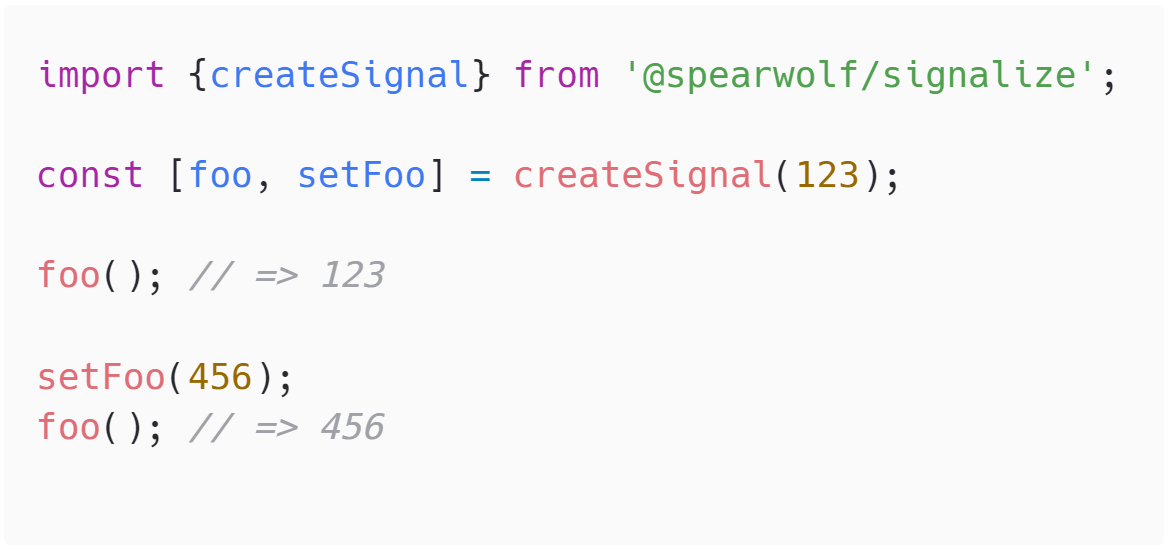
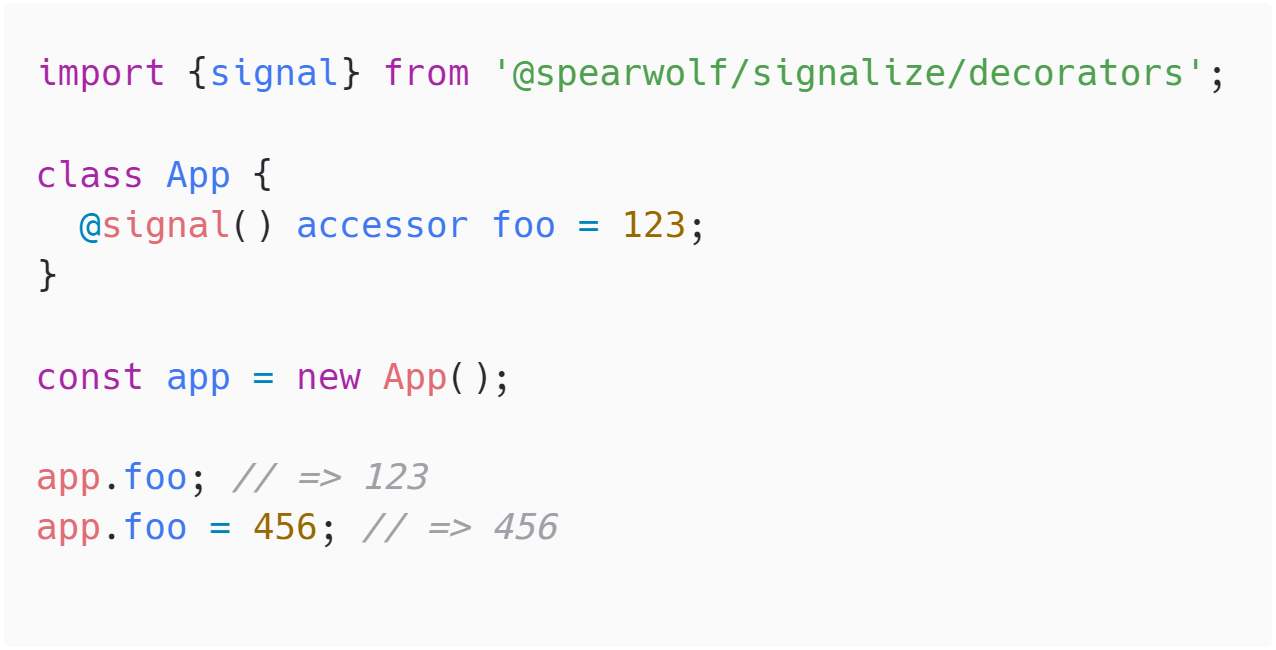
### Create a signal
#### API
```js
🦋 = {get: λ, set: setλ} = createSignal()
⋯ = createSignal(initialValue)
⋯ = createSignal(initialValue, options)
```
##### Return value
`createSignal()` → `🦋 | {get: signalReader, set: signalWriter}` returns the _signal object_ (🦋), which contains the _signal reader_ and the _signal writer_ functions.
If the _signal reader_ is called as a function, it returns the current _signal value_ as the return value: `λ(): value`
If the _signal writer_ is called with a value, this value is set as the new _signal value_: `setλ(nextValue)`
When the signal value _changes_, any _effects_ that depend on it will be executed.
Reading and writing is always immediate. Any effects are called synchronously. However, it is possible to change this behavior using `batch()`, `beQuiet()`, `value()` or other methods of this library.
The _signal object_ (🦋) is a wrapper around it, providing a signal API beyond read and write:
| 🦋-Methods | Description |
|------------|-------------|
| .get() → value | The _signal reader_ returns the value. If the method is called during a _dynamic effect_, the effect is informed of this and the next time the value changes, the effect is automatically repeated. |
| `.set(value)` | The _signal writer_ sets the new value and informs the observers of the new value. |
| `.value` | Just return the value. This is done without noticing any effect, as opposed to using `.get()` |
| .onChange((value) → void) | ... |
| `.muted` | ... |
| `.touch()` | ... |
| `.destroy()` | ... |
> [!NOTE]
> You can destroy the reactivity of a signal with `🦋.destroy()` or `destroySignal(λ)`.
> **A destroyed signal will no longer trigger any effects**. But both the _signal reader_ and the _signal writer_ are still usable and will read and write the _signal value_.
##### createSignal() Options
| option | type | description |
| -------------- | ------------------- | ----------- |
| `compare` | (a, b) => boolean | Normally, the equality of two values is checked with the strict equality operator `===`. If you want to go a different way here, you can pass a function that does this. |
| `lazy` | `boolean` | If this flag is set, it is assumed that the value is a function that _returns the current value_. This function is then executed _lazy_, i.e. only when the signal is read for the first time. At this point, however, it should be noted that the _signal value_ is initially only _lazy_. once resolved, it is no longer _lazy_. |
| `beforeRead` | () => void | the name says it all: a callback that is executed before the signal value is read. not intended for everyday use, but quite useful for edge cases and testing. |
### Create a signal using decorators
```js
import {signal} from '@spearwolf/signalize/decorators';
import {findObjectSignalByName} from '@spearwolf/signalize';
class Foo {
@signal() accessor foo = 'bar';
@signal({readAsValue: true}) accessor xyz = 123;
}
const obj = new Foo();
obj.foo; // => 'bar'
obj.foo = 'plah'; // set value to 'plah'
obj.xyz; // => 123
obj.xyz = 456; // set value to 456
findObjectSignalByName.get(obj, 'xyz').value // => 456
```
#### API
##### `@signal`
```js
class {
@signal() accessor Λ = initialValue
@signal(options) accessor Λ = initialValue
}
```
| option | type | description |
| ------------- | -------------------- | ----------- |
| `name` | `string` \| `symbol` | The name of the signal. setting a name is optional, the signal name is usually the same as the _accessor_ name. each object has an internal map of its signals, where the key is the signal name. the name is used later, for example, for `findObjectSignalByName()` or `destroySignal()` |
| `readAsValue` | `boolean` | If enabled, the value of the signal will be read without informing the dependencies, just like the `value(λ)` helper does. However, if the signal was defined as an object accessor using the decorator, it is not possible to access the signal object without the `findObjectSignalByName()` helper. |
### Read signal value
```typescript
λ(): val
🦋.get(): val
```
Calling the _signal reader_ without arguments returns the value of the signal. If this _is called up within a dynamic effect_, the effect remembers this signal and marks it as a dependent signal.
```js
value(λ|🦋): val
🦋.value
```
returns the value of the signal. in contrast to the previous variant, however, **no effect is notified here**. it really only returns the value, there are no side effects.
```js
beQuiet(callback)
```
executes the callback immediately. if a signal is read out within the callback, this is done without notifying an active dynamic effect. it does not matter whether the signal is read out directly or with the `value()` helper.
### Write signal value
```js
setλ(value)
🦋.set(val)
```
Calling the _signal writer_ sets a new signal value. if the value changes (this is normally simply checked using the `===` operator), all effects that have marked this signal as a dependency are executed immediately.
```js
touch(λ|🦋)
🦋.touch()
```
does not change the value of the signal. however, all dependent effects are still notified and executed.
```js
batch(callback)
```
executes the callback immediately. if values are changed within the callback signal, the values are changed immediately - but any dependent effects are only executed once after the end of the callback. this prevents effects with multiple dependencies from being triggered multiple times if several signals are written.
See [The difference between the standard behavior of effects and the use of batching](./docs/AdvancedGuide.md#the-difference-between-the-standard-behavior-of-effects-and-the-use-of-batching) for more informations on this.
### Destroy signal
```js
destroySignal(λ|🦋)
🦋.destroy()
```
Destroys the _reactivity_ of the signal. This signal will no longer be able to cause any effects.
However, the _signal reader_ and _signal writer_ functions will continue to work as expected.
## 📖 Effects
Effects are functions that react to changes in signals and are executed automatically.
Without effects, signals are nothing more than ordinary variables.
With effects, you can easily control behavior changes in your application without having to write complex dependency or monitoring logic.
### Dynamic vs. Static effects
A dynamic effect function
A class with a dynamic effect


**Dynamic effects** are always executed the first time. During the execution of an effect callback function, the read signals are tracked. If one of the signals is changed afterwards, the effect is (automatically) called again.
> [!NOTE]
> The signals used are re-recorded each time the effect runs again.
> This is why they are called _dynamic_ effects.
**Static effects** do not track signals; instead, dependencies are defined in advance during effect creation:
```js
createEffect(() => {
const sum = a() + b();
console.log('sum of', a(), 'and', b(), 'is', sum);
}, [a, b]);
```
It doesn't matter which signals are used within the effect function, the effect will be re-run whenever a signal in the signal dependencies list changes.
### API
#### Static Effects
```js
🦄 = {run, destroy} = createEffect(callback, [...dependencies])
🦄 = {run, destroy} = createEffect(callback, options)
```
| option | type | description |
| ----------- | ----------------------------- | ----------- |
| `dependencies` | `Array<` λ \| `string` \| `symbol` `>` | these are the signal dependencies that mark this as a _static_ effect. otherwise it is a _dynamic_ effect. the effect is only executed when the dependent signals change. in contrast to the dynamic effects, it does not matter which signals are used within the effect. |
| `autorun` | `boolean` | if _autorun_ is set to `false`, the effect callback will not be called automatically at any time! to call the effect, you must explicitly call the `run()` function. everything else behaves as expected for an effect. when `run()` is called, the effect is only executed when the signals have changed (or on the very first call). |
```js
λ(effectCallback)
```
alternatively, the _signal reader_ can also be called with an effect callback. this creates a _static_ effect that is called whenever the signal value changes. important here: the callback is not called automatically the first time, but only when the _signal value_ changes afterwards.
> [!NOTE]
> By the way, you cannot directly destroy an effect created in this way, this happens automatically when the signal is destroyed.
#### Dynamic Effects
```js
🦄 = {run, destroy} = createEffect(callback)
🦄 = {run, destroy} = createEffect(callback, options)
```
| option | type | description |
| ----------- | ----------------------------- | ----------- |
| `autorun` | `boolean` | if _autorun_ is set to `false`, the effect callback will not be called automatically at any time! to call the effect, you must explicitly call the `run()` function. everything else behaves as expected for an effect. when `run()` is called, the effect is only executed when the signals have changed (or on the very first call). |
#### The return value of `createEffect()`
The call to `createEffect()` returns an effect object.
Here you can find the `run()` function. When the _run_ function is called, the effect is executed, but only if the dependent signals have changed.
So this function is not really useful unless you use the `autorun: false` feature, which prevents the effect from being executed automatically.
This is where the `run()` comes in, which explicitly executes the effect: for example, do you want to execute an effect only at a certain time (e.g. within a `setInterval()` or `requestAnimationFrame()` callback)? then `run()` is the way to go!
The effect object also contains the destroy callback, which destroys the effect when called.
### The effect can optionally return a _cleanup_ function
Your _effect callback_ (which is your function that you pass to the effect as parameter) may also optionally return a _cleanup_ function.
Before calling an _effect_, a previously set _cleanup_ function is executed.
The effect cleanup function is reset each time the effect is executed. If the effect does not return a function, nothing will be called the next time the effect is called.
> [!NOTE]
> Does this behavior look familiar? probably because this feature was inspired by [react's useEffect hook](https://react.dev/reference/react/useEffect)
#### Example: Use an effect _cleanup_ function
```js
const {get: getSelector, set: makeInteractive} = createSignal();
function onClick(event) {
console.log('click! selector=', getSelector(), 'element=', event.target);
}
createEffect(() => {
if (getSelector()) {
const el = document.querySelector(getSelector());
el.addEventListener('click', onClick, false);
return () => {
el.removeEventListener('click', onClick, false);
};
}
})
makeInteractive('#foo'); // foo is now interactive
makeInteractive('.bar'); // bar is now interactive, but foo is not
```
---
_more docs coming!!_