https://github.com/speps/xinputdotnet
C# wrapper around XInput, works with any Mono or .NET application (eg. Unity3D)
https://github.com/speps/xinputdotnet
c-sharp unity3d xbox-controller xinput
Last synced: over 1 year ago
JSON representation
C# wrapper around XInput, works with any Mono or .NET application (eg. Unity3D)
- Host: GitHub
- URL: https://github.com/speps/xinputdotnet
- Owner: speps
- Created: 2013-07-04T19:32:11.000Z (about 13 years ago)
- Default Branch: master
- Last Pushed: 2020-10-07T08:48:23.000Z (almost 6 years ago)
- Last Synced: 2025-03-29T16:06:45.091Z (over 1 year ago)
- Topics: c-sharp, unity3d, xbox-controller, xinput
- Language: Rich Text Format
- Size: 2.63 MB
- Stars: 464
- Watchers: 45
- Forks: 94
- Open Issues: 12
-
Metadata Files:
- Readme: README.md
- License: LicenseError.jpg
Awesome Lists containing this project
README
XInputDotNet
============
C# wrapper around XInput, works with any Mono or .NET application (eg. Unity3D).
### What is XInput?
[XInput](http://msdn.microsoft.com/en-us/library/ee416996%28VS.85%29.aspx) is a DirectX API to manage the controllers connected to a PC (the same API is also used on Xbox 360). It allows an Xbox 360 controller to be used on a Windows PC.
### What is XInput.NET?
**XInput.NET** is a .NET library which wraps the functions of XInput. It is different from what you can find inside [SlimDX](http://slimdx.org/) for example because it is designed to be pure [CIL](http://en.wikipedia.org/wiki/Common_Intermediate_Language). That means you can use it in [Unity3D](http://unity3d.com/) Free (as well as Pro of course). The API was designed to be very similar (if not identical) to the [GamePad class from XNA](http://msdn.microsoft.com/en-us/library/microsoft.xna.framework.input.gamepad.aspx).
### Ready to go !
Pre-built binaries are available from the [releases tab](https://github.com/speps/XInputDotNet/releases) :
* **XInputDotNetPure.dll**, .NET assembly containing the [GamePad](http://msdn.microsoft.com/en-us/library/microsoft.xna.framework.input.gamepad.aspx) class
- You need to add a reference to this one in your C# project for example
* **XInputInterface.dll**, utility DLL which makes the calls to XInput
- You have to copy this one next to your .exe
### Examples
Some examples are available in this repository :
* **XInputDemo.exe**, small console application for the most simple use of the API
* **XInputReporter.exe**, visual debugging aid for seeing the values from the controller
* **XInputUnity**, Unity 4 project rotating a cube with the pad and changing colors
### Using with Unity
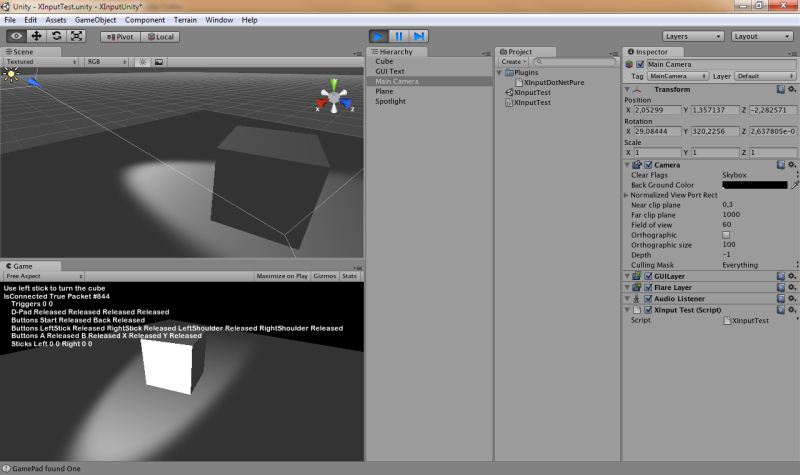
* Download the latest `XInputDotNet.unityPackage` from the [releases tab](https://github.com/speps/XInputDotNet/releases)
* Open the menu Assets > Import Package > Custom Package and select the package you just downloaded
* See XInputTestCS.cs for a basic usage example
### Building errors
#### error CS1704: An assembly with the same name `XInputDotNetPure' has already been imported.
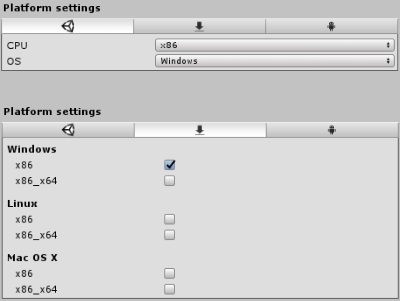
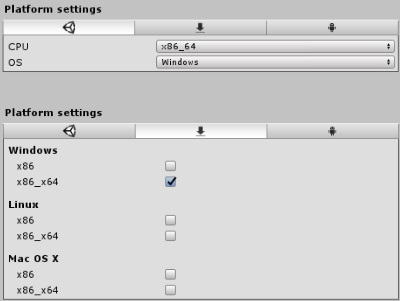
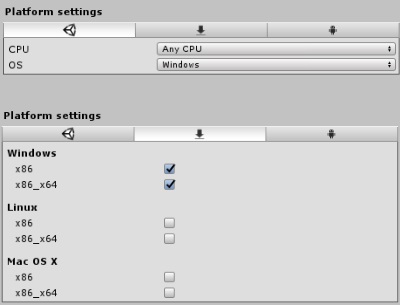
If you get this error, or a similar one, make sure the settings for each file matches the settings below.
For `Plugins\x86\XInputInterface.dll`
For `Plugins\x86_64\XInputInterface.dll`
For `Plugins\XInputDotNetPure.dll`
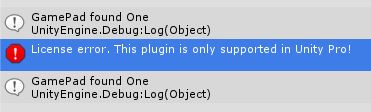
#### Special instructions for Free version of Unity
NOTE: this is needed only for Unity 4, Unity 5 seems to have the right behaviour
* Import the .unityPackage as described above
* Copy `[Project Folder]\Assets\Plugins\x86\XInputInterface.dll` to `[Project Folder]\XInputInterface.dll`
* **Making a Build does NOT require to copy `XInputInterface.dll` in the same folder the your game .exe file**
**NOTE** : you may see this error message but it should still work as expected, the message won't appear in a Build
### Notes
* Under Windows XP, you'll need special drivers for your Xbox 360 Controller. You can find them at this address : [XBox 360 Controller for Windows Software](http://www.microsoft.com/en-us/download/details.aspx?id=34001)
* You'll need the latest DirectX SDK to compile it, the binaries were built with the June 2010 version.