https://github.com/spimy/csc1024-assignment
Code for Programming Principles Group Assignment
https://github.com/spimy/csc1024-assignment
Last synced: 9 months ago
JSON representation
Code for Programming Principles Group Assignment
- Host: GitHub
- URL: https://github.com/spimy/csc1024-assignment
- Owner: Spimy
- Archived: true
- Created: 2023-11-08T14:52:40.000Z (over 2 years ago)
- Default Branch: main
- Last Pushed: 2023-12-10T07:14:45.000Z (over 2 years ago)
- Last Synced: 2024-12-17T19:42:43.592Z (over 1 year ago)
- Language: Python
- Size: 382 KB
- Stars: 2
- Watchers: 2
- Forks: 1
- Open Issues: 0
-
Metadata Files:
- Readme: README.md
Awesome Lists containing this project
README
# CSC1024 - Assignment
Development of A Personal Book Management System using Python
## Table of Contents
- [CSC1024 - Assignment](#csc1024---assignment)
- [Table of Contents](#table-of-contents)
- [Getting Started](#getting-started)
- [Cloning the Repo](#cloning-the-repo)
- [Creating a New Branch](#creating-a-new-branch)
- [Switching Back to Main Branch](#switching-back-to-main-branch)
- [Opening a Pull Request (PR)](#opening-a-pull-request--pr-)
- [Comments](#comments)
- [Code Styling](#code-styling)
- [Error Handling](#error-handling)
- [Task Delegation](#task-delegation)
## Getting Started
To start, make sure you have [Git](https://git-scm.com/) installed on your computer. You do **not** need to install the GitHub Desktop app.
### Cloning the Repo
Find a suitable folder you want your project in and clone the repo by running: `git clone https://github.com/Spimy/CSC1024-Assignment.git`. This will download the repo to your computer.
### Creating a New Branch
**IMPORTANT:** Please, before adding new features to the project, please make sure to create a new branch for that feature! This is to ensure there are no conflicts when merging code while working in a group.
For more information on what a branch is, please check the [official Git documentation](https://git-scm.com/docs/user-manual#what-is-a-branch).
You may use the Git integration in your preferred IDE to create the new branch or you may use the Git CLI to create a new branch. I am not familiar with PyCharm so I cannot add instructions for it.
Create a New Branch via the Git CLI: `git checkout -b `
Create a New Branch via VSCode
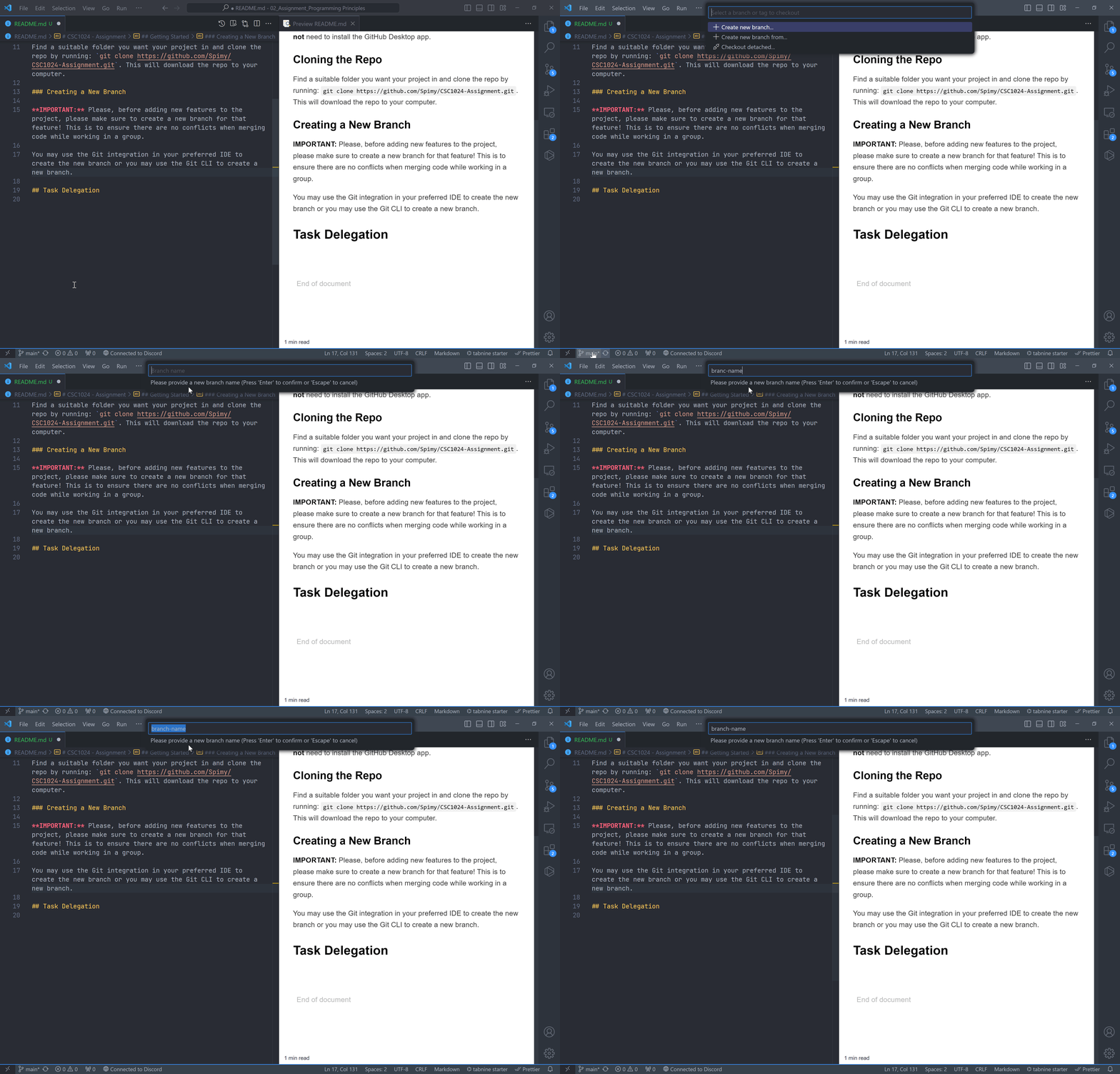
In case anyone is working on the same branch as you to help you out on your task, please make sure to **always** push your code to the repo before calling it a day. Similarly, before you start working on your task again, **always** pull your code from the repo. This also applies to whoever is helping out on your task.
### Switching Back to Main Branch
Generally, you should only need to do this after you are done working on your own branch and after your branch has been merged with the main branch.
In VSCode, it is in the same menu as shown above. Just click the main branch and you would be switched to it.
In the Git CLI, run `git checkout main`.
### Opening a Pull Request (PR)
Once you are done working on your branch to add the feature required, please open a pull request to merge the branch with the main branch. Please message the WhatsApp group when you do. The code will first be reviewed by everyone before merging to ensure consistency, readability and to find potential issues it may cause after merging.
You open the pull request directly at the GitHub repository.
## Comments
Please comment on what your code does as much as possible so that it is documented and can be easily understood. This will ultimately help the entire group during the presentation phase.
## Code Styling
Please follow [PEP8](https://peps.python.org/pep-0008/) syntax styling guidelines. In VSCode, you can install the [Python extension](https://marketplace.visualstudio.com/items?itemName=ms-python.python) for better syntax highlighting experience and enable 'Format on Save' in your VSCode settings using [autopep8](https://marketplace.visualstudio.com/items?itemName=ms-python.autopep8) as the formatter. It should also automatically highlight syntax errors for you.
Once again, I am not able to provide any instructions for PyCharm.
## Error Handling
This goes without saying but make sure you handle all the errors possible. For e.g., converting a string to a number can throw a `ValueError` exception in Python, make sure you surround it in a try except block.
Your `except` block **should** specify what error it is handling. If multiple errors can occur, multiple `except` blocks is possible in Python:
```python
my_list = []
try:
# Convert input to an integer
num = int(input('Enter a number: '))
# Add integer to list
my_list.append(num)
# Try accessing list item at index 1 (causes IndexError)
print(my_list[1])
except ValueError:
# Handle the error where input could not convert to an interger
print('Input was not a number!')
except IndexError as err:
# Print out the default error message for index error without crashing
print(str(err))
```
## Task Delegation
Please view the [Projects](https://github.com/Spimy/CSC1024-Assignment/projects) page. Your task has been delegated there in the TODO board.
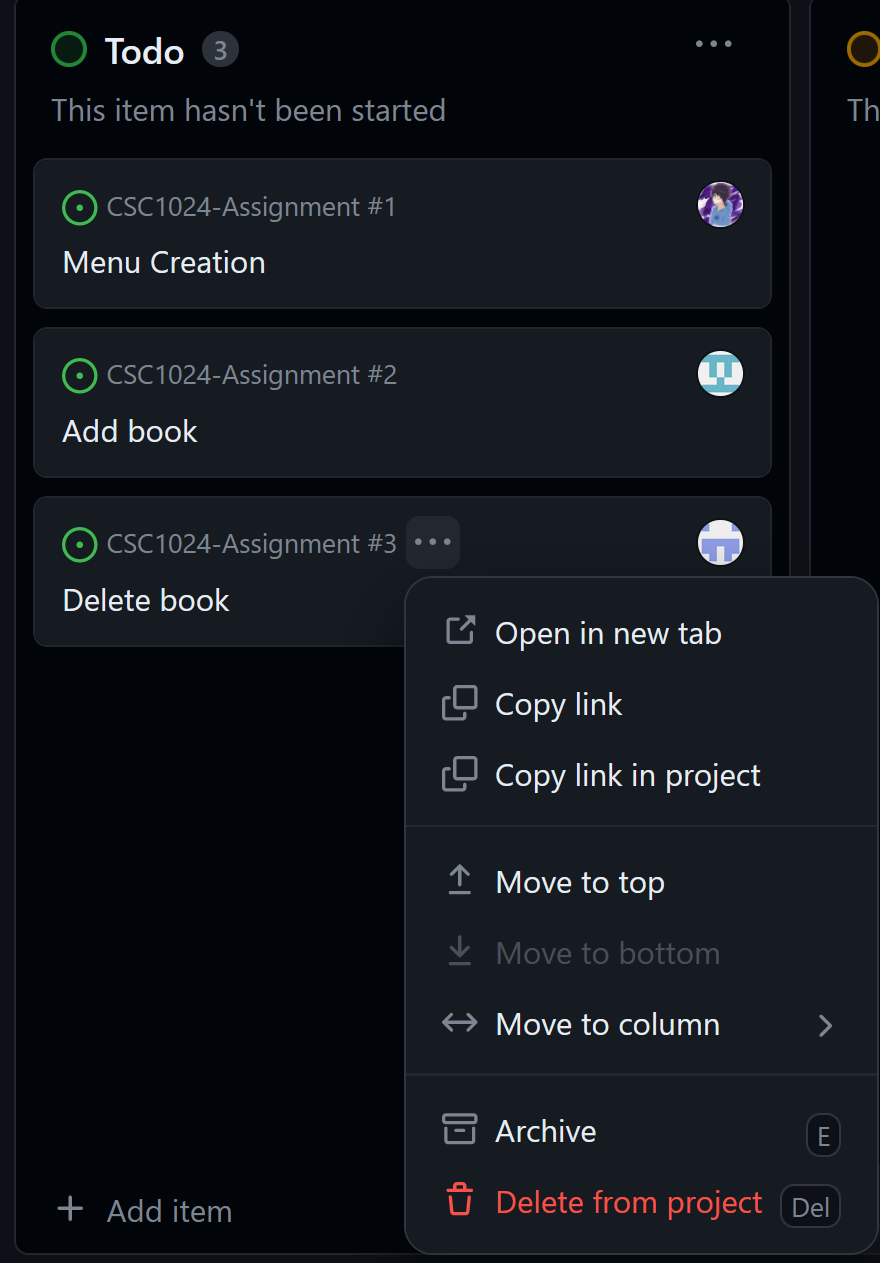
If you are working on the task, please drag it from 'Todo' to 'In Progress'. Similarly, if you are done, drag it to 'Done'.
Click the 3 dots to open a menu and click on 'Open in new tab' to view your task in more detail: