https://github.com/splunk/splunkrepl
An awesome little REPL for issuing SPLUNK queries
https://github.com/splunk/splunkrepl
Last synced: 10 months ago
JSON representation
An awesome little REPL for issuing SPLUNK queries
- Host: GitHub
- URL: https://github.com/splunk/splunkrepl
- Owner: splunk
- License: apache-2.0
- Created: 2015-07-30T20:55:36.000Z (almost 11 years ago)
- Default Branch: master
- Last Pushed: 2015-12-18T02:04:35.000Z (over 10 years ago)
- Last Synced: 2025-09-04T12:56:16.146Z (11 months ago)
- Language: JavaScript
- Size: 3.87 MB
- Stars: 28
- Watchers: 30
- Forks: 13
- Open Issues: 6
-
Metadata Files:
- Readme: README.md
- Changelog: changelog.md
- License: LICENSE
Awesome Lists containing this project
README
# splunkrepl
An awesome little REPL for issuing Splunk queries
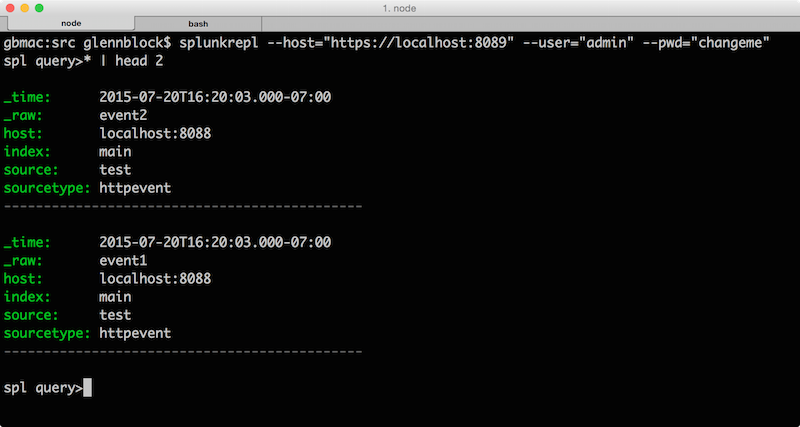
## What is it?
splunkrepl is an interactive tool for issuing Splunk queries right from the terminal!
## Installing
`npm install -g splunkrepl`
## How to use it
splunkrepl works both in an interactive REPL mode and as a non-interactive executor.
### REPL
* Run "splunkrepl" at the terminal, passing in optional params of `--host`, `--user` and `--pwd`.
#### REPL Commands
All REPL commands use positional arguments.
##### :connect
Allows you to connect to a Splunk instance.
Argument | Description
-------- | --------------
host | Optional. Specifies the host to connect to. Will default to `host` from config.
user | Optional. Specifies the user. Will default to `user` from config.
pwd | Optional. Specifies the password. Will default to `pwd` from config.
*Examples*
* `:connect localhost admin changeme`
* `:connect https://localhost:8089 admin changeme`
* `:connect https://localhost:8089`
##### :web
Opens the Splunk Web UI and sends a query
Argument | Description
-------- | --------------
query | Optional. Specifies the query to send to Splunk. Will default to the last query issued.
*Example*
* `:web * | head 10`
##### :set
Stores a command in memory using the specified key. splunkrepl allows you to store an arbitrary number of commands which you can retrieve for later use. The commands are automatically loaded on startup from the `.splunkrepl` file in the home directory.
Argument | Description
-------- | --------------
key | Required. Specifies the key. Must not contain spaces.
value | Required. Specifies the value. Anything after the key will be taken verbatim
Note: The keys `host`,`user`,`pwd`,`port` and `webport` set the default connection parameters as well as the port to use for the `:web` command.
*Examples*
* `:set myconn :connect localhost server1 admin changeme`
* `:set head10 * | head 10`
* `:set main_sourcetypes * | stats count by sourcetype, source`
##### :get
Gets the value and immediately executes it as if the user typed it in.
Argument | Description
-------- | --------------
key | Required. Specifies the key to retrieve. Must not contain spaces.
*Example*
Using head10 from the previous example
`:get head10`
will result in the query `* | head 10` immediately being executed.
##### :list
Lists all key/values from configuration.
##### :save
Saves all commands to the `.splunkrepl` file. If you do not save changes they will be discarded when you exit the REPL.
### Non-Interactive
* Run "splunkrepl" at the terminal, passing in required params of `--host`, `--user` and `--pwd` and also passing `--query`
## Command arguments
Argument | Description
-------- | -----------------
--host | Splunk host to connect to including the port, ex. "https://localhost:8089"
--user | Splunk user to connect with
--pwd | Password for the Splunk Account
--query | SPL query to immediately execute. Runs in non-interactive mode
--verbose | Return as much detail as possible within each event (see below)
--json | Send all output in JSON
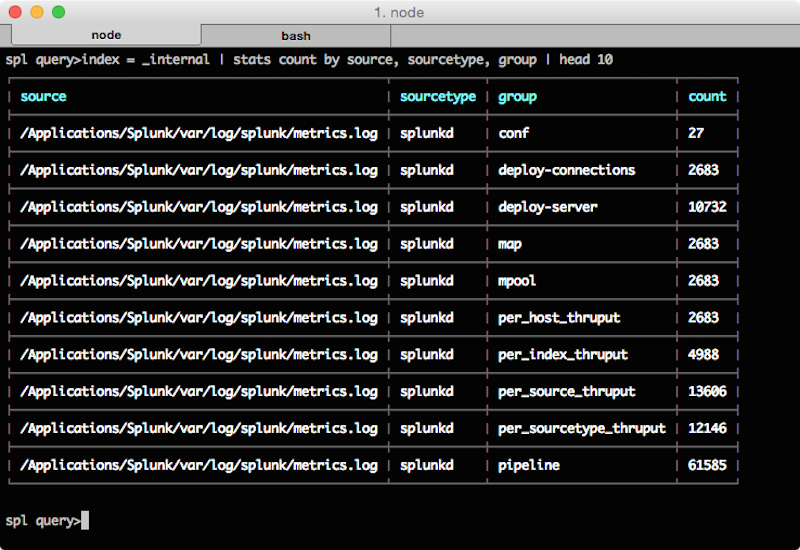
## Tables
When the results that are returned are calculated (do not have _raw) such as from stats or table, then a table view will be displayed:
## Verbose mode
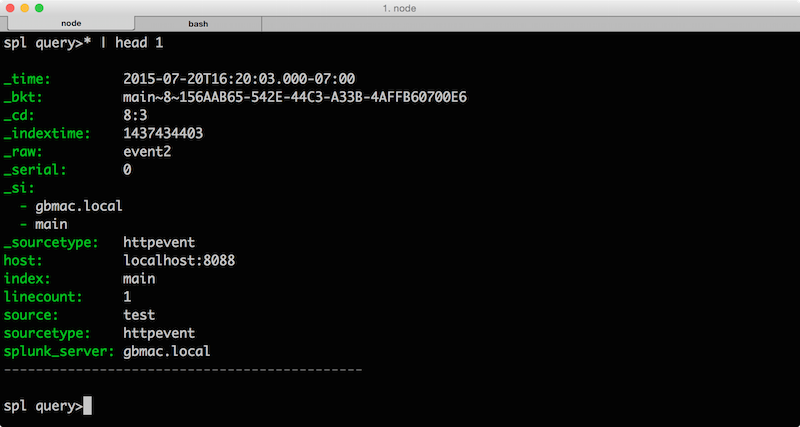
By default when queries run, splunkrepl will return only `_time`, `source`, `sourcetype`, `host` and `_raw` (if available) fields. To get all the details specify `--verbose` and you will get output similar to below:
## License
splunkrepl is licensed under the Apache License 2.0. Details can be found in the file LICENSE.
## Release notes
Check the change log [here](https://github.com/glennblock/splunkrepl/blob/master/changelog.md)