https://github.com/splware/esproc_reporting
A middleware for report data preparation that effiently manages endless report development.
https://github.com/splware/esproc_reporting
Last synced: about 1 year ago
JSON representation
A middleware for report data preparation that effiently manages endless report development.
- Host: GitHub
- URL: https://github.com/splware/esproc_reporting
- Owner: SPLWare
- Created: 2024-12-25T01:31:50.000Z (over 1 year ago)
- Default Branch: main
- Last Pushed: 2025-02-20T11:31:13.000Z (over 1 year ago)
- Last Synced: 2025-02-20T12:29:20.605Z (over 1 year ago)
- Homepage: https://www.esproc.com/esproc-for-Reporting/
- Size: 9.77 KB
- Stars: 3
- Watchers: 1
- Forks: 2
- Open Issues: 1
-
Metadata Files:
- Readme: README.md
Awesome Lists containing this project
README




esProc Reporting Solution
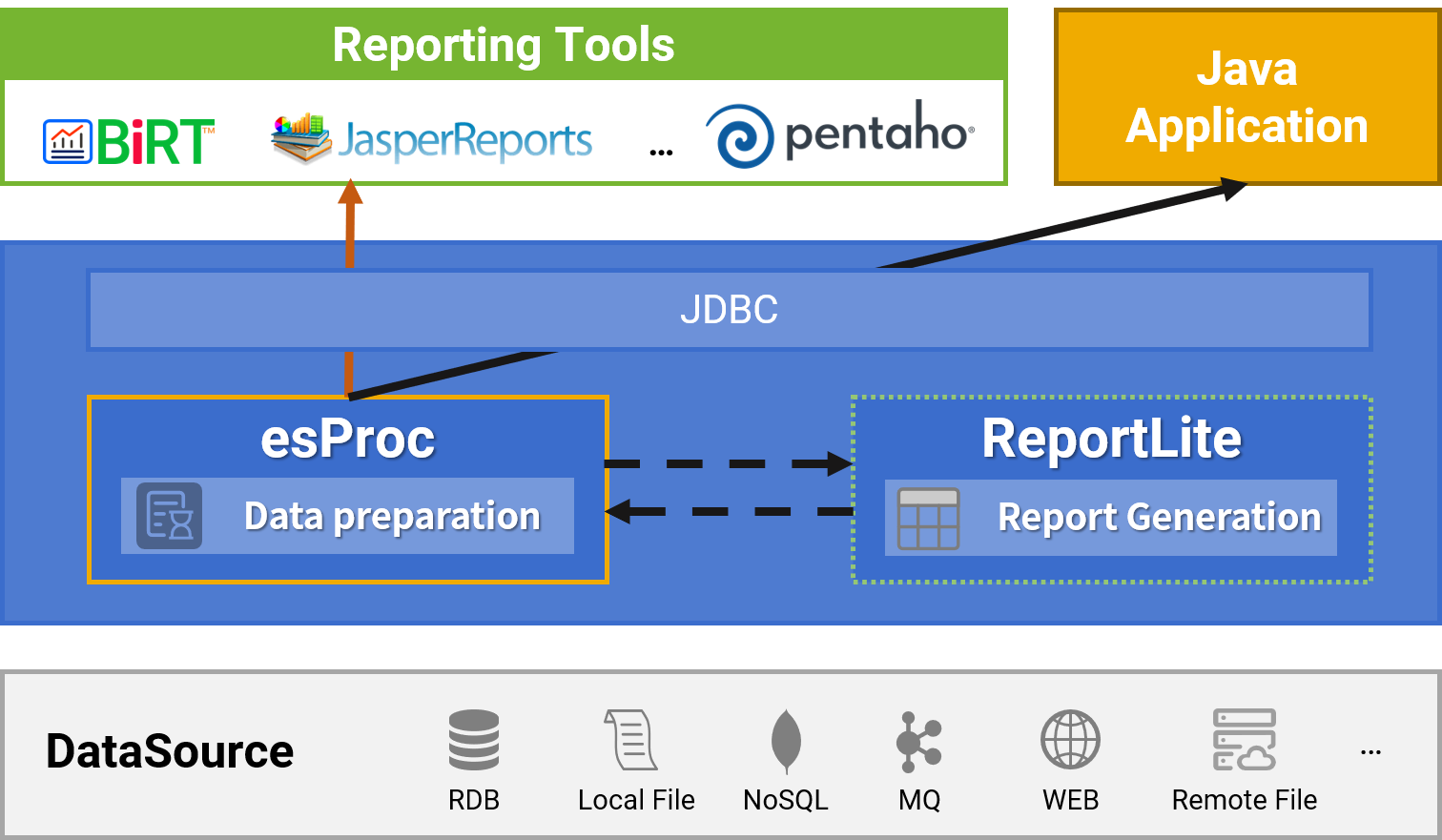
Technical Architecture
---
Seamless integration with reporting tools/Java applications

esProcPure Java
✓ Lightweight
✓ Embedded, no independent server
✓ JVM,JDK1.8 or above
✓ VM/Container/Android
---
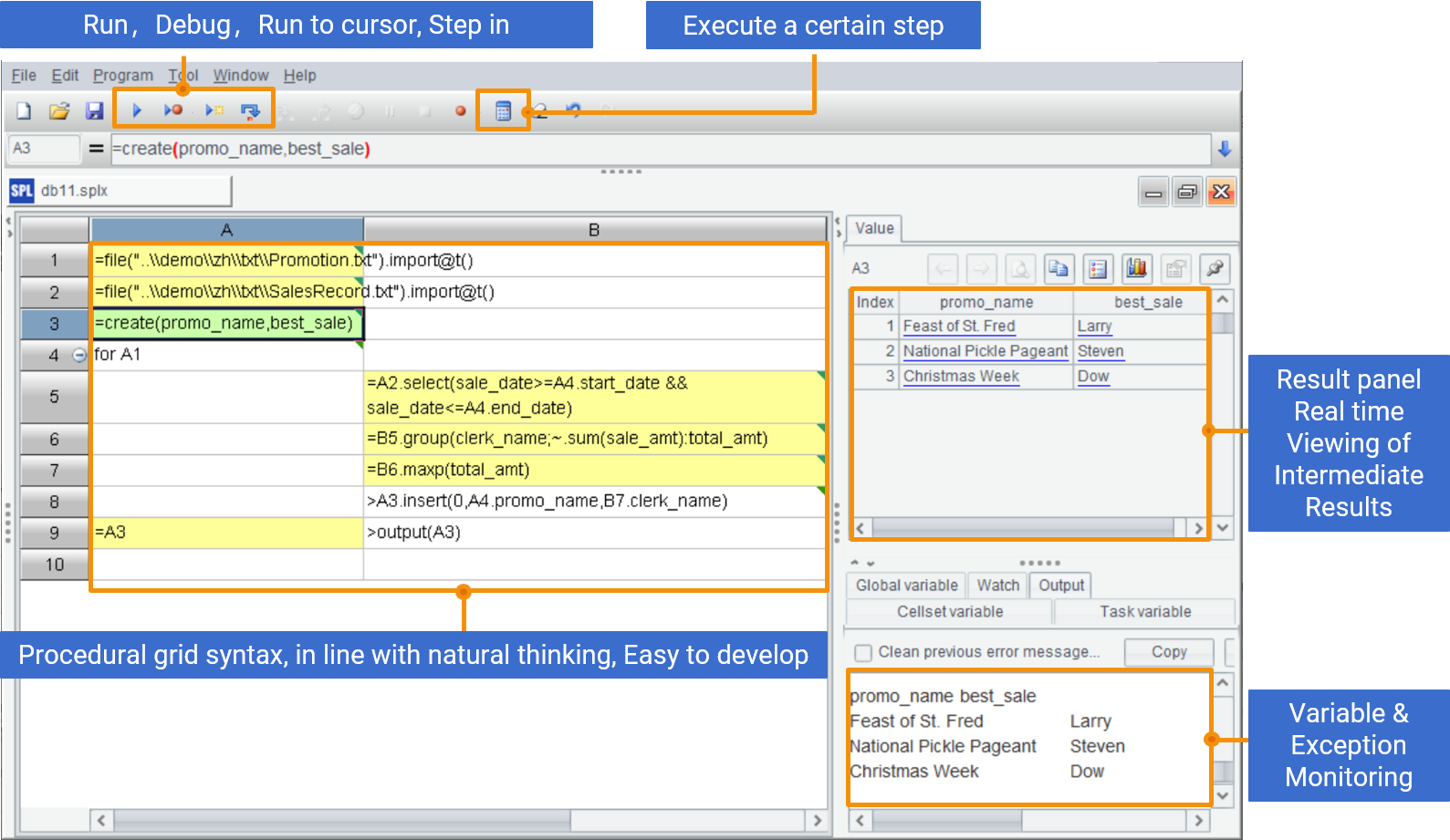
Development Efficiency Improvement
Easy to develop and debug grid programming
---
Simplify complex SQL of report
> **Report objective: To query the status of major customers and orders that account for half of the total sales revenue**
#### SQL
```sql
SELECT CUSTOMER, AMOUNT, SUM_AMOUNT
FROM (SELECT CUSTOMER, AMOUNT,
SUM(AMOUNT) OVER(ORDER BY AMOUNT DESC) SUM_AMOUNT
FROM (SELECT CUSTOMER, SUM(AMOUNT) AMOUNT
FROM ORDERS GROUP BY CUSTOMER))
WHERE 2 * SUM_AMOUNT < (SELECT SUM(AMOUNT) TOTAL FROM ORDERS)
```
#### SPL
| | A | B |
| --- | --- | --- |
| 1 | =db.query("select customer,amount from orders order by amount desc") ||
| 2 | =A1.sum(amount)/2 | =0 |
| 3 | =A1.pselect((B1+=amount)>=A2) | return A1.to(A3) |
---
More complex SQL
> **Report objective: To track the retention of new users for the next day on a daily basis**
#### SQL
```sql
WITH first_login AS (
SELECT userid, MIN(TRUNC(ts)) AS first_login_date FROM login_data GROUP BY userid),
next_day_login AS (
SELECT DISTINCT(fl.userid), fl.first_login_date, TRUNC(ld.ts) AS next_day_login_date
FROM first_login fl LEFT JOIN login_data ld ON fl.userid = ld.userid WHERE TRUNC(ld.ts) = fl.first_login_date + 1),
day_new_users AS (
SELECT first_login_date,COUNT(*) AS new_user_num FROM first_login GROUP BY first_login_date),
next_new_users AS (
SELECT next_day_login_date, COUNT(*) AS next_user_num FROM next_day_login GROUP BY next_day_login_date),
all_date AS (
SELECT DISTINCT(TRUNC(ts)) AS login_date FROM login_data)
SELECT all_date.login_date+1 AS dt,dn. new_user_num,nn. next_user_num,
(CASE WHEN nn. next_day_login_date IS NULL THEN 0 ELSE nn.next_user_num END)/dn.new_user_num AS ret_rate
FROM all_date JOIN day_new_users dn ON all_date.login_date=dn.first_login_date
LEFT JOIN next_new_users nn ON dn.first_login_date+1=nn. next_day_login_date
ORDER BY all_date.login_date;
```
#### SPL
| | A |
| --- | --- |
| 1 | =file("login_data.csv").import@tc() |
| 2 | =A1.group(userid;fst=date(ts):fst\_login,~.(date(ts)).pos(fst+1)>0:w\_sec_login) |
| 3 | =A2.groups(fst_login+1:dt;count(w_sec_login)/count(1):ret_rate) |
---
Enrich report formats
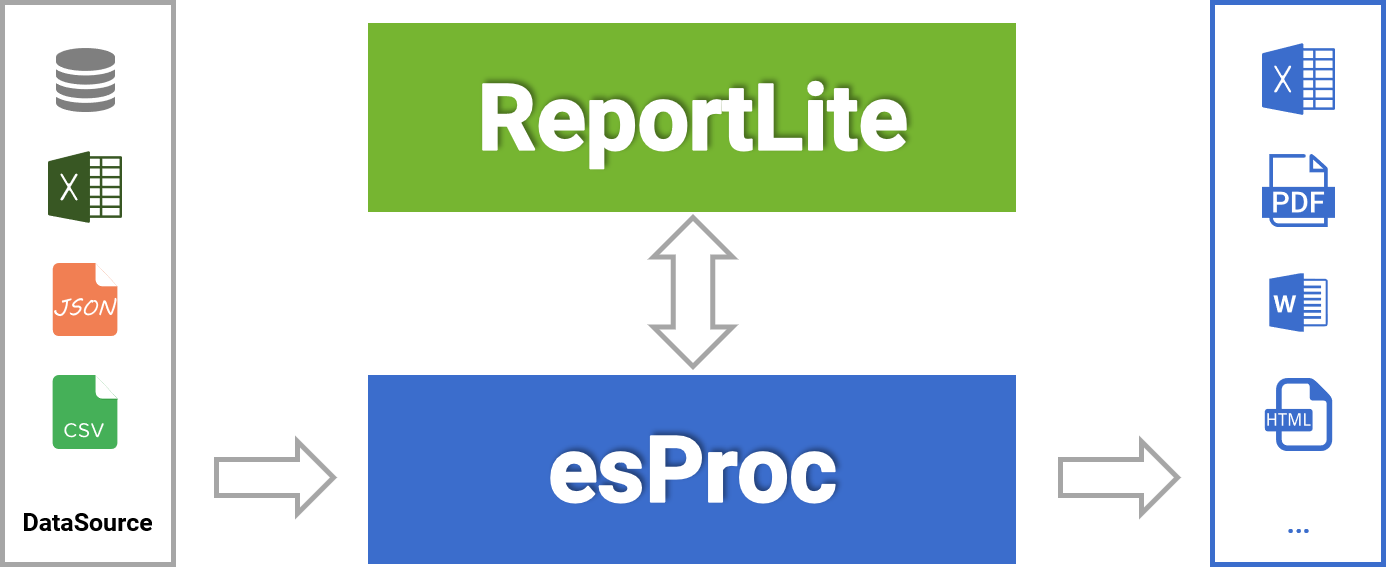
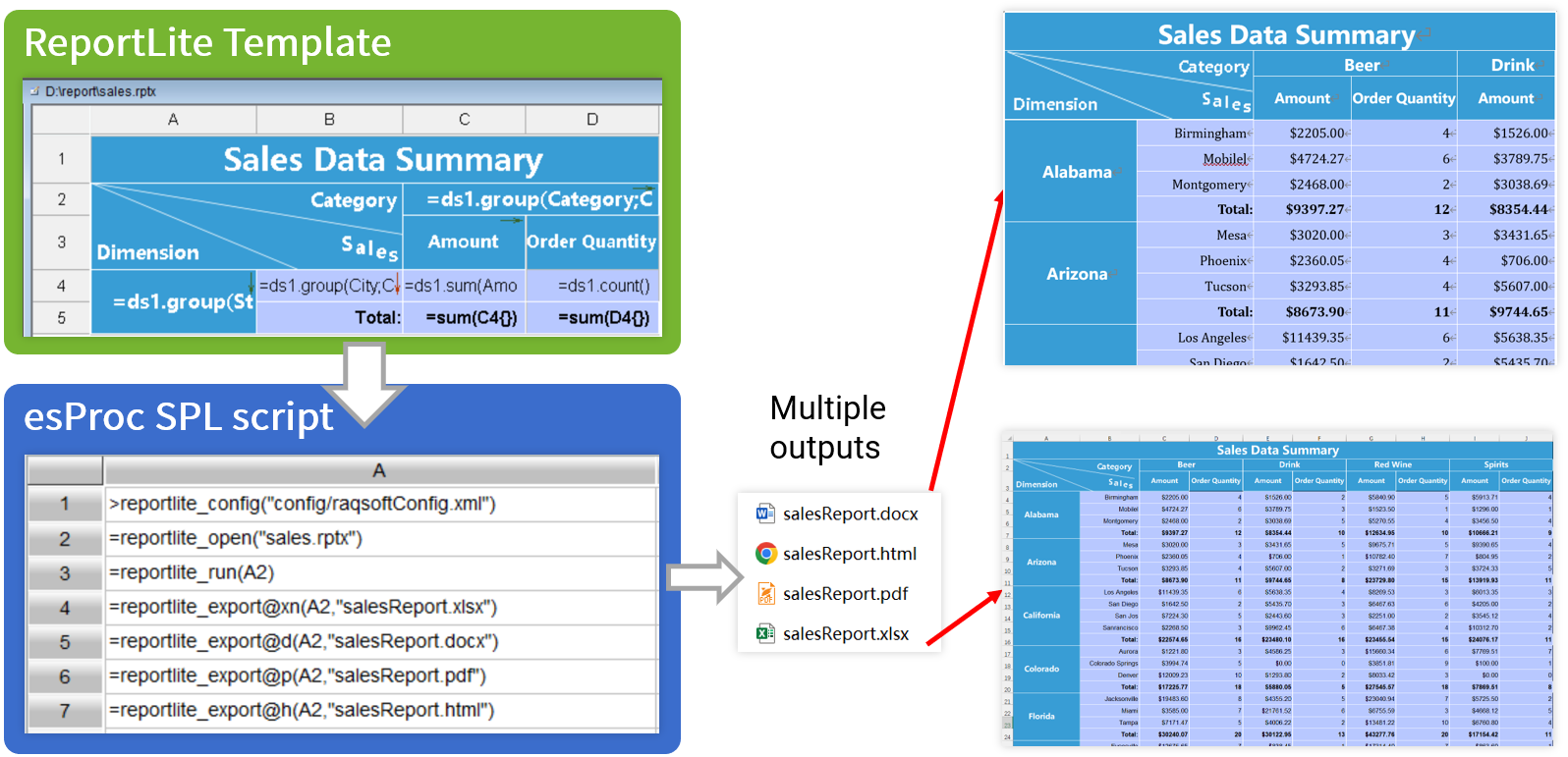
Creating complex reports is simpler than BIRT/JasperReport
---
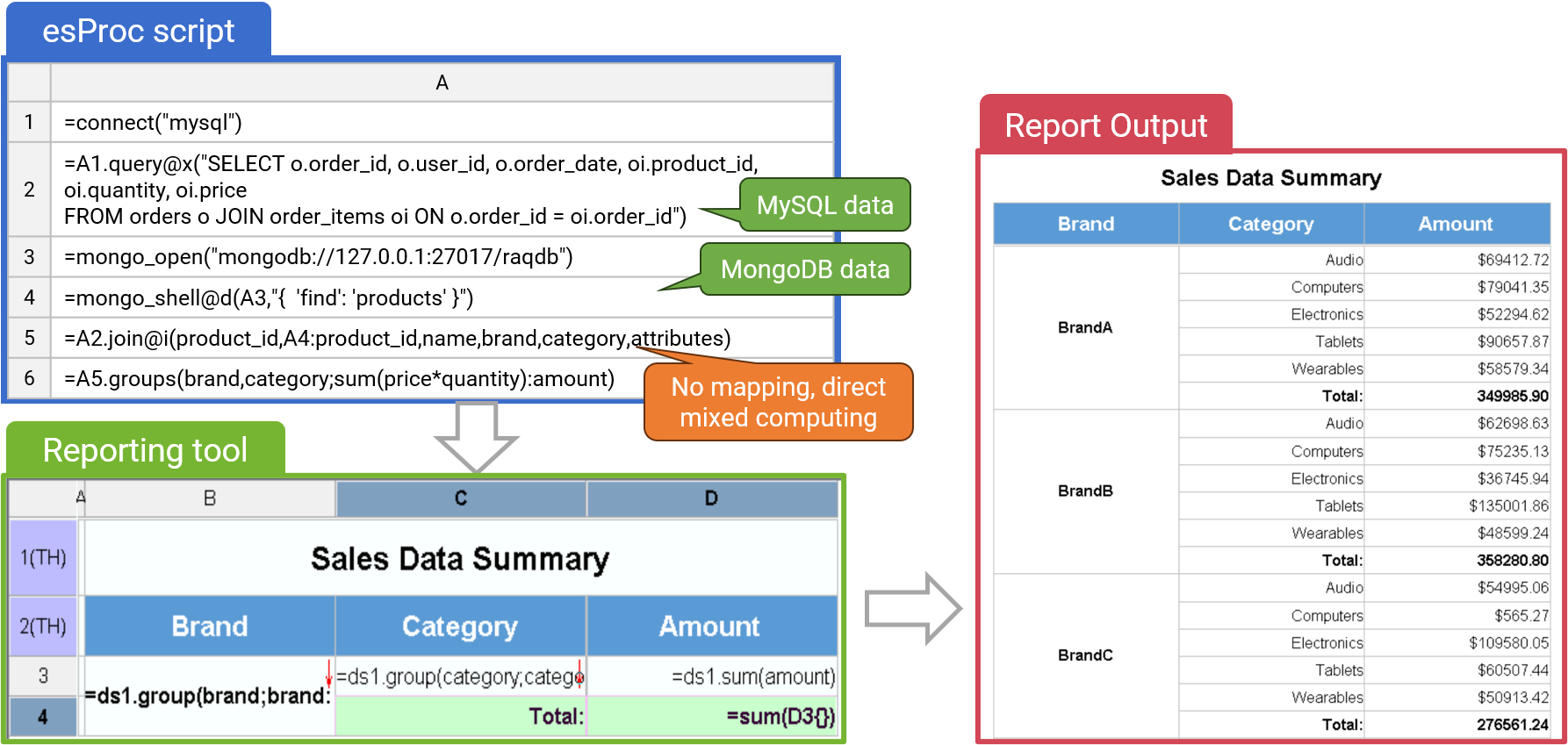
Multi Data Source Computing
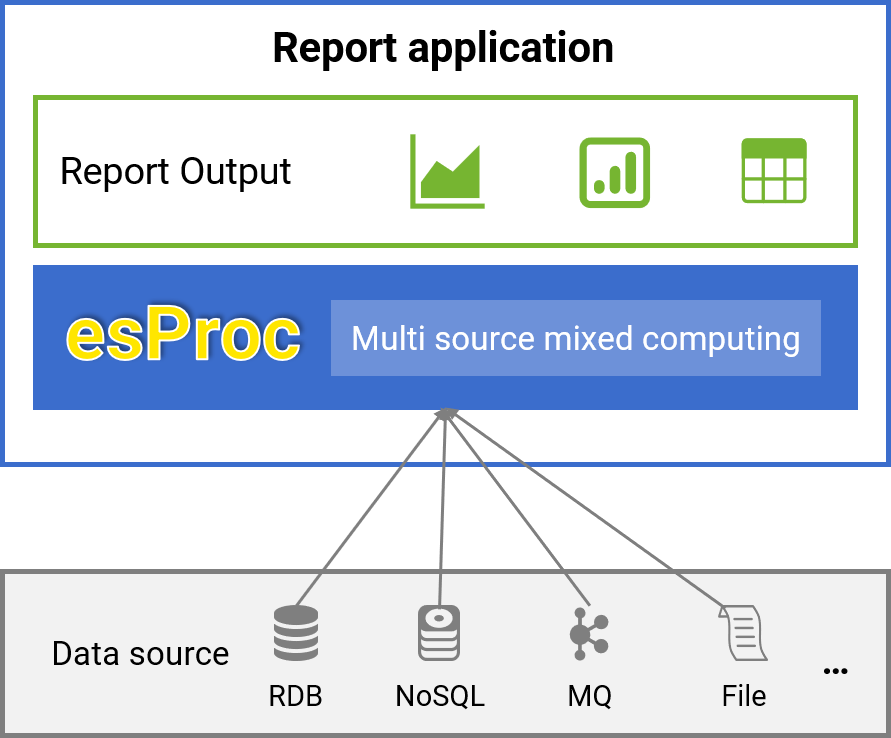
Multi data source report
✓ Access data sources directly through the native interface, without predefined mapping, while preserving their features
✓ Lightweight, avoiding heavy logical data warehouses
---
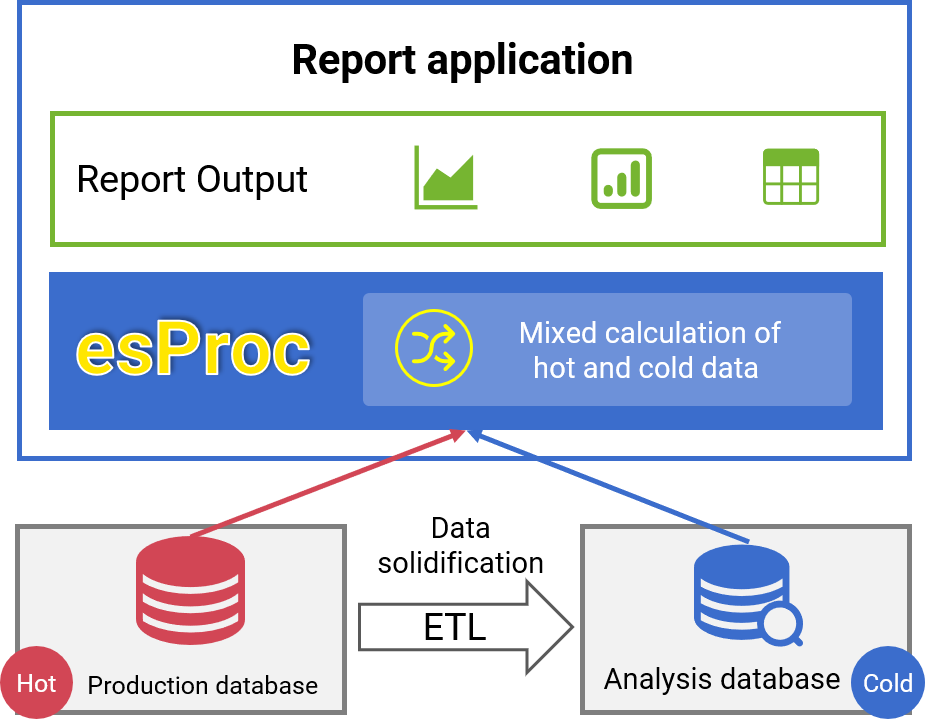
Application of multi source mixed computing - Real-time report
✓ AHistorical cold data is calculated and read from the AP database
✓ Transaction hot data is read from the TP database in real time
✓ Mixed computing to implement real-time report of whole dat
---
Cross database migration
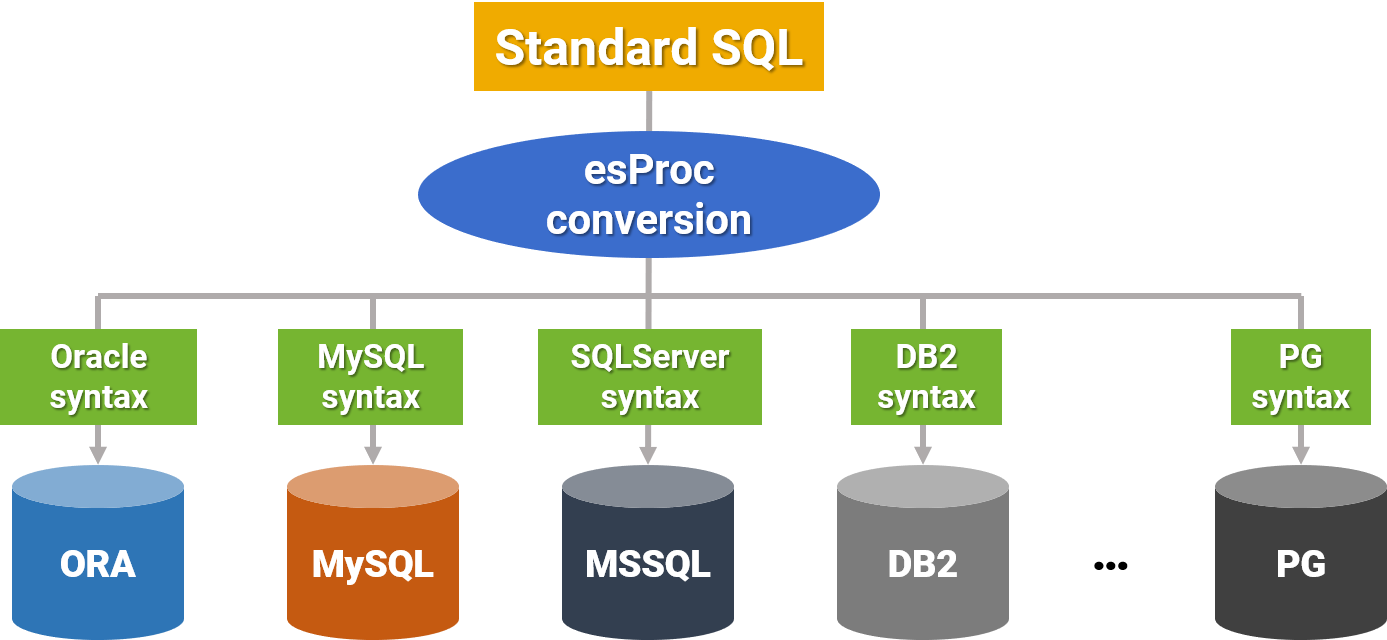
One SQL statement that works across all databases, allowing migration without altering the report.
---
Cross database migration – Conversion example
| | |
| --- | --- |
| **SQL** | SELECT EID, NAME, BIRTHDAY, **ADDMONTHS(BIRTHDAY,10)** DAY10 FROM EMP |
| | **⇩ esProc conversion ⇩** |
| **ORACLE** | SELECT EID, NAME, BIRTHDAY, **BIRTHDAY+NUMTOYMINTERVAL(10,'MONTH')** DAY10 FROM EMP|
| **SQLSVR** | SELECT EID, NAME, BIRTHDAY, **DATEADD(MM,10,BIRTHDAY)** DAY10 FROM EMP|
| **DB2** | SELECT EID, NAME, BIRTHDAY, **BIRTHDAY+10 MONTHS** DAY10 FROM EMP|
| **MYSQL** | SELECT EID, NAME, BIRTHDAY, **BIRTHDAY+INTERVAL 10 MONTH** DAY10 FROM EMP|
| **POSTGRES** | SELECT EID, NAME, BIRTHDAY, **BIRTHDAY+interval '10 months'** DAY10 FROM EMP|
| **TERADATA** | SELECT EID, NAME, BIRTHDAY, **ADD_MONTHS(BIRTHDAY, 10)** DAY10 FROM EMP|
---
The file data source
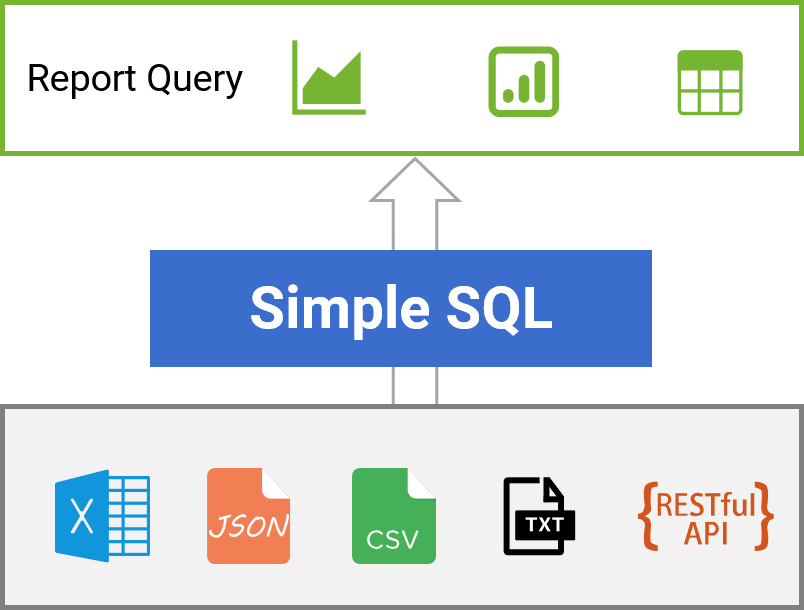

---
Architecture Optimization
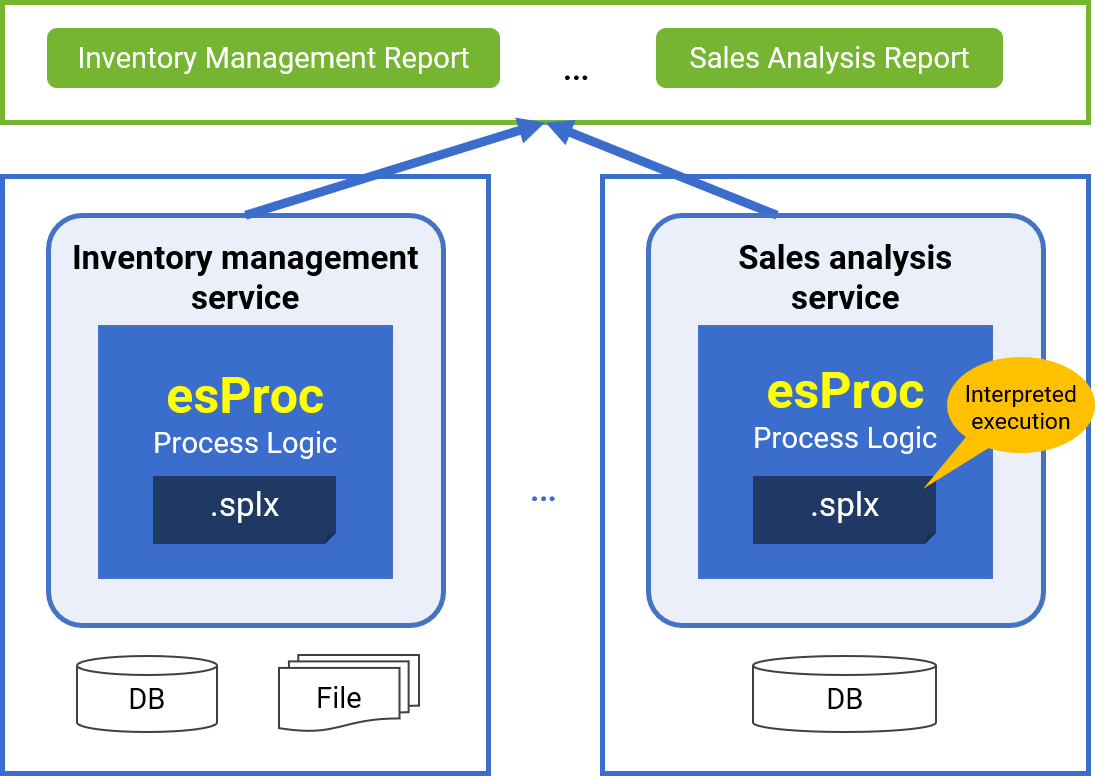
Report microservices
✓ "Report data sources are delivered as microservices, simplifying extension and migration
✓ esProc scripts are interpreted, enabling hot swapping by default
✓ Adapt to the ever-changing reporting business.
---
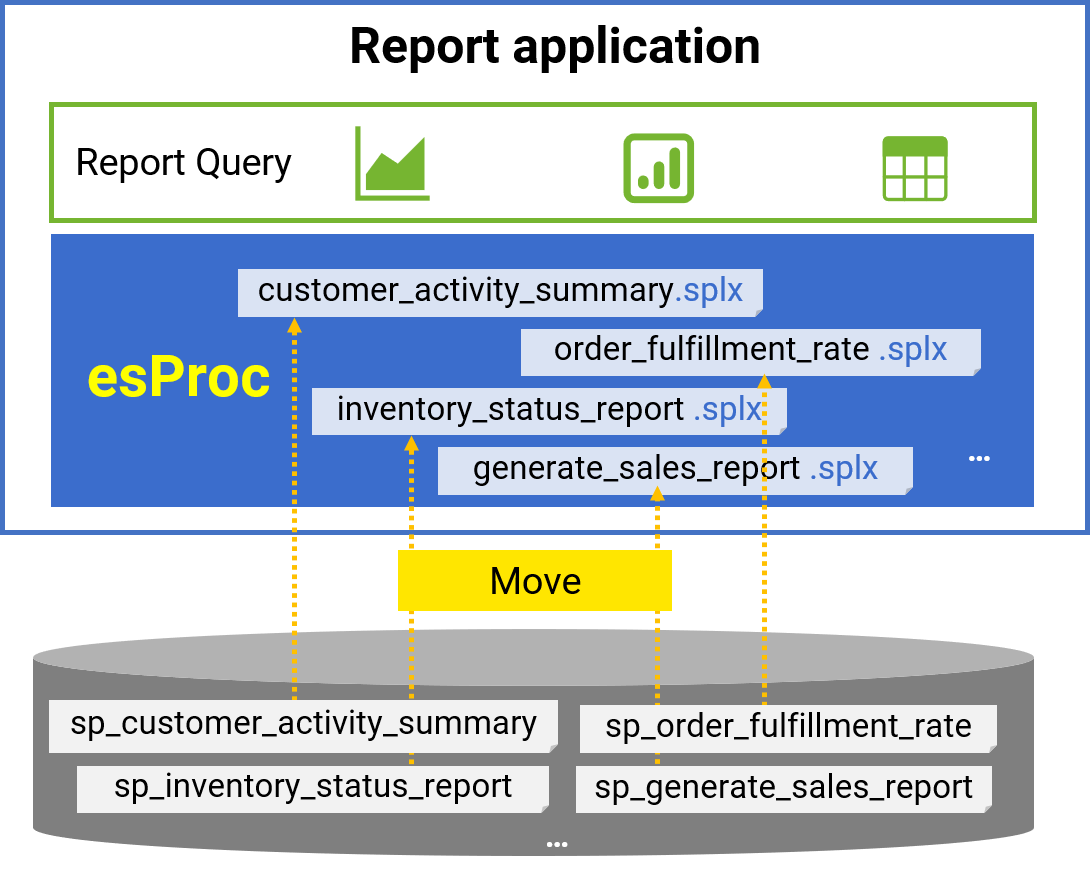
Replace stored procedures
✓ Move stored procedures outside the database, making them independent and easily migratable
✓ Reduce coupling between applications
✓ No need for compile privileges on stored procedures, enhancing security and reliability
---
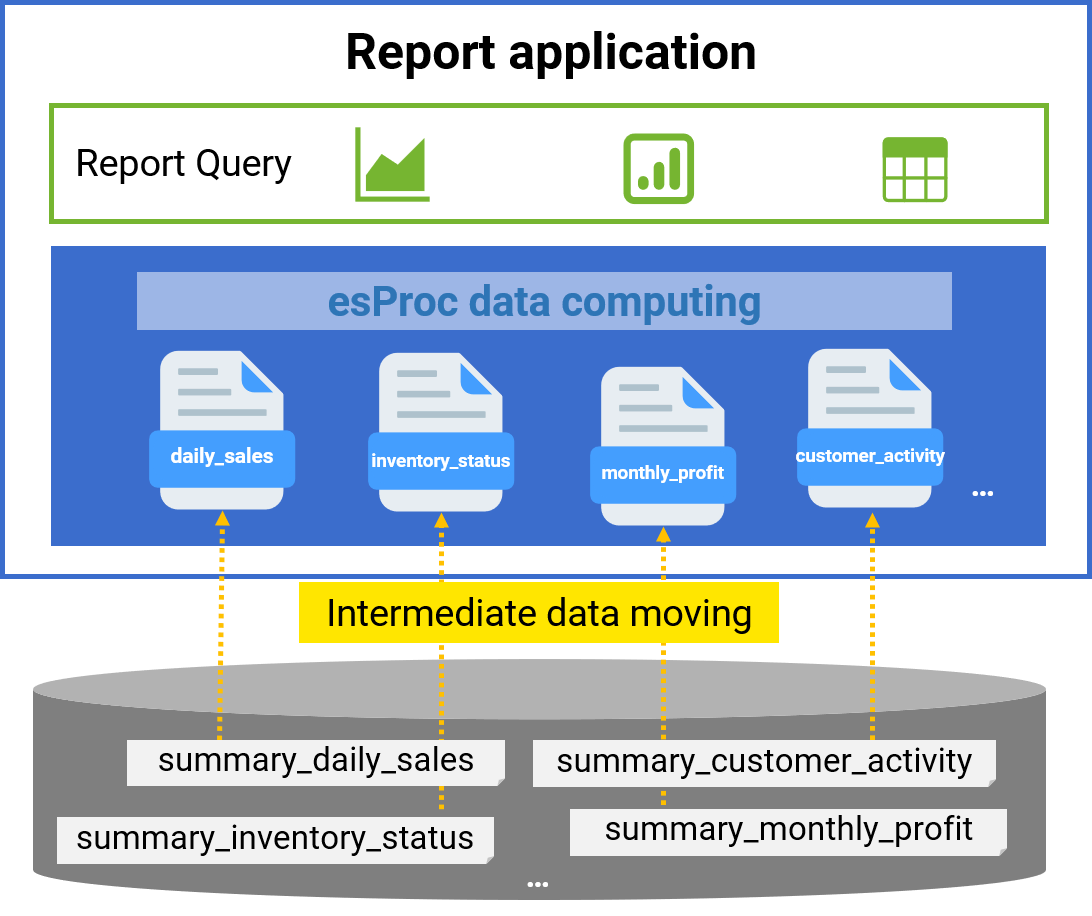
Eliminate intermediate tables in the database
✓ Move intermediate tables to files for storage and processing, easing the database load
✓ The tree-structured file system simplifies management and reduces coupling between applications
---
Performance Boosting
Multi threaded parallel data retrieval
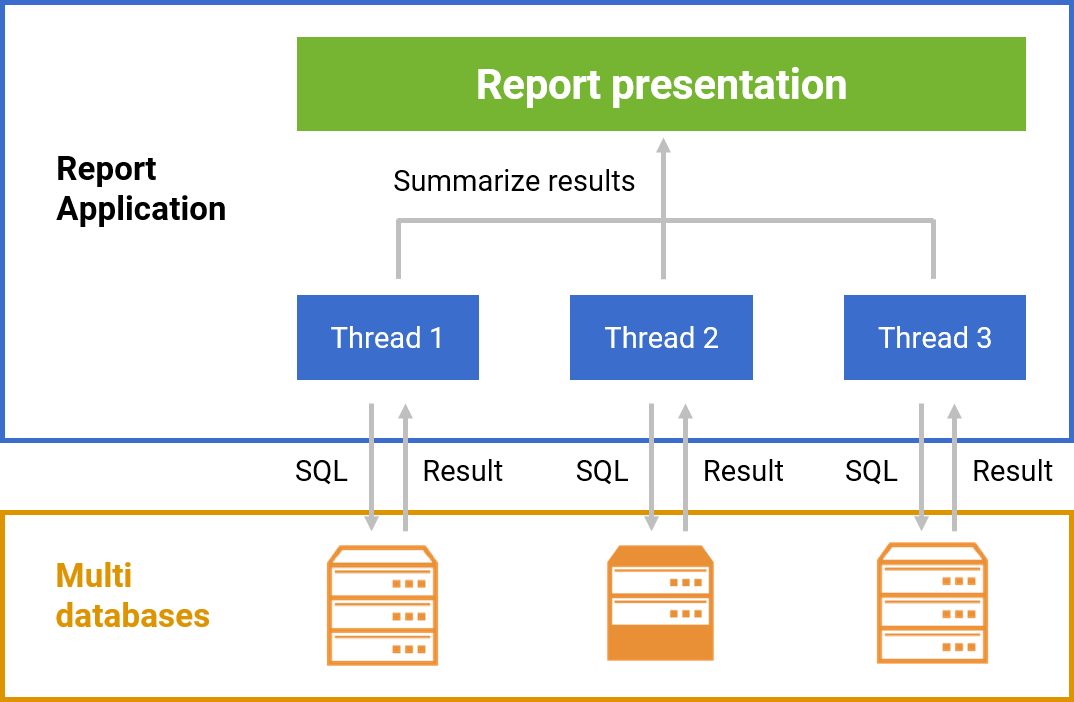
Multi threaded parallel data retrieval, compatible with both homogeneous and heterogeneous databases, boosts query performance
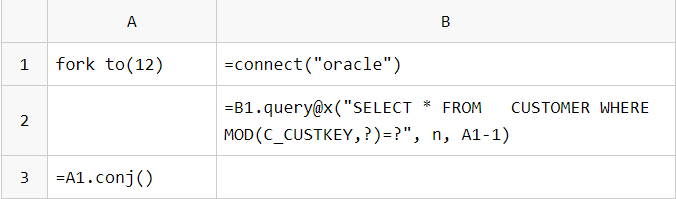
Single table parallel data retrieval:
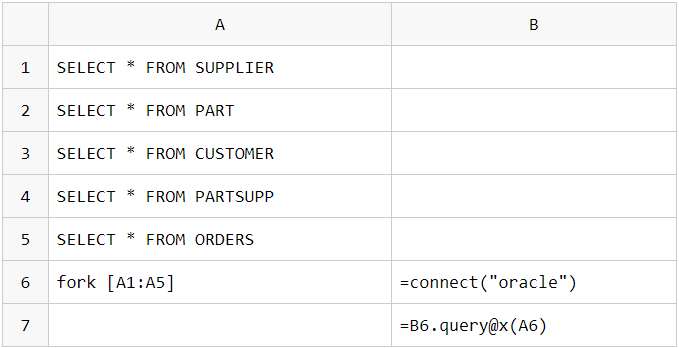
Parallel data retrieval from multiple tables (databases):
---
Simple Big Data and Parallel Computing
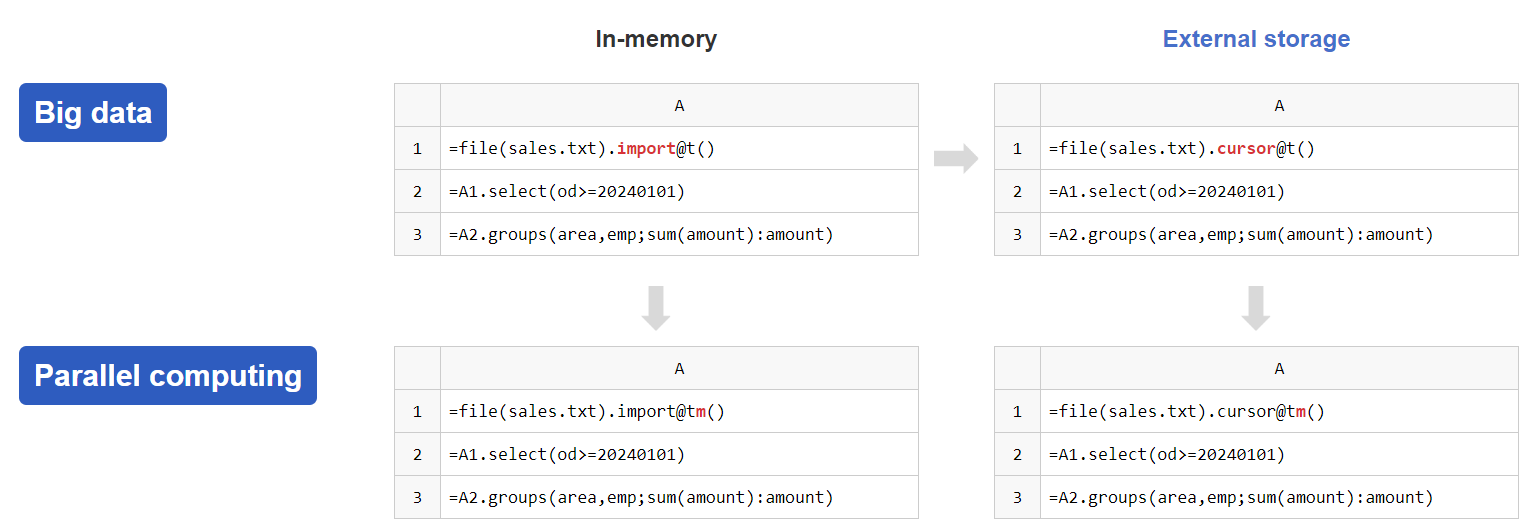
An option to enable parallelism can significantly enhance computing performance
---
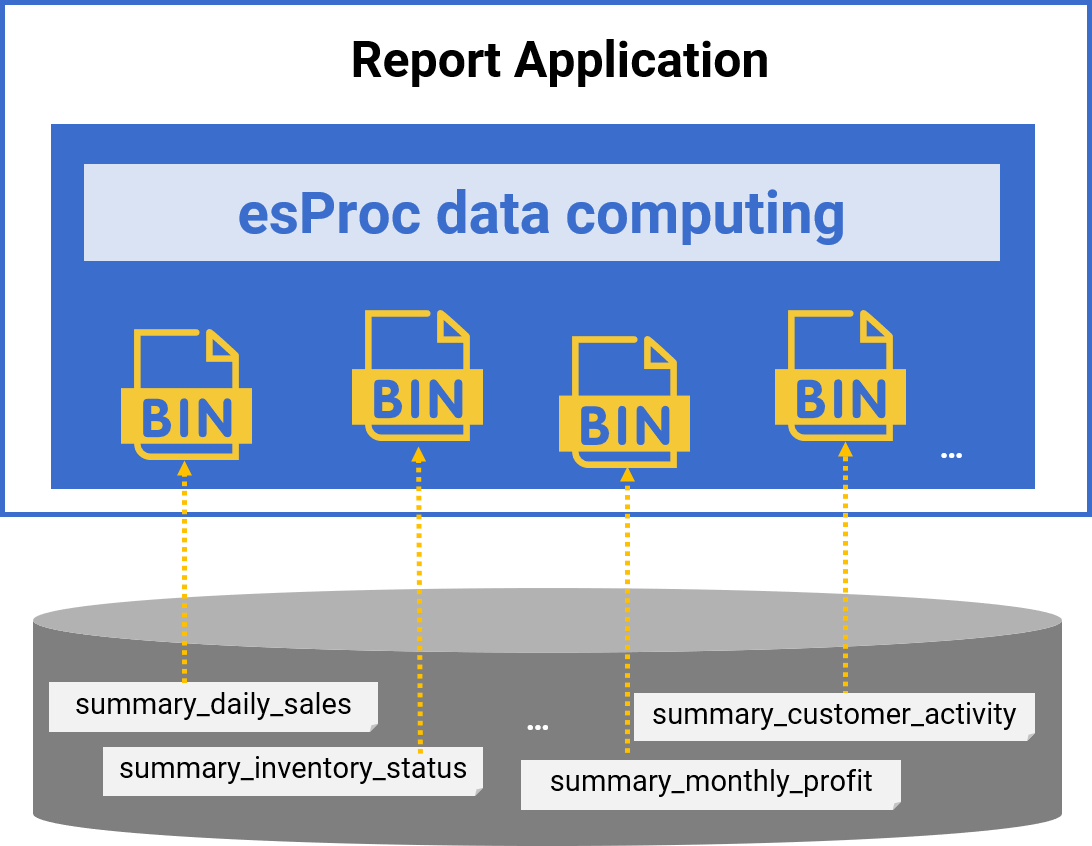
Local file data cache
✓ Faster file system IO
✓ Binary format does not require parsing
✓ High performance support: compression, columnar storage, indexing …
---
High performance algorithms
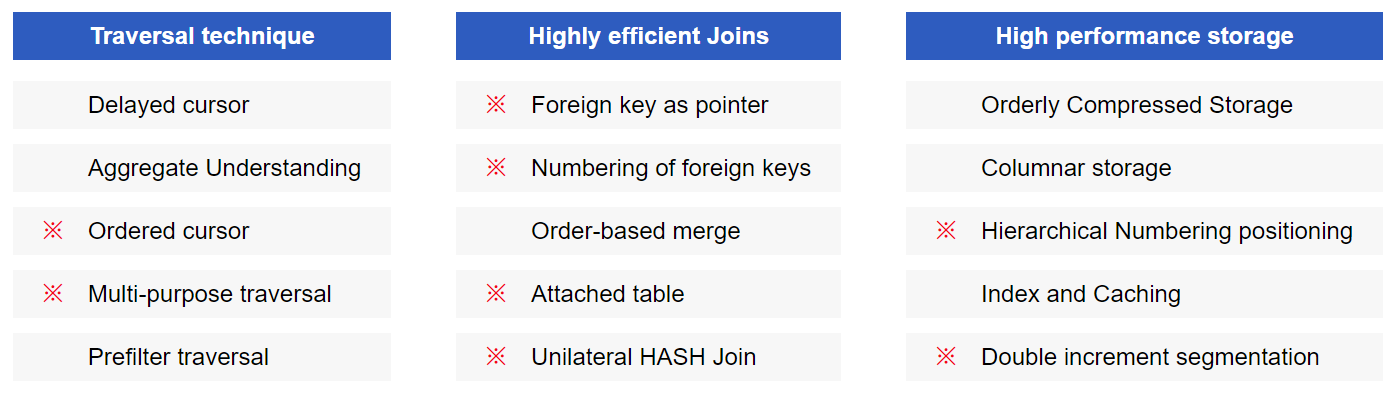
Improve the performance of report computation
---
# Resource
- [Download esProc SPL](https://www.esproc.com/download-esproc)
- [Community - c.esproc.com](https://c.esproc.com/)