https://github.com/spoonysimone/autoggplus
The best AutoGG mod for Hypixel out there!
https://github.com/spoonysimone/autoggplus
forge forge-mod hypixel minecraft minecraft-forge-mod minecraft-mod mod modrinth utility
Last synced: 3 months ago
JSON representation
The best AutoGG mod for Hypixel out there!
- Host: GitHub
- URL: https://github.com/spoonysimone/autoggplus
- Owner: SpoonySimone
- License: gpl-3.0
- Created: 2024-02-16T15:55:10.000Z (over 2 years ago)
- Default Branch: main
- Last Pushed: 2025-08-25T17:44:03.000Z (10 months ago)
- Last Synced: 2025-08-25T19:27:41.328Z (10 months ago)
- Topics: forge, forge-mod, hypixel, minecraft, minecraft-forge-mod, minecraft-mod, mod, modrinth, utility
- Language: Java
- Homepage: https://modrinth.com/mod/autoggplus
- Size: 1.27 MB
- Stars: 1
- Watchers: 1
- Forks: 0
- Open Issues: 0
-
Metadata Files:
- Readme: README.md
- License: LICENSE
Awesome Lists containing this project
README
# AutoGG+
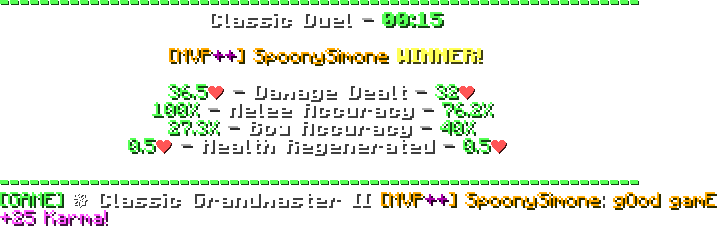
AutoGG+ is a mod designed for Hypixel to automatically say a message when a game finishes.
# Why AutoGG+?
Compared to other existing AutoGG mods, AutoGG+ has some exclusive features, such as:
- **Message randomization**: Tired of Hypixel constantly blocking your message for spam? AutoGG+ automatically rotates the capitalization of your message, so it never gets blocked!
- **Customizable messages**: You can set your own custom messages, so you can say whatever you want.
- **Second message**: Want to say more after your GG message? AutoGG+ makes it possible!
- **Accurate triggers**: No false positives - AutoGG+ uses accurate patterns to detect when a game finishes, ensuring you don't randomly shout "Good Game!" in the middle of a game. AutoGG+ can even send "gg" when a Pit event finishes!
- **Support for the latest Hypixel games**: AutoGG+ supports most of Hypixel games (with more to come!).
- **Nice and easy to use configuration**: AutoGG+ uses [OneConfig](https://polyfrost.org/projects/oneconfig/) as its configuration manager, allowing you to easily change the mod's options in a beautiful interface with just a click of a button (R-SHIFT by default).
- **Plug and play**: Just install the mod and it's ready to work, no configuration required!
# Mod showcase
**Configuration menu**

**Mod in action**
# Commands
- `/autoggplus` - Opens the configuration menu.
- `/gg` - Send a GG message in the chat with your configured settings.
# Credits
Credits to [Sk1er](https://www.youtube.com/@Sk1erDev) for a portion of the triggers list
Thanks to [Lucide](https://lucide.dev/) for providing the message icon
[](https://polyfrost.org/projects/oneconfig/)
# Disclaimers
This product is not affiliated or endorsed by Hypixel in any way.
[As with all mods on Hypixel](https://hypixel.net/allowed-mods), **you use this at your own risk**. That said, AutoGG mods have **never** led to any punishment.
# Download
You can download the mod [here](https://modrinth.com/project/autoggplus).
# Development
> [!WARNING]
> This section is meant for developers who want to contribute to the mod or build it locally.
>
> If you just want to use the mod, you can ignore this and [download the mod](https://github.com/SpoonySimone/AutoGGPlus?tab=readme-ov-file#download) instead.
> [!NOTE]
> You need to have [Git](https://git-scm.com/) & [JDK 17](https://adoptium.net/temurin/releases?version=17&os=any&arch=any) installed on your computer.
To build the mod locally, you have to:
1. Clone the repository and navigate to it
```
git clone https://github.com/SpoonySimone/AutoGGPlus; cd AutoGGPlus
```
2. Build the mod using Gradle
**Linux**
```
./gradlew build
```
**Windows**
```
gradlew.bat build
```
3. The built mod will be located in `/versions/1.8.9-forge/build/libs/`