https://github.com/spren9er/tilez
A generic layout engine for Svelte components
https://github.com/spren9er/tilez
chart composition data-visualization layout svelte svg
Last synced: 9 months ago
JSON representation
A generic layout engine for Svelte components
- Host: GitHub
- URL: https://github.com/spren9er/tilez
- Owner: spren9er
- License: mit
- Created: 2022-12-11T11:42:46.000Z (over 3 years ago)
- Default Branch: main
- Last Pushed: 2025-05-17T05:40:19.000Z (about 1 year ago)
- Last Synced: 2025-05-17T06:27:30.362Z (about 1 year ago)
- Topics: chart, composition, data-visualization, layout, svelte, svg
- Language: TypeScript
- Homepage: https://tilez.spren9er.de
- Size: 4.13 MB
- Stars: 24
- Watchers: 1
- Forks: 1
- Open Issues: 0
-
Metadata Files:
- Readme: README.md
- License: LICENSE.md
Awesome Lists containing this project
README



#  tilez
**_tilez_** is a generic layout engine for Svelte components.
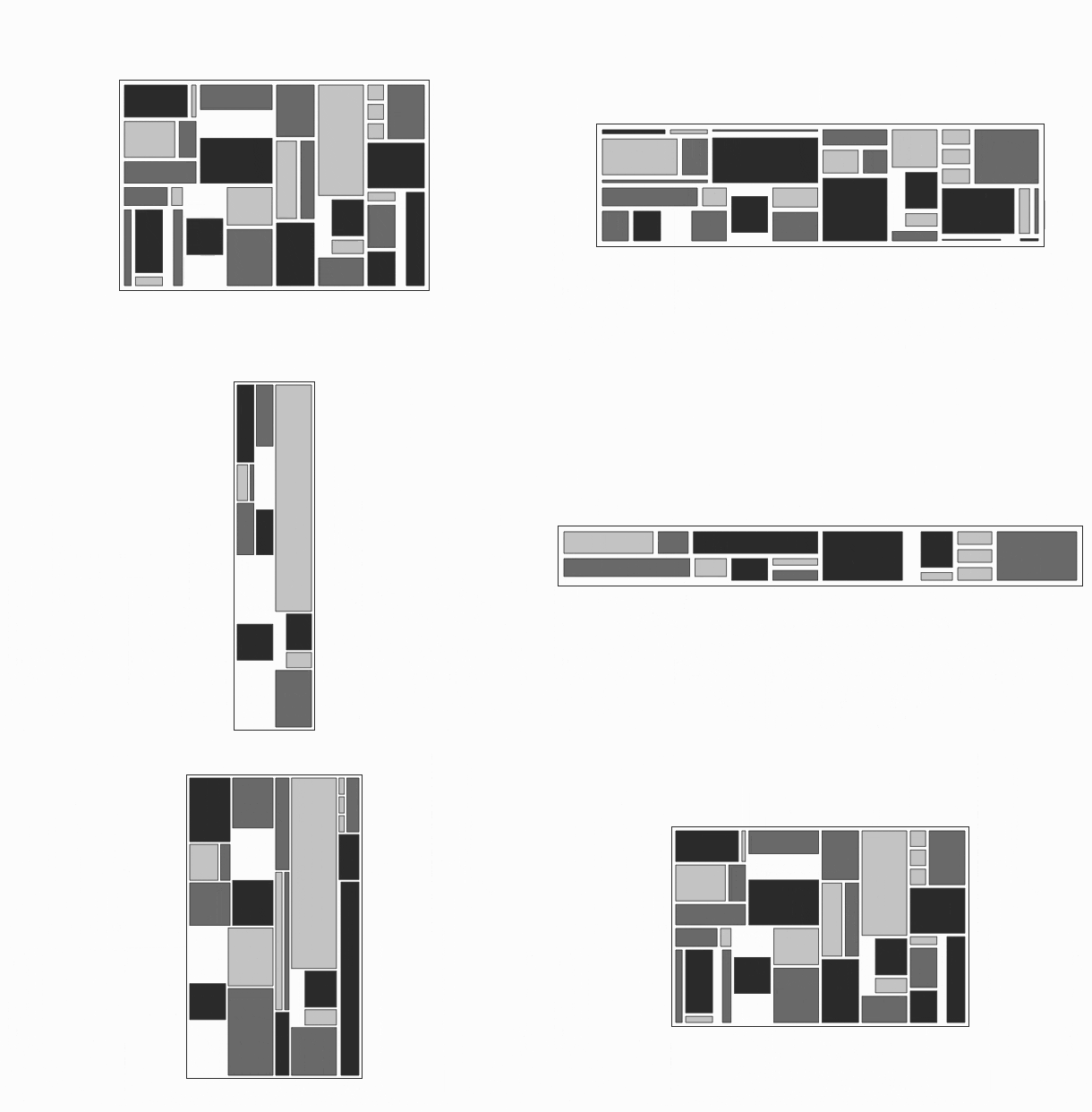
_Above layout was generated by **_tilez_**, where root tile props (width, height and padding) are changing over time.
Boxes shown are a mixture of HTML, SVG, Canvas and WebGL elements._
By default, all tiles – the building blocks of a layout – are renderless components. A layout is defined via nested, stackable tiles, where each tile has its own coordinate space, which is accessible through Svelte stores within a tile's context.
**_tilez_** is
- easy-to-use – _declare your layout in a simple manner_
- flexible – _can be used with SVG, HTML, Canvas, WebGL or renderless components_
- reactive – _changing props of a tile will update all subtiles_
- free of dependencies – _except for Svelte_
- opinionated – _the way the layout algorithm works (see [here](#how-does-the-layout-algorithm-work))_
- robust – _handles edge cases very well_
- light-weight – _does not add more than a few bytes to your Svelte application_
The main application of **_tilez_** is to use it as abstraction layer for creating compositions and layers of arbitrary SVG charts for data visualization. As SVG is lacking a layout engine, **_tilez_** fills that gap. However, it can be used with HTML, Canvas and WebGL, too.
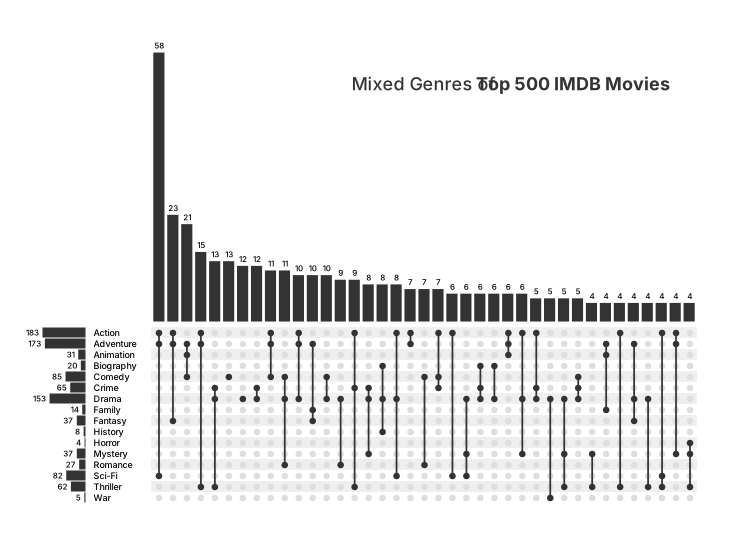
Here is an example of a composition of several different [Observable Plot](https://github.com/observablehq/plot) charts, which makes up an [UpSet plot](https://upset.app). Individual charts are embedded in a simple **_tilez_** layout.
The final result is one single SVG chart (w/o HTML).
**_tilez_** is also helpful for building dashboards. It can easily create _open_, _table_, _stratified_ and _grouped_ layouts (see also [Dashboard Design Patterns](https://dashboarddesignpatterns.github.io/patterns.html#page-layout)).
With **_tilez_**, pure SVG dashboards can be implemented effortlessly.
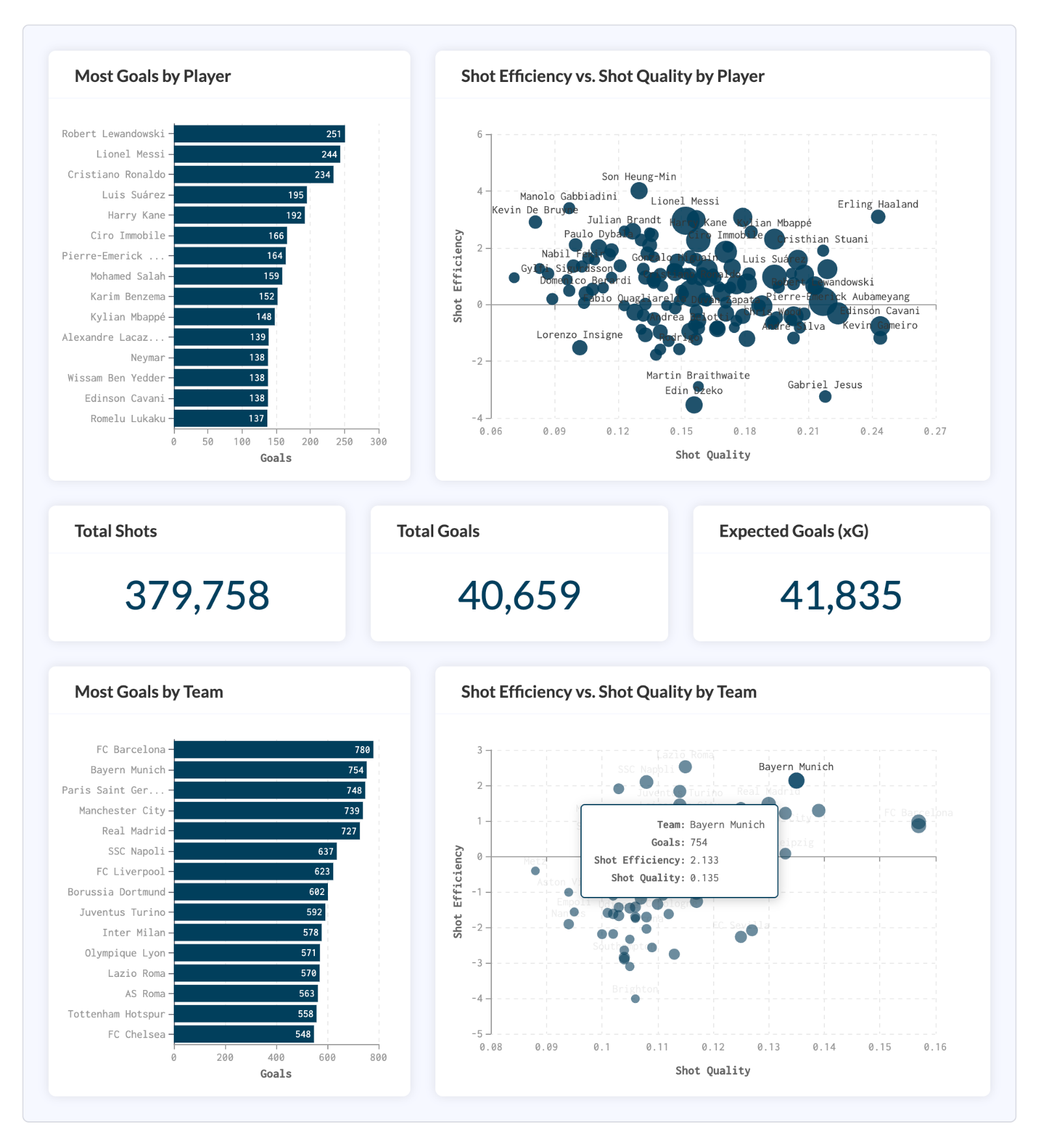
_Above dashboard in open layout contains charts using [Apache ECharts](https://github.com/apache/echarts) library._
Look at accompanying packages
- [tilez-vega-lite](https://github.com/spren9er/tilez-vega-lite)
- [tilez-observable-plot](https://github.com/spren9er/tilez-observable-plot)
- [tilez-echarts](https://github.com/spren9er/tilez-echarts)
for using chart libraries with **_tilez_**.
## Table of contents
- [Installation](#installation)
- [How to specify layouts?](#how-to-specify-layouts)
- [How to access tile information?](#how-to-access-tile-information)
- [How does the layout algorithm work?](#how-does-the-layout-algorithm-work)
- [API Reference](#api-reference)
## Installation
Install **_tilez_** as npm package via
```
npm install tilez
```
## How to specify layouts?
A **Tile** component is a building block of a layout.
### Import Tile Component
A **Tile** component can be imported by
```javascript
import { Tile } from 'tilez';
```
### Tile Component Props
A **Tile** component has following available props (see [API Tile Props](#tile-props) for details)
```svelte
...
```
All props are optional, i.e. you can have tiles with no props at all
```svelte
...
```
**Tile** props are reactive (except for [stack](#props_stack) and [type](#props_type)), i.e. if you change props for an arbitrary tile in tile hierarchy, whole subtree of tiles is rerendered according to updated props.
If you want to know exactly what happens, when you alter these props in a given layout – without reading through [API Tile Props](#tile-props) – take a look at [tilez.spren9er.de](https://tilez.spren9er.de) and play around with an interactive example layout.
### Stacking Tiles
The main concept of **_tilez_** is stacking tiles in _horizontal_ or _vertical_ direction, recursively.
Within a stack, a tile starts at the point where the last tile ends. For stacking, you use the property [stack](#props_stack), which defines in which direction children tiles should be stacked.
For convenience, there are following shortcuts available
- **HTile** for _horizontal_ stacking
- **VTile** for _vertical_ stacking
These components have the same props available as a basic **Tile** component (except for [stack](#props_stack) property).
### Layering Tiles
Assuming no stack is given for a tile, then all children tiles will be layered. They share the same coordinate space like their parent tile. Also, they are rendered in the specified order. Thus, first tile will be displayed in the back, last tile in the front.
### Tile Layouts
Layouts can be described in a declarative way, by defining props of nested tiles. Here is an example of a simple layout
```svelte
```
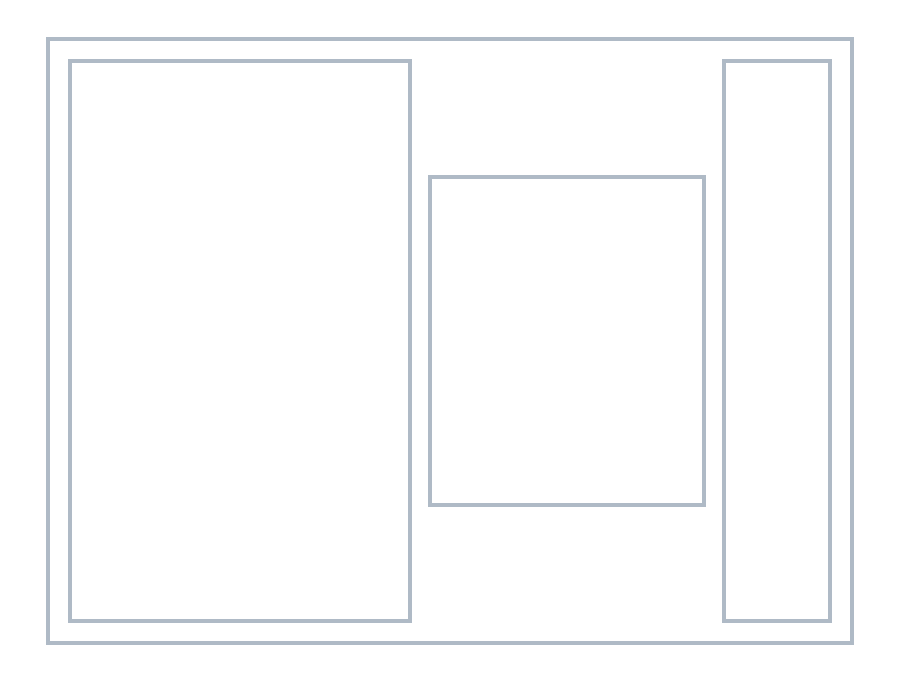
Check out a similar example in [Svelte REPL](https://svelte.dev/playground/1a8e45baea624a079255275a1473374b?version=5.1.1)!
## How to access tile information?
After defining a layout, arbitrary Svelte components can be embedded in your tiles. In your components you get access to tile specs, linear scales of local coordinate system and a reference to HTML/SVG/Canvas/WebGL element by adding the following lines
```javascript
import { getTileContext } from 'tilez';
const {specs, xScale, yScale, element } = getTileContext();
```
All objects – which you obtain from a tile's context – are Svelte stores. See [API Tile Context](#tile-context) for details.
Alternatively, you can use `getContext` from Svelte
```javascript
import { getContext } from 'svelte';
const {specs, xScale, yScale, element } = getContext('tilez');
```
For Canvas or WebGL elements you can retrieve additionally _CanvasRenderingContext2D_ or _WebGLRenderingContext_, respectively as Svelte store `context` from `getTileContext`.
### Tile Specs from Tile Context
Tile specs give you information about [_width_](#specs_width) and [_height_](#specs_height) of tile, as well as relative positions w.r.t. root, subroot and parent tile.
For further specs information see [API Tile Specs](#tile-specs).
### Linear Scales from Tile Context
For each tile, there are two linear scales `$xScale` and `$yScale` available, one for _x_-axis and one for _y_-axis.
Their domain is `[0, 1]` and their range is `[0, $specs.width]` or `[0, $specs.height]`, respectively.
You can modify the domain for each scale.
```javascript
import { getTileContext } from 'tilez';
const { xScale, yScale } = getTileContext();
const x = $xScale.domain([-5, 5]);
const y = $yScale.domain([0, 400]);
const sampleCoords = [x(0.5), y(150)];
```
_**Note:** If you need non-linear scales, consider using _d3-scale_ with given tile specs._
See also [API Linear Scale](#linear-scale).
### Access HTML, SVG or Canvas element
There are following ways to get a reference to the underlying HTML, SVG, Canvas or WebGL element of a tile.
#### Get Element from Tile Context
Within your component – which is embedded in a **Tile** component – you can get access to an element store by using `getTileContext`.
```javascript
import { getTileContext } from 'tilez';
const { element } = getTileContext();
$effect(() => {
doSomethingWith($element);
});
```
#### Bind Element from Tile
Elements can also be accessed from outside of tile scope using `bind`
```svelte
import { Tile } from 'tilez';
let element: SVGElement;
$effect(() => {
doSomethingWith(element);
});
...
```
#### Get Canvas or WebGL Context from Tile
For Canvas and WebGL elements, you retrieve context for drawing from [getTileContext](#get_tile_context).
Here is an example of using Canvas in your component
```javascript
const { specs, context } = getTileContext();
$effect.pre(() => {
if ($context) {
const ctx = $context as CanvasRenderingContext2D;
const dpr = window.devicePixelRatio || 1;
const thickness = 1 * dpr;
const offset = thickness / 2;
const width = $specs.width * dpr - thickness;
const height = $specs.height * dpr - thickness;
ctx.beginPath();
ctx.strokeStyle = '#cccccc';
ctx.lineWidth = thickness;
ctx.rect(offset, offset, width, height);
ctx.stroke();
ctx.closePath();
}
});
```
_**Note:** When using Canvas tiles, make sure that you multiply specs coordinates with `window.devicePixelRatio`._
### Tile Specs from Tile Component
Tile specs can also be accessed directly via `children` snippet
```svelte
{#snippet children({ specs: { width, height } = {} })}
{/snippet}
...
```
or from outside of tile scope using `bind`
```svelte
import { Tile, type TileSpecs } from 'tilez';
let specs: TileSpecs | undefined;
$effect(() => {
doSomethingWith(specs);
});
...
```
## How does the layout algorithm work?
The underlying layout algorithm should behave well in all circumstances, especially when there is not enough space to render all given tiles.
But which tiles should be rendered and which should be ignored?
In the following, we take a closer look at an opinionated rendering algorithm, which is implemented in **_tilez_**. We consider the algorithm for a single tile with a non-trivial stack direction (_'horizontal'_ or _'vertical'_) and its direct children tiles. This algorithm then can be applied to each stack of the tiles hierarchy.
### Tiles Prioritization
Before tiles are rendered within a stack, they are sorted according to following order
1. Tiles of absolute sizes
2. Tiles of relative sizes
3. Tiles of flex sizes (no size specification)
Within each group, tiles are sorted according to the natural order given (ascending order of children tiles within parent tile).
The order gives information about the priority for rendering. First tiles of above order have high priority and will be rendered first, while last tiles have low priority and won't be rendered at all, if there is not enough space left.
_**Note:** Alignment props are **not** taken into consideration when sorting!
Thus, tile _B_ which comes **after** tile _A_ in natural order and belongs to same group, could be aligned as such that it appears **before** tile _A_. This fact can be used to take influence in the rendering behavior._
### Layout Algorithm
1. We take one tile after the other of first sorted group above (tiles of absolute sizes) and for each tile we determine its size, as long as enough space is available. A tile which doesn't fit completely in available space is cut off. Then, rest of tiles will have zero size.
2. For determining other tiles sizes, we have to look at each specific layout mode separately (see [API Layout Mode](#props_mode))
1. **Spacing Mode:** If sizes of all tiles of first group are determined and there is still space left, the available space will be distributed between all remaining tiles in the following way
1. Filter out tiles of relative size which can't be rendered, because their calculated size is less than _1px_.
2. For all remaining tiles of second group (tiles of relative sizes), we will process tiles like in first step: Resulting sizes will be determined one by one. If there is not enough space available, tile will be cut off and all remaining tiles will have zero size.
3. If sizes of all tiles of relative sizes are determined and there is still space left, we consider the last group of tiles (flex tiles w/o size specification). Assuming there are _n_ flex tiles left. Their size will be calculated by distributing remaining space equally across flex tiles (each flex tile will have same size). If sizes are less than _1px_, we try to distribute remaining space across _n - 1_ flex tiles, then _n - 2_ flex tiles, and so on. Finally, we either have some flex tiles with large enough sizes to render or all flex tiles will have zero size.
2. **Sizing Mode:** Let _m_ be the number of tiles with relative and flex sizes. We want to distribute _k <= m_ tiles (with _k_ max.) and start with _k = m_.
1. We try to determine _k_ tiles with non-zero relative and flex sizes.
2. We subtract _(k - 1) x inner padding_ from available space.
3. For remaining space we apply above steps of _'spacing'_ mode. Assuming _p_ tiles of relative size have non-zero size, then in last step we only check if _n = k - p_ flex tiles can be rendered or not.
4. If previous step is not successful (there aren't _k_ tiles in total which have non-zero size), then we decrement _k_ and repeat steps above. Algorithm stops at the latest when _k = 0_ and all tiles have zero size.
So far, we only computed the resulting size for each tile.
Now, we consider the rendering algorithm. When all sizes are determined with the process above, tiles are grouped according to their alignment w.r.t. stack direction (_'hAlign'_ for _'horizontal'_ and _'vAlign'_ for _'vertical'_).
This will generate three groups. We process them in the following way
1. Render all tiles of _'left'_ or _'top'_ group according to their natural order from left to right or top to bottom.
2. Render all tiles of _'right'_ or _'bottom'_ group according to their natural order (here descending) from right to left or bottom to top.
3. Render all tiles of _'center'_ group according to their natural order in the middle of parent tile. If there is an overlap with tiles from first or last group, we shift the center group to the right or left (this group then won't appear in the center).
In each step above, zero-sized tiles are ignored.
## API Reference
- [Tile Props](#tile-props)
- [Tile Context](#tile-context)
- [Tile Specs](#tile-specs)
- [Linear Scale](#linear-scale)
### Tile Props
# tilez.Tile.stack · (_'horizontal'_ | _'vertical'_) [default: `undefined`]
When this property is not given, all children tiles will have the same coordinate space like current tile and they are layered in the natural order given. Otherwise, children tiles will be distributed within current tile according to their props in _'horizontal'_ or _'vertical'_ direction.
---
# tilez.Tile.width
Argument can be an absolute or relative number. Accepts strings like _"500px"_, _"500"_, _"50%"_, _"0.5"_ or numbers like _500_ or _0.5_. Numbers between _0_ and _1_ are interpreted as percentages, otherwise they represent absolute widths.
The given width will result in different tile widths, depending on the layout [mode](#props_mode).
Relative widths refer to the width you obtain when you subtract all absolute tile widths from full width.
When there is no width given (default), remaining width in parent tile – after rendering tiles with absolute and relative width – will be distributed equally between current tile and other tiles having no width specification.
For root tile relative widths are not allowed. When no width is given in root tile, parent container needs to have explicit width specified, otherwise nothing is rendered.
---
# tilez.Tile.height
Analog to [width](#props_width) above.
---
# tilez.Tile.innerPadding · [default: 0] [inherits]
Defines the padding **between** children tiles of current tile. Format must be either a string like _"10px"_, _"10"_ or a number like _10_. Relative values are not supported.
For layout mode _'spacing'_ it adds half of the given inner padding to the left and right of the outer tiles (or tile if there is only one).
This property will be inherited, thus all children tiles will have the same inner padding for their children unless not specified explicitly in children tile. In other words, if inner padding of children tile is given, this value will be considered instead of inner padding of parent tile.
---
# tilez.Tile.outerPadding · [default: 0]
Defines the padding **around** children tile(s) of current tile. It is similar to CSS padding of a HTML container.
This property won't be inherited.
---
# tilez.Tile.hAlign · (_'left'_ | _'center'_ | _'right'_) [default: _'left'_]
Defines the horizontal alignment w.r.t. parent tile. Accepts _'left'_, _'center'_ and _'right'_.
When several children tiles share the same alignment property, they will be positioned as a group according to their given order within parent tile. For _'center'_ applies: If centered group can't be positioned in the center because there will be an overlap with _'left'_ or _'right'_ groups, it will be shifted to the right or left, respectively.
---
# tilez.Tile.vAlign · (_'top'_ | _'center'_ | _'bottom'_) [default: _'top'_]
Defines the vertical alignment w.r.t. parent tile. Accepts _'top'_, _'center'_ and _'bottom'_.
It behaves like [hAlign](#props_h_align), but in vertical direction.
---
# tilez.Tile.type · (_'plain'_ | _'svg'_ | _'html'_ | _'canvas'_ | _'webgl'_) [default: _'plain'_] [inherits]
This property sets the document type of current tile. Available types are _'plain'_, _'svg'_, _'html'_, _'canvas'_ and _'webgl'_.
Type inherits from parent tile unless not specified explicitly. Otherwise, given type will be taken into consideration.
#### Plain Tile (Renderless Component)
By default, using **_tilez_** won't create any containers, i.e. all components are renderless components (_type_ is _'plain'_).
#### SVG Tile
Using type _'svg'_, (sub)root tile will be an SVG container `` and all children tiles will be rendered as SVG group ``.
#### HTML Tile
For _'html'_ tiles, all `
` containers are implicitly absolute positioned. If you want to have a pure HTML layout, you should probably consider using CSS flexbox and CSS grid, as they are more powerful and flexible.
#### Canvas Tile
If you use _'canvas'_ tiles, (sub)root tile creates a `` container. Within this container coordinate system is translated to each tile's origin. All children tiles will share the same `` element.
#### WebGL Tile
If you use _'webgl'_ tiles, (sub)root tile creates a `` container. All children tiles will share the same `` element and also the same coordinate system, even they are placed in a stack.
#### Mixing Tile Types
You can mix tile types, e.g. start with an HTML tile and add various subroot SVG, Canvas and/or WebGL tiles. Plain tiles can be added at each level in the tile hierarchy. However, there are following restrictions:
- An _'html'_ tile can't be embedded into an _'svg'_, _'canvas'_ or _'webgl'_ tile.
- An _'svg'_ tile can't be embedded into a _'canvas'_ or _'webgl'_ tile and vice versa.
- A _'canvas'_ tile can't be embedded into a _'webgl'_ tile and vice versa.
---
# tilez.Tile.mode · (_'spacing'_ | _'sizing'_ ) [default: _'spacing'_] [inherits]
There are two layout modes available: one which is optimized for _'spacing'_ and one for _'sizing'_. They differ on how to interpret sizes when you specify a non-zero inner padding. When no inner padding is given, both modes produce the same layout.
#### Tile Layout Mode _Spacing_
In layout mode _'spacing'_ (default mode), inner padding is part of the size specification of a tile. For a given width of _100px_ and an inner padding of _20px_, the resulting width of the tile is _80px_. On each side of a tile, there is an empty space of _50% of inner padding_, in our example _10px_. The consequence is that in this layout spacings are aligned properly across stacks, e.g. the first gap of a tile with _50%_ width is aligned with the fifth gap of five stacked tiles with _10%_ width each.
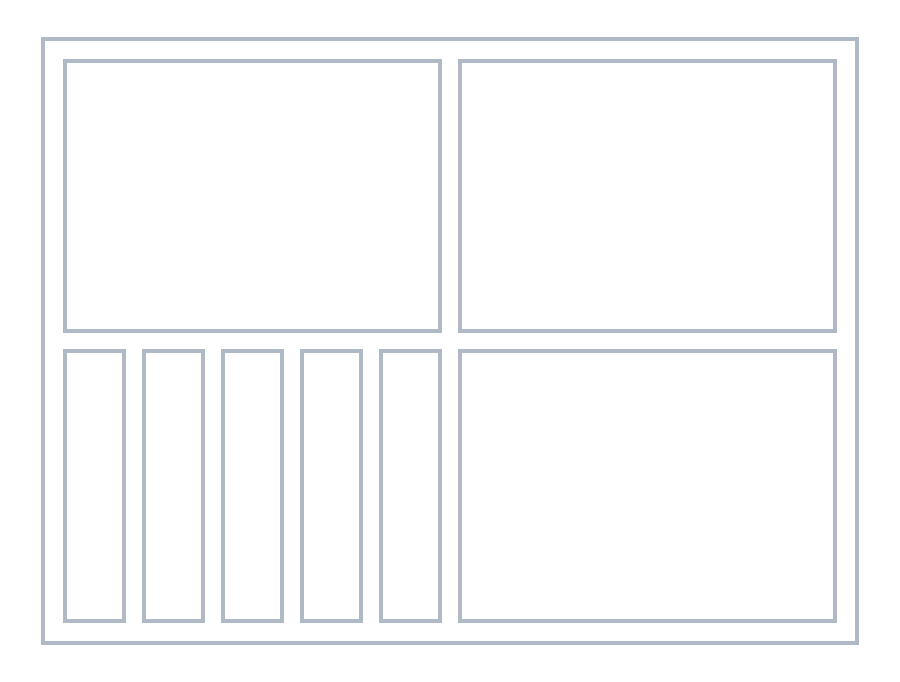
_**Note:** There will be empty space of _50% inner padding_ on all sides of the most outer tile. If you want equidistant paddings throughout the whole tile hierarchy, you can add an outer padding in root tile of _inner padding / 2_._
When you use absolute sizes together with relative sizes to define your layout, make sure to add outer padding to your size beforehand. As an example: You want to work with a width of _200px_ and outer padding is given as _10px_. Then a tile of width _100px_ corresponds to a tile of _50%_ only when the initial width is defined as _220px_, not _200px_.
#### Tile Layout Mode _Sizing_
When layout mode _'sizing'_ is used, all tiles have exactly the size which is specified in tile props, i.e. for a given width of _100px_, the tile has exactly a width of _100px_ (when there is enough space to render). Also, a tile of width _50%_ has _5_ times the width of a tile of width _10%_ (if they are in the same stack!), which generally does not apply to _'spacing'_ layout mode.
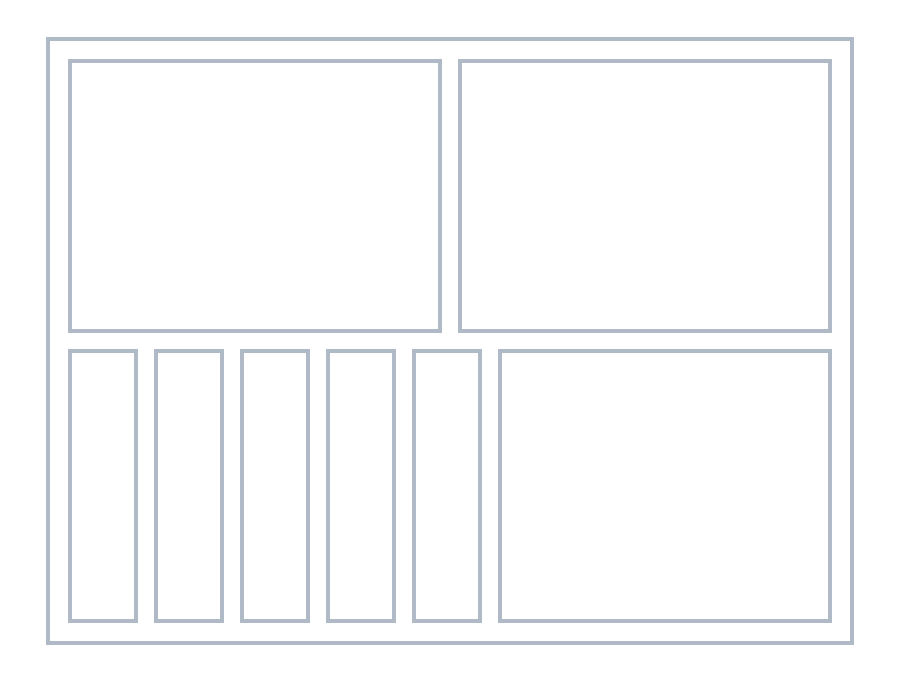
It depends on your use case, which mode you choose. You can also mix modes, start with one mode and change to the other mode in an inner tile.
---
# tilez.Tile.specs
A reference to tile specs.
---
# tilez.Tile.element
A reference to an HTML, SVG or Canvas element (depending on the [type](#props_type)). For renderless components (_'plain'_ type), element is `undefined`. See also [this section](#access-html-svg-or-canvas-element).
---
# tilez.Tile.wrapper
A reference to the wrapper element (`HTMLDivElement`) containing all tiles. This can be used to add styles via
```svelte
import { onMount } from 'svelte';
import { Tile } from 'tilez';
let wrapper: HTMLDivElement;
onMount(() => {
if (wrapper) wrapper.style.border = '2px solid red';
});
...
```
Only applicable for root tile.
### Tile Context
# tilez.getTileContext()
Returns an object containing following Svelte stores
- _specs_ of class **Writable\**
- _xScale_ of class **Writable\**
- _yScale_ of class **Writable\**
- _element_ of class **Writable\**
- _context_ of class **Writable\**
### Tile Specs
# tilez.TileSpecs.width
Width of tile
---
# tilez.TileSpecs.height
Height of tile
---
# tilez.TileSpecs.rootX
The _x_-coordinate w.r.t. root tile
---
# tilez.TileSpecs.rootY
The _y_-coordinate w.r.t. root tile
---
# tilez.TileSpecs.subRootX
The _x_-coordinate w.r.t. subroot tile. When type of tile changes when going from parent to child tile, there will be a new subtree in tiles hierarchy. The root tile of this subtree is called a subroot tile. The _x_ value is the distance between the left position of subroot tile and the left position of given tile in horizontal direction.
---
# tilez.TileSpecs.subRootY
The _y_-coordinate w.r.t. subroot tile. See [subRootX](#specs_subroot_x) for definition of a subroot.
---
# tilez.TileSpecs.parentX
The _x_-coordinate w.r.t. parent tile
---
# tilez.TileSpecs.parentY
The _y_-coordinate w.r.t. parent tile
---
# tilez.TileSpecs.innerPadding
Padding between children tiles
---
# tilez.TileSpecs.outerPadding
Padding around children tiles
---
# tilez.TileSpecs.hAlign · (_'left'_ | _'center'_ | _'right'_)
Horizontal alignment w.r.t. parent tile
---
# tilez.TileSpecs.vAlign · (_'top'_ | _'center'_ | _'bottom'_)
Vertical alignment w.r.t. parent tile
---
# tilez.TileSpecs.aspectRatio
Aspect ratio (width / height) of tile
### Linear Scale
# tilez.LinearScale.domain(domain: [number, number]) · [default: `[0, 1]`]
You can set a _domain_ which will be mapped to the tile range. Domains are also supported, where upper bound is less than lower bound, e.g. for `$xScale` or `$yScale` using `[1, 0]` will map `0` to full width or height and `1` to `0`.
---
# tilez.LinearScale.range(range: [number, number])
Even though `$xScale` and `$yScale` from a tile's context are coming with predefined ranges, such that they span the full width or height of a tile, you can override the _range_ with this method.
---
# tilez.LinearScale.(x: number)
The class itself is directly callable. It computes the function value for a given _x_ value.
---
# tilez.LinearScale.inv(y: number)
Method `inv` computes the _x_ value for a given _y_ value w.r.t. the inverse function. This can be useful for working with coords of mouse position.