https://github.com/squarewavesystems/squarebox
A curated set of modern CLI/TUI tools and AI coding assistants in a container. Batteries included.
https://github.com/squarewavesystems/squarebox
ai ai-tools claude-code cli codex codex-cli dev docker gemini gemini-cli opencode tui
Last synced: about 19 hours ago
JSON representation
A curated set of modern CLI/TUI tools and AI coding assistants in a container. Batteries included.
- Host: GitHub
- URL: https://github.com/squarewavesystems/squarebox
- Owner: SquareWaveSystems
- License: mit
- Created: 2026-04-04T04:09:33.000Z (3 months ago)
- Default Branch: main
- Last Pushed: 2026-07-07T03:39:33.000Z (2 days ago)
- Last Synced: 2026-07-07T05:13:40.727Z (2 days ago)
- Topics: ai, ai-tools, claude-code, cli, codex, codex-cli, dev, docker, gemini, gemini-cli, opencode, tui
- Language: Shell
- Homepage:
- Size: 1.16 MB
- Stars: 67
- Watchers: 0
- Forks: 9
- Open Issues: 0
-
Metadata Files:
- Readme: README.md
- Contributing: CONTRIBUTING.md
- License: LICENSE
- Security: SECURITY.md
- Roadmap: ROADMAP.md
Awesome Lists containing this project
README
# 🟧📦 squarebox
**A curated set of modern CLI/TUI tools and AI coding assistants in a container. Batteries included.**
*For developers who live in the terminal but need to work across
multiple platforms and devices.*
**squarebox** packages a complete terminal-based development environment
into a single container (Docker; Podman experimental): modern CLI tools, AI coding
assistants, language SDKs, and an opinionated set of shell aliases. Run the
same box anywhere (desktop, VPS, or Codespace) and SSH in from your laptop,
tablet, or phone (please don't).
The goal is to make modern terminal tooling easy and accessible. One-line
install, interactive first-run setup, sensible defaults (thanks [omarchy](https://omarchy.org)).
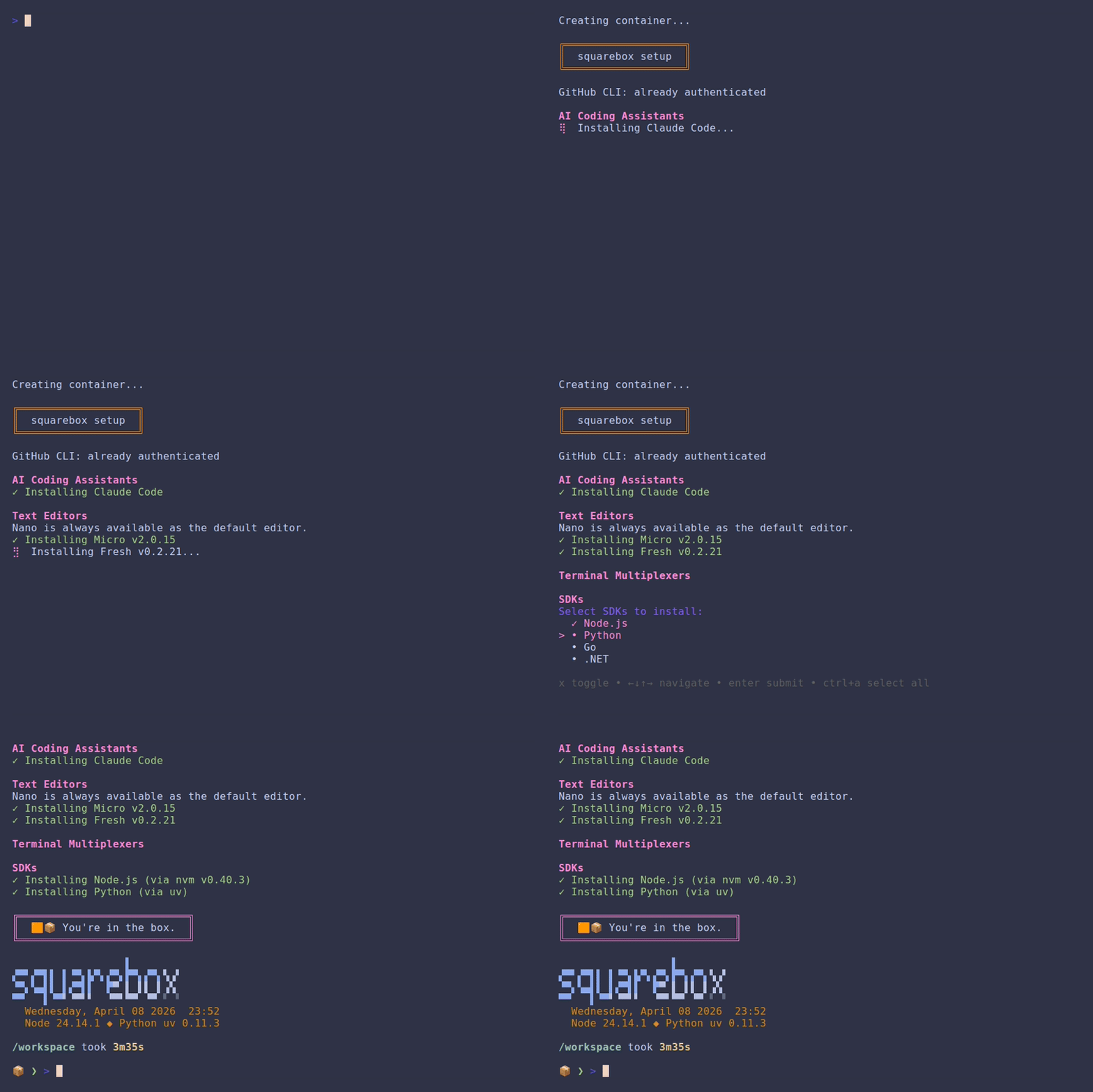
*(Actual setup may involve more staring at the screen.)*
Prerequisites
-------------
- [Docker](https://docs.docker.com/get-docker/) or [Podman](https://podman.io/getting-started/installation) (experimental — see one-line install below if you don't have either)
- [Git](https://git-scm.com/) - on Windows, install [Git for Windows](https://gitforwindows.org/)
The installer auto-detects which runtime is available. If both are installed, it
asks which to use. Override with `SQUAREBOX_RUNTIME=docker` or
`SQUAREBOX_RUNTIME=podman`.
> **Podman (Experimental):** Docker is the primary tested runtime; Podman may
> have rough edges around volume mounts, SSH agent forwarding, or rebuild
> flows — please file an issue if you hit one.
Don't have Docker or Podman? One-line install
**macOS** (via [Homebrew](https://brew.sh)):
brew install --cask docker-desktop
**Linux** (official convenience script - inspect it first at [get.docker.com](https://get.docker.com)):
curl -fsSL https://get.docker.com | sh && sudo usermod -aG docker $USER
Log out and back in (or run `newgrp docker`) so your shell picks up the new group.
**Windows** (via [winget](https://learn.microsoft.com/en-us/windows/package-manager/winget/), in PowerShell 7+):
winget install --id Docker.DockerDesktop -e
On macOS and Windows, start Docker Desktop once after install so the daemon is
running before you continue.
Install
-------
These commands install squarebox and drop you into the container (if possible).
By default they **pull a prebuilt image** from GHCR — no local Docker build, no
build toolchain — then clone the repo into `~/squarebox` for the config files
and the `sqrbx` helper commands. On first login, a setup script runs
automatically to configure git (pulling your name and email from the host's
global git config if available), optionally sign in to GitHub CLI, your choice
of AI coding assistant, and language SDKs.
**Stable**
curl -fsSL https://github.com/SquareWaveSystems/squarebox/releases/latest/download/install.sh | bash
**Edge**
curl -fsSL https://github.com/SquareWaveSystems/squarebox/releases/latest/download/install.sh | bash -s -- --edge
Stable pulls the prebuilt image for the latest tagged release (pre-release tags
like `-rc` are skipped). Edge builds from the latest commit on `main` — no image
is published for unreleased commits, so edge always builds from source. To build
the released version from source instead of pulling, pass `--build`. The install
script itself is published as a release asset, so the URL is pinned to a tagged
version of the script — pushes to `main` won't break new installs until a
release is cut.
If the install fails or you want to see the full build/pull and git output,
re-run with `--verbose`.
Advanced install options (flags & environment variables)
Flags: `--build` (build from source instead of pulling), `--edge` (latest
`main`), `--verbose`.
| Variable | Default | Purpose |
|----------|---------|---------|
| `SQUAREBOX_DIR` | `~/squarebox` | Install location (repo + workspace). Point at durable storage on hosts where `$HOME` is volatile — e.g. Unraid `/mnt/user/appdata/squarebox`. |
| `SQUAREBOX_WORKSPACE` | `$SQUAREBOX_DIR/workspace` | Host path mounted as `/workspace`. |
| `SQUAREBOX_TAG` | matched release / `latest` | Image tag to pull (e.g. `v1.0.0-rc1` to test a pre-release). |
| `SQUAREBOX_IMAGE` | `ghcr.io/squarewavesystems/squarebox` | Image repository to pull from. |
| `SQUAREBOX_BUILD` | `0` | `1` is equivalent to `--build`. |
| `PUID` / `PGID` | `1000` / `1000` | Host uid/gid that should own bind-mounted files. Unraid/NAS: `99` / `100`. |
| `SQUAREBOX_RUNTIME` | auto | Force `docker` or `podman`. |
| `SQUAREBOX_HOME_VOLUME` | `squarebox-home` | Name of the named volume backing `/home/dev`. |
| `SQUAREBOX_EDGE` | `0` | `1` is equivalent to `--edge`. |
**Non-interactive provisioning** — set any of these to a comma-separated list to
pre-select a toolset and install it without prompts (handy for servers and
scripted installs). Values use the same keys as `sqrbx-setup`:
| Variable | Selects |
|----------|---------|
| `SQUAREBOX_AI` | AI assistants (`claude,copilot,gemini,codex,opencode,pi,paseo`) |
| `SQUAREBOX_SDKS` | language SDKs (`node,python,go,dotnet,rust`) |
| `SQUAREBOX_EDITORS` | editors (`micro,edit,fresh,nvim`) |
| `SQUAREBOX_TUIS` | TUI tools (`lazygit,gh-dash,yazi`) |
| `SQUAREBOX_MULTIPLEXERS` | multiplexers (`tmux,zellij`) |
| `SQUAREBOX_GIT_NAME` / `SQUAREBOX_GIT_EMAIL` | git identity (when no host gitconfig) |
Example: `SQUAREBOX_AI=claude SQUAREBOX_SDKS=node,python curl -fsSL …/install.sh | bash`
**Windows (PowerShell 7+)**
Windows users can install directly from PowerShell - no Git Bash required.
This handles clone, build, container creation, and PowerShell aliases
(`sqrbx`, `squarebox`, etc.) natively:
irm https://github.com/SquareWaveSystems/squarebox/releases/latest/download/install.ps1 | iex
Once installed, you can re-run or pass flags from the local copy:
.\install.ps1 # re-install / update
.\install.ps1 -Edge # latest main instead of latest release
.\install.ps1 -Verbose # show full build output
> **Note:** `irm ... | iex` does not support flags - PowerShell interprets them
> as arguments to `Invoke-Expression`, not the script. Use the local
> `.\install.ps1` form for `-Edge` or `-Verbose`.
Start
-----
squarebox # or: sqrbx
These are shell functions wrapping `docker start -ai squarebox` (or
`podman start -ai squarebox`), added automatically for Bash, Zsh, and
PowerShell 7+.
The container is persistent: it suspends on exit and resumes on start, keeping
installed packages, config, and shell history intact between sessions. Your
code lives on the host at `~/squarebox/workspace` (bind-mounted), and per-user
state — shell history, GitHub CLI auth, claude-code data, mise toolchains —
lives in a named Docker volume (`squarebox-home`) that survives container
recreation. Image-managed config like `.bashrc` is bind-mounted from the repo
so updates flow through to the running container.
Run as a long-lived server (Unraid / NAS / VPS)
-----------------------------------------------
The `curl | bash` installer is built around an interactive desktop shell. To run
squarebox as a persistent server container you attach into on demand — on
Unraid, a NAS, or a VPS — use the prebuilt image directly with the bundled
`docker-compose.yml`:
cp .env.example .env # set PUID/PGID, the workspace path, and a tag
docker compose up -d
docker compose exec -u dev squarebox bash
Set `PUID`/`PGID` in `.env` to match your host so files squarebox writes to the
workspace mount are owned correctly — on Unraid that's `99` / `100`. The `-u dev`
on `exec` is needed because the container starts as root (to apply PUID/PGID)
then drops to the `dev` user; `exec` bypasses that, so `-u dev` lands you where
you want to be.
Per-user state (shell history, gh auth, mise toolchains, AI-assistant state)
lives in the `squarebox-home` named volume and survives image updates; your code
lives on the host at the workspace path. To update, pull a newer tag and
`docker compose up -d`. The published image is multi-arch (amd64 + arm64), so it
also runs on ARM NAS/VPS hosts.
> **Unraid note:** the host's `/root` is tmpfs and wiped on reboot, so a raw
> `curl | bash` install there won't persist. Either use compose (above) with the
> workspace path under `/mnt/user/appdata`, or run the installer with
> `SQUAREBOX_DIR` and `SQUAREBOX_WORKSPACE` pointed at appdata.
What's included
---------------
### CLI Tools
| Name | Language | Description |
|------|----------|-------------|
| [bat](https://github.com/sharkdp/bat) | Rust | Cat clone with syntax highlighting |
| [curl](https://github.com/curl/curl) | C | URL data transfer |
| [delta](https://github.com/dandavison/delta) | Rust | Syntax-highlighting pager for git diffs |
| [difftastic](https://github.com/Wilfred/difftastic) | Rust | Syntax-aware structural diff tool (`difft`) |
| [eza](https://github.com/eza-community/eza) | Rust | Modern ls replacement |
| [fd](https://github.com/sharkdp/fd) | Rust | Fast, user-friendly find alternative |
| [fzf](https://github.com/junegunn/fzf) | Go | Fuzzy finder |
| [gh](https://github.com/cli/cli) | Go | GitHub CLI |
| [glow](https://github.com/charmbracelet/glow) | Go | Terminal markdown renderer |
| [gum](https://github.com/charmbracelet/gum) | Go | Tool for shell scripts and dotfiles |
| [jq](https://github.com/jqlang/jq) | C | JSON processor |
| [just](https://github.com/casey/just) | Rust | Command runner / modern make alternative |
| [nano](https://nano-editor.org) | C | Default text editor |
| [ripgrep](https://github.com/BurntSushi/ripgrep) | Rust | Fast recursive grep |
| [starship](https://github.com/starship/starship) | Rust | Cross-shell prompt |
| [xh](https://github.com/ducaale/xh) | Rust | Friendly HTTP client |
| [yq](https://github.com/mikefarah/yq) | Go | YAML/JSON/XML processor |
| [zoxide](https://github.com/ajeetdsouza/zoxide) | Rust | Smarter cd command |
What's optional
----------------
Selected during first-run setup. Choose any combination, all, or none.
Selections are saved under `/workspace/.squarebox` (on the host workspace bind
mount) and reused automatically on container rebuilds. They can also be
pre-selected non-interactively via the `SQUAREBOX_AI`/`SQUAREBOX_SDKS`/… env vars
(see *Advanced install options* above).
### AI Coding Assistants
| Name | Language | Description |
|------|----------|-------------|
| [Claude Code](https://github.com/anthropics/claude-code) | TypeScript | AI coding assistant |
| [GitHub Copilot CLI](https://github.com/githubnext/github-copilot-cli) | TypeScript | GitHub Copilot in the terminal * |
| [Google Gemini CLI](https://github.com/google-gemini/gemini-cli) | TypeScript | Google Gemini in the terminal * |
| [OpenAI Codex CLI](https://github.com/openai/codex) | TypeScript | OpenAI Codex in the terminal * |
| [opencode](https://github.com/anomalyco/opencode) | Go | AI coding TUI |
| [Pi Coding Agent](https://github.com/earendil-works/pi) | TypeScript | Minimal terminal coding harness (Earendil) * |
| [Paseo](https://paseo.sh) | TypeScript | Remote control for AI CLI agents * |
\* Requires Node.js (auto-installed if needed).
### Text Editors
Nano is always available as the default editor.
| Name | Language | Description |
|------|----------|-------------|
| [micro](https://github.com/micro-editor/micro) | Go | Modern, intuitive terminal editor |
| [edit](https://github.com/microsoft/edit) | Rust | Terminal text editor (Microsoft) |
| [fresh](https://github.com/sinelaw/fresh) | Rust | Modern terminal text editor |
| [helix](https://github.com/helix-editor/helix) | Rust | Modal editor (Kakoune-inspired) - *coming soon* |
| [nvim](https://github.com/neovim/neovim) | C/Lua | Neovim |
Selecting **nvim** offers to install the [LazyVim](https://www.lazyvim.org/) starter config to `~/.config/nvim`, turning Neovim into a preconfigured IDE. Plugins sync on first launch and persist in the `squarebox-home` volume. A Nerd Font in your terminal is recommended for icons; the starter is skipped if `~/.config/nvim` already exists, so your own config is never overwritten.
### TUI Tools
Installed during first-run setup. Choose any combination:
| Name | Language | Description |
|------|----------|-------------|
| [lazygit](https://github.com/jesseduffield/lazygit) | Go | Git terminal UI |
| [gh-dash](https://github.com/dlvhdr/gh-dash) | Go | GitHub dashboard for the terminal |
| [yazi](https://github.com/sxyazi/yazi) | Rust | Terminal file manager |
### Terminal Multiplexers
Installed during first-run setup. Choose either, both, or neither:
| Name | Description |
|------|-------------|
| [tmux](https://github.com/tmux/tmux) | Classic terminal multiplexer |
| [zellij](https://github.com/zellij-org/zellij) | Friendly terminal workspace |
### Shell (Experimental)
By default, squarebox uses Bash. During first-run setup you can opt in to
**Zsh** or **Fish** instead.
**Zsh** installs:
| Name | Description |
|------|-------------|
| [zsh](https://www.zsh.org) | Z shell (via apt) |
| [Oh My Zsh](https://ohmyz.sh) | Community framework for managing zsh config |
| [zsh-autosuggestions](https://github.com/zsh-users/zsh-autosuggestions) | Fish-like history-based suggestions |
| [zsh-syntax-highlighting](https://github.com/zsh-users/zsh-syntax-highlighting) | Inline command syntax highlighting |
The generated `~/.zshrc` mirrors the default bashrc — same aliases, starship
prompt, zoxide, and AI/editor/SDK sourcing — layered on top of Oh My Zsh.
**Fish** installs [fish](https://fishshell.com) (via apt), which ships with
autosuggestions and syntax highlighting built in. The generated
`~/.config/fish/config.fish` mirrors the default bashrc in fish-native syntax;
AI/editor/TUI/SDK selections are translated from their bash files into
`~/.config/fish/conf.d/squarebox-selections.fish` at setup time.
> **Experimental:** the marker file `~/.squarebox-use-zsh` (or
> `~/.squarebox-use-fish`) causes `~/.bashrc` to `exec` the chosen shell on
> every interactive login, so the next shell start picks up the new shell.
> Set `SQUAREBOX_NO_ZSH=1` or `SQUAREBOX_NO_FISH=1` to force bash for a single
> session, or re-run `sqrbx-setup shell` to switch back permanently. Tooling
> is primarily tested against bash, so a few edge cases may need polish —
> please file an issue if you hit one. SDK shims are wired into all three
> shells via `mise activate {bash,zsh,fish}`.
### SDKs
All SDKs are managed by [mise](https://github.com/jdx/mise) — a single
polyglot version manager. Selections are written to `~/.config/mise/config.toml`
and `mise activate` wires up shims and PATH automatically across bash, zsh,
and fish.
| SDK | mise tool |
|-------|-----------|
| Node.js | `node` |
| Python | `python` |
| Go | `go` |
| .NET | `dotnet` |
| Rust | `rust` |
### Learning mode (beta)
Optional. When enabled during first-run setup (or via `sqrbx-setup learn`),
the container ships an interactive guide to every tool in the toolkit —
history, why-it-exists, and skill-level-adapted "try it" examples.
sqrbx-learn # open the menu
sqrbx-learn rg # jump straight to a tool's lesson
sqrbx-learn ask "..." # one-shot toolkit question to your AI CLI
sqrbx-learn explain '...' # explain a command flag-by-flag
sqrbx-learn recap # review the commands your agent has been running
sqrbx-learn --progress # show what you've completed
sqrbx-learn --reset # wipe progress AND skill level
The top menu entry, **Learn hands-on with your AI agent**, launches your
configured AI CLI — Claude Code, OpenCode, Gemini CLI, or Codex CLI — in a
coaching mode for the session: instead of doing the work for you, it explains
each step, hands you the exact command and the reason for the tool choice,
and asks you to run it yourself. Say "just do it" at any point to let it take
over. Claude Code gets the coaching persona via `--append-system-prompt`; the
others receive it as a session-opening instruction. Either way it's
session-scoped and never touches your workspace's own `CLAUDE.md`/`AGENTS.md`.
(No AI CLI yet? Add one with `sqrbx-setup ai`.)
`ask` and `explain` use the same AI CLI non-interactively: `ask` answers a
toolkit question with the exact command to run, and `explain` breaks down a
command flag-by-flag (defaulting to the last one in your shell history) and
suggests the modern squarebox equivalent when you fed it a legacy tool. Both
run on your own agent auth and cost tokens, so they only fire on demand.
`recap` reverses the direction — learn from what your agent does. After
`sqrbx-learn recap --enable` registers a Claude Code `PostToolUse` hook, every
squarebox toolkit command the agent runs while working is logged to
`/workspace/.squarebox/agent-tool-log`. `sqrbx-learn recap` then shows
per-tool counts with real examples from your own tasks, and can hand the
recent log to your AI CLI for a debrief of what those commands actually did.
`recap --disable` removes the hook.
The first launch asks for a skill level (beginner / intermediate / expert)
to scale both the examples and the agent's coaching; you can change it later
from the menu. Lessons render through `glow` when available so the markdown
bodies display properly.
Getting help
------------
Run `sqrbx-help` inside the container for a one-screen overview of the
`sqrbx-*` commands plus the fzf (`Ctrl+R`/`Ctrl+T`/`Alt+C`/`**`) and
zoxide (`z`/`zi`) keyboard shortcuts. The MOTD points to it on every shell
start.
Reconfiguring
-------------
Re-run the first-run wizard at any time from inside the container with
`sqrbx-setup`. With no arguments it walks every section; pass one or more
section names to reconfigure just those: `git`, `github`, `ai`, `editors`,
`tuis`, `multiplexers`, `sdks`, `shell`, `learn`. `sqrbx-setup --list` shows your
current selections and `sqrbx-setup --help` the usage.
Aliases
-------
| Alias | Command | Description |
|-------|---------|-------------|
| `ls` | `eza --icons` | Modern ls with icons |
| `ll` | `eza -la --icons` | Long listing with icons |
| `lsa` | `ls -a` (resolves to `eza --icons -a`) | List all including hidden files |
| `lt` | `eza --tree --level=2 --long --icons --git` | Tree view with git status |
| `lta` | `lt -a` | Tree view including hidden files |
| `cat` | `bat --paging=never` | Syntax-highlighted cat |
| `ff` | `fzf --preview 'bat ...'` | Fuzzy find with preview |
| `eff` | `$EDITOR "$(ff)"` | Fuzzy find and edit |
| `..` | `cd ..` | Go up one directory |
| `...` | `cd ../..` | Go up two directories |
| `....` | `cd ../../..` | Go up three directories |
| `c` | first selected AI tool | Launch selected AI assistant |
| `g` | `git` | Git shorthand |
| `gcm` | `git commit -m` | Commit with message |
| `gcam` | `git commit -a -m` | Stage all and commit |
| `gcad` | `git commit -a --amend` | Stage all and amend |
| `lg` | `lazygit` | Launch lazygit (if installed) |
| `claude-yolo` | `claude --dangerously-skip-permissions` | Claude without prompts |
| `opencode-yolo` | `opencode --dangerously-skip-permissions` | OpenCode without prompts |
### Multiplexer Keybindings (Experimental)
Both tmux and zellij ship with Omarchy-inspired defaults and matching keybindings:
| Feature | Tmux | Zellij |
|---------|------|--------|
| Config path | `~/.config/tmux/tmux.conf` | `~/.config/zellij/config.kdl` |
| Prefix | `Ctrl+Space` | `Ctrl+Space` (Tmux mode) |
| Pane navigation | `Ctrl+Alt+Arrow` | `Ctrl+Alt+Arrow` |
| Pane resizing | `Ctrl+Alt+Shift+Arrow` | `Ctrl+Alt+Shift+Arrow` |
| Tab/window select | `Alt+1-9` | `Alt+1-9` |
| Tab/window cycle | `Alt+Left/Right` | `Alt+Left/Right` |
| Split horizontal | `prefix h` | `prefix h` |
| Split vertical | `prefix v` | `prefix v` |
| Scrollback | 50,000 lines | 50,000 lines |
| Copy mode | Vi keys | Vi-style scroll |
| Theme | Blue accent, top bar | Blue accent, compact layout |
Update
------
### Quick update (from inside the container)
sqrbx-update
Checks all GitHub-released tools against latest versions and updates them
in-place. No rebuild required. Your container state, SDKs, and config are
preserved.
sqrbx-update # show available updates (dry run)
sqrbx-update --apply # download and install all updates
sqrbx-update lazygit # update a single tool
sqrbx-update --list # list all tools and current versions
### Full rebuild (from the host)
sqrbx-rebuild
Pulls the latest changes, rebuilds the image, and replaces the container.
Your code in ~/squarebox/workspace is safe since it lives on the host. Most
in-container state (shell history, GitHub auth, SDK toolchains) survives
because /home/dev is backed by the `squarebox-home` named Docker volume.
Manually installed apt packages are still lost, since the image is rebuilt.
#### What survives a rebuild
| Survives | Lost |
|----------|------|
| Code in ~/squarebox/workspace (host bind mount) | Manually installed apt packages |
| /home/dev (squarebox-home named volume): shell history, GitHub CLI auth, claude-code data, mise toolchains | |
| Starship, lazygit, .bashrc (bind-mounted from repo, picks up updates) | |
| AI tool / editor / SDK selections (in /workspace/.squarebox) | |
| SSH keys (on host, forwarded via agent) | |
To wipe per-user state and start fresh, remove the named volume:
`docker volume rm squarebox-home`.
> **Tip:** Use `sqrbx-update` from inside the container to update tools without
> rebuilding. Only use `sqrbx-rebuild` when the base image itself needs to
> change (new apt packages, new base tools, Dockerfile changes).
Disk usage
----------
The base image (CLI tools only, no optional components) is **~370 MB** on disk.
First-run selections add to that:
| Component | Adds |
|-----------|------|
| Claude Code | ~300 MB |
| GitHub Copilot CLI | ~50 MB |
| Google Gemini CLI | ~50 MB |
| OpenAI Codex CLI | ~50 MB |
| OpenCode | ~30 MB |
| Pi Coding Agent | ~50 MB |
| lazygit / gh-dash / yazi | ~10 / ~10 / ~10 MB |
| micro / edit | ~12 / ~7 MB |
| fresh / nvim | ~10 / ~45 MB |
| Node.js | ~90 MB |
| Python | ~50 MB |
| Go | ~500 MB |
| .NET | ~800 MB |
A typical setup (Claude Code + Node.js + one editor) lands around **~800 MB**.
Sizes are approximate and will vary as tools are updated.
Security
--------
Base image tools are pinned to specific versions and verified against SHA256
checksums when the Docker image is built, so `docker build` is reproducible.
Optional tools selected during first-run setup (editors, TUIs, OpenCode,
zellij) install the latest upstream release at the time you run setup. The
trust model is the same as running each tool's installer yourself: HTTPS
downloads from the project's official GitHub release (or upstream server). You
get new features without waiting for a squarebox release, at the cost of
build-time pinning for that tier.
SDKs (Node, Python, Go, .NET, Rust) are installed by [mise](https://github.com/jdx/mise),
which is itself a Dockerfile-tier pinned binary. mise downloads each SDK
toolchain from its upstream over HTTPS using its own integrity checks. npm-based
AI tools (Copilot CLI, Gemini CLI, Codex CLI, Pi) use npm's built-in integrity verification.
For the full trust model (what `install.sh` does on your machine, how each
layer is verified, and how to inspect the script before running it) see
[SECURITY.md](SECURITY.md).
Devcontainer / Codespaces
-------------------------
Open this repo in VS Code with the
[Dev Containers extension](https://marketplace.visualstudio.com/items?itemName=ms-vscode-remote.remote-containers),
or launch it in [GitHub Codespaces](https://github.com/features/codespaces).
The included `.devcontainer/devcontainer.json` builds the full **squarebox** image
automatically and opens the cloned repo at `/workspaces/`.
The interactive first-run wizard can't run in devcontainer mode (no TTY at
create time), so a default toolset — **Claude Code + Node.js** — is installed
non-interactively by `postCreateCommand`. Override the defaults with these
container environment variables (set to an empty string to opt out of a tier):
| Variable | Default | Selects |
|----------|---------|---------|
| `SQUAREBOX_DC_AI` | `claude` | AI assistants (`claude,copilot,gemini,codex,opencode,pi`) |
| `SQUAREBOX_DC_SDKS` | `node` | SDKs (`node,python,go,dotnet,rust`) |
| `SQUAREBOX_DC_EDITORS` | _(none)_ | Editors (`micro,edit,fresh,nvim`) |
| `SQUAREBOX_DC_TUIS` | _(none)_ | TUI tools (`lazygit,gh-dash,yazi`) |
To add or change tools after the fact, run `sqrbx-setup` from the integrated
terminal.
You can also attach to a running codespace directly from your local terminal
using `gh codespace ssh`.
Uninstall
---------
sqrbx-uninstall
Removes the container, image, and shell integration but **keeps**
`~/squarebox` (including `workspace/`) and the `squarebox-home` named volume
(shell history, gh auth, mise toolchains) so your code and per-user state are
safe by default. Pass `--purge` to also remove both:
sqrbx-uninstall --purge
A second confirmation is required if `~/squarebox/workspace` is non-empty.
Pass `-y` (or `-Yes` on PowerShell) to skip all prompts for scripting.
Idempotent: safe to re-run once uninstalled.
**Windows (PowerShell 7+):**
sqrbx-uninstall # keep ~/squarebox
sqrbx-uninstall -Purge # also remove ~/squarebox
sqrbx-uninstall -Yes # skip confirmations
**Broken-state recovery** (e.g. shell functions are missing, or after partial
install): run the script directly from the install directory:
~/squarebox/uninstall.sh # Linux / macOS / Git Bash
~/squarebox/uninstall.ps1 # Windows PowerShell
Start a new shell afterwards (or `exec bash` / `exec zsh`) so the `sqrbx` and
`squarebox` functions are dropped from the current session.
Make it your own
-----------------
**squarebox** is meant to be a starting point, not a finished product. Fork it,
swap out tools, add your own dotfiles, change the theme - build the dev
environment that fits the way you work. The Dockerfile is intentionally
straightforward and the tool registry (`scripts/lib/tools.yaml`) makes it easy
to add or remove tools. Use it as a base, take what's useful, and make it yours.