https://github.com/squirrel-forge/node-cfx
Node stdout/console styler, replace the basic console methods and allow for coloured output.
https://github.com/squirrel-forge/node-cfx
ascii cli colors console javascript node nodejs output stdout styling terminal
Last synced: 4 months ago
JSON representation
Node stdout/console styler, replace the basic console methods and allow for coloured output.
- Host: GitHub
- URL: https://github.com/squirrel-forge/node-cfx
- Owner: squirrel-forge
- License: mit
- Created: 2021-06-16T16:42:37.000Z (about 5 years ago)
- Default Branch: main
- Last Pushed: 2022-01-28T00:15:48.000Z (over 4 years ago)
- Last Synced: 2025-10-17T07:39:20.782Z (10 months ago)
- Topics: ascii, cli, colors, console, javascript, node, nodejs, output, stdout, styling, terminal
- Language: JavaScript
- Homepage:
- Size: 294 KB
- Stars: 0
- Watchers: 1
- Forks: 0
- Open Issues: 0
-
Metadata Files:
- Readme: README.md
- Changelog: CHANGELOG.md
- License: LICENSE
Awesome Lists containing this project
README
# @squirrel-forge/node-cfx
Node stdout/console styler, replace the basic *console* methods and allow for coloured output.
## Install
```
npm i @squirrel-forge/node-cfx
```
## Example output
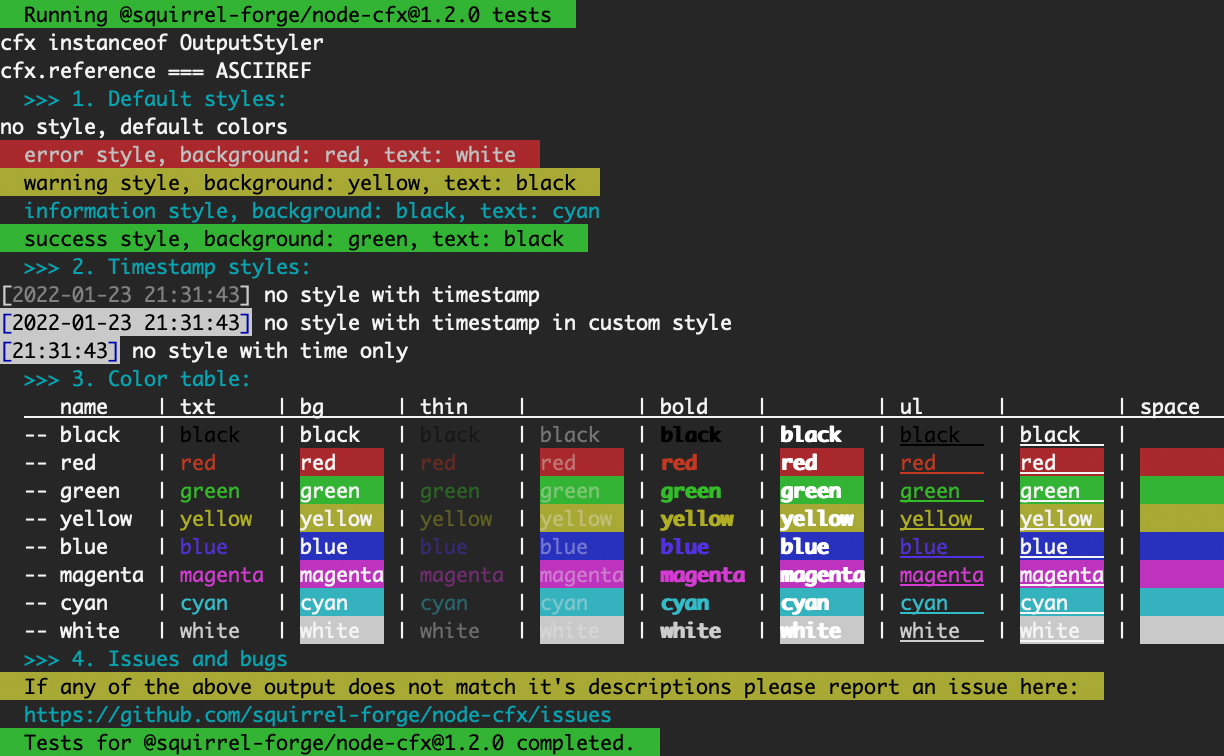
## Usage
Getting and using a default instance.
```javascript
const { cfx } = require( '@squirrel-forge/node-cfx' );
cfx.log( '[ul][fgreen]underlined green text[re]' );
```
Default styled output.
```javascript
cfx.success( 'success' );
cfx.error( 'error' );
cfx.warn( 'warning' );
cfx.info( 'info' );
```
Objects will not be styled, but outputted in plain, so you may mix arguments like with the console object.
```javascript
cfx.success( 'success', { some : 'object' }, 'another message' );
```
Get a styled string:
```javascript
const str = cfx.setStyle( '[ul][fgreen]underlined green text[re]' ); // \x1b[4m\x1b[32munderlined green text\x1b[0m
```
To enable automatic prefixing with the current timestamp set the *prependTime* property:
```javascript
cfx.prependTime = true;
```
To change the timestamp style, use the *timestampPrefix* and *timestampSuffix* properties:
```javascript
cfx.timestampPrefix = '[fwhite][[re][th]';
cfx.timestampSuffix = '[re][fwhite]][re] ';
```
Setting a custom timestamp format, see [time-stamp](https://www.npmjs.com/package/time-stamp) for details.
```javascript
cfx.timestampFormat = 'YYYY-MM-DD HH:mm:ss';
```
## Styling options
### Control and text style
| Code | Control | Code | Text |
|------|---------|------|-----------|
| [re] | Reset | [bo] | Bold |
| [rv] | Reverse | [th] | Thin |
| - | - | [ul] | Underline |
| - | - | [bl] | Blink |
| - | - | [hd] | Hidden |
### Text and background colors
| Text | Background | Color |
|------------|------------|---------|
| [fblack] | [bblack] | Black |
| [fred] | [bred] | Red |
| [fgreen] | [bgreen] | Green |
| [fyellow] | [byellow] | Yellow |
| [fblue] | [bblue] | Blue |
| [fmagenta] | [bmagenta] | Magenta |
| [fcyan] | [bcyan] | Cyan |
| [fwhite] | [bwhite] | White |
## Overriding default styles
Default styles and reset.
```javascript
cfx.style = {
error : '[bred][fwhite] ',
warn : '[byellow][fblack] ',
info : '[bblack][fcyan] ',
success : '[bgreen][fblack] ',
};
this.styleReset = ' [re]';
```
Default reset, used when no other reset is passed to the internal *_write* method, useful when making your own style methods.
```javascript
cfx.defaultReset = ' [re]';
```
## Creating a custom instance
```javascript
const { ASCIIREF, OutputStyler } = require( '@squirrel-forge/node-cfx' );
const myCfx = new OutputStyler( ASCIIREF, console );
```
## Extending the styler
```javascript
const { ASCIIREF, OutputStyler } = require( '@squirrel-forge/node-cfx' );
// Extended styler class
class MyOutputStyler extends OutputStyler {
constructor() {
super( ASCIIREF, console );
// Extend the constructor or set default options
}
// Add override or extend any methods
}
```
## Issues and docs
If you encounter any issues, please report [here](https://github.com/squirrel-forge/node-cfx/issues).
---
Check the sourcecode on [github](https://github.com/squirrel-forge/node-cfx) for detailed comments.