https://github.com/squizzdotcom/squizz-platform-api-dotnet-library
The library can be used by .NET applications to access the SQUIZZ.com platform's Application Programming Interface (API) to push and pull data from the API's endpoints.
https://github.com/squizzdotcom/squizz-platform-api-dotnet-library
Last synced: 5 months ago
JSON representation
The library can be used by .NET applications to access the SQUIZZ.com platform's Application Programming Interface (API) to push and pull data from the API's endpoints.
- Host: GitHub
- URL: https://github.com/squizzdotcom/squizz-platform-api-dotnet-library
- Owner: squizzdotcom
- License: gpl-3.0
- Created: 2017-08-18T09:21:45.000Z (almost 9 years ago)
- Default Branch: master
- Last Pushed: 2024-09-16T19:52:12.000Z (almost 2 years ago)
- Last Synced: 2025-09-23T10:57:35.834Z (9 months ago)
- Language: C#
- Size: 204 KB
- Stars: 0
- Watchers: 1
- Forks: 0
- Open Issues: 1
-
Metadata Files:
- Readme: README.md
- License: LICENSE
Awesome Lists containing this project
README

# SQUIZZ.com Platform API .NET Library
The [SQUIZZ.com](https://www.squizz.com) Platform API .NET Library can be used by .NET applications to access the SQUIZZ.com platform's Application Programming Interface (API), allowing data to be pushed and pulled from the API's endpoints in a clean and elegant way. The kinds of data pushed and pulled from the API using the library can include organisational data such as products, sales orders, purchase orders, customer accounts, supplier accounts, notifications, and other data that the platform supports.
This library removes the need for .NET software developers to write boilerplate code for connecting and accessing the platform's API, allowing .NET software using the platform's API to be writen faster and simpler. The library provides classes and objects that can be directly referenced within a .NET application, making it easy to manipulate data retreived from the platform, or create and send data to platform.
If you are a software developer writing a .NET application then we recommend that you use this library instead of directly calling the platform's APIs, since it will simplify your development times and allow you to easily incorporate new functionality from the API by simplying updating this library.
- You can find more information about the SQUIZZ.com platform by visiting [https://www.squizz.com/docs/squizz](https://www.squizz.com/docs/squizz)
- To find more information about developing software for the SQUIZZ.com visit [https://www.squizz.com/docs/squizz/Integrate-Software-Into-SQUIZZ.com-Platform.html](https://www.squizz.com/docs/squizz/Integrate-Software-Into-SQUIZZ.com-Platform.html)
- To find more information about the platform's API visit [https://www.squizz.com/docs/squizz/Platform-API.html](https://www.squizz.com/docs/squizz/Platform-API.html)
## Contents
* [Getting Started](#getting-started)
* [Example Usages](#example-usages)
* [Create Organisation API Session Endpoint](#create-organisation-api-session-endpoint)
* [Send and Procure Purchase Order From Supplier Endpoint](#send-and-procure-purchase-order-from-supplier-endpoint)
* [Send Customer Invoices to Customer Endpoint](#send-customer-invoices-to-customer-endpoint)
* [Send Delivery Notice to Customer Endpoint](#send-delivery-notice-to-customer-endpoint)
* [Retrieve Organisation Data Endpoint](#retrieve-organisation-data-endpoint)
* [Import Organisation Data Endpoint](#import-organisation-data-endpoint)
* [Import Organisation Sales Order Endpoint](#import-organisation-sales-order-endpoint)
* [Search Customer Account Records Endpoint](#search-customer-account-records-endpoint)
* [Retrieve Customer Account Record Endpoint](#retrieve-customer-account-record-endpoint)
* [Create Organisation Notification Endpoint](#create-organisation-notification-endpoint)
* [Validate Organisation API Session Endpoint](#validate-organisation-api-session-endpoint)
* [Validate/Create Organisation API Session Endpoint](#validatecreate-organisation-api-session-endpoint)
* [Destroy Organisation API Session Endpoint](#destroy-organisation-api-session-endpoint)
## Getting Started
To get started using the library within .NET applications, you can download the API library and its dependent libraries into your Visual Studio solution from [NuGET](https://www.nuget.org/) package manager. The library is hosted at [NuGet Squizz.Platform.API](https://www.nuget.org/packages/Squizz.Platform.API/) package. You can install the NuGET hosted package with the command line below, or visually find and install the package using [Visual Studio NuGET Package Manager](https://marketplace.visualstudio.com/items?itemName=NuGetTeam.NuGetPackageManager) plugin.
```
Install-Package Squizz.Platform.API -Version 1.5.0
```
Alternatively you can download and add the required files direct from the [Release page](https://github.com/squizzdotcom/squizz-platform-api-dotnet-library/releases). Once done then add references to the DLL files in your visual studio solution.
The library contains dependencies on [Newtonsoft's Json.NET Library](https://www.newtonsoft.com/json) as well as the [Ecommerce Standards Documents .NET Library](https://github.com/squizzdotcom/ecommerce-standards-documents-dotnet-library)
Once this library is referenced within your .NET application then to use it within a .NET class you can use the following "using" syntax:
```
using Squizz.Platform.API.v1;
using Squizz.Platform.API.v1.endpoint;
```
## Example Usages
### Create Organisation API Session Endpoint
To start using the SQUIZZ.com platform's API a session must first be created. A session can only be created after credentials for a specified organisation have been given to the API and have been verified.
Once the session has been created then all other endpoints in the API can be called.
Read [https://www.squizz.com/docs/squizz/Platform-API.html#section840](https://www.squizz.com/docs/squizz/Platform-API.html#section840) for more documentation about the endpoint.
```csharp
using System;
using System.Collections.Generic;
using System.Linq;
using System.Text;
using System.Threading.Tasks;
using Squizz.Platform.API.v1;
using Squizz.Platform.API.v1.endpoint;
namespace Squizz.Platform.API.Examples.APIv1
{
/// Class runs a console application that shows an example on how create a session in the platform's API
public class APIv1ExampleRunnerCreateSession
{
public static void runAPIv1ExampleRunnerCreateSession()
{
Console.WriteLine("Example - Creating An Organisation API Session");
Console.WriteLine("");
//obtain or load in an organisation's API credentials, in this example from the user in the console
Console.WriteLine("Enter Organisation ID:");
string orgID = Console.ReadLine();
Console.WriteLine("Enter Organisation API Key:");
string orgAPIKey = Console.ReadLine();
Console.WriteLine("Enter Organisation API Password:");
string orgAPIPass = Console.ReadLine();
//create an API session instance
int sessionTimeoutMilliseconds = 20000;
APIv1OrgSession apiOrgSession = new APIv1OrgSession(orgID, orgAPIKey, orgAPIPass, sessionTimeoutMilliseconds, APIv1Constants.SUPPORTED_LOCALES_EN_AU);
//call the platform's API to request that a session is created
APIv1EndpointResponse endpointResponse = apiOrgSession.createOrgSession();
//check if the organisation's credentials were correct and that a session was created in the platform's API
if (endpointResponse.result.ToUpper() == APIv1EndpointResponse.ENDPOINT_RESULT_SUCCESS)
{
//session has been created so now can call other API endpoints
Console.WriteLine("SUCCESS - API session has successfully been created.");
}
else
{
//session failed to be created
Console.WriteLine("FAIL - API session failed to be created. Reason: " + endpointResponse.result_message + " Error Code: " + endpointResponse.result_code);
}
//next steps
//call API endpoints...
//destroy API session when done...
Console.WriteLine("Example Finished.");
}
}
}
```
### Send and Procure Purchase Order From Supplier Endpoint
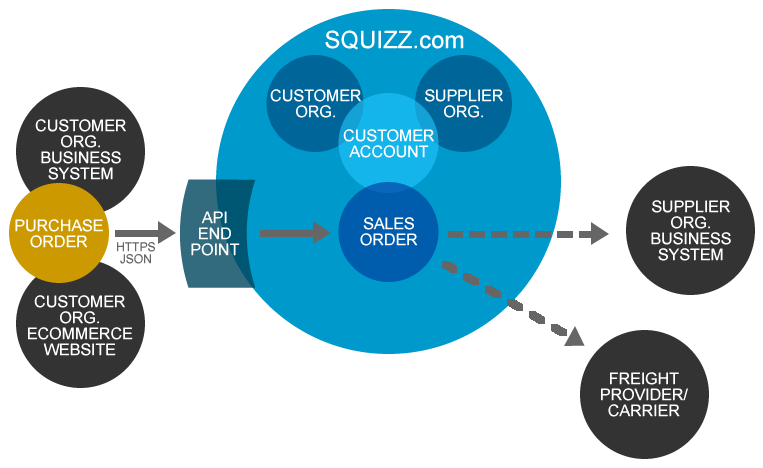
The SQUIZZ.com platform's API has an endpoint that allows an orgnisation to import a purchase order. and have it procured/converted into a sales order of a designated supplier organisation.
This endpoint allows a customer organisation to commit to buy goods and services of an organisation, and have the order processed, and delivered by the supplier organisation.
- The endpoint relies upon a connection first being setup between organisations within the SQUIZZ.com platform.
- The endpoint relies upon being able to find matching supplier products as with what has been ordered.
- The endpoint has a number of other requirements. See the endpoint documentation for more details on these requirements.
Each purchase order needs to be imported within a "Ecommerce Standards Document" that contains a record for each purchase order. Use the Ecommerce Standards library to easily create these documents and records.
It is recommended to only import one purchase order at a time, since if an array of purchase orders is imported and one order failed to be procured, then no other orders in the list will be attempted to import.
Read [https://www.squizz.com/docs/squizz/Platform-API.html#section961](https://www.squizz.com/docs/squizz/Platform-API.html#section961) for more documentation about the endpoint and its requirements.
See the example below on how the call the Send and Procure Purchase order From Supplier endpoint. Note that a session must first be created in the API before calling the endpoint.
```csharp
using System;
using System.Collections.Generic;
using System.Linq;
using System.Text;
using System.Threading.Tasks;
using Squizz.Platform.API.v1;
using Squizz.Platform.API.v1.endpoint;
using EcommerceStandardsDocuments;
namespace Squizz.Platform.API.Examples.APIv1
{
/**
* Shows an example of creating a organisation session with the SQUIZZ.com platform's API, then sends a organisation's purchase order data to supplier
*/
public class APIv1ExampleRunnerProcurePurchaseOrderFromSupplier
{
public static void runAPIv1ExampleRunnerProcurePurchaseOrderFromSupplier()
{
Console.WriteLine("Example - Procure Purchase Order From Supplier API Session");
Console.WriteLine("");
//obtain or load in an organisation's API credentials, in this example from the user in the console
Console.WriteLine("Enter Organisation ID:");
string orgID = Console.ReadLine();
Console.WriteLine("Enter Organisation API Key:");
string orgAPIKey = Console.ReadLine();
Console.WriteLine("Enter Organisation API Password:");
string orgAPIPass = Console.ReadLine();
Console.WriteLine("Enter Supplier Organisation ID:");
string supplierOrgID = Console.ReadLine();
Console.WriteLine("(optional) Enter Supplier's Customer Account Code:");
string customerAccountCode = Console.ReadLine();
//create an API session instance
int sessionTimeoutMilliseconds = 20000;
APIv1OrgSession apiOrgSession = new APIv1OrgSession(orgID, orgAPIKey, orgAPIPass, sessionTimeoutMilliseconds, APIv1Constants.SUPPORTED_LOCALES_EN_AU);
//call the platform's API to request that a session is created
APIv1EndpointResponse endpointResponse = apiOrgSession.createOrgSession();
//check if the organisation's credentials were correct and that a session was created in the platform's API
if (endpointResponse.result.ToUpper() == APIv1EndpointResponse.ENDPOINT_RESULT_SUCCESS)
{
//session has been created so now can call other API endpoints
Console.WriteLine("SUCCESS - API session has successfully been created.");
}
else
{
//session failed to be created
Console.WriteLine("FAIL - API session failed to be created. Reason: " + endpointResponse.result_message + " Error Code: " + endpointResponse.result_code);
}
//sand and procure purchsae order if the API was successfully created
if (apiOrgSession.doesSessionExist())
{
//create purchase order record to import
ESDRecordOrderPurchase purchaseOrderRecord = new ESDRecordOrderPurchase();
//set data within the purchase order
purchaseOrderRecord.keyPurchaseOrderID = "111";
purchaseOrderRecord.purchaseOrderCode = "POEXAMPLE-345";
purchaseOrderRecord.purchaseOrderNumber = "345";
purchaseOrderRecord.purchaseOrderNumber = "345";
purchaseOrderRecord.instructions = "Leave goods at the back entrance";
purchaseOrderRecord.keySupplierAccountID = "2";
purchaseOrderRecord.supplierAccountCode = "ACM-002";
//set delivery address that ordered goods will be delivered to
purchaseOrderRecord.deliveryAddress1 = "32";
purchaseOrderRecord.deliveryAddress2 = "Main Street";
purchaseOrderRecord.deliveryAddress3 = "Melbourne";
purchaseOrderRecord.deliveryRegionName = "Victoria";
purchaseOrderRecord.deliveryCountryName = "Australia";
purchaseOrderRecord.deliveryPostcode = "3000";
purchaseOrderRecord.deliveryOrgName = "Acme Industries";
purchaseOrderRecord.deliveryContact = "Jane Doe";
//set billing address that the order will be billed to for payment
purchaseOrderRecord.billingAddress1 = "43";
purchaseOrderRecord.billingAddress2 = " High Street";
purchaseOrderRecord.billingAddress3 = "Melbourne";
purchaseOrderRecord.billingRegionName = "Victoria";
purchaseOrderRecord.billingCountryName = "Australia";
purchaseOrderRecord.billingPostcode = "3000";
purchaseOrderRecord.billingOrgName = "Acme Industries International";
purchaseOrderRecord.billingContact = "John Citizen";
//create an array of purchase order lines
List orderLines = new List();
//create purchase order line record 1
ESDRecordOrderPurchaseLine orderProduct = new ESDRecordOrderPurchaseLine();
orderProduct.lineType = ESDocumentConstants.ORDER_LINE_TYPE_PRODUCT;
orderProduct.productCode = "TEA-TOWEL-GREEN";
orderProduct.productName = "Green tea towel - 30 x 6 centimetres";
orderProduct.keySellUnitID = "2";
orderProduct.unitName = "EACH";
orderProduct.quantity = 4;
orderProduct.sellUnitBaseQuantity = 4;
orderProduct.priceExTax = (decimal)5.00;
orderProduct.priceIncTax = (decimal)5.50;
orderProduct.priceTax = (decimal)0.50;
orderProduct.priceTotalIncTax = (decimal)22.00;
orderProduct.priceTotalExTax = (decimal)20.00;
orderProduct.priceTotalTax = (decimal)2.00;
//specify supplier's product code in salesOrderProductCode if it is different to the line's productCode field
orderProduct.salesOrderProductCode = "ACME-SUPPLIER-TTGREEN";
//add 1st order line to lines list
orderLines.Add(orderProduct);
//create purchase order line record 2
orderProduct = new ESDRecordOrderPurchaseLine();
orderProduct.lineType = ESDocumentConstants.ORDER_LINE_TYPE_PRODUCT;
orderProduct.productCode = "TEA-TOWEL-BLUE";
orderProduct.quantity = 10;
orderProduct.salesOrderProductCode = "ACME-TTBLUE";
//add 2nd order line to lines list
orderLines.Add(orderProduct);
//add order lines to the order
purchaseOrderRecord.lines = orderLines;
//create purchase order records list and add purchase order to it
List purchaseOrderRecords = new List();
purchaseOrderRecords.Add(purchaseOrderRecord);
//after 60 seconds give up on waiting for a response from the API when creating the notification
int timeoutMilliseconds = 60000;
//create purchase order Ecommerce Standards document and add purchse order records to the document
ESDocumentOrderPurchase orderPurchaseESD = new ESDocumentOrderPurchase(ESDocumentConstants.RESULT_SUCCESS, "successfully obtained data", purchaseOrderRecords.ToArray(), new Dictionary());
//send purchase order document to the API for procurement by the supplier organisation
APIv1EndpointResponseESD endpointResponseESD = APIv1EndpointOrgProcurePurchaseOrderFromSupplier.call(apiOrgSession, timeoutMilliseconds, supplierOrgID, customerAccountCode, orderPurchaseESD);
ESDocumentOrderSale esDocumentOrderSale = endpointResponseESD.esDocument;
//check the result of procuring the purchase orders
if (endpointResponseESD.result.ToUpper() == APIv1EndpointResponse.ENDPOINT_RESULT_SUCCESS) {
Console.WriteLine("SUCCESS - organisation purchase orders have successfully been sent to supplier organisation.");
//iterate through each of the returned sales orders and output the details of the sales orders
if (esDocumentOrderSale.dataRecords != null) {
foreach(ESDRecordOrderSale salesOrderRecord in esDocumentOrderSale.dataRecords) {
Console.WriteLine("\nSales Order Returned, Order Details: ");
Console.WriteLine("Sales Order Code: " + salesOrderRecord.salesOrderCode);
Console.WriteLine("Sales Order Total Cost: " + salesOrderRecord.totalPriceIncTax + " (" + salesOrderRecord.currencyISOCode + ")");
Console.WriteLine("Sales Order Total Taxes: " + salesOrderRecord.totalTax + " (" + salesOrderRecord.currencyISOCode + ")");
Console.WriteLine("Sales Order Customer Account: " + salesOrderRecord.customerAccountCode);
Console.WriteLine("Sales Order Total Lines: " + salesOrderRecord.totalLines);
}
}
} else {
Console.WriteLine("FAIL - organisation purchase orders failed to be processed. Reason: " + endpointResponseESD.result_message + " Error Code: " + endpointResponseESD.result_code);
//check that a Ecommerce standards document was returned
if (esDocumentOrderSale != null && esDocumentOrderSale.configs != null)
{
//if one or more products in the purchase order could not match a product for the supplier organisation then find out the order lines caused the problem
if (esDocumentOrderSale.configs.ContainsKey(APIv1EndpointResponseESD.ESD_CONFIG_ORDERS_WITH_UNMAPPED_LINES))
{
//get a list of order lines that could not be mapped
List> unmappedLines = APIv1EndpointOrgProcurePurchaseOrderFromSupplier.getUnmappedOrderLines(esDocumentOrderSale);
//iterate through each unmapped order line
foreach (KeyValuePair unmappedLine in unmappedLines)
{
//get the index of the purchase order and line that contained the unmapped product
int orderIndex = unmappedLine.Key;
int lineIndex = unmappedLine.Value;
//check that the order can be found that contains the problematic line
if (orderIndex < orderPurchaseESD.dataRecords.Length && lineIndex < orderPurchaseESD.dataRecords[orderIndex].lines.Count)
{
Console.WriteLine("For purchase order: " + orderPurchaseESD.dataRecords[orderIndex].purchaseOrderCode + " a matching supplier product for line number: " + (lineIndex + 1) + " could not be found.");
}
}
}
//if one or more supplier organisation's products in the purchase order are not stock then find the order lines that caused the problem
if (esDocumentOrderSale.configs.ContainsKey(APIv1EndpointResponseESD.ESD_CONFIG_ORDERS_WITH_UNSTOCKED_LINES))
{
//get a list of order lines that are not stocked by the supplier
List> unstockedLines = APIv1EndpointOrgProcurePurchaseOrderFromSupplier.getOutOfStockOrderLines(esDocumentOrderSale);
//iterate through each unstocked order line
foreach (KeyValuePair unstockedLine in unstockedLines)
{
//get the index of the purchase order and line that contained the unstocked product
int orderIndex = unstockedLine.Key;
int lineIndex = unstockedLine.Value;
//check that the order can be found that contains the problematic line
if (orderIndex < orderPurchaseESD.dataRecords.Length && lineIndex < orderPurchaseESD.dataRecords[orderIndex].lines.Count)
{
Console.WriteLine("For purchase order: " + orderPurchaseESD.dataRecords[orderIndex].purchaseOrderCode + " the supplier has no products in stock for line number: " + (lineIndex + 1));
}
}
}
//if one or more products in the purchase order could not be priced by the supplier organisation then find the order line that caused the problem
if (esDocumentOrderSale.configs.ContainsKey(APIv1EndpointResponseESD.ESD_CONFIG_ORDERS_WITH_UNPRICED_LINES))
{
//get a list of order lines that could not be priced
List> unpricedLines = APIv1EndpointOrgProcurePurchaseOrderFromSupplier.getUnpricedOrderLines(esDocumentOrderSale);
//iterate through each unpriced order line
foreach (KeyValuePair unpricedLine in unpricedLines) {
//get the index of the purchase order and line that contained the unpriced product
int orderIndex = unpricedLine.Key;
int lineIndex = unpricedLine.Value;
//check that the order can be found that contains the problematic line
if (orderIndex < orderPurchaseESD.dataRecords.Length && lineIndex < orderPurchaseESD.dataRecords[orderIndex].lines.Count) {
Console.WriteLine("For purchase order: " + orderPurchaseESD.dataRecords[orderIndex].purchaseOrderCode + " the supplier has not set pricing for line number: " + (lineIndex + 1));
}
}
}
}
}
//next steps
//call other API endpoints...
//destroy API session when done...
apiOrgSession.destroyOrgSession();
}
Console.WriteLine("Example Finished.");
}
}
}
```
### Send Customer Invoices To Customer Endpoint
The SQUIZZ.com platform's API has an endpoint that allows an orgnisation to send invoices it has raised against a customer account (A.K.A debtor) to the designated customer organisation, allowing the invoice to be imported into the customer's system as a supplier invoice (A.K.A bill).
This endpoint allows a supplier organisation to automate the sending out of invoices to its customers, and it allows the customer organisations to automate the receiving of invoices and importing them back into their own systems.
- The endpoint relies upon a connection first being setup between the supplier and customer organisations within the SQUIZZ.com platform.
- The endpoint optionally relies upon being able to match up products, surcharges and taxcodes from the customer invoice to the customer organisation, or such matching is ignored if the customer organisation does not require it.
- The endpoint has a number of other requirements. See the endpoint documentation for more details on these requirements.
Each customer invoice needs to be imported within a "Ecommerce Standards Document" that contains a record for each customer invoice. Use the Ecommerce Standards library to easily create these documents and records.
It is recommended to only import one customer invoice at a time, since if an array of customer invoices is imported and one invoice failed to import, then no other invoices in the list will be attempted to import.
Read [https://www.squizz.com/docs/squizz/Platform-API.html#section1154](https://www.squizz.com/docs/squizz/Platform-API.html#section1154) for more documentation about the endpoint and its requirements.
See the example below on how the call the Send Customer Invoices To Customer endpoint. Note that a session must first be created in the API before calling the endpoint.
```csharp
using System;
using System.Collections.Generic;
using System.Linq;
using System.Text;
using System.Threading.Tasks;
using Squizz.Platform.API.v1;
using Squizz.Platform.API.v1.endpoint;
using EcommerceStandardsDocuments;
namespace Squizz.Platform.API.Examples.APIv1
{
/**
* Shows an example of creating a organisation session with the SQUIZZ.com platform's API, then sends an organisation's customer invoice to a customer organisation
*/
public class APIv1ExampleRunnerSendCustomerInvoiceToCustomer
{
public static void runAPIv1ExampleRunnerSendCustomerInvoiceToCustomer()
{
Console.WriteLine("Example - Send Customer Invoice To Customer API Session");
Console.WriteLine("");
//obtain or load in an organisation's API credentials, in this example from the user in the console
Console.WriteLine("Enter Organisation ID:");
string orgID = Console.ReadLine();
Console.WriteLine("Enter Organisation API Key:");
string orgAPIKey = Console.ReadLine();
Console.WriteLine("Enter Organisation API Password:");
string orgAPIPass = Console.ReadLine();
Console.WriteLine("Enter Customer Organisation ID:");
string customerOrgID = Console.ReadLine();
Console.WriteLine("(optional) Enter Customer's Supplier Account Code:");
string supplierAccountCode = Console.ReadLine();
//create an API session instance
int sessionTimeoutMilliseconds = 20000;
APIv1OrgSession apiOrgSession = new APIv1OrgSession(orgID, orgAPIKey, orgAPIPass, sessionTimeoutMilliseconds, APIv1Constants.SUPPORTED_LOCALES_EN_AU);
//call the platform's API to request that a session is created
APIv1EndpointResponse endpointResponse = apiOrgSession.createOrgSession();
//check if the organisation's credentials were correct and that a session was created in the platform's API
if (endpointResponse.result.ToUpper() == APIv1EndpointResponse.ENDPOINT_RESULT_SUCCESS)
{
//session has been created so now can call other API endpoints
Console.WriteLine("SUCCESS - API session has successfully been created.");
}
else
{
//session failed to be created
Console.WriteLine("FAIL - API session failed to be created. Reason: " + endpointResponse.result_message + " Error Code: " + endpointResponse.result_code);
}
//create and send customer invoice if the API was successfully created
if (apiOrgSession.doesSessionExist())
{
//create customer invoice record to import
ESDRecordCustomerInvoice customerInvoiceRecord = new ESDRecordCustomerInvoice();
//set data within the customer invoice
customerInvoiceRecord.keyCustomerInvoiceID = "111";
customerInvoiceRecord.customerInvoiceCode = "CINV-22";
customerInvoiceRecord.customerInvoiceNumber = "22";
customerInvoiceRecord.salesOrderCode = "SO-332";
customerInvoiceRecord.purchaseOrderNumber = "PO-345";
customerInvoiceRecord.instructions = "Please pay within 30 days";
customerInvoiceRecord.keyCustomerAccountID = "2";
customerInvoiceRecord.customerAccountCode = "ACM-002";
//set dates within the invoice, in unix time, milliseconds since the 01/01/1970 12AM UTC epoch
DateTime epochDateTime = new DateTime(1970, 1, 1, 0, 0, 0, DateTimeKind.Utc);
customerInvoiceRecord.paymentDueDate = (long)(DateTime.UtcNow.AddDays(30) - epochDateTime).TotalMilliseconds;
customerInvoiceRecord.createdDate = (long)(DateTime.UtcNow - epochDateTime).TotalMilliseconds;
customerInvoiceRecord.dispatchedDate = (long)(DateTime.UtcNow.AddDays(-2) - epochDateTime).TotalMilliseconds;
//set delivery address that invoice goods were delivered to
customerInvoiceRecord.deliveryAddress1 = "32";
customerInvoiceRecord.deliveryAddress2 = "Main Street";
customerInvoiceRecord.deliveryAddress3 = "Melbourne";
customerInvoiceRecord.deliveryRegionName = "Victoria";
customerInvoiceRecord.deliveryCountryName = "Australia";
customerInvoiceRecord.deliveryPostcode = "3000";
customerInvoiceRecord.deliveryOrgName = "Acme Industries";
customerInvoiceRecord.deliveryContact = "Jane Doe";
//set billing address that the invoice is billed to for payment
customerInvoiceRecord.billingAddress1 = "43";
customerInvoiceRecord.billingAddress2 = " Smith Street";
customerInvoiceRecord.billingAddress3 = "Melbourne";
customerInvoiceRecord.billingRegionName = "Victoria";
customerInvoiceRecord.billingCountryName = "Australia";
customerInvoiceRecord.billingPostcode = "3000";
customerInvoiceRecord.billingOrgName = "Supplier Industries International";
customerInvoiceRecord.billingContact = "Lee Lang";
//create an array of customer invoice lines
List invoiceLines = new List();
//create invoice line record 1
ESDRecordCustomerInvoiceLine invoicedProduct = new ESDRecordCustomerInvoiceLine();
invoicedProduct.lineType = ESDocumentConstants.INVOICE_LINE_TYPE_PRODUCT;
invoicedProduct.productCode = "ACME-SUPPLIER-TTGREEN";
invoicedProduct.productName = "Green tea towel - 30 x 6 centimetres";
invoicedProduct.keySellUnitID = "2";
invoicedProduct.unitName = "EACH";
invoicedProduct.quantityInvoiced = 4;
invoicedProduct.sellUnitBaseQuantity = 4;
invoicedProduct.priceExTax = (decimal)5.00;
invoicedProduct.priceIncTax = (decimal)5.50;
invoicedProduct.priceTax = (decimal)0.50;
invoicedProduct.priceTotalIncTax = (decimal)22.00;
invoicedProduct.priceTotalExTax = (decimal)20.00;
invoicedProduct.priceTotalTax = (decimal)2.00;
//optionally specify customer's product code in purchaseOrderProductCode if it is different to the line's productCode field and the supplier org. knows the customer's codes
invoicedProduct.purchaseOrderProductCode = "TEA-TOWEL-GREEN";
//add tax details to the product invoice line
ESDRecordInvoiceLineTax productTax = new ESDRecordInvoiceLineTax();
productTax.priceTax = invoicedProduct.priceTax;
productTax.priceTotalTax = invoicedProduct.priceTotalTax;
productTax.quantity = invoicedProduct.quantityInvoiced;
productTax.taxRate = (decimal)10.00;
productTax.taxcode = "GST";
productTax.taxcodeLabel = "Goods And Services Tax";
invoicedProduct.taxes = new List(){productTax};
//add 1st invoice line to lines list
invoiceLines.Add(invoicedProduct);
//add a 2nd invoice line record that is a text line
invoicedProduct = new ESDRecordCustomerInvoiceLine();
invoicedProduct.lineType = ESDocumentConstants.INVOICE_LINE_TYPE_TEXT;
invoicedProduct.textDescription = "Please bundle tea towels into a box";
invoiceLines.Add(invoicedProduct);
//add a 3rd invoice line product record to the invoice
invoicedProduct = new ESDRecordCustomerInvoiceLine();
invoicedProduct.lineType = ESDocumentConstants.INVOICE_LINE_TYPE_PRODUCT;
invoicedProduct.productCode = "ACME-TTBLUE";
invoicedProduct.quantityInvoiced = 10;
invoicedProduct.priceExTax = (decimal)10.00;
invoicedProduct.priceIncTax = (decimal)1.10;
invoicedProduct.priceTax = (decimal)1.00;
invoicedProduct.priceTotalIncTax = (decimal)110.00;
invoicedProduct.priceTotalExTax = (decimal)100.00;
invoicedProduct.priceTotalTax = (decimal)10.00;
invoiceLines.Add(invoicedProduct);
//add lines to the invoice
customerInvoiceRecord.lines = invoiceLines;
//set invoice totals
customerInvoiceRecord.totalPriceIncTax = (decimal)132.00;
customerInvoiceRecord.totalPriceExTax = (decimal)120.00;
customerInvoiceRecord.totalTax = (decimal)12.00;
customerInvoiceRecord.totalLines = invoiceLines.Count;
customerInvoiceRecord.totalProducts = 2;
//create customer invoices records list and add customer invoice to it
List customerInvoiceRecords = new List();
customerInvoiceRecords.Add(customerInvoiceRecord);
//after 60 seconds give up on waiting for a response from the API when creating the notification
int timeoutMilliseconds = 60000;
//create customer invoice Ecommerce Standards document and add customer invoice records to the document
ESDocumentCustomerInvoice customerInvoiceESD = new ESDocumentCustomerInvoice(ESDocumentConstants.RESULT_SUCCESS, "successfully obtained data", customerInvoiceRecords.ToArray(), new Dictionary());
//send customer invoice document to the API and onto the customer organisation
APIv1EndpointResponseESD endpointResponseESD = APIv1EndpointOrgSendCustomerInvoiceToCustomer.call(apiOrgSession, timeoutMilliseconds, customerOrgID, supplierAccountCode, customerInvoiceESD);
ESDocumentSupplierInvoice esDocumentSupplierInvoice = endpointResponseESD.esDocument;
//check the result of sending the supplier invoice
if (endpointResponseESD.result.ToUpper() == APIv1EndpointResponse.ENDPOINT_RESULT_SUCCESS)
{
Console.WriteLine("SUCCESS - organisation customer invoice(s) have successfully been sent to customer organisation.");
//iterate through each of the returned supplier invoice(s) that the customer invoice(s) were converted from and output the details of the supplier invoices
if (esDocumentSupplierInvoice.dataRecords != null)
{
foreach (ESDRecordSupplierInvoice supplierInvoiceRecord in esDocumentSupplierInvoice.dataRecords)
{
Console.WriteLine("\nCustomer Invoice Returned, Invoice Details: ");
Console.WriteLine("Supplier Invoice Code: " + supplierInvoiceRecord.supplierInvoiceCode);
Console.WriteLine("Supplier Invoice Total Cost: " + supplierInvoiceRecord.totalPriceIncTax + " (" + supplierInvoiceRecord.currencyISOCode + ")");
Console.WriteLine("Supplier Invoice Total Taxes: " + supplierInvoiceRecord.totalTax + " (" + supplierInvoiceRecord.currencyISOCode + ")");
Console.WriteLine("Supplier Invoice Supplier Account: " + supplierInvoiceRecord.supplierAccountCode);
Console.WriteLine("Supplier Invoice Total Lines: " + supplierInvoiceRecord.totalLines);
}
}
}
else {
Console.WriteLine("FAIL - organisation customer invoice(s) failed to be processed. Reason: " + endpointResponseESD.result_message + " Error Code: " + endpointResponseESD.result_code);
//check that a Ecommerce standards document was returned
if (esDocumentSupplierInvoice != null && esDocumentSupplierInvoice.configs != null)
{
//if one or more products in the customer invoice could not match a product to the customer organisation then find out the invoice lines that caused the problem
if (esDocumentSupplierInvoice.configs.ContainsKey(APIv1EndpointResponseESD.ESD_CONFIG_INVOICES_WITH_UNMAPPED_LINES))
{
//get a list of invoice lines that could not be mapped
List> unmappedLines = APIv1EndpointOrgSendCustomerInvoiceToCustomer.getUnmappedInvoiceLines(esDocumentSupplierInvoice);
//iterate through each unmapped invoice line
foreach (KeyValuePair unmappedLine in unmappedLines)
{
//get the index of the customer invoice and line that contained the unmapped product
int invoiceIndex = unmappedLine.Key;
int lineIndex = unmappedLine.Value;
//check that the invoice can be found that contains the problematic line
if (invoiceIndex < customerInvoiceESD.dataRecords.Length && lineIndex < customerInvoiceESD.dataRecords[invoiceIndex].lines.Count)
{
Console.WriteLine("For customer invoice: " + customerInvoiceESD.dataRecords[invoiceIndex].customerInvoiceCode + " a matching customer product for line number: " + (lineIndex + 1) + " could not be matched up or handled.");
}
}
}
}
}
//next steps
//call other API endpoints...
//destroy API session when done...
apiOrgSession.destroyOrgSession();
}
Console.WriteLine("Example Finished.");
}
}
}
```
### Send Delivery Notice to Customer Endpoint
The SQUIZZ.com platform's API has an endpoint that allows an orgnisation to send delivery notices (also known as shipping notices, freight notices, advanced shipping notices) for goods it having delivered to a customer, notifying where the ordered goods are being handled in the dispatch and delivery/shipping process.
This endpoint allows a supplier organisation to automate the sending out of delivery notices to its customers, allowing either individuals ordering in squizz to receive these notices, as well as allow customer organisations to automate the receiving of delivery notices and importing them back into their own systems.
Many delivery notices may be sent for the same delivery of ordered goods, containing a status and message outlining where the goods are currently located. This can allow customers to receive many notifications as it progresses. It's up to you to determine how often the customer should be aware of delivery progression.
- The endpoint relies upon a supplier organisations first importing customer accounts within the SQUIZZ.com platform that the delivery notices are associated to.
- If the delivery notices needs to be forwarded onto customer organisations, then endpoint either relies upon a connection first being setup between the supplier and customer organisations within the SQUIZZ.com platform, or the supplying organisation setting up a data adaptor to export the customer delivery notices to the customers external system. The first option is preferred since the supplying org then doesn't need to know what system the customer organisation is running.
- The endpoint has a number of other requirements. See the endpoint documentation for more details on these requirements.
Each delivery notice needs to be imported within a "Ecommerce Standards Document" that contains a record for each delivery notice. Use the Ecommerce Standards library to easily create these documents and records.
It is recommended to only import one delivery notice at a time, since if an array of delivery notice is imported and one notice failed to import, then no other notices in the list will be attempted to import.
Read [https://www.squizz.com/docs/squizz/Platform-API.html#section1550](https://www.squizz.com/docs/squizz/Platform-API.html#section1550) for more documentation about the endpoint and its requirements.
See the example below on how the call the Send Delivery Notice To Customer endpoint. Note that a session must first be created in the API before calling the endpoint.
```csharp
using System;
using System.Collections.Generic;
using Squizz.Platform.API.v1;
using Squizz.Platform.API.v1.endpoint;
using EcommerceStandardsDocuments;
namespace Squizz.Platform.API.Examples.APIv1
{
/**
* Shows an example of creating a organisation session with the SQUIZZ.com platform's API, then sends an organisation's delivery notice to a customer to advise of the delivery of goods
*/
public class APIv1ExampleRunnerSendDeliveryNoticeToCustomer
{
public static void runAPIv1ExampleRunnerSendDeliveryNoticeToCustomer()
{
Console.WriteLine("Example - Send Delivery Notice To Customer API Session");
Console.WriteLine("");
//obtain or load in an organisation's API credentials, in this example from the user in the console
Console.WriteLine("Enter Organisation ID:");
string orgID = Console.ReadLine();
Console.WriteLine("Enter Organisation API Key:");
string orgAPIKey = Console.ReadLine();
Console.WriteLine("Enter Organisation API Password:");
string orgAPIPass = Console.ReadLine();
Console.WriteLine("(optional) Enter Customer Organisation ID:");
string customerOrgID = Console.ReadLine();
Console.WriteLine("(optional) Enter Customer's Supplier Account Code:");
string supplierAccountCode = Console.ReadLine();
Console.WriteLine("(optional) Should Notice Be Exported Using Data Adaptor ("+ ESDocumentConstants.ESD_VALUE_YES + " or "+ ESDocumentConstants.ESD_VALUE_NO + "):");
bool useDeliveryNoticeExport = Console.ReadLine().Trim().ToUpper() == ESDocumentConstants.ESD_VALUE_YES;
//create an API session instance
int sessionTimeoutMilliseconds = 20000;
APIv1OrgSession apiOrgSession = new APIv1OrgSession(orgID, orgAPIKey, orgAPIPass, sessionTimeoutMilliseconds, APIv1Constants.SUPPORTED_LOCALES_EN_AU);
//call the platform's API to request that a session is created
APIv1EndpointResponse endpointResponse = apiOrgSession.createOrgSession();
//check if the organisation's credentials were correct and that a session was created in the platform's API
if (endpointResponse.result.ToUpper() == APIv1EndpointResponse.ENDPOINT_RESULT_SUCCESS)
{
//session has been created so now can call other API endpoints
Console.WriteLine("SUCCESS - API session has successfully been created.");
}
else
{
//session failed to be created
Console.WriteLine("FAIL - API session failed to be created. Reason: " + endpointResponse.result_message + " Error Code: " + endpointResponse.result_code);
}
//create and send delivery notice if the API was successfully created
if (apiOrgSession.doesSessionExist())
{
//create delivery notice record to import
ESDRecordDeliveryNotice deliveryNoticeRecord = new ESDRecordDeliveryNotice();
//set data within the delivery notice
deliveryNoticeRecord.keyDeliveryNoticeID = "DN123";
deliveryNoticeRecord.deliveryNoticeCode = "CUSDELNUM-123-A";
deliveryNoticeRecord.deliveryStatus = ESDocumentConstants.DELIVERY_STATUS_IN_TRANSIT;
deliveryNoticeRecord.deliveryStatusMessage = "Currently en-route to receiver.";
//set information about the freight carrier currently performing the delivery
deliveryNoticeRecord.freightCarrierName = "ACME Freight Logistics Inc.";
deliveryNoticeRecord.freightCarrierCode = "ACFLI";
deliveryNoticeRecord.freightCarrierTrackingCode = "34320-ACFLI-34324-234";
deliveryNoticeRecord.freightCarrierAccountCode = "VIP00012";
deliveryNoticeRecord.freightCarrierConsignCode = "42343-242344";
deliveryNoticeRecord.freightCarrierServiceCode = "SUPER-SMART-FREIGHT-FACILITATOR";
deliveryNoticeRecord.freightSystemRefCode = "SSFF-3421";
// add references to other records (sales order, customer invoice, purchase order, customer account) that this delivery is associated to
deliveryNoticeRecord.keyCustomerInvoiceID = "111";
deliveryNoticeRecord.customerInvoiceCode = "CINV-22";
deliveryNoticeRecord.customerInvoiceNumber = "22";
deliveryNoticeRecord.keySalesOrderID = "332";
deliveryNoticeRecord.salesOrderCode = "SO-332";
deliveryNoticeRecord.salesOrderNumber = "SO-332";
deliveryNoticeRecord.purchaseOrderCode = "PO-345";
deliveryNoticeRecord.purchaseOrderNumber = "345";
deliveryNoticeRecord.instructions = "Please leave goods via the back driveway";
deliveryNoticeRecord.keyCustomerAccountID = "2";
// set where the delivery is currently located geographically
deliveryNoticeRecord.atGeographicLocation = ESDocumentConstants.ESD_VALUE_YES;
deliveryNoticeRecord.locationLatitude = (decimal)-37.8277324706811;
deliveryNoticeRecord.locationLongitude = (decimal)144.92382897158126;
//set dates within the invoice, in unix time, milliseconds since the 01/01/1970 12AM UTC epoch
DateTime epochDateTime = new DateTime(1970, 1, 1, 0, 0, 0, DateTimeKind.Utc);
deliveryNoticeRecord.deliveryDate = (long)(DateTime.UtcNow - epochDateTime).TotalMilliseconds;
deliveryNoticeRecord.dispatchedDate = (long)(DateTime.UtcNow.AddDays(-2) - epochDateTime).TotalMilliseconds;
//create delivery notice records list and add the delivery notice to it
List deliveryNoticeRecords = new List();
deliveryNoticeRecords.Add(deliveryNoticeRecord);
//after 60 seconds give up on waiting for a response from the API when creating the delivery notice
int timeoutMilliseconds = 60000;
//create delivery notice Ecommerce Standards document and add delivery notice records to the document
ESDocumentDeliveryNotice deliveryNoticeESD = new ESDocumentDeliveryNotice(ESDocumentConstants.RESULT_SUCCESS, "successfully obtained data", deliveryNoticeRecords.ToArray(), new Dictionary());
//send delivery notice document to the API and onto the customer
APIv1EndpointResponseESD endpointResponseESD = APIv1EndpointOrgSendDeliveryNoticeToCustomer.call(apiOrgSession, timeoutMilliseconds, customerOrgID, supplierAccountCode, useDeliveryNoticeExport, deliveryNoticeESD);
ESDocument esDocumentResult = endpointResponseESD.esDocument;
//check the result of sending the supplier invoice
if (endpointResponseESD.result.ToUpper() == APIv1EndpointResponse.ENDPOINT_RESULT_SUCCESS)
{
Console.WriteLine("SUCCESS - organisation delivery notice(s) have successfully been sent to customer.");
}
else
{
Console.WriteLine("FAIL - organisation delivery notice(s) failed to be processed. Reason: " + endpointResponseESD.result_message + " Error Code: " + endpointResponseESD.result_code);
}
//next steps
//call other API endpoints...
//destroy API session when done...
apiOrgSession.destroyOrgSession();
}
Console.WriteLine("Example Finished.");
}
}
}
```
### Retrieve Organisation Data Endpoint
The SQUIZZ.com platform's API has an endpoint that allows a variety of different types of data to be retrieved from another organisation stored on the platform.
The organisational data that can be retrieved includes products, product stock quantities, product pricing, categories, attributes, makers, maker models and maker model mappings.
The data retrieved can be used to allow an organisation to set additional information about products being bought or sold, as well as being used in many other ways.
Each kind of data retrieved from endpoint is formatted as JSON data conforming to the "Ecommerce Standards Document" standards, with each document containing an array of zero or more records. Use the Ecommerce Standards library to easily read through these documents and records, to find data natively using Java classes.
Read [https://www.squizz.com/docs/squizz/Platform-API-Endpoint:-Retrieve-Organisation-Data.html](https://www.squizz.com/docs/squizz/Platform-API-Endpoint:-Retrieve-Organisation-Data.html) for more documentation about the endpoint and its requirements.
See the example below on how the call the Retrieve Organisation ESD Data endpoint. Note that a session must first be created in the API before calling the endpoint.
Other examples exist in this repository's examples folder on how to retrieve serveral different types of data. Note that some of these examples show how to different types of data can be retrieved and combined together, showing the interconnected nature of several data types:
- Retrieve Products [APIv1ExampleRunnerRetrieveOrgESDDataProduct.cs](https://github.com/squizzdotcom/squizz-platform-api-dotnet-library/blob/master/Source/Examples/APIv1/APIv1ExampleRunnerRetrieveOrgESDDataProduct.cs)
- Retrieve Product Stock Quantities [APIv1ExampleRunnerRetrieveOrgESDDataProductStock.cs](https://github.com/squizzdotcom/squizz-platform-api-dotnet-library/blob/master/Source/Examples/APIv1/APIv1ExampleRunnerRetrieveOrgESDDataProductStock.cs)
- Retrieve Product Pricing [APIv1ExampleRunnerRetrieveOrgESDDataPrice.cs](https://github.com/squizzdotcom/squizz-platform-api-dotnet-library/blob/master/Source/Examples/APIv1/APIv1ExampleRunnerRetrieveOrgESDDataPrice.cs)
- Retrieve Categories [APIv1ExampleRunnerRetrieveOrgESDDataCategories.cs](https://github.com/squizzdotcom/squizz-platform-api-dotnet-library/blob/master/Source/Examples/APIv1/APIv1ExampleRunnerRetrieveOrgESDDataCategories.cs)
- Retrieve Attributes [APIv1ExampleRunnerRetrieveOrgESDDataAttributes.cs](https://github.com/squizzdotcom/squizz-platform-api-dotnet-library/blob/master/Source/Examples/APIv1/APIv1ExampleRunnerRetrieveOrgESDDataAttributes.cs)
- Retrieve Makers [APIv1ExampleRunnerRetrieveOrgESDDataMakers.cs](https://github.com/squizzdotcom/squizz-platform-api-dotnet-library/blob/master/Source/Examples/APIv1/APIv1ExampleRunnerRetrieveOrgESDDataMakers.cs)
- Retrieve Maker Models [APIv1ExampleRunnerRetrieveOrgESDDataMakerModels.cs](https://github.com/squizzdotcom/squizz-platform-api-dotnet-library/blob/master/Source/Examples/APIv1/APIv1ExampleRunnerRetrieveOrgESDDataMakerModels.cs)
- Retrieve Maker Model Mappings [APIv1ExampleRunnerRetrieveOrgESDDataMakerModelMappings.cs](https://github.com/squizzdotcom/squizz-platform-api-dotnet-library/blob/master/Source/Examples/APIv1/APIv1ExampleRunnerRetrieveOrgESDDataMakerModelMappings.cs)
```csharp
using System;
using System.Collections.Generic;
using System.Linq;
using System.Text;
using System.Threading.Tasks;
using Squizz.Platform.API.v1;
using Squizz.Platform.API.v1.endpoint;
using EcommerceStandardsDocuments;
namespace Squizz.Platform.API.Examples.APIv1
{
/// Shows an example of creating a organisation session with the SQUIZZ.com platform's API, then retrieves Ecommerce data from a conencted organisation in the platform
public class APIv1ExampleRunnerRetrieveOrgESDDataProduct
{
public static void runAPIv1ExampleRunnerRetrieveOrgESDDataProduct()
{
Console.WriteLine("Example - Retrieve Supplier Organisation Product Data");
Console.WriteLine("");
//obtain or load in an organisation's API credentials, in this example from the user in the console
Console.WriteLine("Enter Organisation ID:");
string orgID = Console.ReadLine();
Console.WriteLine("Enter Organisation API Key:");
string orgAPIKey = Console.ReadLine();
Console.WriteLine("Enter Organisation API Password:");
string orgAPIPass = Console.ReadLine();
Console.WriteLine("Enter Supplier Organisation ID:");
string supplierOrgID = Console.ReadLine();
//create an API session instance
int sessionTimeoutMilliseconds = 20000;
APIv1OrgSession apiOrgSession = new APIv1OrgSession(orgID, orgAPIKey, orgAPIPass, sessionTimeoutMilliseconds, APIv1Constants.SUPPORTED_LOCALES_EN_AU);
//call the platform's API to request that a session is created
APIv1EndpointResponse endpointResponse = apiOrgSession.createOrgSession();
//check if the organisation's credentials were correct and that a session was created in the platform's API
if (endpointResponse.result.ToUpper() == APIv1EndpointResponse.ENDPOINT_RESULT_SUCCESS)
{
//session has been created so now can call other API endpoints
Console.WriteLine("SUCCESS - API session has successfully been created.");
}
else
{
//session failed to be created
Console.WriteLine("FAIL - API session failed to be created. Reason: " + endpointResponse.result_message + " Error Code: " + endpointResponse.result_code);
}
//import organisation data if the API was successfully created
if (apiOrgSession.doesSessionExist())
{
//after 60 seconds give up on waiting for a response from the API when creating the notification
int timeoutMilliseconds = 60000;
//loop through retrieving pages of records from the API
bool hasMoreRecordsToRetrieve = true;
int recordStartIndex = 0;
while(hasMoreRecordsToRetrieve)
{
//call the platform's API to get the supplier organisation's product data
APIv1EndpointResponseESD endpointResponseESD = APIv1EndpointOrgRetrieveESDocument.callRetrieveProducts(apiOrgSession, timeoutMilliseconds, supplierOrgID, APIv1EndpointOrgRetrieveESDocument.MAX_RECORDS_PER_REQUEST, recordStartIndex, "");
ESDocumentProduct esDocumentProduct = (ESDocumentProduct)endpointResponseESD.esDocument;
//check that the data successfully retrieved
if (endpointResponseESD.result.ToUpper()==APIv1EndpointResponse.ENDPOINT_RESULT_SUCCESS)
{
Console.WriteLine("SUCCESS - organisation data successfully obtained from the platform");
Console.WriteLine("\nProduct Records Returned: " + esDocumentProduct.totalDataRecords);
//check that records have been placed into the standards document
if (esDocumentProduct.dataRecords != null) {
Console.WriteLine("Product Records:");
//iterate through each product record stored within the standards document
int i = 0;
foreach(ESDRecordProduct productRecord in esDocumentProduct.dataRecords)
{
//output details of the product record
Console.WriteLine(APIv1ExampleRunner.CONSOLE_LINE);
Console.WriteLine(" Product Record #: " + i);
Console.WriteLine(" Key Product ID: " + productRecord.keyProductID);
Console.WriteLine(" Product Code: " + productRecord.productCode);
Console.WriteLine(" Name: " + productRecord.name);
Console.WriteLine(" Barcode: " + productRecord.barcode);
Console.WriteLine(" Stock Available: " + productRecord.stockQuantity);
Console.WriteLine(" Brand: " + productRecord.brand);
Console.WriteLine(APIv1ExampleRunner.CONSOLE_LINE);
i++;
}
}
//check to see if a full page of records were retrieved and if there is more records to get
if (esDocumentProduct.totalDataRecords >= APIv1EndpointOrgRetrieveESDocument.MAX_RECORDS_PER_REQUEST) {
recordStartIndex += APIv1EndpointOrgRetrieveESDocument.MAX_RECORDS_PER_REQUEST;
}else{
hasMoreRecordsToRetrieve = false;
}
} else {
Console.WriteLine("FAIL - organisation data failed to be obtained from the platform. Reason: " + endpointResponseESD.result_message + " Error Code: " + endpointResponseESD.result_code);
break;
}
}
//next steps
//call other API endpoints...
//destroy API session when done...
apiOrgSession.destroyOrgSession();
}
}
}
}
```
### Import Organisation Data Endpoint
The SQUIZZ.com platform's API has an endpoint that allows a wide variety of different types of data to be imported into the platform against an organisation.
This organisational data includes taxcodes, products, customer accounts, supplier accounts. pricing, price levels, locations, categories, makers, models, and many other kinds of data.
This data is used to allow the organisation to buy and sell products, as well manage customers, suppliers, employees, and other people.
Each type of data needs to be imported as an "Ecommerce Standards Document" that contains one or more records. Use the Ecommerce Standards library to easily create these documents and records.
When importing one type of organisational data, it is important to import the full data set, otherwise the platform will deactivate un-imported data.
For example if 3 products are imported, then another products import is run that only imports 2 records, then 1 product will become deactivated and no longer be able to be sold.
Read [https://www.squizz.com/docs/squizz/Platform-API-Endpoint:-Import-Organisation-Data.html](https://www.squizz.com/docs/squizz/Platform-API-Endpoint:-Import-Organisation-Data.html) for more documentation about the endpoint and its requirements.
See the example below on how the call the Import Organisation ESD Data endpoint. Note that a session must first be created in the API before calling the endpoint.
Other examples exist in this repository's examples folder on how to import serveral different types of data:
- Import Products [APIv1ExampleRunnerImportOrgESDDataProducts.cs](https://github.com/squizzdotcom/squizz-platform-api-dotnet-library/blob/master/Source/Examples/APIv1/APIv1ExampleRunnerImportOrgESDDataProducts.cs)
- Import Taxcodes [APIv1ExampleRunnerImportOrgESDDataTaxcodes.cs](https://github.com/squizzdotcom/squizz-platform-api-dotnet-library/blob/master/Source/Examples/APIv1/APIv1ExampleRunnerImportOrgESDDataTaxcodes.cs)
- Import Categories [APIv1ExampleRunnerImportOrgESDDataCategories.cs](https://github.com/squizzdotcom/squizz-platform-api-dotnet-library/blob/master/Source/Examples/APIv1/APIv1ExampleRunnerImportOrgESDDataCategories.cs)
- Import Attributes [APIv1ExampleRunnerImportOrgESDDataAttributes.cs](https://github.com/squizzdotcom/squizz-platform-api-dotnet-library/blob/master/Source/Examples/APIv1/APIv1ExampleRunnerImportOrgESDDataAttributes.cs)
- Import Makers [APIv1ExampleRunnerImportOrgESDDataMakers.cs](https://github.com/squizzdotcom/squizz-platform-api-dotnet-library/blob/master/Source/Examples/APIv1/APIv1ExampleRunnerImportOrgESDDataMakers.cs)
- Import Maker Models [APIv1ExampleRunnerImportOrgESDDataMakerModels.cs](https://github.com/squizzdotcom/squizz-platform-api-dotnet-library/blob/master/Source/Examples/APIv1/APIv1ExampleRunnerImportOrgESDDataMakerModels.cs)
- Import Maker Model Mappings [APIv1ExampleRunnerImportOrgESDDataMakerModelMappings.cs](https://github.com/squizzdotcom/squizz-platform-api-dotnet-library/blob/master/Source/Examples/APIv1/APIv1ExampleRunnerImportOrgESDDataMakerModelMappings.cs)
```csharp
using System;
using System.Collections.Generic;
using System.Linq;
using System.Text;
using System.Threading.Tasks;
using Squizz.Platform.API.v1;
using Squizz.Platform.API.v1.endpoint;
using EcommerceStandardsDocuments;
namespace Squizz.Platform.API.Examples.APIv1
{
/// Shows an example of creating a organisation session with the SQUIZZ.com platform's API, then imports organisation data into the platform
public class APIv1ExampleRunnerImportOrgESDData
{
public static void runAPIv1ExampleRunnerImportOrgESDData()
{
Console.WriteLine("Example - Import Organisation Taxcode Data");
Console.WriteLine("");
//obtain or load in an organisation's API credentials, in this example from the user in the console
Console.WriteLine("Enter Organisation ID:");
string orgID = Console.ReadLine();
Console.WriteLine("Enter Organisation API Key:");
string orgAPIKey = Console.ReadLine();
Console.WriteLine("Enter Organisation API Password:");
string orgAPIPass = Console.ReadLine();
int sessionTimeoutMilliseconds = 20000;
//create an API session instance
APIv1OrgSession apiOrgSession = new APIv1OrgSession(orgID, orgAPIKey, orgAPIPass, sessionTimeoutMilliseconds, APIv1Constants.SUPPORTED_LOCALES_EN_AU);
//call the platform's API to request that a session is created
APIv1EndpointResponse endpointResponse = apiOrgSession.createOrgSession();
//check if the organisation's credentials were correct and that a session was created in the platform's API
if (endpointResponse.result.ToUpper() == APIv1EndpointResponse.ENDPOINT_RESULT_SUCCESS)
{
//session has been created so now can call other API endpoints
Console.WriteLine("SUCCESS - API session has successfully been created.");
}
else
{
//session failed to be created
Console.WriteLine("FAIL - API session failed to be created. Reason: " + endpointResponse.result_message + " Error Code: " + endpointResponse.result_code);
}
//import organisation data if the API was successfully created
if (apiOrgSession.doesSessionExist())
{
//create taxcode records
List taxcodeRecords = new List();
ESDRecordTaxcode taxcodeRecord = new ESDRecordTaxcode();
taxcodeRecord.keyTaxcodeID = "1";
taxcodeRecord.taxcode = "GST";
taxcodeRecord.taxcodeLabel = "GST";
taxcodeRecord.description = "Goods And Services Tax";
taxcodeRecord.taxcodePercentageRate = 10;
taxcodeRecords.Add(taxcodeRecord);
taxcodeRecord = new ESDRecordTaxcode();
taxcodeRecord.keyTaxcodeID = "2";
taxcodeRecord.taxcode = "FREE";
taxcodeRecord.taxcodeLabel = "Tax Free";
taxcodeRecord.description = "Free from Any Taxes";
taxcodeRecord.taxcodePercentageRate = 0;
taxcodeRecords.Add(taxcodeRecord);
taxcodeRecord = new ESDRecordTaxcode();
taxcodeRecord.keyTaxcodeID = "3";
taxcodeRecord.taxcode = "NZGST";
taxcodeRecord.taxcodeLabel = "New Zealand GST Tax";
taxcodeRecord.description = "New Zealand Goods and Services Tax";
taxcodeRecord.taxcodePercentageRate = 15;
taxcodeRecords.Add(taxcodeRecord);
//create a hashmap containing configurations of the organisation taxcode data
Dictionary configs = new Dictionary();
//add a dataFields attribute that contains a comma delimited list of taxcode record fields that the API is allowed to insert, update in the platform
configs.Add("dataFields", "keyTaxcodeID,taxcode,taxcodeLabel,description,taxcodePercentageRate");
//create a Ecommerce Standards Document that stores an array of taxcode records
ESDocumentTaxcode taxcodeESD = new ESDocumentTaxcode(ESDocumentConstants.RESULT_SUCCESS, "successfully obtained data", taxcodeRecords.ToArray(), configs);
//after 30 seconds give up on waiting for a response from the API when creating the notification
int timeoutMilliseconds = 30000;
//call the platform's API to import in the organisation's data
APIv1EndpointResponseESD endpointResponseESD = APIv1EndpointOrgImportESDocument.call(apiOrgSession, timeoutMilliseconds, APIv1EndpointOrgImportESDocument.IMPORT_TYPE_ID_TAXCODES, taxcodeESD);
//check that the data successfully imported
if (endpointResponseESD.result.ToUpper() == APIv1EndpointResponse.ENDPOINT_RESULT_SUCCESS) {
Console.WriteLine("SUCCESS - organisation data successfully imported into the platform");
} else {
Console.WriteLine("FAIL - organisation data failed to be imported into the platform. Reason: " + endpointResponseESD.result_message + " Error Code: " + endpointResponseESD.result_code);
}
//next steps
//call other API endpoints...
//destroy API session when done...
apiOrgSession.destroyOrgSession();
}
}
}
}
```
### Import Organisation Sales Order Endpoint
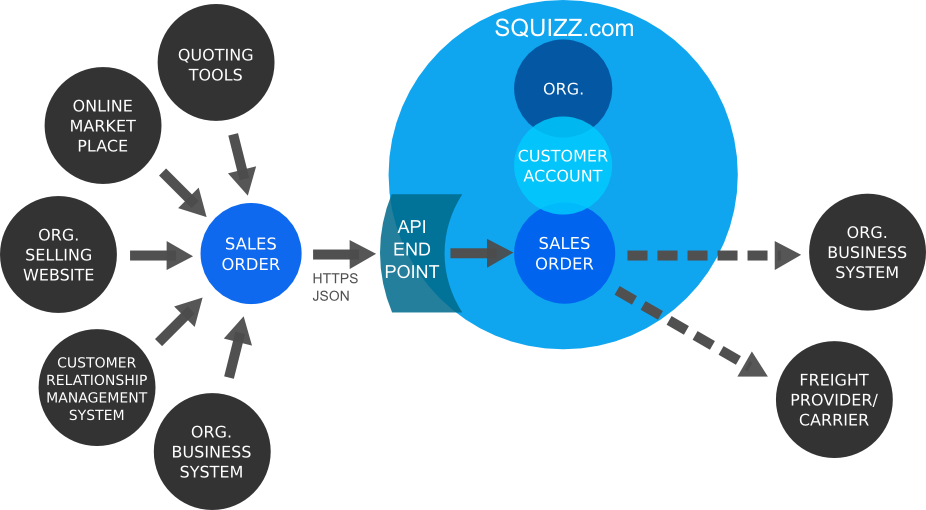
The SQUIZZ.com platform's API has an endpoint that allows an organisation to import a sales order into the SQUIZZ.com platform, against its own organisation.
This endpoint is typically used by an organisation to import sales orders from any systems, websites or services it uses to capture sales orders from, including Ecommerce websites, online marketplaces, Customer Relationship Management (CRM) systems, quoting software tools, or any other business systems and software.
Note that this endpoint should not be used by customer organisations to send orders to supplying organisations. For that use case the [Send and Procure Purchase Order From Supplier Endpoint](#send-and-procure-purchase-order-from-supplier-endpoint) should be called instead.
When calling the endpoint there is an parameter that can optionally allow the order to be re-priced or not. This allows the most up-to-date pricing to be set in the sales order when imported.
Each sales order needs to be imported as an "Ecommerce Standards Document" that contains one or more records. Use the Ecommerce Standards library to easily create the Sales Order documents and Sales Order records.
Read [https://www.squizz.com/docs/squizz/Platform-API-Endpoint:-Import-Organisation-Sales-Order.html](https://www.squizz.com/docs/squizz/Platform-API-Endpoint:-Import-Organisation-Sales-Order.html) for more documentation about the endpoint and its requirements.
See the example below on how the call the Import Organisation Sales Order ESD Data endpoint. Note that a session must first be created in the API before calling the endpoint.
```csharp
using System;
using System.Collections.Generic;
using System.Linq;
using System.Text;
using System.Threading.Tasks;
using Squizz.Platform.API.v1;
using Squizz.Platform.API.v1.endpoint;
using EcommerceStandardsDocuments;
namespace Squizz.Platform.API.Examples.APIv1
{
/**
* Shows an example of creating a organisation session with the SQUIZZ.com platform's API, then sends a organisation's purchase order data to supplier
*/
public class APIv1ExampleRunnerImportOrgESDDataOrderSales
{
public static void runAPIv1ExampleRunnerImportOrgESDDataOrderSales()
{
Console.WriteLine("Example - Import Organisation's Sales Order");
Console.WriteLine("");
//obtain or load in an organisation's API credentials, in this example from the user in the console
Console.WriteLine("Enter Organisation ID:");
string orgID = Console.ReadLine();
Console.WriteLine("Enter Organisation API Key:");
string orgAPIKey = Console.ReadLine();
Console.WriteLine("Enter Organisation API Password:");
string orgAPIPass = Console.ReadLine();
Console.WriteLine("Enter Reprice Order (set Y, or N):");
string repriceOrder = Console.ReadLine();
//create an API session instance
int sessionTimeoutMilliseconds = 20000;
APIv1OrgSession apiOrgSession = new APIv1OrgSession(orgID, orgAPIKey, orgAPIPass, sessionTimeoutMilliseconds, APIv1Constants.SUPPORTED_LOCALES_EN_AU);
//call the platform's API to request that a session is created
APIv1EndpointResponse endpointResponse = apiOrgSession.createOrgSession();
//check if the organisation's credentials were correct and that a session was created in the platform's API
if (endpointResponse.result.ToUpper() == APIv1EndpointResponse.ENDPOINT_RESULT_SUCCESS)
{
//session has been created so now can call other API endpoints
Console.WriteLine("SUCCESS - API session has successfully been created.");
}
else
{
//session failed to be created
Console.WriteLine("FAIL - API session failed to be created. Reason: " + endpointResponse.result_message + " Error Code: " + endpointResponse.result_code);
}
//import sales order if the API session was successfully created
if (apiOrgSession.doesSessionExist())
{
//create sales order record to import
ESDRecordOrderSale salesOrderRecord = new ESDRecordOrderSale();
//set data within the sales order
salesOrderRecord.keySalesOrderID = "111";
salesOrderRecord.salesOrderCode = "SOEXAMPLE-678";
salesOrderRecord.salesOrderNumber = "678";
salesOrderRecord.salesOrderNumber = "678";
salesOrderRecord.instructions = "Leave goods at the back entrance";
salesOrderRecord.keyCustomerAccountID = "3";
salesOrderRecord.customerAccountCode = "CUS-003";
salesOrderRecord.customerAccountName = "Acme Industries";
salesOrderRecord.customerEntity = ESDocumentConstants.ENTITY_TYPE_ORG;
salesOrderRecord.customerOrgName = "Acme Industries Pty Ltd";
//set delivery address that ordered goods will be delivered to
salesOrderRecord.deliveryAddress1 = "32";
salesOrderRecord.deliveryAddress2 = "Main Street";
salesOrderRecord.deliveryAddress3 = "Melbourne";
salesOrderRecord.deliveryRegionName = "Victoria";
salesOrderRecord.deliveryCountryName = "Australia";
salesOrderRecord.deliveryPostcode = "3000";
salesOrderRecord.deliveryOrgName = "Acme Industries";
salesOrderRecord.deliveryContact = "Jane Doe";
//set billing address that the order will be billed to for payment
salesOrderRecord.billingAddress1 = "43";
salesOrderRecord.billingAddress2 = " High Street";
salesOrderRecord.billingAddress3 = "Melbourne";
salesOrderRecord.billingRegionName = "Victoria";
salesOrderRecord.billingCountryName = "Australia";
salesOrderRecord.billingPostcode = "3000";
salesOrderRecord.billingOrgName = "Acme Industries International";
salesOrderRecord.billingContact = "John Citizen";
//create an array of sales order lines
List orderLines = new List();
//create sales order line record
ESDRecordOrderSaleLine orderProduct = new ESDRecordOrderSaleLine();
orderProduct.lineType = ESDocumentConstants.ORDER_LINE_TYPE_PRODUCT;
orderProduct.productCode = "TEA-TOWEL-GREEN";
orderProduct.productName = "Green tea towel - 30 x 6 centimetres";
orderProduct.unitName = "EACH";
orderProduct.keySellUnitID = "EA";
orderProduct.quantity = 4;
orderProduct.sellUnitBaseQuantity = 4;
//pricing data only needs to be set if the order isn't being repriced
orderProduct.priceExTax = (decimal)5.00;
orderProduct.priceIncTax = (decimal)5.50;
orderProduct.priceTax = (decimal)0.50;
orderProduct.priceTotalIncTax = (decimal)22.00;
orderProduct.priceTotalExTax = (decimal)20.00;
orderProduct.priceTotalTax = (decimal)2.00;
orderLines.Add(orderProduct);
//add taxes to the line
orderProduct.taxes = new List();
ESDRecordOrderLineTax orderProductTax = new ESDRecordOrderLineTax();
orderProductTax.keyTaxcodeID = "TAXCODE-1";
orderProductTax.taxcode = "GST";
orderProductTax.taxcodeLabel = "Goods And Services Tax";
//pricing data only needs to be set if the order isn't being repriced
orderProductTax.priceTax = (decimal)0.50;
orderProductTax.taxRate = (decimal)10;
orderProductTax.quantity = (decimal)4;
orderProductTax.priceTotalTax = (decimal)2.00;
orderProduct.taxes.Add(orderProductTax);
//add a 2nd sales order line record that is a text line
orderProduct = new ESDRecordOrderSaleLine();
orderProduct.lineType = ESDocumentConstants.ORDER_LINE_TYPE_TEXT;
orderProduct.productCode = "TEA-TOWEL-BLUE";
orderProduct.textDescription = "Please bundle tea towels into a box";
orderLines.Add(orderProduct);
//add a 3rd sales order line record
orderProduct = new ESDRecordOrderSaleLine();
orderProduct.lineType = ESDocumentConstants.ORDER_LINE_TYPE_PRODUCT;
orderProduct.productCode = "TEA-TOWEL-BLUE";
orderProduct.productName = "Blue tea towel - 30 x 6 centimetres";
orderProduct.unitName = "BOX";
orderProduct.keySellUnitID = "BOX-OF-10";
orderProduct.quantity = 2;
orderProduct.sellUnitBaseQuantity = 20;
//pricing data only needs to be set if the order isn't being repriced
orderProduct.priceExTax = (decimal)10.00;
orderProduct.priceIncTax = (decimal)11.00;
orderProduct.priceTax = (decimal)1.00;
orderProduct.priceTotalIncTax = (decimal)22.00;
orderProduct.priceTotalExTax = (decimal)20.00;
orderProduct.priceTotalTax = (decimal)2.00;
orderLines.Add(orderProduct);
//add taxes to the line
orderProduct.taxes = new List();
orderProductTax = new ESDRecordOrderLineTax();
orderProductTax.keyTaxcodeID = "TAXCODE-1";
orderProductTax.taxcode = "GST";
orderProductTax.taxcodeLabel = "Goods And Services Tax";
orderProductTax.quantity = 2;
//pricing data only needs to be set if the order isn't being repriced
orderProductTax.priceTax = (decimal)1.00;
orderProductTax.taxRate = (decimal)10;
orderProductTax.priceTotalTax = (decimal)2.00;
orderProduct.taxes.Add(orderProductTax);
//add order lines to the order
salesOrderRecord.lines = orderLines;
//create an array of sales order surcharges
List orderSurcharges = new List();
//create sales order surcharge record
ESDRecordOrderSurcharge orderSurcharge = new ESDRecordOrderSurcharge();
orderSurcharge.surchargeCode = "FREIGHT-FEE";
orderSurcharge.surchargeLabel = "Freight Surcharge";
orderSurcharge.surchargeDescription = "Cost of freight delivery";
orderSurcharge.keySurchargeID = "SURCHARGE-1";
//pricing data only needs to be set if the order isn't being repriced
orderSurcharge.priceExTax = (decimal)3.00;
orderSurcharge.priceIncTax = (decimal)3.30;
orderSurcharge.priceTax = (decimal)0.30;
orderSurcharges.Add(orderSurcharge);
//add taxes to the surcharge
orderSurcharge.taxes = new List();
ESDRecordOrderLineTax orderSurchargeTax = new ESDRecordOrderLineTax();
orderSurchargeTax.keyTaxcodeID = "TAXCODE-1";
orderSurchargeTax.taxcode = "GST";
orderSurchargeTax.taxcodeLabel = "Goods And Services Tax";
orderSurchargeTax.quantity = 1;
//pricing data only needs to be set if the order isn't being repriced
orderSurchargeTax.priceTax = (decimal)0.30;
orderSurchargeTax.taxRate = (decimal)10;
orderSurchargeTax.priceTotalTax = (decimal)0.30;
orderSurcharge.taxes.Add(orderSurchargeTax);
//create 2nd sales order surcharge record
orderSurcharge = new ESDRecordOrderSurcharge();
orderSurcharge.surchargeCode = "PAYMENT-FEE";
orderSurcharge.surchargeLabel = "Credit Card Surcharge";
orderSurcharge.surchargeDescription = "Cost of Credit Card Payment";
orderSurcharge.keySurchargeID = "SURCHARGE-2";
//pricing data only needs to be set if the order isn't being repriced
orderSurcharge.priceExTax = (decimal)5.00;
orderSurcharge.priceIncTax = (decimal)5.50;
orderSurcharge.priceTax = (decimal)0.50;
orderSurcharges.Add(orderSurcharge);
//add taxes to the 2nd surcharge
orderSurcharge.taxes = new List();
orderSurchargeTax = new ESDRecordOrderLineTax();
orderSurchargeTax.keyTaxcodeID = "TAXCODE-1";
orderSurchargeTax.taxcode = "GST";
orderSurchargeTax.taxcodeLabel = "Goods And Services Tax";
//pricing data only needs to be set if the order isn't being repriced
orderSurchargeTax.priceTax = (decimal)0.50;
orderSurchargeTax.taxRate = (decimal)10;
orderSurchargeTax.quantity = (decimal)1;
orderSurchargeTax.priceTotalTax = (decimal)5.00;
orderSurcharge.taxes.Add(orderSurchargeTax);
//add surcharges to the order
salesOrderRecord.surcharges = orderSurcharges;
//create an array of sales order payments
List orderPayments = new List();
//create sales order payment record
ESDRecordOrderPayment orderPayment = new ESDRecordOrderPayment();
orderPayment.paymentMethod = ESDocumentConstants.PAYMENT_METHOD_CREDIT;
orderPayment.paymentProprietaryCode = "Freight Surcharge";
orderPayment.paymentReceipt = "3422ads2342233";
orderPayment.keyPaymentTypeID = "VISA-CREDIT-CARD";
orderPayment.paymentAmount = (decimal)22.80;
orderPayments.Add(orderPayment);
//create 2nd sales order payment record
orderPayment = new ESDRecordOrderPayment();
orderPayment.paymentMethod = ESDocumentConstants.PAYMENT_METHOD_PROPRIETARY;
orderPayment.paymentProprietaryCode = "PAYPAL";
orderPayment.paymentReceipt = "2323432341231";
orderPayment.keyPaymentTypeID = "PP";
orderPayment.paymentAmount = (decimal)30.00;
orderPayments.Add(orderPayment);
//add payments to the order and set overall payment details
salesOrderRecord.payments = orderPayments;
salesOrderRecord.paymentAmount = (decimal)41.00;
salesOrderRecord.paymentStatus = ESDocumentConstants.PAYMENT_STATUS_PAID;
//set order totals, pricing data only needs to be set if the order isn't being repriced
salesOrderRecord.totalPriceIncTax = (decimal)52.80;
salesOrderRecord.totalPriceExTax = (decimal)48.00;
salesOrderRecord.totalTax = (decimal)4.80;
salesOrderRecord.totalSurchargeExTax = (decimal)8.00;
salesOrderRecord.totalSurchargeIncTax = (decimal)8.80;
salesOrderRecord.totalSurchargeTax = (decimal)8.00;
//create sales order records list and add the sales order record to it
List salesOrderRecords = new List();
salesOrderRecords.Add(salesOrderRecord);
//after 120 seconds give up on waiting for a response from the API when importing a sales order
int timeoutMilliseconds = 120000;
//create purchase order Ecommerce Standards document and add purchse order records to the document
ESDocumentOrderSale orderSaleESD = new ESDocumentOrderSale(ESDocumentConstants.RESULT_SUCCESS, "successfully obtained data", salesOrderRecords.ToArray(), new Dictionary());
//send purchase order document to the API for procurement by the supplier organisation
APIv1EndpointResponseESD endpointResponseESD = APIv1EndpointOrgImportSalesOrder.call(apiOrgSession, timeoutMilliseconds, orderSaleESD, repriceOrder.ToUpper() == ESDocumentConstants.ESD_VALUE_YES);
ESDocumentOrderSale esDocumentOrderSale = endpointResponseESD.esDocument;
//check the result of procuring the purchase orders
if (endpointResponseESD.result.ToUpper() == APIv1EndpointResponse.ENDPOINT_RESULT_SUCCESS)
{
Console.WriteLine("SUCCESS - organisation purchase orders have successfully been sent to supplier organisation.");
//iterate through each of the returned sales orders and output the details of the sales orders
if (esDocumentOrderSale.dataRecords != null)
{
foreach (ESDRecordOrderSale salesOrderRecordResponse in esDocumentOrderSale.dataRecords)
{
Console.WriteLine("\nSales Order Returned, Order Details: ");
Console.WriteLine("Sales Order Code: " + salesOrderRecordResponse.salesOrderCode);
Console.WriteLine("Sales Order Total Cost: " + salesOrderRecordResponse.totalPriceIncTax + " (" + salesOrderRecordResponse.currencyISOCode + ")");
Console.WriteLine("Sales Order Total Taxes: " + salesOrderRecordResponse.totalTax + " (" + salesOrderRecordResponse.currencyISOCode + ")");
Console.WriteLine("Sales Order Customer Account: " + salesOrderRecordResponse.customerAccountCode);
Console.WriteLine("Sales Order Total Lines: " + salesOrderRecordResponse.totalLines);
}
}
}
else
{
Console.WriteLine("FAIL - organisation purchase orders failed to be processed. Reason: " + endpointResponseESD.result_message + " Error Code: " + endpointResponseESD.result_code);
//check if the server response returned back a Ecommerce Standards Document
if (esDocumentOrderSale != null)
{
switch (endpointResponseESD.result_code)
{
//if one or more products in the sales order could not match the organisation's products then find out the order lines caused the problem
case APIv1EndpointResponse.ENDPOINT_RESULT_CODE_ERROR_ORDER_PRODUCT_NOT_MATCHED:
//get a list of order lines that could not be mapped
List> unmatchedLines = APIv1EndpointOrgImportSalesOrder.getUnmatchedOrderLines(esDocumentOrderSale);
//iterate through each unmatched order line
foreach (KeyValuePair unmatchedLine in unmatchedLines)
{
//get the index of the sales order and line that contained the unmatched product
int orderIndex = unmatchedLine.Key;
int lineIndex = unmatchedLine.Value;
//check that the order can be found that contains the problematic line
if (orderIndex < orderSaleESD.dataRecords.Length && lineIndex < orderSaleESD.dataRecords[orderIndex].lines.Count)
{
Console.WriteLine("For sales order: " + orderSaleESD.dataRecords[orderIndex].salesOrderCode + " a matching product for line number: " + (lineIndex + 1) + " could not be found.");
}
}
break;
//if one or more products in the sales order could not be priced then find the order line that caused the problem
case APIv1EndpointResponse.ENDPOINT_RESULT_CODE_ERROR_ORDER_LINE_PRICING_MISSING:
//get a list of order lines that could not be priced
List> unpricedLines = APIv1EndpointOrgImportSalesOrder.getUnpricedOrderLines(esDocumentOrderSale);
//iterate through each unpriced order line
foreach (KeyValuePair unmappedLine in unpricedLines)
{
//get the index of the sales order and line that contained the unpriced product
int orderIndex = unmappedLine.Key;
int lineIndex = unmappedLine.Value;
//check that the order can be found that contains the problematic line
if (orderIndex < orderSaleESD.dataRecords.Length && lineIndex < orderSaleESD.dataRecords[orderIndex].lines.Count)
{
Console.WriteLine("For sales order: " + orderSaleESD.dataRecords[orderIndex].salesOrderCode + " has not set pricing for line number: " + (lineIndex + 1));
}
}
break;
case APIv1EndpointResponse.ENDPOINT_RESULT_CODE_ERROR_ORDER_SURCHARGE_NOT_FOUND:
//get a list of order surcharges that could not be matched
List> unmappedSurcharges = APIv1EndpointOrgImportSalesOrder.getUnmatchedOrderSurcharges(esDocumentOrderSale);
//iterate through each unmatched order surcharge
foreach (KeyValuePair unmappedSurcharge in unmappedSurcharges)
{
//get the index of the sales order and surcharge that contained the unmapped surcharge
int orderIndex = unmappedSurcharge.Key;
int surchargeIndex = unmappedSurcharge.Value;
//check that the order can be found that contains the problematic surcharge
if (orderIndex < orderSaleESD.dataRecords.Length && surchargeIndex < orderSaleESD.dataRecords[orderIndex].surcharges.Count)
{
Console.WriteLine("For sales order: " + orderSaleESD.dataRecords[orderIndex].salesOrderCode + " a matching surcharge for surcharge number: " + (surchargeIndex + 1) + " could not be found.");
}
}
break;
//if one or more surcharges in the sales order could not be priced then find the order surcharge that caused the problem
case APIv1EndpointResponse.ENDPOINT_RESULT_CODE_ERROR_ORDER_SURCHARGE_PRICING_MISSING:
//get a list of order surcharges that could not be priced
List> unpricedSurcharges = APIv1EndpointOrgImportSalesOrder.getUnpricedOrderSurcharges(esDocumentOrderSale);
//iterate through each unpriced order surcharge
foreach (KeyValuePair unmappedSurcharge in unpricedSurcharges)
{
//get the index of the purchase order and surcharge that contained the unpriced surcharge
int orderIndex = unmappedSurcharge.Key;
int surchargeIndex = unmappedSurcharge.Value;
//check that the order can be found that contains the problematic surcharge
if (orderIndex < orderSaleESD.dataRecords.Length && surchargeIndex < orderSaleESD.dataRecords[orderIndex].surcharges.Count)
{
Console.WriteLine("For sales order: " + orderSaleESD.dataRecords[orderIndex].salesOrderCode + " has not set pricing for surcharge number: " + (surchargeIndex + 1));
}
}
break;
case APIv1EndpointResponse.ENDPOINT_RESULT_CODE_ERROR_ORDER_PAYMENT_NOT_MATCHED:
//get a list of order payments that could not be mapped
List> unmappedPayments = APIv1EndpointOrgImportSalesOrder.getUnmatchedOrderPayments(esDocumentOrderSale);
//iterate through each unmapped order payment
foreach (KeyValuePair unmappedPayment in unmappedPayments)
{
//get the index of the purchase order and payment that contained the unmapped payment
int orderIndex = unmappedPayment.Key;
int paymentIndex = unmappedPayment.Value;
//check that the order can be found that contains the problematic payment
if (orderIndex < orderSaleESD.dataRecords.Length && paymentIndex < orderSaleESD.dataRecords[orderIndex].payments.Count)
{
Console.WriteLine("For sales order: " + orderSaleESD.dataRecords[orderIndex].salesOrderCode + " a matching payment for payment number: " + (paymentIndex + 1) + " could not be found.");
}
}
break;
}
}
}
//next steps
//call other API endpoints...
//destroy API session when done...
apiOrgSession.destroyOrgSession();
}
Console.WriteLine("Example Finished.");
}
}
}
```
### Search Customer Account Records Endpoint
The SQUIZZ.com platform's API has an endpoint that allows an organisation to search for records within another connected organisation's business sytem, based on records associated to an assigned customer account.
This endpoint allows an organisation to securely search for invoice, sales order, back order, transactions. credit and payment records, retrieved in realtime from a supplier organisation's connected business system.
The endpoint also makes it easier to search for records across multiple suppliers and systems, without having to do complete one-on-one integrations.
The records returned from endpoint is formatted as JSON data conforming to the "Ecommerce Standards Document" standards, with each document containing an array of zero or more records. Use the Ecommerce Standards library to easily read through these documents and records, to find data natively using .NET classes.
Read [https://www.squizz.com/docs/squizz/Platform-API.html#section1473](https://www.squizz.com/docs/squizz/Platform-API.html#section1473) for more documentation about the endpoint and its requirements.
See the example below on how the call the Search Customer Account Records endpoint. Note that a session must first be created in the API before calling the endpoint.
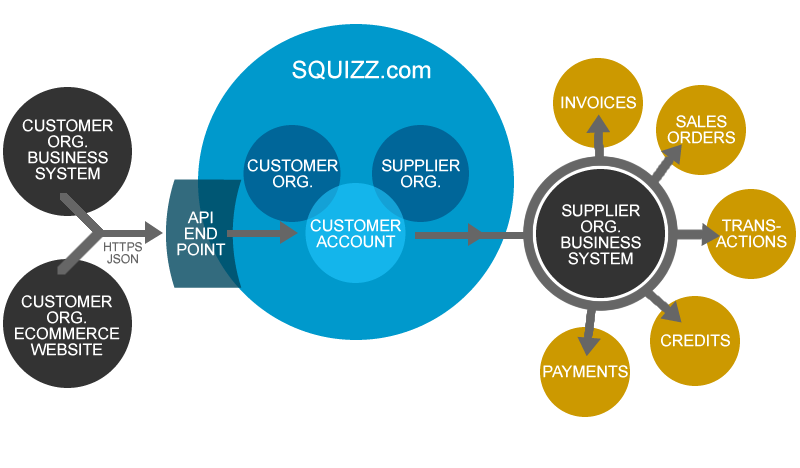
```csharp
using System;
using System.Collections.Generic;
using System.Linq;
using System.Text;
using System.Threading.Tasks;
using Squizz.Platform.API.v1;
using Squizz.Platform.API.v1.endpoint;
using EcommerceStandardsDocuments;
namespace Squizz.Platform.API.Examples.APIv1
{
/// Shows an example of creating a organisation session with the SQUIZZ.com platform's API, then search for records from a conencted organisation's customer account in the platform
public class APIv1ExampleRunnerSearchCustomerAccountRecords
{
public static DateTime EPOCH_DATE_TIME = new DateTime(1970, 1, 1, 0, 0, 0, DateTimeKind.Utc);
public static string RECORD_DATE_FORMAT = "dd-MM-yyyy";
public static void runAPIv1ExampleRunnerSearchCustomerAccountRecords()
{
Console.WriteLine("Example - Search Supplier Organisation Customer Account Records");
Console.WriteLine("");
//obtain or load in an organisation's API credentials, in this example from the user in the console
Console.WriteLine("Enter Organisation ID:");
string orgID = Console.ReadLine();
Console.WriteLine("Enter Organisation API Key:");
string orgAPIKey = Console.ReadLine();
Console.WriteLine("Enter Organisation API Password:");
string orgAPIPass = Console.ReadLine();
Console.WriteLine("Enter Supplier Organisation ID:");
string supplierOrgID = Console.ReadLine();
Console.WriteLine("(Optioanal) Enter Supplier's Customer Account Code:");
string customerAccountCode = Console.ReadLine();
Console.WriteLine("Enter number for type of records to search for:");
Console.WriteLine("1 - Invoices");
Console.WriteLine("2 - Sales Orders");
Console.WriteLine("3 - Back Orders");
Console.WriteLine("4 - Transactions");
Console.WriteLine("5 - Credits");
Console.WriteLine("6 - Payments");
//validate the type of record to obtain
int recordTypeNumber =