https://github.com/srect/mobx-demo
mobx and mobx-react-lite demo
https://github.com/srect/mobx-demo
mobx mobx-react mobx-react-lite
Last synced: about 1 year ago
JSON representation
mobx and mobx-react-lite demo
- Host: GitHub
- URL: https://github.com/srect/mobx-demo
- Owner: sRect
- Created: 2021-03-30T07:43:06.000Z (over 5 years ago)
- Default Branch: main
- Last Pushed: 2021-03-31T08:10:34.000Z (over 5 years ago)
- Last Synced: 2025-02-22T03:41:58.425Z (over 1 year ago)
- Topics: mobx, mobx-react, mobx-react-lite
- Language: JavaScript
- Homepage:
- Size: 91.8 KB
- Stars: 0
- Watchers: 1
- Forks: 0
- Open Issues: 0
-
Metadata Files:
- Readme: README.md
Awesome Lists containing this project
README
### 1. 写在前面
本文会介绍`mobx`、`mobx-react`和`mobx-react-lite`的基本使用,还有配合`react context api`的使用,都是api的入门使用,不涉及源码剖析。
### 2. 什么是Mobx?
1. [Simple, scalable state management](https://www.npmjs.com/package/mobx)
2. [MobX is a battle tested library that makes state management simple and scalable by transparently applying functional reactive programming (TFRP)](https://www.npmjs.com/package/mobx)
**Mobx是简单、可扩展的状态管理库**。是经过战斗洗礼的库,通过透明的函数响应式编程使状态管理变得更加简单且可扩展。说明Mobx足够可靠,可放心在项目中使用。
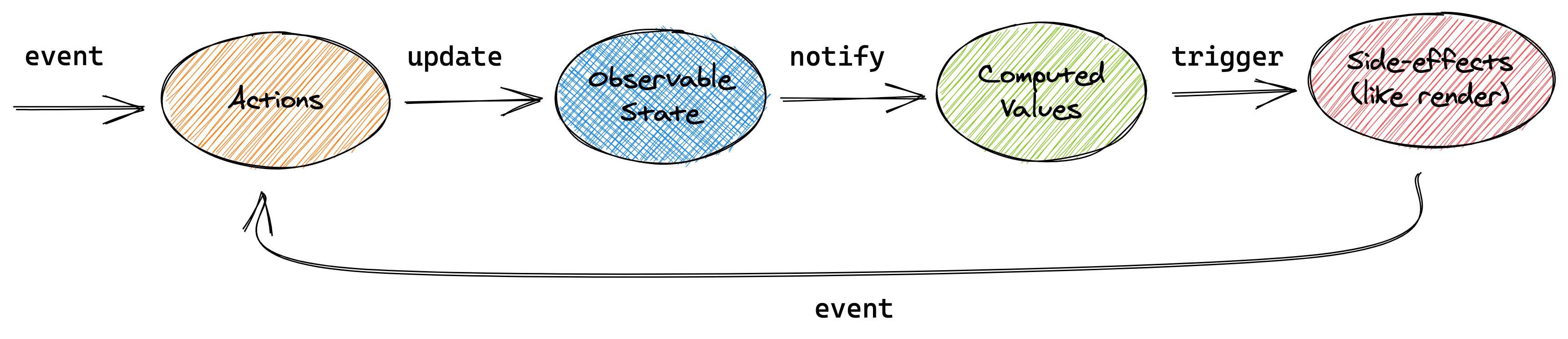
上图所示,**Mobx是通过`event`事件调用`action`,修改`observal state`数据,进而触发`computed`,使其自动更新数据,`Reactions`是对state的改变做出的反应,以此更新视图,这是Mobx的核心所在**。
### 3. **mobx**的使用
> mobx 为 6.x 版本,常用api的使用
#### 3.1 使用`makeObservable`
```javascript
import {
makeObservable,
observable,
action,
computed,
autorun,
reaction,
when,
} from "mobx";
// 创建store
const store = makeObservable(
{
count: 1,
get double() {
return this.count * 2;
},
increment() {
// 定义action
this.count += 1;
},
decrement() {
this.count -= 1;
},
},
{
count: observable, // 需要响应的属性
double: computed, // 计算属性
increment: action, // action
decrement: action,
}
);
class MobxDemo {
constructor() {
this.increaseBtn = document.querySelector("#increaseBtn");
this.decreaseBtn = document.querySelector("#decreaseBtn");
this.container = document.querySelector(".container");
}
handleRefresh() {
this.container.innerHTML = `
count: ${store.count}
double count: ${store.double}
`;
}
init() {
this.handleRefresh();
this.increaseBtn.addEventListener("click", () => {
store.increment();
});
this.decreaseBtn.addEventListener("click", () => {
store.decrement();
});
// autorun类似于react hooks中的useEffect
// 当observable响应属性被更新时,autorun立即被调用一次
autorun(() => {
this.handleRefresh();
});
// 类似Vue中的watch观察
reaction(
() => store.count, // 指定观察count属性
(currentVal, oldVal) => {
console.log(`current: ${currentVal}, old: ${oldVal}`);
}
);
// 条件响应
when(
() => store.count < 0,
() => {
console.log("count小于0");
}
);
}
}
const mobxDemo = new MobxDemo();
mobxDemo.init();
```
#### 3.2 使用`makeAutoObservable`
> 相比`makeObservable`,`makeAutoObservable`就简化多了,无需再手动指定observable、action、computed
```javascript
import { makeAutoObservable, autorun, runInAction } from "mobx";
// 直接使用makeAutoObservable
const store = makeAutoObservable({
count: 1,
get double() {
return this.count * 2;
},
increment() {
this.count += 1;
},
decrement() {
this.count -= 1;
},
// 在 MobX 中,不管是同步还是异步操作,都可以放到 action 中,
// 只是异步操作在修改属性时,需要将赋值操作放到 runInAction 中。
async asyncDecreament() {
// 模拟ajax获取数据
const count = await new Promise((resolve) => {
setTimeout(() => resolve(1), 500);
});
// 获取数据后,将赋值操作放到 runInAction 中
runInAction(() => {
this.count -= count;
});
},
});
```
#### 3.3 使用 6.x 版本之前的 decorator 装饰器写法
使用装饰器步骤:
1. 安装依赖 `npm i @babel/plugin-proposal-decorators -D`
2. 在`.babelrc`配置文件`plugins`顶部添加`["@babel/plugin-proposal-decorators", {"legacy": true}],`装饰器配置
3. 如果`vsCode编辑器`显示装饰器语法报错,在项目根目录添加`jsconfig.json`文件,输入`{"compilerOptions": {"experimentalDecorators": true}}`,重启编辑器即生效
```javascript
import { observable, action, computed } from "mobx";
class Store {
@observable count = 0;
constructor() {
makeObservable(this);
}
@computed get double() {
return this.count * 2;
}
@action increment() {
this.count++;
}
@action decrement() {
this.count--;
}
}
const store = new Store();
```
### 4. **mobx-react-lite**的使用
> `mobx-react-lite`是`mobx-react`的轻量化版本,在`mobx-react@6`版本中已经包含了`mobx-react-lite`,但是如果只在函数式组件中使用,推荐使用轻量化的`mobx-react-lite`
#### 4.1 父组件使用`useLocalObservable`创建store,配合React提供的`Context`传递store
```javascript
import React, { createContext } from "react";
import { observer, useLocalObservable } from "mobx-react-lite";
import Child1 from "@/component/Child1";
import Child2 from "@/component/Child2";
import Child3 from "@/component/Child3";
export const Context = createContext(null);
const Parent = () => {
// 'useLocalStore' is deprecated, use 'useLocalObservable' instead.
const storeContext = useLocalObservable(() => ({
count: 1,
get double() {
return this.count * 2;
},
increase() {
this.count += 1;
},
decrease() {
this.count -= 1;
},
}));
return (
);
};
export default observer(Parent);
```
#### 4.2 子组建为 function 组件(**使用Context**)
```javascript
import React, { useContext, useEffect } from "react";
import { observer } from "mobx-react-lite";
import { toJS, reaction, when } from "mobx";
import { Context } from "@/App";
const Child1 = () => {
const store = useContext(Context);
useEffect(() => {
console.log("store===>", toJS(store));
reaction(
() => store.count,
(cur, pre) => {
console.log(`cur: ${cur}, pre: ${pre}`);
}
);
when(
() => store.count < 0,
() => {
console.log("小于0");
}
);
}, [store]);
// [mobx-react-lite] 'useObserver(fn)' is deprecated.
// Use `{fn}` instead, or wrap the entire component in `observer`.
// return useObserver(() => (
return (
function Child1 page
count: {store?.count}
double: {store?.double}
store.increase()}>increase
store.decrease()}>decrease
// ));
);
};
// export default Child1;
export default observer(Child1);
```
#### 4.3 子组建为 function 组件(**不使用Context**)
> 不使用 Context,就要用到`mobx-react`,看 *5.3* 部分
#### 4.4 子组件为 class 组件
> 通过`Context.Consumer`组件获取到store
```javascript
import React, { Component } from "react";
import { Observer } from "mobx-react-lite";
import { Context } from "@/App";
class Child3 extends Component {
render() {
return (
{(store) => (
class Child3 page
{/* count: {store?.count}
double: {store?.double} */}
{/* 必须使用Observer包裹,否则视图不会更新 */}
{() => count: {store?.count}}
{() => double: {store?.double}}
store.increase()}>increase
store.decrease()}>decrease
)}
);
}
}
export default Child3;
```
### 5. **mobx-react**的使用
#### 5.1 父组件用`mobx-react`提供的`Provider组件`向下传递store
```javascript
import React from "react";
import { Provider } from "mobx-react";
import { useLocalObservable } from "mobx-react-lite";
import Child1 from "@/component/Child1";
import Child2 from "@/component/Child2";
const Parent = () => {
// 也可以使用mobx创建一个store,这里为了方便,直接使用了useLocalObservable
const storeContext = useLocalObservable(() => ({
count: 1,
get double() {
return this.count * 2;
},
increase() {
this.count += 1;
},
decrease() {
this.count -= 1;
},
}));
return (
);
};
export default observer(Parent);
```
#### 5.2 子组件为 class 组件
```javascript
import React from "react";
import { observer, inject } from "mobx-react";
@inject("store")
@observer
class Child1 extends React.Component {
render() {
class Child3 page
count: {store?.count}
double: {store?.double}
store.increase()}>increase
store.decrease()}>decrease
;
}
}
export default observer(Child1);
```
#### 5.3 子组件为 function 组件
```javascript
import React from "react";
import { inject, observer } from "mobx-react";
const Child2 = ({ store }) => {
return (
function Child2 page
count: {store?.count}
double: {store?.double}
store.increase()}>increase
store.decrease()}>decrease
);
};
export default inject("store")(observer(Child2));
```
### 6. 参考资料
1. [MobX 上手指南,写 Vue 的感觉?](https://mp.weixin.qq.com/s/AsH0nRYr3hDF2Zr4_KQOCA)
2. [mobx-react-lite 基于 React Hook API 轻量级状态管理](https://blog.csdn.net/roamingcode/article/details/95069891)
3. [初探mobx-react-lite](https://mu-xue.github.io/2019/08/11/front/mobx-react-lite/)
4. [mobx-npm](https://www.npmjs.com/package/mobx)