https://github.com/sstark/paperd
epaper display server
https://github.com/sstark/paperd
cloudless display epaper iot music-player raspberrypi
Last synced: about 1 year ago
JSON representation
epaper display server
- Host: GitHub
- URL: https://github.com/sstark/paperd
- Owner: sstark
- License: isc
- Created: 2018-09-22T19:31:49.000Z (almost 8 years ago)
- Default Branch: master
- Last Pushed: 2024-04-25T05:13:38.000Z (about 2 years ago)
- Last Synced: 2025-04-23T13:08:54.474Z (about 1 year ago)
- Topics: cloudless, display, epaper, iot, music-player, raspberrypi
- Language: Python
- Size: 360 KB
- Stars: 5
- Watchers: 1
- Forks: 0
- Open Issues: 0
-
Metadata Files:
- Readme: README.md
- License: LICENSE.TXT
Awesome Lists containing this project
README
# paperd
An epaper display server.
So you have your epaper display sucessfully connected to your Raspberry Pi. Now
what do do with it?
paperd will make it easy to push content to your epaper display by letting you
define areas on the display and individually update those areas using a restful
web api.
In the configuration file those areas are defined with their position on the
display and their size. Furthermore it lets you set parameters like how to
handle box overflow or font sizes.
An area can currently be of type "image" or "text". If you push an image
(anything supported by PIL) to an area it will replace the contents of that
area. Likewise, text will be written to a text area in the defined font, size
and alignment.
paperd makes use of the partial update feature of some of the epaper displays
available and can currently only work with those.
Since epaper displays are notoriously slow, you can use a tk based realtime
preview window on your development system.
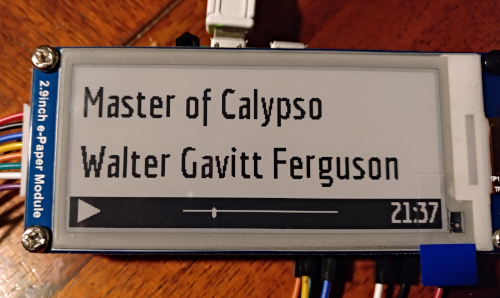
All testing is currently done on a Raspberry Pi Zero W and a Waveshare 2.9"
epaper, using Raspbian stretch.
## Installation
Recommended (work in progress!):
pipx install paperd
Run the development version without installation:
poetry run paperd
For programming the epaper display, the driver for the Waveshare 2.9" (1-color
version) is included. This display has a resolution of 128x296 pixels. More
drivers will follow.
## Configuration
The configuration file is written in yaml and looks like this:
paperd:
v1:
resolution: {x: 296, y: 128}
orientation: 1
output: epd2in9
colordepth: 1
maxfps: 4
areas:
- name: background
type:
format: image
overflow: resize
origin: {x: 0, y: 0}
size: {x: 296, y: 128}
- name: title
type:
format: text
overflow: scrolling
font:
face: examples/musicplayer/fonts/pf_tempesta_seven_condensed.ttf
size: 24
align: left
origin: {x: 70, y: 0}
size: {x: 226, y: 64}
See the examples directory for another example. Some of the options in those
examples are not implemented yet: `orientation`, `colordepth`, `scrolling`.
`maxfps` is only partially implemented.
If text does not fit into a text area, paperd will try to scale down the font
size to make it fit, but only if the resulting font size is not smaller than
half the original font size, and not smaller than 4. If the text still does not
fit, it will be split into two lines at half the font size.
## Running
In order to run the included example using the tk preview run this command:
./paperd.py -c examples/musicplayer/paperd.yml -o tk
If you have a hidpi display you might want to add the `--scale 2` option to the
command line.
For running the example on your Raspberry Pi with the epd output module, simply
remove the `-o tk` parameter and it will use whichever driver is defined in the
configuration.
## Using the API
Currently there are only two useful api URLs:
### Change contents of an area
PUT http://localhost:2354/v1/areas/
This PUTs content to the area named ``. The area must be defined in the
configuration file of paperd. Say you have an area "logo", you can test it
with curl like this:
curl -T logo.png http://localhost:2354/v1/areas/logo
By default, paperd will resize the image to fit in the dimensions of the area.
However it is strongly recommended to provide the image in the correct
resolution already, since rescaling will likely look bad at such a small scale.
If the area you want to PUT something is of type text, you can use curl like
this:
curl -X PUT -d "the text" http://localhost:2354/v1/areas/title
### Update the display
After you have uploaded some text or images to areas, you have to update the
display. For this use this API call:
curl -sS http://localhost:2354/v1/update
This will swap the two frame buffers of the display, showing what you have
drawn since the last update.
## Development
This is an early, but working development version of paperd. Please be kind if
it does weird things and file an issue.
Since the original waveshare epd2in9 driver is used, and there is no low level
tweaking going on in paperd, it is unlikely this will cause any damage to your
display or Raspberry Pi.
To get debug information from paperd, set the environment variable
`PAPERD_LOGLEVEL` to "debug"