https://github.com/stackgl/gl-mesh
Draws static indexed geometry in WebGL
https://github.com/stackgl/gl-mesh
Last synced: 9 months ago
JSON representation
Draws static indexed geometry in WebGL
- Host: GitHub
- URL: https://github.com/stackgl/gl-mesh
- Owner: stackgl
- License: mit
- Created: 2013-06-21T23:42:46.000Z (about 13 years ago)
- Default Branch: master
- Last Pushed: 2016-05-24T17:22:36.000Z (about 10 years ago)
- Last Synced: 2024-11-08T05:47:41.029Z (over 1 year ago)
- Language: JavaScript
- Homepage: http://mikolalysenko.github.io/gl-mesh/
- Size: 209 KB
- Stars: 12
- Watchers: 4
- Forks: 3
- Open Issues: 0
-
Metadata Files:
- Readme: README.md
- License: LICENSE
Awesome Lists containing this project
README
gl-mesh
=======
WebGL class for rendering static indexed geometry
# Example
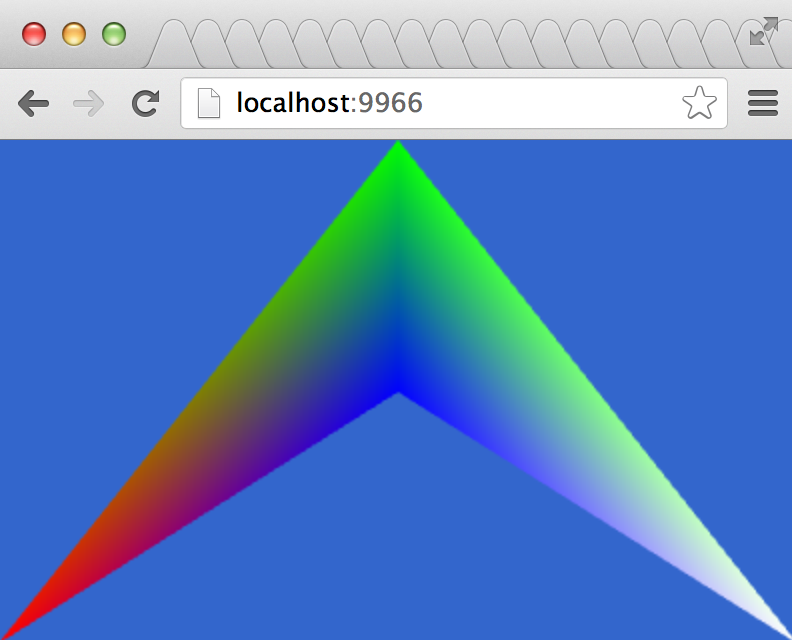
[Try this demo in your browser](http://mikolalysenko.github.io/gl-mesh/)
```javascript
var shell = require("gl-now")()
var createMesh = require("gl-mesh")
var simple2DShader = require("simple-2d-shader")
var mesh, shader
shell.on("gl-init", function() {
shader = simple2DShader(shell.gl)
mesh = createMesh(shell.gl,
[[0, 1, 2],
[2, 1, 3]],
{ "position": [[-1,-1], [0, 1], [0, 0], [1, -1]],
"color": [[1, 0, 0], [0, 1, 0], [0, 0, 1], [1, 1, 1]] })
})
shell.on("gl-render", function(t) {
shader.bind()
mesh.bind(shader)
mesh.draw()
mesh.unbind()
})
```
And here is what it should look like:
# Install
Use [npm](https://npmjs.org/) to install it locally:
npm install gl-mesh
Then you can build/run the client using any tool that compiles CommonJS modules, for example [browserify](https://github.com/substack/node-browserify) or [beefy](https://github.com/chrisdickinson/beefy).
# API
```javascript
var createMesh = require("gl-mesh")
```
## Constructor
### `var mesh = createMesh(gl, cells, attributes)`
Creates a static mesh.
* `gl` is a webgl context
* `cells` is a list of representing indices into the geometry
* `attributes` is an object of attributes to pass to the mesh
Each of these objects can be encoded as either an array-of-native-arrays or as a typed array using [ndarrays](https://github.com/mikolalysenko/ndarray). The first dimension in the shape is interepreted as the number of vertices in the attribute while the second dimension is interpreted as the size. For example, to pass in a packed array of 3d vertices in a typed array you could do:
```javascript
var mesh = createMesh(gl, cells, { "positions": ndarray(position_data, [numVertices, 3]) })
```
The drawing mode for the mesh is determined by the shape of the cells according to the following rule:
* `cells.length == 0` : empty mesh
* `cells[0].length == 1` : `gl.POINTS`
* `cells[0].length == 2` : `gl.LINES`
* `cells[0].length == 3` : `gl.TRIANGLES`
You can also skip the `cells` parameter, in which case the resulting mesh is drawn as a point cloud.
Also you can pass a single object with a `cells` field. For example, here is the quickest way to create a Stanford bunny test mesh:
```javascript
var bunnyMesh = createMesh(gl, require("bunny"))
```
Where the module comes from the [`bunny`](https://npmjs.org/package/bunny) package
**Returns** A `Mesh` object
## Methods
Each `Mesh` object has the following methods:
### `mesh.bind(shader)`
Binds the mesh to the given shader updating attributes accordingly.
* `shader` is an instance of a shader created using [`gl-shader`](https://github.com/mikolalysenko/gl-shader)
### `mesh.draw()`
Draws an instance of the mesh once it is bound to a shader
### `mesh.unbind()`
Unbinds the mesh releasing the current vertex attribute state
### `mesh.dispose()`
Destroys the mesh and releases all of its associated resources
# Credits
(c) 2013 Mikola Lysenko. MIT License