https://github.com/stackgl/gl-shader
🎁 WebGL shader wrapper
https://github.com/stackgl/gl-shader
Last synced: about 1 year ago
JSON representation
🎁 WebGL shader wrapper
- Host: GitHub
- URL: https://github.com/stackgl/gl-shader
- Owner: stackgl
- License: mit
- Created: 2013-06-12T18:52:02.000Z (about 13 years ago)
- Default Branch: master
- Last Pushed: 2022-09-09T07:57:36.000Z (almost 4 years ago)
- Last Synced: 2025-04-13T04:59:58.718Z (about 1 year ago)
- Language: JavaScript
- Homepage: http://stackgl.github.io/gl-shader/
- Size: 203 KB
- Stars: 124
- Watchers: 13
- Forks: 23
- Open Issues: 5
-
Metadata Files:
- Readme: README.md
- License: LICENSE
Awesome Lists containing this project
README
gl-shader
=========
A wrapper for WebGL shaders. Part of [stack.gl](http://stack.gl)
# Example
Try it out now in your browser: [http://stackgl.github.io/gl-shader/](http://stackgl.github.io/gl-shader/)
```javascript
var shell = require('gl-now')()
var createShader = require('gl-shader')
var shader, buffer
shell.on('gl-init', function() {
var gl = shell.gl
//Create shader
shader = createShader(gl,
'attribute vec3 position;\
varying vec2 uv;\
void main() {\
gl_Position = vec4(position, 1.0);\
uv = position.xy;\
}',
'precision highp float;\
uniform float t;\
varying vec2 uv;\
void main() {\
gl_FragColor = vec4(0.5*(uv+1.0), 0.5*(cos(t)+1.0), 1.0);\
}')
//Create vertex buffer
buffer = gl.createBuffer()
gl.bindBuffer(gl.ARRAY_BUFFER, buffer)
gl.bufferData(gl.ARRAY_BUFFER, new Float32Array([
-1, 0, 0,
0, -1, 0,
1, 1, 0
]), gl.STATIC_DRAW)
})
shell.on('gl-render', function(t) {
var gl = shell.gl
//Bind shader
shader.bind()
//Set attributes
gl.bindBuffer(gl.ARRAY_BUFFER, buffer)
shader.attributes.position.pointer()
//Set uniforms
shader.uniforms.t += 0.01
//Draw
gl.drawArrays(gl.TRIANGLES, 0, 3)
})
```
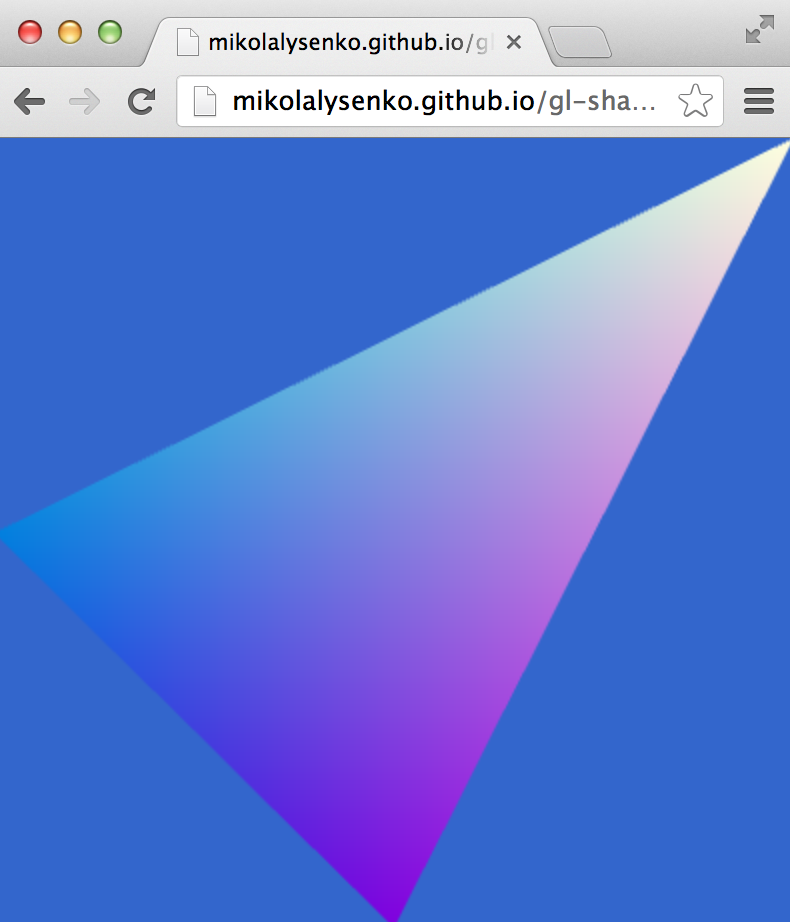
Here is the result:
# Install
npm install gl-shader
# API
```javascript
var createShader = require('gl-shader')
```
### Constructor
There are two main usages for the constructor. First,
#### `var shader = createShader(gl, vertexSource, fragmentSource[, uniforms, attributes])`
Constructs a wrapped shader object with shims for all of the uniforms and attributes in the program.
* `gl` is the webgl context in which the program will be created
* `vertexSource` is the source code for the vertex shader
* `fragmentSource` is the source code for the fragment shader
* `uniforms` is an (optional) list of all uniforms exported by the shader program
* `attributes` is an (optional) list of all attributes exported by the shader program
The optional `uniforms` and `attributes` arrays have the following format. This will be extracted at run-time from the shader, so you can typically omit the `uniforms` and `attributes` arguments.
```js
{
uniforms: [
{ type: 'mat4', name: 'projection' },
{ type: 'sampler2D', name: 'texture0' }
],
attributes: [
{ type: 'vec3', name: 'position' }
]
}
```
You can specify a default `location` number for each attribute, otherwise WebGL will bind it automatically.
**Returns** A compiled shader object.
#### `var shader = createShader(gl, opt)`
The same as above, but takes an object instead of a parameter list.
* `gl` is a WebGL context
* `opt.vertex` a vertex shader source
* `opt.fragment` a fragment shader source
* `opt.uniforms` (optional) a list of uniforms
* `opt.attributes` (optional) a list of attributes
**Returns** A wrapped shader object
### Methods
#### `shader.bind()`
Binds the shader for rendering
#### `shader.update(vertSource,fragSource[,uniforms,attributes])`
Rebuilds the shader object with new vertex and fragment shaders (same behavior as constructor)
#### `shader.update(opt)`
Rebuilds the shader object with new vertex and fragment shaders (same behavior as constructor)
#### `shader.dispose()`
Deletes the shader program and associated resources.
### Properties
#### `gl`
The WebGL context associated to the shader
#### `program`
A reference to the underlying program object in the WebGL context
#### `vertShader`
A reference to the underlying vertex shader object
#### `fragShader`
A reference to the underlying fragment shader object
### Uniforms
The uniforms for the shader program are packaged up as properties in the `shader.uniforms` object. The shader must be bound before the uniforms are assigned. For example, to update a scalar uniform you can just assign to it:
```javascript
shader.bind()
shader.uniforms.scalar = 1.0
```
While you can update vector uniforms by writing an array to them:
```javascript
shader.uniforms.vector = [1,0,1,0]
```
Matrix uniforms must have their arrays flattened first:
```javascript
shader.uniforms.matrix = [ 1, 0, 1, 0,
0, 1, 0, 0,
0, 0, 1, 1,
0, 0, 0, 1 ]
```
You can read the value of uniform too if the underlying shader is currently bound. For example,
```javascript
shader.bind()
console.log(shader.uniforms.scalar)
console.log(shader.uniforms.vector)
console.log(shader.uniforms.matrix)
```
Struct uniforms can also be accessed using the normal dot property syntax:
```javascript
shader.uniforms.light[0].color = [1, 0, 0, 1]
```
It is also possible to initialize uniforms in bulk by assigning an object:
```javascript
shader.uniforms = {
model: [1, 0, 0, 0,
0, 1, 0, 0,
0, 0, 1, 0,
0, 0, 0, 1],
color: [1, 0, 1, 1]
}
```
The contents of uniform values are lost when a shader is unbound.
### Attributes
The basic idea behind the attribute interface is similar to that for uniforms, however because attributes can be either a constant value or get values from a vertex array they have a slightly more complicated interface. All of the attributes are stored in the `shader.attributes` property.
#### `attrib = constant`
For non-array attributes you can set the constant value to be broadcast across all vertices. For example, to set the vertex color of a shader to a constant you could do:
```javascript
shader.attributes.color = [1, 0, 0, 1]
```
This internally uses [`gl.vertexAttribnf`](http://www.khronos.org/opengles/sdk/docs/man/xhtml/glVertexAttrib.xml). Setting the attribute will also call `gl.disableVertexAttribArray` on the attribute's location.
#### `attrib.location`
This property accesses the location of the attribute. You can assign/read from it to modify the location of the attribute. For example, you can update the location by doing:
```javascript
attrib.location = 0
```
Or you can read the currently bound location back by just accessing it:
```javascript
console.log(attrib.location)
```
**WARNING** Changing the attribute location requires recompiling the program. This recompilation is deferred until the next call to `.bind()`
#### `attrib.pointer([type, normalized, stride, offset])`
A shortcut for `gl.vertexAttribPointer`/`gl.enableVertexAttribArray`. See the [OpenGL man page for details on how this works](http://www.khronos.org/opengles/sdk/docs/man/xhtml/glVertexAttribPointer.xml). The main difference here is that the WebGL context, size and index are known and so these parameters are bound.
* `type` is the type of the pointer (default `gl.FLOAT`)
* `normalized` specifies whether fixed-point data values should be normalized (`true`) or converted directly as fixed-point values (`false`) when they are accessed. (Default `false`)
* `stride` the byte offset between consecutive generic vertex attributes. (Default: `0`)
* `offset` offset of the first element of the array in bytes. (Default `0`)
#### Matrix attributes
Matrix attributes are also supported, however there are a few subtle difference. Due to WebGL limitations, d-dimensional matrix attributes require d separate attribute locations. If `matrix` is a matrix attribute, then the rows of the matrix can be accessed independently using:
```javascript
//First row of matrix
shader.attributes.matrix[0]
//Second row
shader.attributes.matrix[1]
// ... etc.
```
The interface for these attributes is identical to the above interfaces for vector attributes (support constant setters, `.pointer()`, and `.location`).
There is also a bulk interface which simplifies working with the matrix as a whole unit. For example, it is possible to update the location of each row of the matrix simultaneously by assigning it a vector value:
```javascript
shader.attributes.matrix.location = [1, 2, 3, 4]
```
Similarly, if the matrix attribute is stored as a contiguous range in memory, the pointer for each row can be set using `.pointer()`. For example, if `matrix` is a 4x4 matrix attribute then,
```javascript
shader.attributes.matrix.pointer(gl.FLOAT, false, 16, 0)
```
is equivalent to,
```javascript
shader.attributes.matrix[0].pointer(gl.FLOAT, false, 16, 0)
shader.attributes.matrix[0].pointer(gl.FLOAT, false, 16, 4)
shader.attributes.matrix[0].pointer(gl.FLOAT, false, 16, 8)
shader.attributes.matrix[0].pointer(gl.FLOAT, false, 16, 12)
```
### Reflection
Finally, the library supports some reflection capabilities. The set of all uniforms and data types are stored in the "type" property of the shader object,
```javascript
console.log(shader.types)
```
This reflects the uniform and attribute parameters that were passed to the shader constructor.
## Acknowledgements
(c) 2013-2015 Mikola Lysenko. MIT License