https://github.com/stackofsugar/orbit-game
Simple game made with SDL + C++ in less than 4 days
https://github.com/stackofsugar/orbit-game
Last synced: 12 months ago
JSON representation
Simple game made with SDL + C++ in less than 4 days
- Host: GitHub
- URL: https://github.com/stackofsugar/orbit-game
- Owner: stackofsugar
- License: mit
- Created: 2021-05-15T15:08:28.000Z (about 5 years ago)
- Default Branch: master
- Last Pushed: 2024-10-30T10:14:14.000Z (over 1 year ago)
- Last Synced: 2025-01-12T16:07:35.179Z (over 1 year ago)
- Language: C++
- Homepage:
- Size: 4.52 MB
- Stars: 1
- Watchers: 1
- Forks: 0
- Open Issues: 0
-
Metadata Files:
- Readme: README.md
- License: LICENSE
Awesome Lists containing this project
README
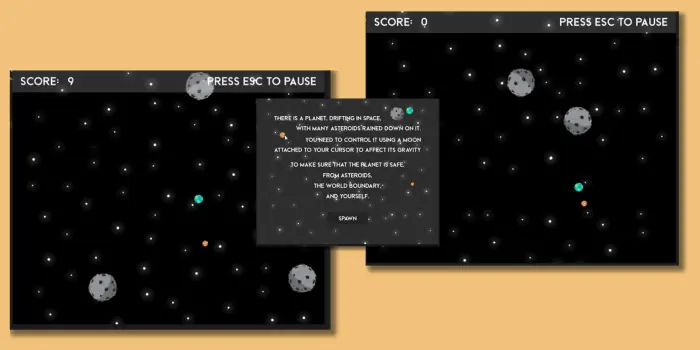
Orbit Game




A simple game I made with SDL in less than 4 days in a game jam challenge.
## 📝 Table of Contents
- [About The Project](#about)
- [Getting Started](#getting-started)
- [Author(s)](#authors)
I made this game back in May 2021 as a submission to an international game jam competition held by my University. This project uses C++ and the [SDL2 library](https://www.libsdl.org/). I also did the graphics and artworks from scratch, mostly on Paint.
The premise of this game is guiding the moon away from the falling asteroids (and the world border) only using the gravitational pull of the Earth, which is your cursor. That's it.
There is a ~~known bug~~ feature in which I tie the physics to the framerate, rather than to time. So, if you run this program in a system with faster screen refresh rate, the game will run very fast.
### Technologies Used
- Programming language: C++
- Library: [SDL2](https://www.libsdl.org/)
- Miscellaneous: Paint, InnoSetup
### Download the installer (Windows x64 only)
The easiest way to install the game is to head to the [latest releases section](https://github.com/stackofsugar/orbit-game/releases/latest) and grab yourself an installer.
### Build from source
This project is a Microsoft Visual Studio project. There are a couple ways to build this game. If you already have MSVS installed, you can open the solution `.sln` file and compile from the IDE.
- [@stackofsugar](https://github.com/stackofsugar) (Myself)
See also a list of [contributors](https://github.com/stackofsugar/personal-website/graphs/contributors) who has participated in this project.