https://github.com/steadramon/espgeiger
☢️ ESP8266 / ESP32 Firmware for collecting and reporting statistics from Geiger counters
https://github.com/steadramon/espgeiger
arduino cajoe esp32 esp8266 gc10 geiger-counter geiger-muller home-assistant iot mightyohm mqtt mqtt-client neopixel pcnt platformio radiation radiation-detector radiation-sensor radmon sdcard
Last synced: about 2 months ago
JSON representation
☢️ ESP8266 / ESP32 Firmware for collecting and reporting statistics from Geiger counters
- Host: GitHub
- URL: https://github.com/steadramon/espgeiger
- Owner: steadramon
- License: gpl-3.0
- Created: 2023-03-28T22:32:46.000Z (over 3 years ago)
- Default Branch: main
- Last Pushed: 2026-05-23T19:36:56.000Z (about 2 months ago)
- Last Synced: 2026-05-23T20:19:32.467Z (about 2 months ago)
- Topics: arduino, cajoe, esp32, esp8266, gc10, geiger-counter, geiger-muller, home-assistant, iot, mightyohm, mqtt, mqtt-client, neopixel, pcnt, platformio, radiation, radiation-detector, radiation-sensor, radmon, sdcard
- Language: C++
- Homepage:
- Size: 58.1 MB
- Stars: 50
- Watchers: 8
- Forks: 5
- Open Issues: 0
-
Metadata Files:
- Readme: README.md
- License: LICENSE
Awesome Lists containing this project
README
[](https://github.com/steadramon/ESPGeiger/actions) [](https://github.com/steadramon/ESPGeiger/issues) [](https://github.com/steadramon/ESPGeiger/stargazers)
#  ESPGeiger
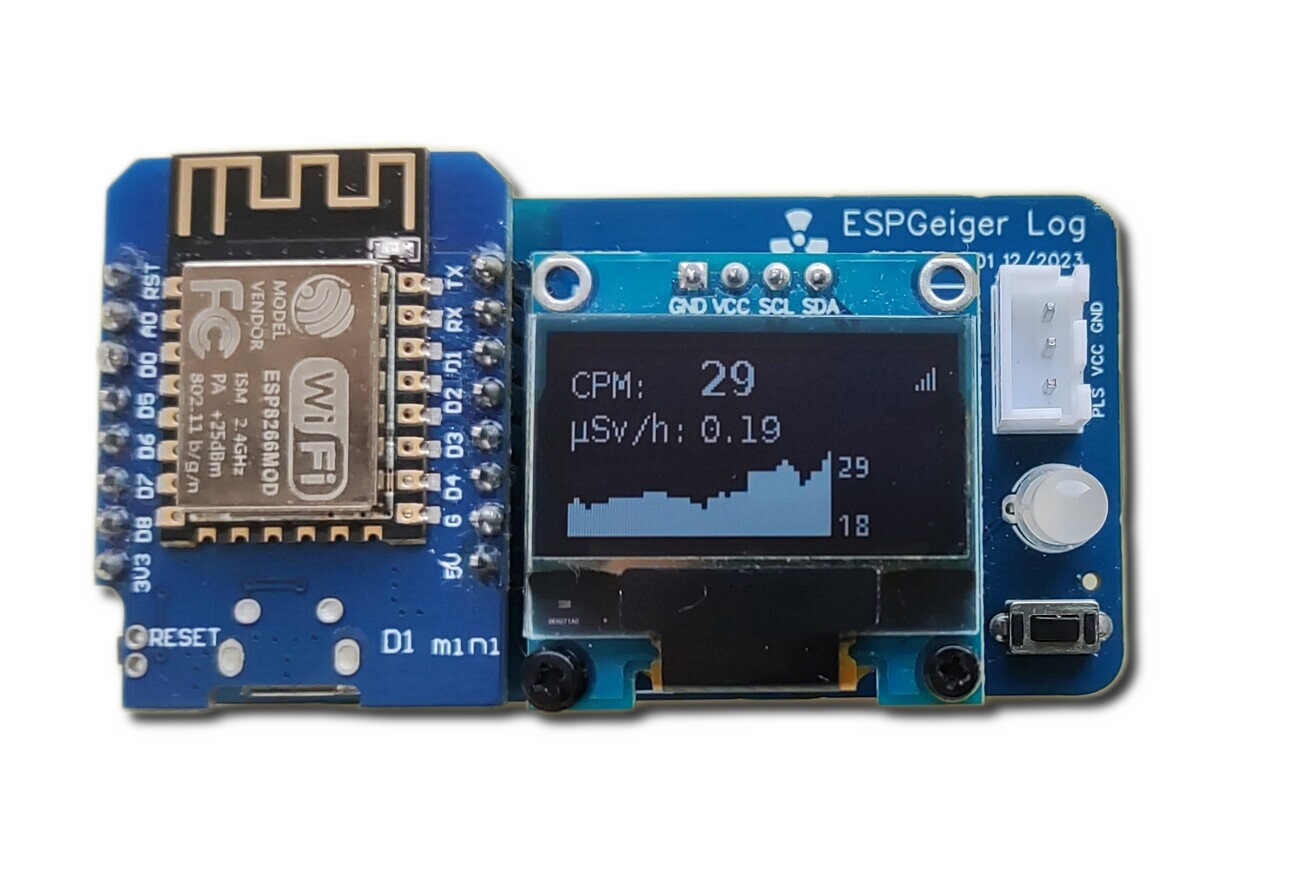
ESPGeiger is an open-source project that turns an ESP8266 or ESP32 into an IoT-connected Geiger counter. It collects, calculates and reports radiation levels from a range of Geiger counters with pulse or serial outputs.
- 😃 Easy to install via web browser - no compiler required
- ✅ Works with generic pulse counters and GC10, GC10next, MightyOhm serial counters
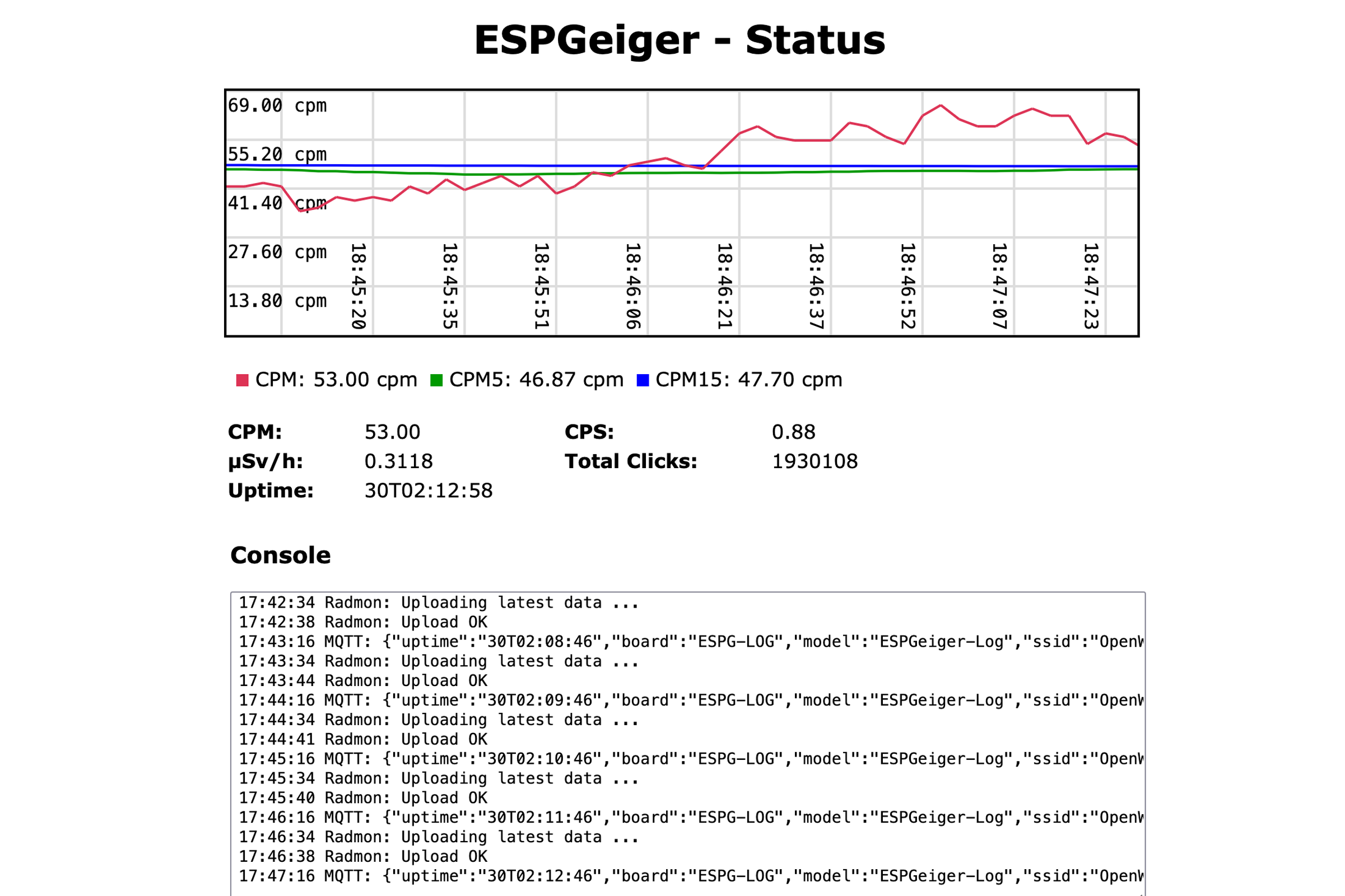
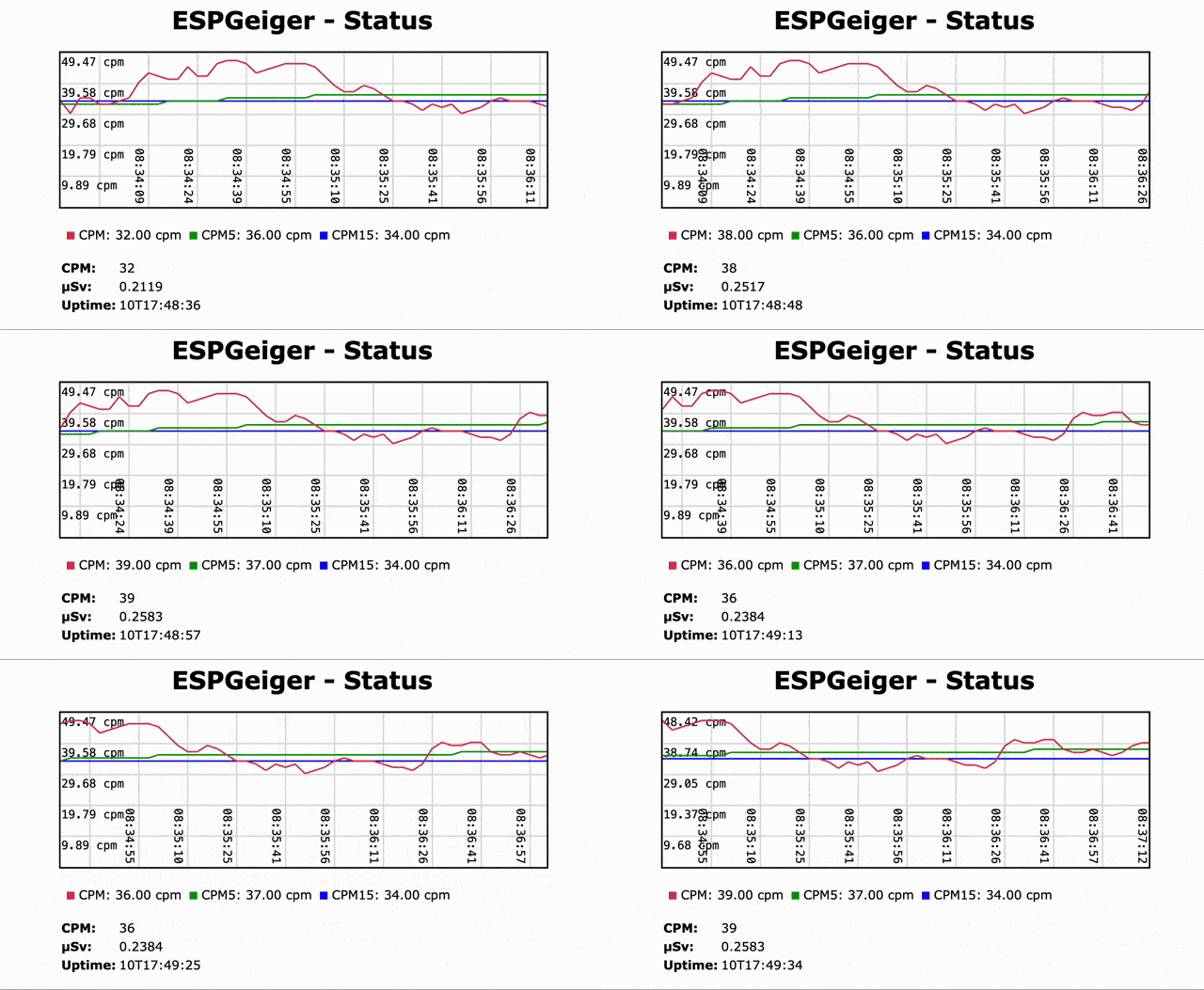
- 📈 Built-in web server with live graphing
- 🔴 Live CPM and μSv/h readings
- 🔢 Smoothed values over 1, 5 and 15 minutes
- 🖥️ Optional SSD1306 / SSD1309 / SH1106 OLED display and WS2812X NeoPixel status light
- 🌡️ Optional BME280 / BMP280 / AHT environmental sensors - auto-detected over I2C
- 📟 Accurate counting via interrupt or ESP32 hardware counter (PCNT)
- 🌐 MQTT, Home Assistant auto-discovery, Radmon.org, GMCMAP, ThingSpeak, custom Webhooks
- 📡 UDP/OSC receiver builds for tubeless mirror displays and fleet aggregators
- 💾 Optional SD card logging
- 🚧 Test builds for emulating pulse and serial counters
## Quick Start
The easiest way to install ESPGeiger is the **Web Installer** - it runs in your Chrome or Edge browser and flashes your device over USB. No code editor or compiler required.
### 👉 [https://install.espgeiger.com](https://install.espgeiger.com)
Select your build from the dropdown and follow the on-screen instructions. Installation takes about two minutes.
## Which Build Do I Need?
Pick the build that matches your hardware. If in doubt, start with **Pulse** - it works with most generic Geiger counters.
### I have an ESP + generic pulse Geiger counter
| Hardware | Recommended Build |
|---|---|
| ESP8266 (Wemos D1 Mini, NodeMCU, etc.) | `esp8266_pulse` |
| ESP8266 with SSD1306 OLED | `esp8266oled_pulse` |
| ESP32 | `esp32_pulse` |
| ESP32 with SSD1306 OLED | `esp32oled_pulse` |
| CAJOE IoT-GM (ESP32 with built-in OLED) | `esp32_cajoe_iotgm` |
### I have an ESP + serial Geiger counter
A single serial build supports all serial counter types (GC10, GC10Next, MightyOhm, ESPGeiger). Select your counter type from the **Config** page after flashing.
| ESP8266 Build | ESP32 Build |
|---|---|
| `esp8266_serial` | `esp32_serial` |
OLED variants: `esp8266oled_serial` / `esp32oled_serial`.
### I have an ESPGeiger-HW or ESPGeiger Log
These are official ESPGeiger hardware kits - use the hardware-specific builds:
| Hardware | Pulse | Serial |
|---|---|---|
| ESPGeiger-HW | `espgeigerhw` | - |
| ESPGeiger Log | `espgeigerlog` | `espgeigerlog_serial` |
### I want to test without a real Geiger counter
Test builds emulate a Geiger counter internally. You can also wire the `TXPIN` of one ESPGeiger to the `RXPIN` of another to simulate a serial counter:
| Build | Description |
|---|---|
| `esp8266_test` / `esp32_test` | Internal counter, no output |
| `esp8266_testpulse` / `esp32_testpulse` | Outputs Poisson-distributed pulses on TXPIN |
| `esp8266_testserial` / `esp32_testserial` | Emulates a serial counter (type selectable via Config) |
### I want a remote display or fleet aggregator (no tube needed)
UDP receiver builds listen for OSC multicast broadcasts from other ESPGeiger devices and mirror them locally. Everything (CPM, µSv, OLED, MQTT, blip-LED) works as if a real tube were attached:
| Hardware | Build |
|---|---|
| ESP8266 | `esp8266_udp` / `esp8266oled_udp` |
| ESP32 | `esp32_udp` / `esp32oled_udp` |
Producers enable the broadcast via Config → Local broadcast → mode 2. See [UDP / OSC Output](https://docs.espgeiger.com/output/udp) for the full protocol.
See the full list of available builds on the [releases page](https://github.com/steadramon/ESPGeiger/releases/latest) or in the [build targets documentation](https://docs.espgeiger.com/install/buildtargets).
## Hardware Connection
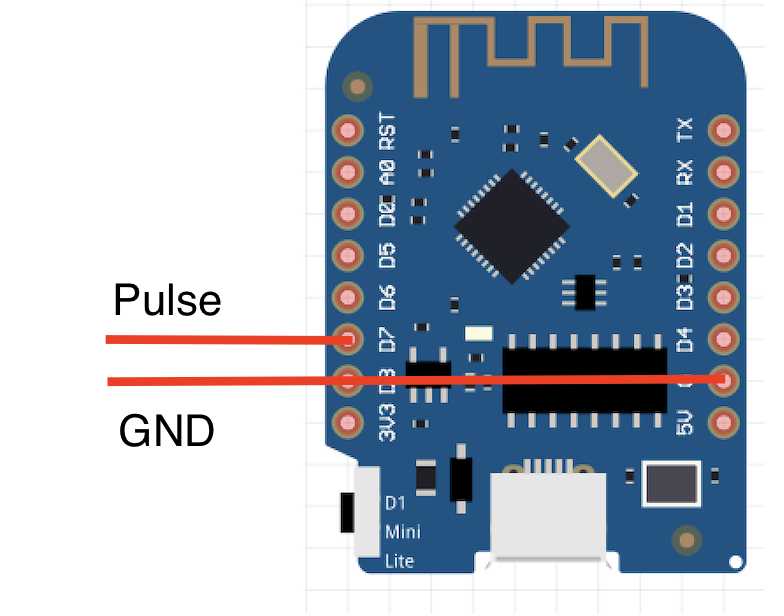
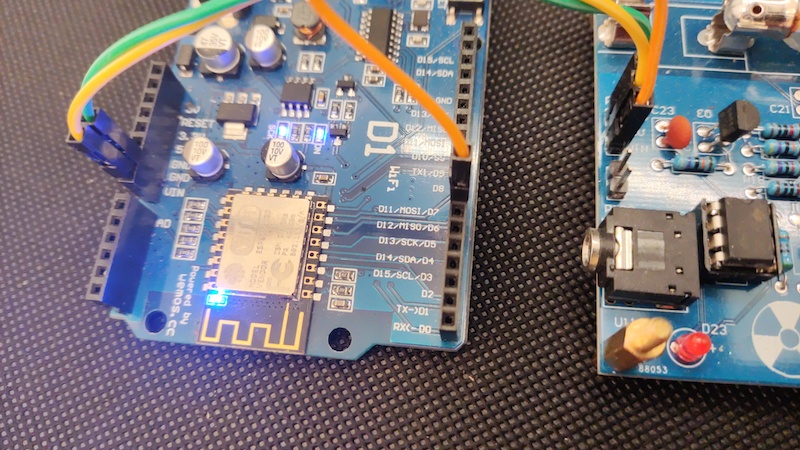
By default `GEIGER_RXPIN` is set to GPIO13. Connect your Geiger counter's pulse or serial TX output to this pin. Don't forget a common ground.
## First-time Setup
1. After flashing, connect to the new Wi-Fi network (`ESPGeiger-XXXXXX`)
2. A captive portal should pop up - if not, browse to http://192.168.4.1/
3. Select your home Wi-Fi network and enter the password
4. Once connected, browse to `http://ESPGeiger-XXXXXX.local` or the assigned IP
5. Configure MQTT, Radmon, GMCMAP, ThingSpeak and other outputs from the Config page
## Upgrading
Upgrades can be done over-the-air through the web interface. Please be careful to select the right firmware for your hardware.
Note: ESP32 users should use the `firmware` binary when upgrading (the `merged` binaries are for fresh installs via the Web Installer).
## Documentation
Full documentation is available at **[docs.espgeiger.com](https://docs.espgeiger.com/)**.
## Building from Source
If you want to customise the firmware or create a build for unsupported hardware, you can build from source using PlatformIO. See the [Platformio Build documentation](https://docs.espgeiger.com/install/platformio) for details.
## Compatible Geiger Counters
### Pulse
- [DIY GeigerKit](https://sites.google.com/site/diygeigercounter/)
- [NetIO GC10](https://www.ebay.co.uk/usr/pelorymate)
- [RHElectronics](https://www.rhelectronics.store/diy-geiger-counter-kit)
- [GeigerHV](https://www.ebay.co.uk/usr/geigerhv)
- [GGreg20](https://www.tindie.com/stores/iotdev/)
- [MightyOhm Kit](https://www.tindie.com/stores/mightyohm/) (can also be used as a pulse counter)
- [DiY-GDC](https://www.ebay.com/usr/impexeris)
- CAJOE (and clones) RadiationD-v1.1
### Serial
- GC10 / GC10-Next
- MightyOhm
- ESPGeiger-HW
Other serial-based counters should be supportable with small additions to the codebase. If you have one not listed, please [raise an issue](https://github.com/steadramon/ESPGeiger/issues).
## Announcing ESPGeiger-HW
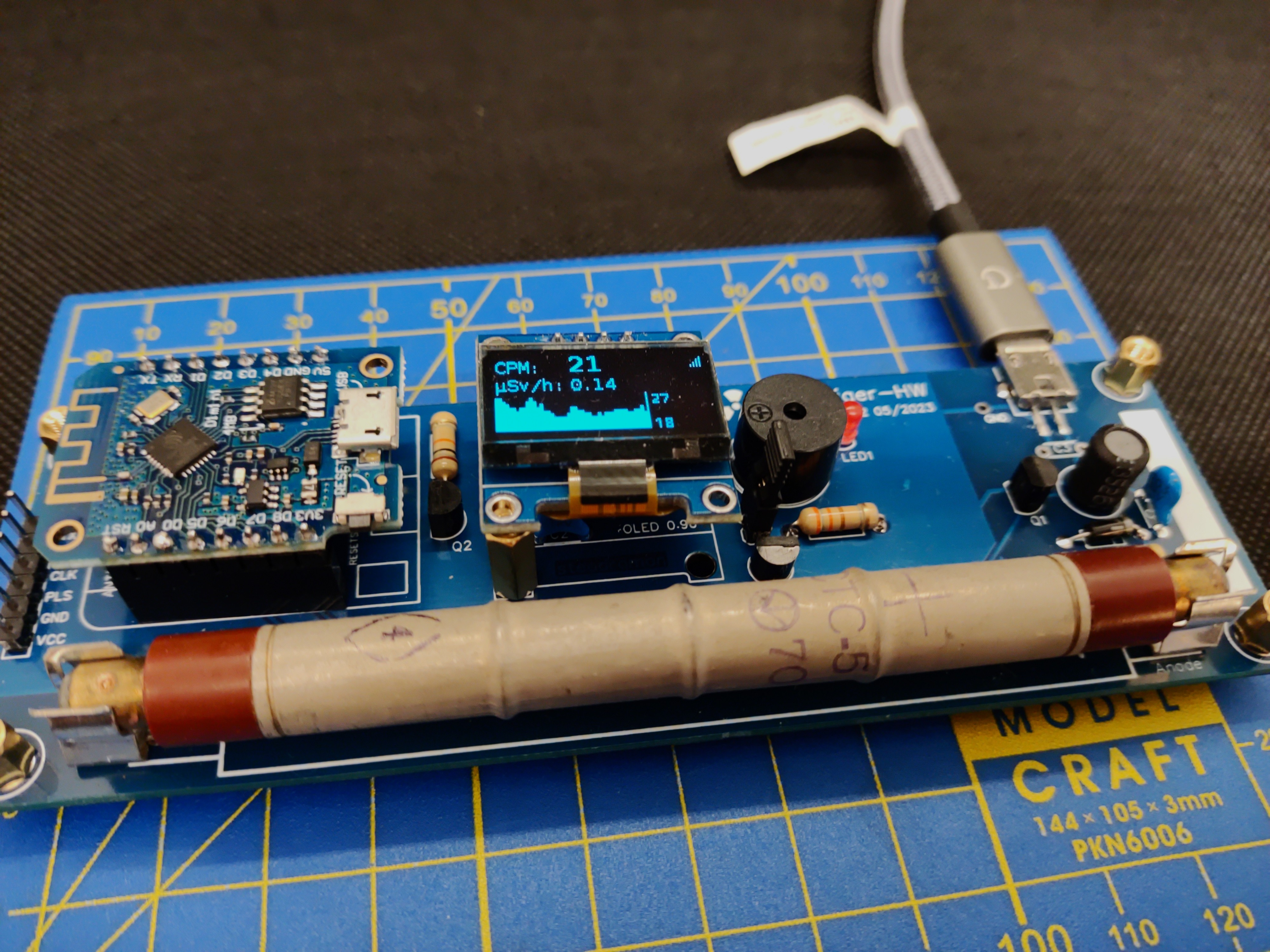
The official IoT Geiger counter powered by ESPGeiger. See [docs.espgeiger.com](https://docs.espgeiger.com/hardware/espgeigerhw) for more information.
## Contributions
Contributions are welcome - please feel free to raise a Pull Request or open an issue.
## Thanks 🙏
Supporting libraries:
- [WiFiManager](https://github.com/tzapu/WiFiManager)
- [AsyncHTTPRequest_Generic](https://github.com/khoih-prog/AsyncHTTPRequest_Generic)
- [ESPNtpClient](https://github.com/gmag11/ESPNtpClient)
- [Smoothed](https://github.com/MattFryer/Smoothed)
- [ArduinoJson](https://github.com/bblanchon/ArduinoJson)
Inspiration:
- [OpenMQTTGateway](https://github.com/1technophile/OpenMQTTGateway)
- [tinyGS](https://github.com/G4lile0/tinyGS/)
- [FreqCountESP](https://github.com/kapraran/FreqCountESP)