https://github.com/steamcore/tinylogger
Tiny extendable logger that plugins into Microsoft.Extensions.Logging
https://github.com/steamcore/tinylogger
colors console dotnet logging
Last synced: about 2 months ago
JSON representation
Tiny extendable logger that plugins into Microsoft.Extensions.Logging
- Host: GitHub
- URL: https://github.com/steamcore/tinylogger
- Owner: steamcore
- License: mit
- Created: 2019-11-30T17:25:05.000Z (over 6 years ago)
- Default Branch: master
- Last Pushed: 2026-04-30T21:54:03.000Z (2 months ago)
- Last Synced: 2026-04-30T22:06:45.953Z (2 months ago)
- Topics: colors, console, dotnet, logging
- Language: C#
- Homepage:
- Size: 331 KB
- Stars: 6
- Watchers: 1
- Forks: 0
- Open Issues: 0
-
Metadata Files:
- Readme: README.md
- License: LICENSE
Awesome Lists containing this project
README
# TinyLogger
[](https://www.nuget.org/packages/TinyLogger/)

TinyLogger is a lightweight, extendable logging library for .NET developers. It integrates seamlessly with
`Microsoft.Extensions.Logging` to provide rich console and file logging options, enhanced readability through
type-aware color-coded output, and customizable log message formats.
## Table of Contents
- [Key Features](#key-features)
- [Simple Example](#simple-example)
- [More Complex Example](#more-complex-example)
- [Screenshots](#screenshot-of-consoleapp-sample)
- [Benefits and Drawbacks](#benefits-and-drawbacks)
- [How It Works](#how-it-works)
- [Background Workers](#background-workers)
## Key Features
- Lightweight and extendable
- Supports console and file logging
- Customizable log message formats
- Type-aware color-coded console output
- Built on Microsoft.Extensions.Logging
## Simple example
If builder is an instance of `ILoggingBuilder` you can simply add the console logger like this:
```csharp
builder.AddTinyConsoleLogger();
```
Keep in mind that the if the standard console logger is in use it may have to be disabled as well,
check out how to do this in the `appsettings.json` file of the generic host sample project.
## More complex example
For more configuration options and file logging, use `AddTinyLogger` method instead. Checkout the sample
`ConsoleApp` for a complete example.
```csharp
builder.AddTinyLogger(options =>
{
// Add custom data to log fields
options.Extenders.Add(new SampleExceptionExtender());
// Use a predefined timestamped message template
options.Template = MessageTemplates.DefaultTimestamped;
// Log messages to the console
options.AddConsole();
// Log messages to a static file
options.AddFile("example.log");
// Log messages to rolling files based on timestamp
options.AddRollingFile(() => $"example-{DateTime.Now:yyyyMMdd-HHmm}.log");
});
```
## Screenshot of ConsoleApp sample
### With TinyLogger
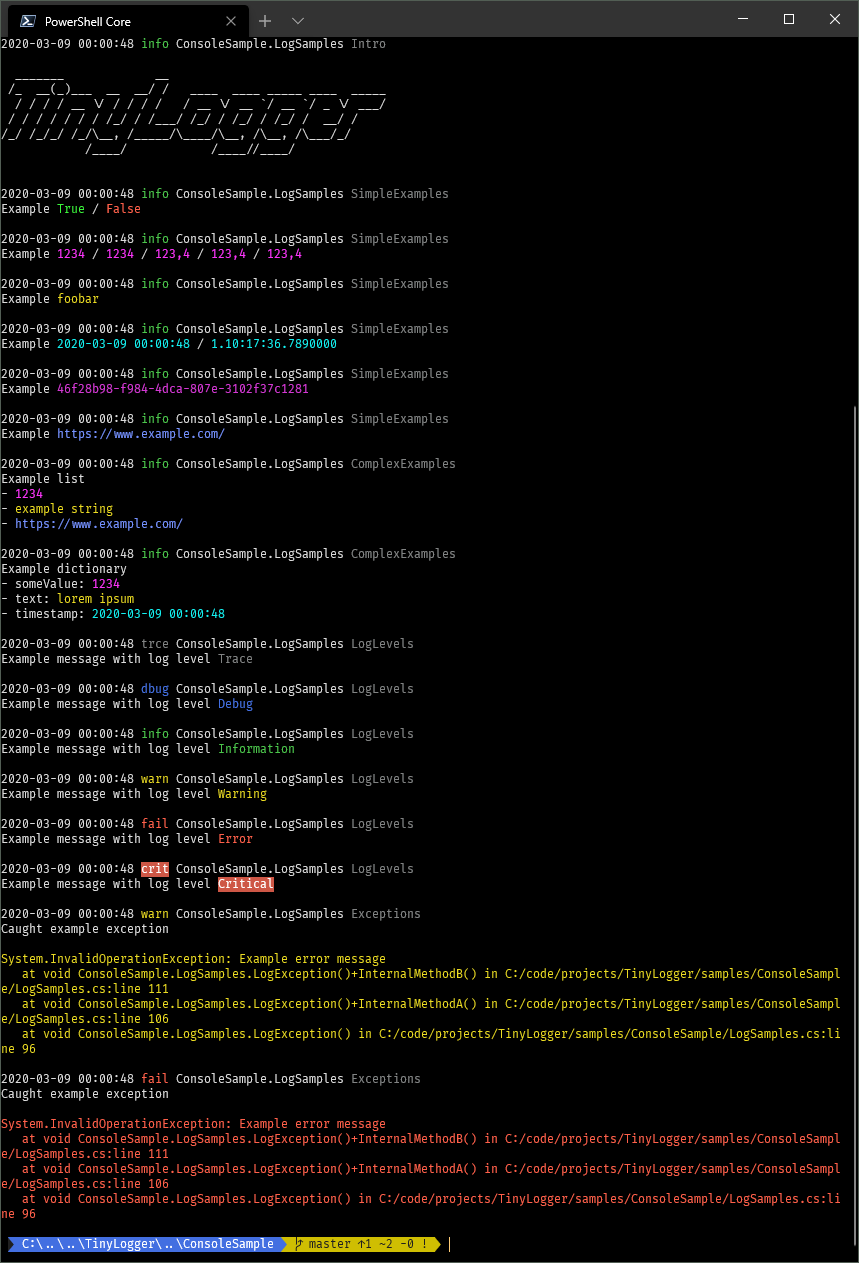
Notice the different colors for numbers, strings, dates, uris, easily readable lists and dictionaries,
and so on. Colors are selected based on the underlying data type, even in dictionaries.
### With standard console logger
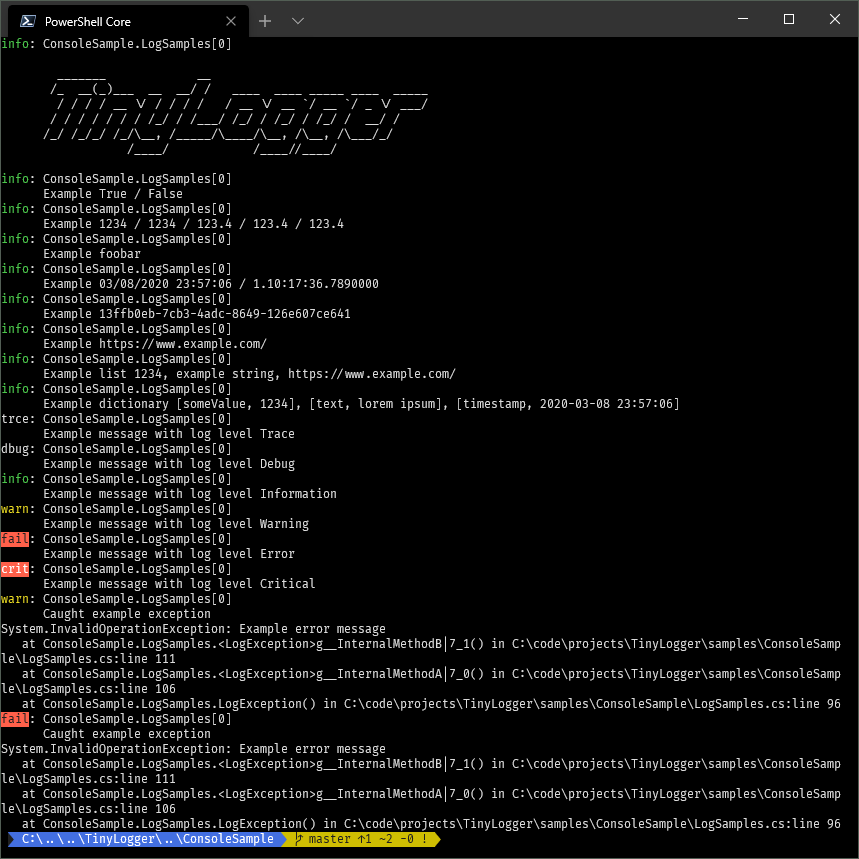
The standard .NET console logger has no spacing between log messages and no color coding except for
log levels which makes it very hard to read.
## Benefits and drawbacks
Because it is a logger provider like any other you are free to use other loggers as well, TinyLogger won't
get in your way. And since it is built on top of the standard logging abstractions from Microsoft there is
no magic other than adding the logging provider and the simple configuration.
## How it works
When a log message is received it is passed to an internal message tokenizer which parses the original
log format, extracts data from the log message state and creates a list of message tokens which easily
can be rendered by any class implementing the `ILogRenderer` interface.
The console renderer will render tokens containing object values with different colors depending on their
type so logs easier to read, while the file logger will render in plain text.
If you want one log format for the console and one log format for files, you can simply add two instances
of TinyLogger with different configuration options.
## Background workers
Everything is rendered on background threads to be as non blocking as possible.
This however means that messages are temporarily stored on a queue until they are ready to be processed
by a log renderer, which should normally be nearly instantly. But if log messages are produced faster than
can be rendered then eventually you may hit the configurable queue depth limit.
If this happens a decision has to be made whether to keep all messages in which case logging threads will
be blocked until the log renderers can catch up, or start discarding messages to give renderers more
breathing room.
It's important to note that the limiting factor here isn't TinyLogger but rather the console itself,
it can be pretty slow on Windows particularly. File logging is much, MUCH faster.
The default behavior is to keep all messages.