https://github.com/steampixel/luftdaten-infoscreen
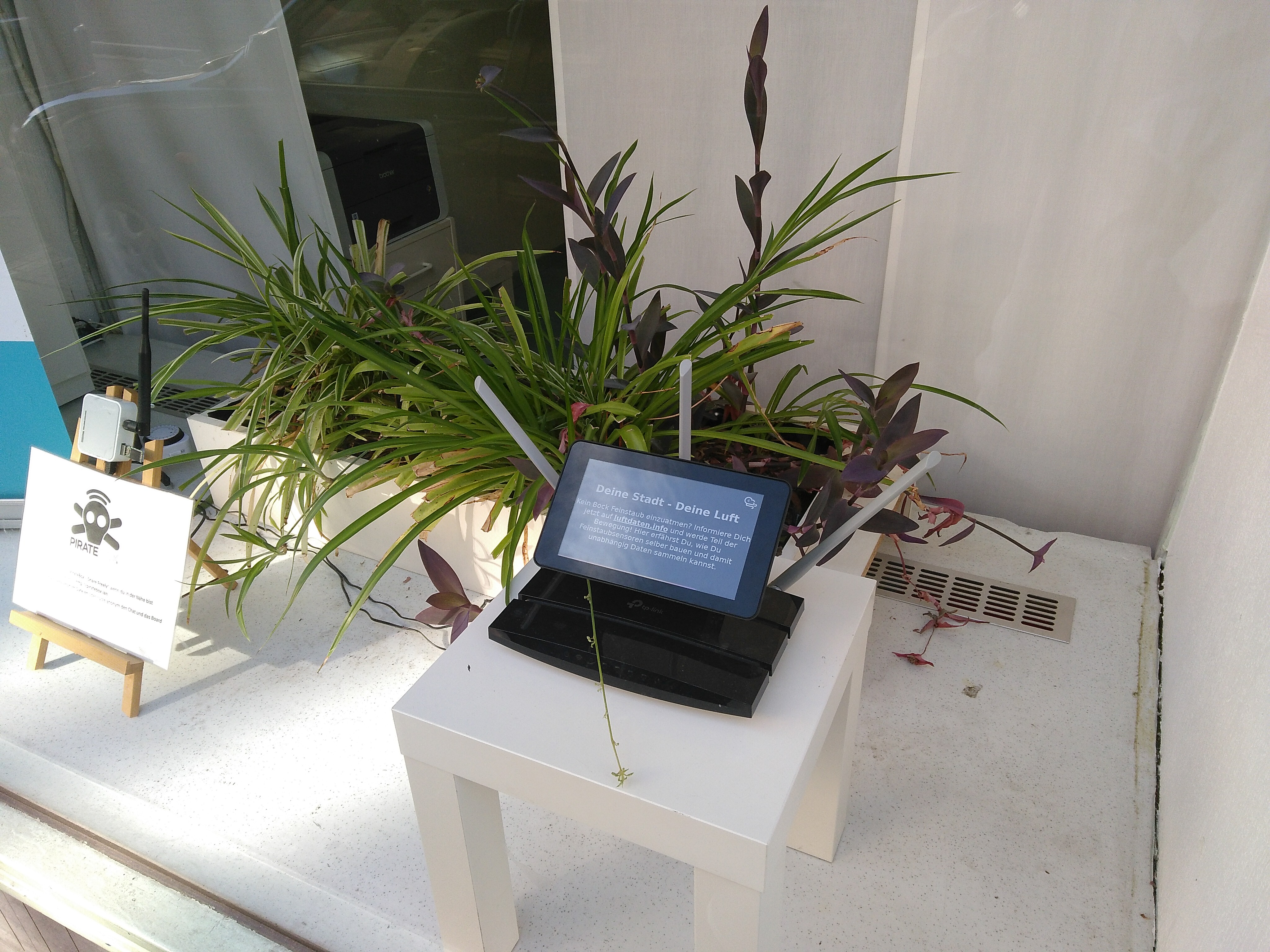
This is a repository for a Raspberry Pi based luftdaten.info info screen using the official 7" touchscreen.
https://github.com/steampixel/luftdaten-infoscreen
Last synced: 3 months ago
JSON representation
This is a repository for a Raspberry Pi based luftdaten.info info screen using the official 7" touchscreen.
- Host: GitHub
- URL: https://github.com/steampixel/luftdaten-infoscreen
- Owner: steampixel
- Created: 2019-01-03T15:34:40.000Z (over 7 years ago)
- Default Branch: master
- Last Pushed: 2019-02-20T10:34:52.000Z (over 7 years ago)
- Last Synced: 2026-03-27T23:42:11.924Z (3 months ago)
- Language: HTML
- Homepage:
- Size: 4.54 MB
- Stars: 2
- Watchers: 2
- Forks: 0
- Open Issues: 0
-
Metadata Files:
- Readme: README.md
Awesome Lists containing this project
README
# Raspberry Pi Info Screen for luftdaten.info
To make the [luftdaten.info](https://luftdaten.info) project more visible to the public I decided to build a little info screen which will jump and zoom over predefined map locations with predefined time intervals. This project uses the little Raspberry Pi 7" touch display in combination with the [FullPageOS](https://github.com/guysoft/FullPageOS). Its ideally for store windows or other locations where pedestrians will pay attention.

## What you will need
* A Raspberry Pi 3 with WiFi support like this one: https://www.rasppishop.de/Raspberry-Pi-3-Model-B-14-GHz-64Bit-Quad-Core
* The official 7" Raspberry Pi touchscreen display: https://www.rasppishop.de/Raspberry-Pi-7-Touchscreen-Display
* Optional: A case for the Pi and the screen: https://www.rasppishop.de/ModMyPi-Raspberry-Pi-7-Touch-Display-Gehaeuse-Schwarz
* A compatible SD card like this one: https://www.rasppishop.de/Sandisk-microSDHC-UHS-I-A1-16GB-Class10
* Basic Raspberry Pi knowledge and some tinkering time
# Installation
## 1. Connect all parts together
Follow the instructions of the screen to connect it to the Pi.
## 2. Install the operating system
To make things easier we will install FullPageOS instead of a default Raspbian image. Download an up to date build from http://unofficialpi.org/Distros/FullPageOS/nightly/.
Than flash it to your SD Card. If you have problems installing this OS refer to the FullPageOS GitHub page: https://github.com/guysoft/FullPageOS
## 3. Configure your SD Card
After flashing the OS to the SD Card you have to edit a few files.
1. Set your WiFi connection details in `fullpageos-wpa-supplicant.txt` as described here: https://github.com/guysoft/FullPageOS#how-to-use-it
2. Copy the files `fullpagedashboard.txt` and `fullpageos.txt` from the repository `/boot` folder to your SD card and override the existing files.
## 4. Start and configure the system
1. Power up the Pi and wait a few minutes. Then start the IP scanner of your choice to find its IP address.
2. Login to your Pi using SSH or SCP.
3. Change the password of your Pi if you wish using the `passwd` command (You really should).
4. Copy the folder `luftdaten.info` from this project to `/var/www/html/luftdaten.info` on your Pi.
5. In some cases you have to switch the GL Driver to legacy mode if the screen does not display anything. In that case type `sudo raspi-config` and go to Advanced Options -> GL Driver panel and switch to legacy mode. See https://github.com/guysoft/FullPageOS/issues/247 for more details about this bug.
## 5. Change, add or delete map positions
If you want to change, add or delete the map URLs you can do this in the `config.js` file. I think this file is self explaining. Just go to https://deutschland.maps.luftdaten.info, zoom to your favorite location and copy the URL. Do not forget to add the `?nooverlay` to the URLs to hide the donation button. For example change https://deutschland.maps.luftdaten.info/#13/49.7956/9.9636 to https://deutschland.maps.luftdaten.info/?nooverlay#13/49.7956/9.9636
# Development
You can launch the web page locally on your PC or Mac and start hacking without a Raspberry Pi. Just clone or download this project. All necessary files are located in /var/www/html/luftdaten.info.
The index.html document contains a little JavaScript code that will iterate over a list of predefined URLs and display them within an iframe. The info.html document just contains a simple start page for the info screen. The rest of the code does not have any dependencies like jQuery, Bootstrap or something. It is written in pure HTML, JS and CSS to keep things simple. Feel free to create forks or pull requests.
# License
The luftdaten.info logo (luftdaten-feinstaub-selber-messen-logo.png) was created by Adam Whitcroft and is licensed as Creative Commons – Attribution ([CC BY 3.0](https://creativecommons.org/licenses/by/3.0/de/)).
## MIT License
Copyright (c) 2018 SteamPixel
Permission is hereby granted, free of charge, to any person obtaining a copy
of this software and associated documentation files (the "Software"), to deal
in the Software without restriction, including without limitation the rights
to use, copy, modify, merge, publish, distribute, sublicense, and/or sell
copies of the Software, and to permit persons to whom the Software is
furnished to do so, subject to the following conditions:
The above copyright notice and this permission notice shall be included in all
copies or substantial portions of the Software.
THE SOFTWARE IS PROVIDED "AS IS", WITHOUT WARRANTY OF ANY KIND, EXPRESS OR
IMPLIED, INCLUDING BUT NOT LIMITED TO THE WARRANTIES OF MERCHANTABILITY,
FITNESS FOR A PARTICULAR PURPOSE AND NONINFRINGEMENT. IN NO EVENT SHALL THE
AUTHORS OR COPYRIGHT HOLDERS BE LIABLE FOR ANY CLAIM, DAMAGES OR OTHER
LIABILITY, WHETHER IN AN ACTION OF CONTRACT, TORT OR OTHERWISE, ARISING FROM,
OUT OF OR IN CONNECTION WITH THE SOFTWARE OR THE USE OR OTHER DEALINGS IN THE
SOFTWARE.