https://github.com/stefansl/image-shrinker
App for macOS. Minify your images and graphics with just one drop. Autorenamed in the same place where it comes from. Immediately!
https://github.com/stefansl/image-shrinker
compressor electron electron-app image-compression image-minify image-shrinker minification minify minify-images mozjpeg pngquant shrink-images spectre-css svgo tiny-image
Last synced: 7 months ago
JSON representation
App for macOS. Minify your images and graphics with just one drop. Autorenamed in the same place where it comes from. Immediately!
- Host: GitHub
- URL: https://github.com/stefansl/image-shrinker
- Owner: stefansl
- License: cc0-1.0
- Created: 2018-02-01T02:17:46.000Z (over 8 years ago)
- Default Branch: main
- Last Pushed: 2025-06-09T18:03:44.000Z (about 1 year ago)
- Last Synced: 2025-06-09T19:20:48.272Z (about 1 year ago)
- Topics: compressor, electron, electron-app, image-compression, image-minify, image-shrinker, minification, minify, minify-images, mozjpeg, pngquant, shrink-images, spectre-css, svgo, tiny-image
- Language: JavaScript
- Homepage: https://image-shrinker.com
- Size: 210 MB
- Stars: 298
- Watchers: 8
- Forks: 35
- Open Issues: 10
-
Metadata Files:
- Readme: README.md
- License: LICENSE.md
Awesome Lists containing this project
README
# Image Shrinker
Image Shrinker is a tool to minify images and graphics using the best available libraries for image processing: [pngquant](https://pngquant.org/), [mozjpg](https://github.com/mozilla/mozjpeg), [SVGO](https://github.com/svg/svgo) and [Gifsicle](https://github.com/kohler/gifsicle). Built with web technologies in [Electron](https://electronjs.org)
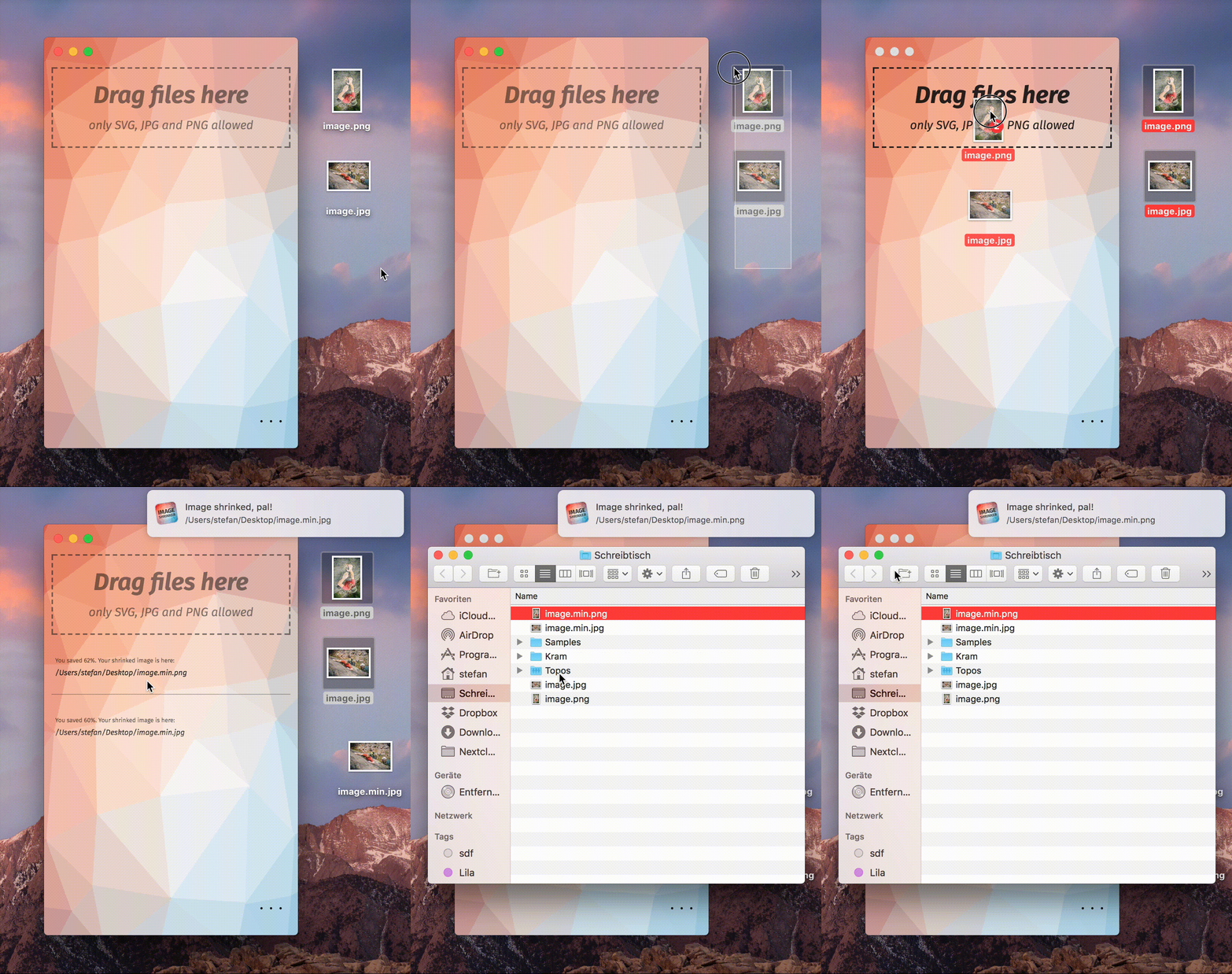
## How to use
Drag your image file onto the Image Shrinker window and it will saved in the same or in a predefined folder as reduced image.
The original graphic will be not replaced.
## Download and Installation on macOS
Download Image Shrinker here:
https://github.com/stefansl/image-shrinker/releases/download/v1.6.5/image-shrinker-1.6.5.dmg
Unpack and copy or drag the app into your macOS application folder.
For uninstalling, just drop the app into the bin.
## Build your own
Get the repo
```shell
git clone https://github.com/stefansl/image-shrinker.git
```
Install dependencies
```shell
$ cd image-shrinker
$ npm install
```
Generate your macOS package
```shell
electron-builder build --mac
```
Generate your Linux package
```shell
electron-builder build --linux
```
Generate your Windows package
```shell
electron-builder build --win
```
Notice: I did not test Windows and Linux. Feel free to commit a pull request.
## Credits
Thank you, guys!
* Electron:
* pngquant:
* mozjpg:
* SVGO:
* Settings framework:
* Poly background:
* CSS: [Spectre Css](https://picturepan2.github.io/spectre/)
* Font: [Mozillas Fira Sans](https://github.com/mozilla/Fira)
* gifsicle: