https://github.com/stepanzubkov/tg-username-clock
Shows current time in telegram username
https://github.com/stepanzubkov/tg-username-clock
Last synced: 25 days ago
JSON representation
Shows current time in telegram username
- Host: GitHub
- URL: https://github.com/stepanzubkov/tg-username-clock
- Owner: stepanzubkov
- License: mit
- Created: 2023-01-01T08:43:44.000Z (over 3 years ago)
- Default Branch: main
- Last Pushed: 2023-01-03T20:06:58.000Z (over 3 years ago)
- Last Synced: 2025-06-27T17:49:29.547Z (about 1 year ago)
- Language: Python
- Size: 8.79 KB
- Stars: 3
- Watchers: 2
- Forks: 0
- Open Issues: 0
-
Metadata Files:
- Readme: README.md
- License: LICENSE
Awesome Lists containing this project
README
# tg-username-clock
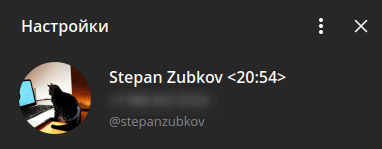
Simple script that sets Telegram user's `last_name` as clock every minute. It uses `apscheduler` as scheduler and `telethon` as Telegram client.
**Examples**
"Stepan Zubkov" => "Stepan Zubkov <15:23>"
(`last_name` is empty)
## Installation
At first, go to https://my.telegram.org/ and fill out a form. In this script only `api_id` and `api_hash` params are used.
### Docker (preffered way)
Clone this repo and go to `/src` directory.
Create `.app.env` file here. Put your `api_id` and `api_hash` in file:
```bash
API_ID=
API_HASH=
```
Build image:
```bash
docker build . -t tg-username-clock
```
Run container:
```bash
docker run --env-file=.app.env -v /etc/localtime:/etc/localtime:ro tg-username-clock
```
On Windows, create file with your timezone. See [all timezones](https://en.wikipedia.org/wiki/List_of_tz_database_time_zones). Then, run:
```bash
docker run --env-file=.app.env -v c:/path/to/your/timezone/file:/etc/timezone:ro tg-username-clock
```
### Python
#### Linux
Create virtual environment and activate it:
```bash
cd src/
python3 -m venv venv
source venv/bin/activate
```
Set environment variables with your credentials:
```bash
export API_ID=
export API_HASH=
```
Run app:
```bash
python main.py
```
#### Windows
Create and activate virtual environment:
```cmd
cd src/
python -m venv venv
venv\Scripts\activate.bat
```
Set environment variables with your credentials:
```cmd
set API_ID=
set API_HASH=
```
Run app:
```bash
python main.py
```