https://github.com/stephlin/bebop_face_following
A simple side-project of single face following based on Parrot Bebop and ROS
https://github.com/stephlin/bebop_face_following
Last synced: 6 months ago
JSON representation
A simple side-project of single face following based on Parrot Bebop and ROS
- Host: GitHub
- URL: https://github.com/stephlin/bebop_face_following
- Owner: StephLin
- Created: 2019-11-25T09:44:23.000Z (over 6 years ago)
- Default Branch: master
- Last Pushed: 2019-11-25T09:51:28.000Z (over 6 years ago)
- Last Synced: 2025-07-24T07:00:37.856Z (about 1 year ago)
- Language: CMake
- Size: 5.86 KB
- Stars: 0
- Watchers: 1
- Forks: 0
- Open Issues: 0
-
Metadata Files:
- Readme: README.md
Awesome Lists containing this project
README
# Bebop Face Following #
This is a simple side-project of single face following based on Parrot Bebop and ROS.
[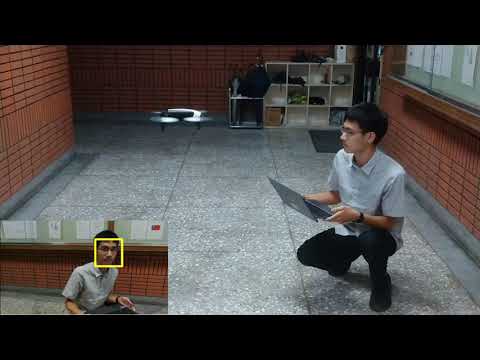](https://youtu.be/0N4ptogSmzs "Face Detection and Auto Centering Using Haar Cascades Classifier - Side project")
## Declaration ##
**This project does not implement any filter for tracking (left as future work if I have enough time).**
## Prerequisite ##
* ROS (tested on [ros-kinetic](http://wiki.ros.org/kinetic))
* Parrot Bebop 1.0 / 2.0, or proper simulator
## Installation ##
### Step 1. Install ROS ###
Please check [the installation page on ROS wiki](http://wiki.ros.org/ROS/Installation).
### Step 2. Install ROS driver for Parrot Bebop Drones 1.0 & 2.0 ###
#### Option 1. Without simulator
If you don't need any simulator, one can just compile from source ([AutonomyLab/bebop_autonomy](https://github.com/AutonomyLab/bebop_autonomy)) with [their documentation](https://bebop-autonomy.readthedocs.io/en/latest/installation.html).
#### Option 2. With Parrot-Sphinx simulator
**Currently only works on ros-kinetic (Ubuntu 16.04), not supported for other version.**
If you also need a simple simulator (powered by [Parrot-Sphinx](https://developer.parrot.com/docs/sphinx/whatissphinx.html)) with some useful scripts, you should do the same instruction as above but clone another repository [StephLin/bebop_autonomy](https://github.com/StephLin/bebop_autonomy).
You can see [README](https://github.com/StephLin/bebop_autonomy/tree/master/sphinx_scripts) here for more information.
### Step 3. Install this project
```bash
cd ~/catkin_ws/src
git clone https://github.com/StephLin/bebop_face_following
chmod +x bebop_face_following/scripts/*.py
```
## Usage ##
This project does not intergrate everything into one single command (or launch) for safety reason.
### Step 0. Connect to Bebop ###
### Step 1. Launch bebop_driver ###
The following command comes from [official documentation of bebop_autonomy](https://bebop-autonomy.readthedocs.io/en/latest/running.html). If there is anything different, follow the official documentation first.
```bash
roslaunch bebop_driver bebop_node.launch
```
### Step 2. Run Face detector node ###
This step will create a new node, subscribe image raw from Bebop, and publish position of detected face.
```bash
rosrun bebop_face_following face_detector.py
```
### Step 3. Takeoff ###
```bash
rostopic pub -1 /bebop/takeoff std_msgs/Empty
```
### Step 4. Run Auto following node ###
This step will create a new node, and start following the face one detected (depends on `face_detector` node).
```bash
rosrun bebop_face_following following.py
```
### Final step. Land ###
```bash
rostopic pub -1 /bebop/land std_msgs/Empty
```