https://github.com/stepzen-dev/stepzen-redwood
A StepZen application with RedwoodJS and Shopify
https://github.com/stepzen-dev/stepzen-redwood
Last synced: 11 months ago
JSON representation
A StepZen application with RedwoodJS and Shopify
- Host: GitHub
- URL: https://github.com/stepzen-dev/stepzen-redwood
- Owner: stepzen-dev
- License: mit
- Created: 2021-03-15T18:45:22.000Z (about 5 years ago)
- Default Branch: main
- Last Pushed: 2021-05-10T21:36:40.000Z (about 5 years ago)
- Last Synced: 2025-07-08T08:09:07.167Z (11 months ago)
- Language: JavaScript
- Homepage: https://stepzen-redwood.netlify.app/
- Size: 449 KB
- Stars: 1
- Watchers: 3
- Forks: 0
- Open Issues: 0
-
Metadata Files:
- Readme: README.md
- License: LICENSE
Awesome Lists containing this project
README
# Redwood+StepZen and Shopify

[RedwoodJS](http://redwoodjs.com/) is a fullstack, serverless web application framework for building and deploying Jamstack applications. Imagine a React frontend, statically delivered from a CDN, talking via GraphQL to a backend running on AWS Lambdas, all deployable with `git push`.
This example project creates a GraphQL API for a Shopify backend connected to a React frontend and deployed on a static hosting provider. Redwood's `api` side is auto-configured with a GraphQL handler that can be deployed with serverless functions, enabling [secure API routes](https://stepzen.com/blog/how-to-secure-api-routes-for-jamstack-sites).
## Project Structure
```
├── api
│ ├── src
│ │ ├── functions
│ │ │ └── graphql.js
│ │ ├── graphql
│ │ │ └── products.sdl.js
│ │ ├── lib
│ │ │ └── client.js
│ │ └── services
│ │ └── products
│ │ └── products.js
│ └── stepzen
│ ├── shopify
│ │ └── products.graphql
│ └── index.graphql
└── web
├── public
│ ├── README.md
│ ├── favicon.png
│ └── robots.txt
└── src
├── components
│ └── ProductsCell
│ ├── ProductsCell.js
│ ├── ProductsCell.mock.js
│ ├── ProductsCell.stories.js
│ └── ProductsCell.test.js
├── layouts
├── pages
│ ├── FatalErrorPage
│ │ └── FatalErrorPage.js
│ ├── HomePage
│ │ └── HomePage.js
│ └── NotFoundPage
│ └── NotFoundPage.js
├── App.js
├── Routes.js
├── index.css
└── index.html
```
## Setup
### Clone repo
```bash
git clone https://github.com/stepzen-samples/stepzen-redwood.git
cd stepzen-redwood
```
### Install dependencies
We'll use [yarn](https://classic.yarnpkg.com/en/docs/install) (which is a requirement) to install our dependencies.
```bash
yarn
```
### Fire it up
Start the development server with `yarn rw dev`.
```bash
yarn rw dev
```
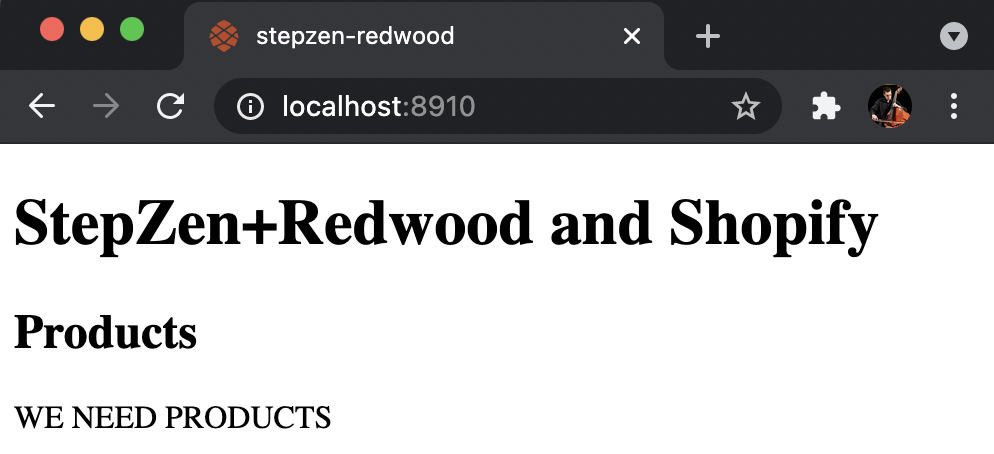
Your browser should open automatically to `http://localhost:8910` to see the web app.
### `config.yaml`
We don't have any products because we haven't connected to Shopify yet. `config.yaml` contains the keys and other credential information that StepZen needs to access your backend data sources. Leave your development server running and open a new terminal.
```bash
touch api/stepzen/config.yaml
```
To connect your Shopify account, enter your `api_key`, `api_password`, and `store_name`.
```yaml
configurationset:
- configuration:
name: shopify_config
api_key:
api_password:
store_name:
```
### Deploy endpoint
Deploy your endpoint with `stepzen start`.
```bash
stepzen start
```
In addition to deploying your endpoint, it will also be running on `localhost:5000`.
```bash
Watching ~/stepzen-redwood/api/stepzen for GraphQL changes
http://localhost:5000/stepzen-redwood/products
```
The terminal will output the link to a deployed endpoint you can query. Your own account name will replace `biggs`.
```bash
Deploying to StepZen...... done
Successfully deployed stepzen-redwood/products at 2:33:27 PM
Your endpoint is available at https://biggs.stepzen.net/stepzen-redwood/products/__graphql
```
### Query endpoint
`getProducts` returns an array of `Product` objects with the `title`, `id`, and `handle` for each. Open the GraphQL explorer and enter the following query.
```graphql
query getProducts {
products {
title
id
handle
}
}
```

### Create `.env` file
Go back to your original terminal and turn off the development server (⌃C). We need to restart the server because we are going to create a `.env` file to hold our environment variables.
```bash
touch .env
```
The server does not detect this change and will result in an error message if you do not restart it after creating the `.env` file.
```bash
API_ENDPOINT=
API_KEY=
```
Enter the endpoint generated by `stepzen start` and include your `API_KEY` which can be found in your StepZen account dashboard.
### Start the development server again
```bash
yarn rw dev
```
The `web` side will be running again on `localhost:8910` and now will return products.

The `api` side can be accessed through a GraphiQL explorer running on `localhost:8911/graphql`.

## StepZen Side
`products.graphql` has a `Product` type and a `products` query that returns an array of `Product` objects. The `@rest` directive accepts the `endpoint` from Shopify and the `@supplies` directive provides the query.
```graphql
# api/stepzen/shopify/products.graphql
type Product {
id: ID!
handle: String
title: String
}
type Query {
products: [Product]
@rest(
resultroot: "products[]"
endpoint: "https://$api_key:$api_password@$store_name.myshopify.com/admin/api/2020-01/products.json"
configuration: "shopify_config"
)
}
```
### index.graphql
Our `schema` in `index.graphql` ties together all of our other schemas. For this example we just have the `products.graphql` file included in our `@sdl` directive.
```graphql
# api/stepzen/index.graphql
schema
@sdl(
files: [ "schema/products.graphql" ]
) {
query: Query
}
```
This file tells StepZen how to assemble the various type definition files into a complete GraphQL schema. The `@sdl` directive is a StepZen directive that specifies the list of files to assemble.
## Redwood API Side
The `functions` directory contains a `graphql.js` file that defines our GraphQL handler for serverless deployment to AWS Lambda or platforms that offer Lambda support such as Netlify and Vercel.
```javascript
// api/src/functions/graphql.js
import {
createGraphQLHandler,
makeMergedSchema,
makeServices,
} from '@redwoodjs/api'
import schemas from 'src/graphql/**/*.{js,ts}'
import services from 'src/services/**/*.{js,ts}'
export const handler = createGraphQLHandler({
schema: makeMergedSchema({
schemas,
services: makeServices({ services }),
}),
})
```
### Products Schema
The `graphql` directory contains `products.sdl.js` with your GraphQL schema written in a Schema Definition Language. This ensures that our Redwood API will have a `schema` that matches our `schema` in `products.graphql`.
```javascript
// api/src/graphql/products.sdl.js
export const schema = gql`
type Product {
id: ID
handle: String
title: String
}
type Query {
products: [Product]
}
`
```
The schema includes a `Product` type, and each `Product` has an `id`, `handle`, and `title`. The `products` query returns an array of `Product` objects.
### GraphQL Client
While Redwood's `web` side includes Apollo Client by default, its `api` side does not include any built in mechanism for making HTTP requests.
```javascript
// api/src/lib/client.js
import { GraphQLClient } from 'graphql-request'
export const request = async (query = {}) => {
const endpoint = process.env.API_ENDPOINT
const graphQLClient = new GraphQLClient(endpoint, {
headers: {
authorization: 'apikey ' + process.env.API_KEY
},
})
try {
return await graphQLClient.request(query)
} catch (err) {
console.log(err)
return err
}
}
```
This project uses `graphql-request` but `node-fetch` could be used instead.
* `endpoint` is set to the url generated by `stepzen start`
* `authorization` includes your StepZen API key appended to `apikey `
### Products Service
In the `services` directory we have a `products` directory with a `products.js` service.
```javascript
// api/src/services/products/products.js
import { request } from 'src/lib/client'
import { gql } from 'graphql-request'
export const products = async () => {
const GET_PRODUCTS_QUERY = gql`
query getProducts {
products {
title
id
handle
}
}
`
const data = await request(GET_PRODUCTS_QUERY)
return data['products']
}
```
The query is asking for the list of `products` and their `title`, `id`, and `handle`. The `GraphQLClient` is imported from `src/lib/client`.
## Redwood Web Side
The `web` side contains our `ProductsCell` for fetching `products` and a `HomePage` for rendering the cell.
### ProductsCell
`getProducts` returns the `id`, `title`, and `handle` of each `Product`. This will send the query to our `api` side, which in turn sends a query to our StepZen API.
```jsx
// web/src/components/ProductsCell/ProductsCell.js
export const QUERY = gql`
query getProducts {
products {
id
title
handle
}
}
`
export const Loading = () =>
Almost there...
export const Empty = () => WE NEED PRODUCTS
export const Failure = ({ error }) => {error.message}
export const Success = ({ products }) => {
return (
- {product.title}
{products.map(product => (
))}
)
}
```
### HomePage
`ProductsCell` is imported onto `HomePage` to display the information fetched by the cell's query.
```jsx
// web/src/pages/HomePage/HomePage.js
import ProductsCell from 'src/components/ProductsCell'
const HomePage = () => {
return (
<>
StepZen+Redwood and Shopify
Products
>
)
}
export default HomePage
```
## Deploy to Netlify
Redwood provides helpful setup commands to deploy to various hosting providers. Our project is already configured to deploy to [Netlify](https://redwoodjs.com/docs/deploy#netlify-deploy) with our `netlify.toml` file.
```toml
[build]
command = "yarn rw deploy netlify"
publish = "web/dist"
functions = "api/dist/functions"
[dev]
command = "yarn rw dev"
[[redirects]]
from = "/*"
to = "/index.html"
status = 200
```
The `netlify.toml` file lets Netlify know that:
* Your `build` command is `yarn rw deploy netlify`
* The `publish` directory for your assets is `web/dist`
* Your `functions` will be in `api/dist/functions`

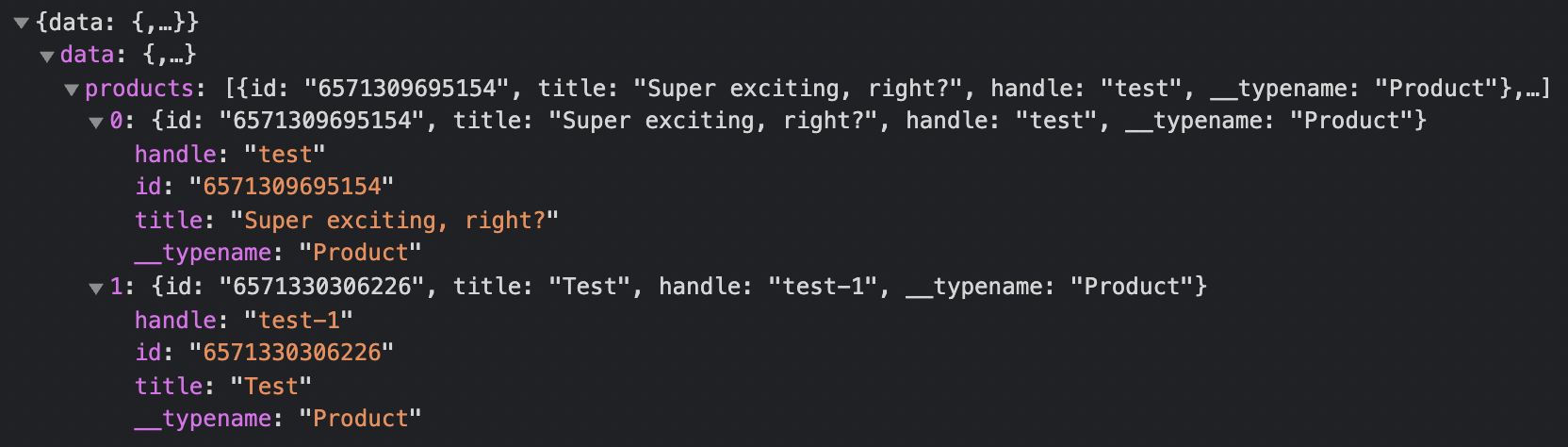
Open your browser's developer tools and look at the response in your Network tab.