https://github.com/steveiliop56/tinyauth
The tiniest authentication and authorization server you have ever seen.
https://github.com/steveiliop56/tinyauth
2fa authentication caddy golang middleware nginx oidc selfhosted sso tinyauth totp typescipt
Last synced: 3 months ago
JSON representation
The tiniest authentication and authorization server you have ever seen.
- Host: GitHub
- URL: https://github.com/steveiliop56/tinyauth
- Owner: steveiliop56
- License: gpl-3.0
- Created: 2025-01-19T11:40:09.000Z (over 1 year ago)
- Default Branch: main
- Last Pushed: 2026-04-15T00:42:11.000Z (4 months ago)
- Last Synced: 2026-04-15T02:35:22.803Z (4 months ago)
- Topics: 2fa, authentication, caddy, golang, middleware, nginx, oidc, selfhosted, sso, tinyauth, totp, typescipt
- Language: Go
- Homepage: https://tinyauth.app
- Size: 14.8 MB
- Stars: 7,225
- Watchers: 13
- Forks: 225
- Open Issues: 20
-
Metadata Files:
- Readme: README.md
- Contributing: CONTRIBUTING.md
- Funding: FUNDING.yml
- License: LICENSE
- Code of conduct: CODE_OF_CONDUCT.md
- Security: SECURITY.md
Awesome Lists containing this project
- awesome-mac-mini-homeserver - TinyAuth - Lightweight forward-auth middleware that adds SSO in front of Traefik, Caddy, or nginx.     (Security  / Privacy front-ends and search)
- StarryDivineSky - steveiliop56/tinyauth
- awesome-ccamel - steveiliop56/tinyauth - The tiniest authentication and authorization server you have ever seen. (Go)
- my-awesome - steveiliop56/tinyauth - 04 star:7.2k fork:0.2k The tiniest authentication and authorization server you have ever seen. (Go)
README

Tinyauth
The tiniest authentication and authorization server you have ever seen.



Tinyauth is the simplest and tiniest authentication and authorization server you have ever seen. It is designed to both work as an authentication middleware for your apps, offering support for OAuth, LDAP and access-controls, and as a standalone authentication server. It supports all the popular proxies like Traefik, Nginx and Caddy.

> [!WARNING]
> Tinyauth is in active development and configuration may change often. Please make sure to carefully read the release notes before updating.
> [!NOTE]
> This is the main development branch. For the latest stable release, see the [documentation](https://tinyauth.app) or the latest stable tag.
> [!NOTE]
> Tinyauth is in the process of migrating to the new [tinyauthapp](https://github.com/tinyauthapp) organization. The organization **is official** and it will host all of the Tinyauth related repositories in the future.
## Getting Started
You can get started with Tinyauth by following the guide in the [documentation](https://tinyauth.app/docs/getting-started). There is also an available [docker-compose](./docker-compose.example.yml) file that has Traefik, Whoami and Tinyauth to demonstrate its capabilities (keep in mind that this file lives in the development branch so it may have updates that are not yet released).
## Demo
If you are still not sure if Tinyauth suits your needs you can try out the [demo](https://demo.tinyauth.app). The default username is `user` and the default password is `password`.
## Documentation
You can find documentation and guides on all of the available configuration of Tinyauth in the [website](https://tinyauth.app).
If you wish to contribute to the documentation head over to the [repository](https://github.com/steveiliop56/tinyauth-docs).
## Discord
Tinyauth has a [Discord](https://discord.gg/eHzVaCzRRd) server. Feel free to hop in to chat about self-hosting, homelabs and of course Tinyauth. See you there!
## Contributing
All contributions to the codebase are welcome! If you have any free time, feel free to pick up an [issue](https://github.com/steveiliop56/tinyauth/issues) or add your own missing features. Make sure to check out the [contributing guide](./CONTRIBUTING.md) for instructions on how to get the development server up and running.
## Localization
If you like, you can help translate Tinyauth into more languages by visiting the [Crowdin](https://crowdin.com/project/tinyauth) page.
## License
Tinyauth is licensed under the GNU General Public License v3.0. TL;DR — You may copy, distribute and modify the software as long as you track changes/dates in source files. Any modifications to or software including (via compiler) GPL-licensed code must also be made available under the GPL along with build & install instructions. For more information about the license check the [license](./LICENSE) file.
## Sponsors
A big thank you to the following people for providing me with more coffee:








## Acknowledgements
- **Freepik** for providing the police hat and badge.
- **Renee French** for the original gopher logo.
- **Coderabbit AI** for providing free AI code reviews.
- **Syrhu** for providing the background image of the app.
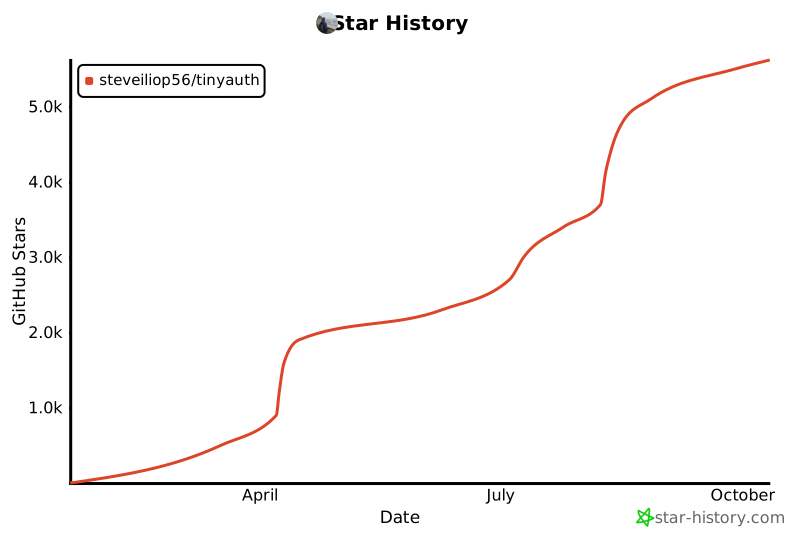
## Star History
[](https://www.star-history.com/#steveiliop56/tinyauth&Date)