https://github.com/stevescruz/task-master
📃✅Task Master: a command-line todo list that allows you to write your tasks, set priorities, view existing tasks and view the next tasks due.
https://github.com/stevescruz/task-master
cli clitools javascript nodejs todolist
Last synced: 5 months ago
JSON representation
📃✅Task Master: a command-line todo list that allows you to write your tasks, set priorities, view existing tasks and view the next tasks due.
- Host: GitHub
- URL: https://github.com/stevescruz/task-master
- Owner: stevescruz
- Created: 2021-03-29T19:39:23.000Z (over 5 years ago)
- Default Branch: master
- Last Pushed: 2021-05-14T03:24:20.000Z (about 5 years ago)
- Last Synced: 2025-10-28T22:46:28.633Z (9 months ago)
- Topics: cli, clitools, javascript, nodejs, todolist
- Language: JavaScript
- Homepage:
- Size: 259 KB
- Stars: 11
- Watchers: 2
- Forks: 1
- Open Issues: 0
-
Metadata Files:
- Readme: README.md
Awesome Lists containing this project
README
Task Master CLI
Task Master is a command-line todo list. It allows you to write your tasks, set priorities, view existing tasks and view the next tasks due.
Goal |
Getting Started |
Commands |
Technologies |
Uninstallation |
License
## Goal
The goal is to create a todo list command-line application using Node.js that prioritizes productivity and contains the most important features without overwhelming the user.
## Getting Started
Prerequisites: to run this application, you need [Node.js v14.14.0][nodejs] (or higher) installed on your computer.
From your terminal:
```bash
# Install the CLI globally
$ npm install -g @stevescruz/task-master
# Execute the CLI
$ task-master
```
### Potential issues
On Windows you may not be able to execute the task-master CLI because of your execution policies' configurations.
Execution policies are responsible for determining what scripts your machine is allowed to execute, thus helping avoid malicious code.
I recommend trying to execute `task-master` through CMD and PowerShell to see which one works. In case both do not work, then it is necessary to change the execution policy for the PowerShell.
Read more about execution policies at the [Microsoft Docs](https://docs.microsoft.com/en-us/powershell/module/microsoft.powershell.core/about/about_execution_policies?view=powershell-7.1).
Read more about this at [Stack Overflow](https://stackoverflow.com/questions/41117421/ps1-cannot-be-loaded-because-running-scripts-is-disabled-on-this-system) (includes a solution).
From your PowerShell terminal:
```powershell
# Check your scopes and their execution policies
Get-ExecutionPolicy -List
# Set the execution policy for the scope that will solve your problem
Set-ExecutionPolicy -Scope CurrentUser -ExecutionPolicy Unrestricted
# Whenever you want, you can revert the changes and set your scope's execution policy back to its original settings
Set-ExecutionPolicy -Scope CurrentUser -ExecutionPolicy Undefined
# NOTE: The scopes and execution policies used here are just examples.
```
## Commands
- `task-master task [subcommand]`
- When no subcommand is specified for `task`, it will execute the `list` subcommand.
- `task-master task add ]`
- Creates a new task.
- The task's `description` is mandatory.
- The task's `-p` (alias: `--priority`) flag is optional. It sets a task's `priority` and can only receive `L`, `N` or `H` as a parameter.
- When the `-p` option is ommitted, **by default**, the new task's `priority` is set to `N`.
- `task-master task delete `
- Deletes a task.
- The task's `id` is mandatory.
- `task-master task done `
- Marks a task's `status` as `done`, hiding it from being listed by the `task list` command.
- The task's `id` is mandatory.
- `task-master task tag `
- Marks a task's tag property with the provided ``, allowing it to be filtered by the `task list -f ` command.
- The task's `id` is mandatory.
- `task-master task untag `
- Removes a task's tag property.
- The task's `id` is mandatory.
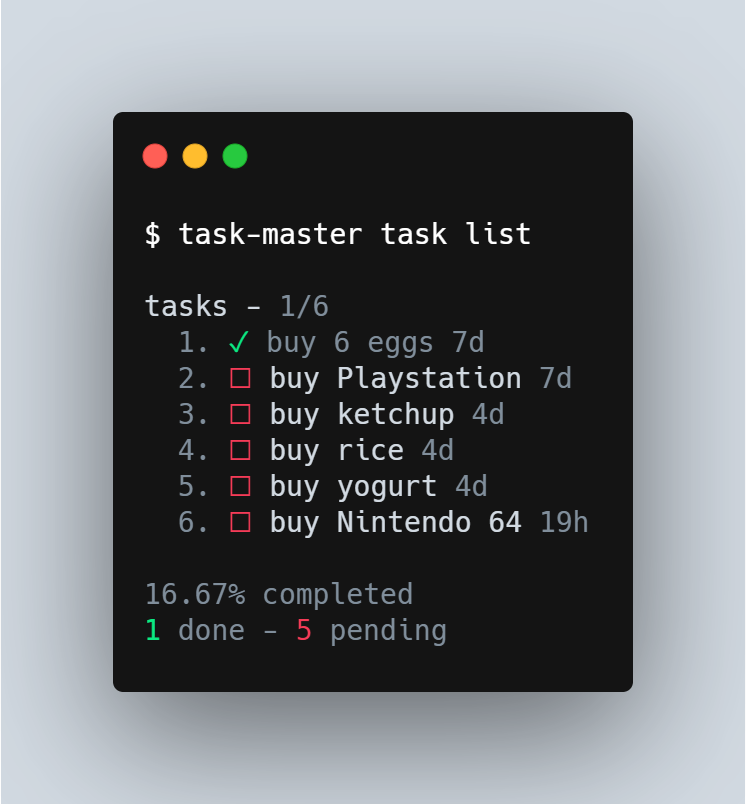
- `task-master task list [-s ] [-f ]`
- Displays all tasks.
- `-s ` (alias: `--show `) is an optional flag that forces the `task list` command to only display the tasks whose status property correspond to the provided `status` (available options for `` are `done` or `pending`).
- `-d` (alias: `--dates`) is an optional flag that forces the `task list` command to display tasks grouped by their creation date.
- `task-master task next`
- Displays all tasks.
- `-f ` (alias: `--filter `) is an optional flag that forces the `task list` command to only display the tasks whose tag property corresponds to the provided `tag`.
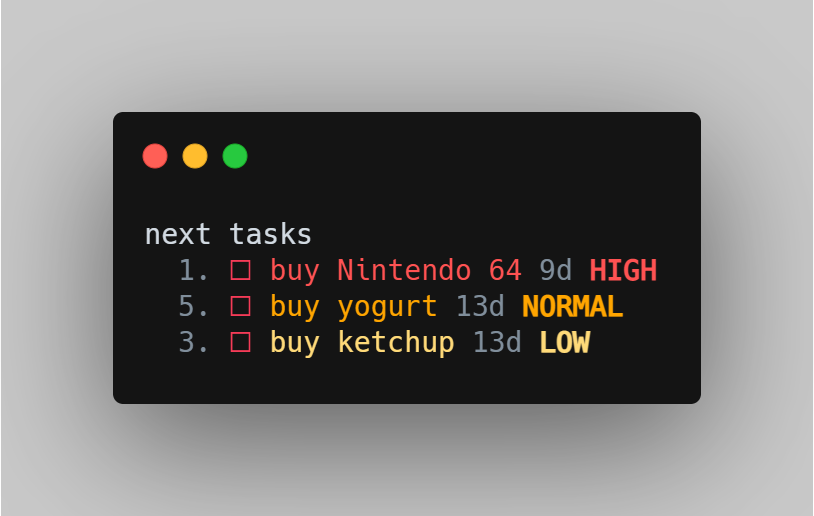
- `task-master task next`
- Displays the next task of each `priority` that was not completed.
- Does not display tasks with `status` `done`.
- `task-master export [target_directory]`
- Exports a *tasks.json* file containing the saved tasks to the `target_directory`.
- If the `target_directory` is ommitted, it exports the file to the current working directory.
- `task-master import `
- Imports a *.json* file containing the saved tasks from the mandatorily specified `filepath`.
- If successful it overwrites the data for the previously existing tasks.
- `task-master config [--no-colors]`
- Updates the configurations for the task-master CLI.
- If all options are ommitted, it sets all configurations to their default values.
- The task's `--no-colors` flag is optional. It sets the `enableTerminalColors` property to `false`, disabling colored output when using the task-master CLI.
- When the `--no-colors` flag is ommitted, **by default**, it sets the `enableTerminalColors` property to `true`, enabling colored output when using the task-master CLI.
## Technologies
This project was developed with the following technologies:
- [Node.js][nodejs]
- [Commander](https://github.com/tj/commander.js/)
- [Inquirer](https://github.com/SBoudrias/Inquirer.js)
- [Chalk](https://github.com/chalk/chalk)
- [NCP](https://github.com/AvianFlu/ncp)
- [Mocha](https://mochajs.org/)
- [Expect](https://jestjs.io/docs/expect)
- [VS Code][vc]
## Uninstallation
You can uninstall task-master CLI through your terminal with the following command:
```bash
# Uninstall the CLI globally
$ npm uninstall -g @stevescruz/task-master
```
## :memo: License
This project is under the MIT license.
---
[Get in touch with me!](https://www.linkedin.com/in/stevescruz/)
[nodejs]: https://nodejs.org/
[vc]: https://code.visualstudio.com/