https://github.com/stonec0der/g-dark-theme
A Visual Studio Code Theme with multiple backgrounds-color and syntax-highlighting to suit your coding environment and minimize eye-strain
https://github.com/stonec0der/g-dark-theme
blue-theme dark-themes eye-strain hacker high-contrast matrix purple-theme reggae synthwave theme-variants themes vscode vscode-theme
Last synced: 4 months ago
JSON representation
A Visual Studio Code Theme with multiple backgrounds-color and syntax-highlighting to suit your coding environment and minimize eye-strain
- Host: GitHub
- URL: https://github.com/stonec0der/g-dark-theme
- Owner: stoneC0der
- License: mit
- Created: 2019-04-03T17:34:16.000Z (about 7 years ago)
- Default Branch: master
- Last Pushed: 2025-08-17T17:34:58.000Z (10 months ago)
- Last Synced: 2025-09-18T13:37:33.101Z (9 months ago)
- Topics: blue-theme, dark-themes, eye-strain, hacker, high-contrast, matrix, purple-theme, reggae, synthwave, theme-variants, themes, vscode, vscode-theme
- Homepage: https://stonec0der.github.io/g-dark-theme/
- Size: 44.9 MB
- Stars: 2
- Watchers: 1
- Forks: 0
- Open Issues: 0
-
Metadata Files:
- Readme: README.md
- Changelog: CHANGELOG.md
- Contributing: CONTRIBUTING.md
- License: LICENSE
- Code of conduct: CODE_OF_CONDUCT.md
Awesome Lists containing this project
README
# G-dark Themes for Vscode
**If you like this theme, please support it by giving it a star on [github](https://github.com/stonec0der/g-dark-theme) or leave a review on the [marketplace](https://marketplace.visualstudio.com/items?itemName=StoneC0der.vscode-g-dark-theme).**
**If you have any issue, please report them on the [issue page](https://github.com/stonec0der/g-dark-theme/issues)**
- [G-dark Themes for Vscode](#g-dark-themes-for-vscode)
- [](#)
- [Getting started](#getting-started)
- [Installation](#installation)
- [Support](#support)
- [Languages](#languages)
- [Night Mode](#night-mode)
- [Other Editors](#other-editors)
- [Custom Settings](#custom-settings)
- [Fonts](#fonts)
- [Happy coding](#happy-coding)
##
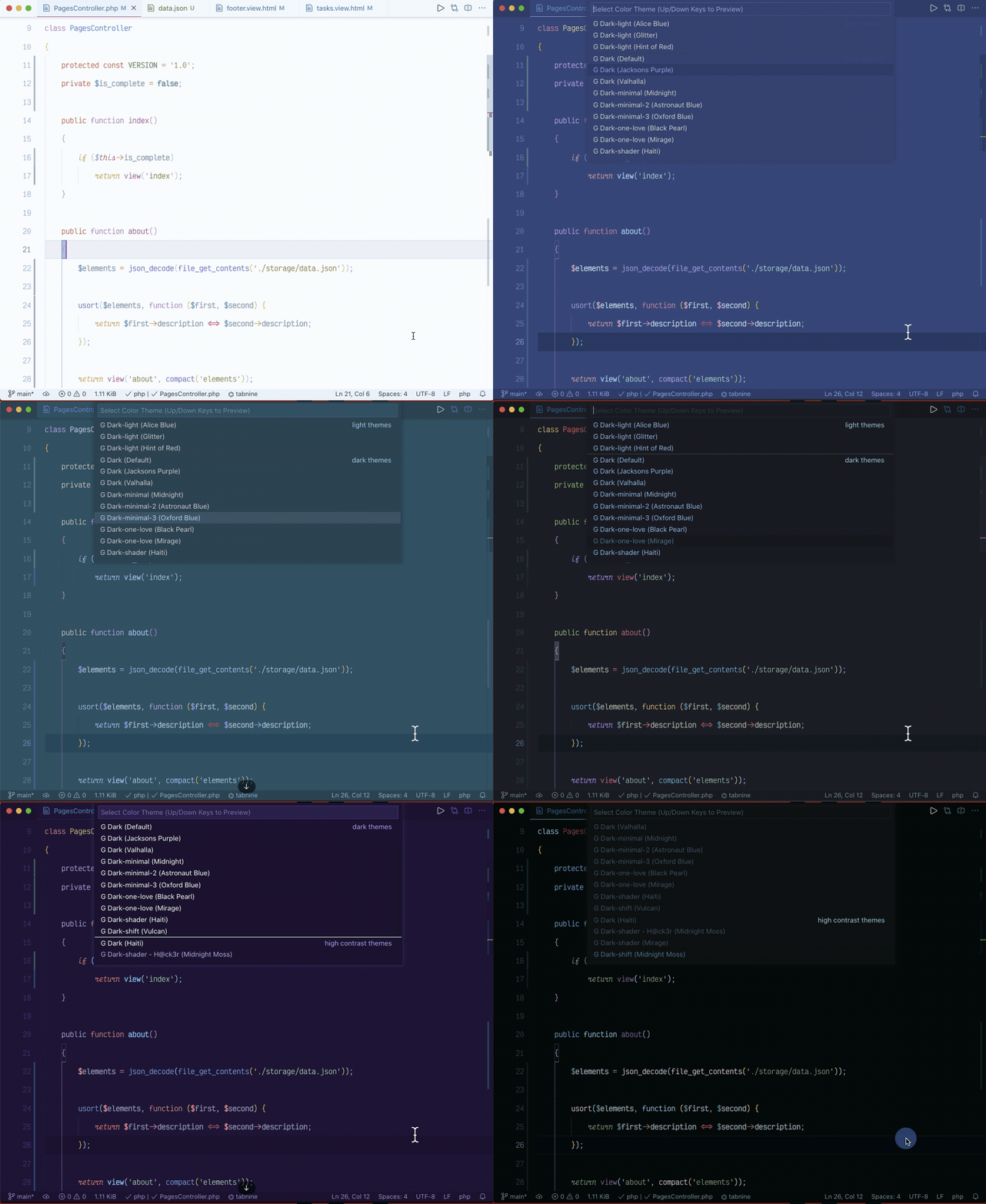
**Give it a try and if you like and can spare e few minutes of time, help spread the word, give a ☆
on github or leave a review if you have time, thank you and happy coding✌🏾**
## Getting started
### Installation
1. Open **Extensions** sidebar panel in VS Code. `View → Extensions`
2. Search for `g-dark`
3. Click **Install** to install it.
4. A drop down list will appear.
5. Select on of **g-dark theme** variants to preview
6. Press Enter to activate the theme
### Support
#### Languages
Optimized for ***PHP***, ***Laval***, ***Blade Template***, ***Jinja***, ***Python***,
***HTML***, ***CSS***, **JSON**, **Markdown**, ***JS (Vanilla)*** and ***Others Languages***.
#### Night Mode
All themes Work well with F.lux/Night Shift or other similar tools.
**Note:** *Some themes are work better in dark room or similar as well as some in bright room
or outside, I suggest you try every themes on different sets to find the one that work for you.*
*Tested on **macOS** & **Linux***
### Other Editors
- For [Nova](https://extensions.panic.com/extensions/stonec0der/stonec0der.GDarkTheme/)
### Custom Settings
#### Fonts
To get the most out of this them please add the following configuration:
1 Download and install Haskling fonts
[Hasklig](https://github.com/i-tu/Hasklig, "Hasklig") or [JetBrains Mono](https://www.jetbrains.com/lp/mono/)
2 Enable ligature in vscode setting or add to settings.json :
```json
"editor.fontLigatures": true,
"editor.fontWeight": "600",
"editor.fontSize": 14.5,
"window.zoomLevel": 1,
```
3 Install [Indent-Rainbow](https://marketplace.visualstudio.com/items?itemName=oderwat.indent-rainbow, "Indent-Rainbow")
- add this to settings.json:
```json
"indentRainbow.colors": [
"rgba(16,16,16,0.10)",
"rgba(16,16,16,0.20)",
"rgba(16,16,16,0.30)",
"rgba(16,16,16,0.35)",
"rgba(16,16,16,0.40)",
"rgba(16,16,16,0.45)",
"rgba(16,16,16,0.50)",
"rgba(16,16,16,0.55)",
"rgba(16,16,16,0.60)",
"rgba(16,16,16,0.65)",
],
```
4 Add the following to setting.json to display white space indicator only on selection
```json
"editor.renderWhitespace": "selection",
```
5 Auto switch between dark and light theme (macOS only)
Install [auto-darkMode](https://marketplace.visualstudio.com/items?itemName=LinusU.auto-dark-mode,
"Auto Dark Mode")
- add the following to settings.json:
```json
"autoDarkMode.darkTheme": "G Dark",
"autoDarkMode.lightTheme": "G Light",
```
6 For colored brackets
```json
"editor.fontWeight": "600",
"bracketPairColorizer.forceUniqueOpeningColor":true,
"bracketPairColorizer.forceIterationColorCycle":true,
"bracketPairColorizer.colorMode":"Consecutive",
"bracketPairColorizer.highlightActiveScope":true,
"bracketPairColorizer.activeScopeCSS":[
"borderStyle : solid",
"borderWidth : 1px",
"borderColor : {color}; opacity: 0.3",
"backgroundColor : {color}"
],
"editor.matchBrackets":"never",
"bracketPairColorizer.showBracketsInGutter":true,
"bracketPairColorizer.consecutivePairColors":[
"()",
"[]",
"{}",
["<", ""],
["<", "/>"],
[
"Gold",
"Orchid",
"LightSkyBlue",
"#854442",
"#08C08C"
],
"Red"
],
```
### Happy coding
All contribution are welcome