https://github.com/stonerl/Thaw
Menu bar manager for macOS
https://github.com/stonerl/Thaw
macos macos-app menu-bar menubar menubar-app status-bar statusbar swift swiftui utility
Last synced: 5 months ago
JSON representation
Menu bar manager for macOS
- Host: GitHub
- URL: https://github.com/stonerl/Thaw
- Owner: stonerl
- License: gpl-3.0
- Created: 2026-01-29T18:26:51.000Z (6 months ago)
- Default Branch: main
- Last Pushed: 2026-02-04T18:23:32.000Z (5 months ago)
- Last Synced: 2026-02-05T04:21:04.297Z (5 months ago)
- Topics: macos, macos-app, menu-bar, menubar, menubar-app, status-bar, statusbar, swift, swiftui, utility
- Language: Swift
- Homepage:
- Size: 22.7 MB
- Stars: 173
- Watchers: 6
- Forks: 3
- Open Issues: 5
-
Metadata Files:
- Readme: README.md
- Funding: .github/FUNDING.yml
- License: LICENSE
- Code of conduct: CODE_OF_CONDUCT.md
Awesome Lists containing this project
- awesome-mac - Thaw - 메뉴 바 항목을 숨기고 표시하는 강력한 메뉴 바 관리 도구. [![Open-Source Software][OSS Icon]](https://github.com/stonerl/Thaw) (유틸리티 / 메뉴 바 도구)
- awesome-swift-macos-apps - Thaw - commit/stonerl/Thaw?style=flat&label=" /> - A powerful menu bar management tool for hiding and showing menu bar items. (Menubar / Text)
- awesome-native-macosx-apps - Thaw - Powerful menu bar management tool. Fork of Ice, lower resource usage. `Free` `Open Source` (Menu Bar Apps / What It Does)
- fucking-awesome-mac - Thaw - 메뉴 바 항목을 숨기고 표시하는 강력한 메뉴 바 관리 도구. [![Open-Source Software][OSS Icon]](https://github.com/stonerl/Thaw) (유틸리티 / 메뉴 바 도구)
- awesome-free-apps - Thaw - Menu bar manager for hiding, arranging, and customizing menu bar items. 🍎 [🟢](https://github.com/stonerl/Thaw) (Customize / System Customization)
README

Thaw
Thaw is a powerful menu bar management tool. While its primary function is hiding and showing menu bar items, it aims to cover a wide variety of additional features to make it one of the most versatile menu bar tools available.

[](https://github.com/stonerl/Thaw/releases/latest)


[](https://github.com/sponsors/stonerl)
[](https://discord.gg/5cnKkKbMFd)
[](LICENSE)
> [!NOTE]
> **Thaw** is a fork of [Ice](https://github.com/jordanbaird/Ice) by Jordan Baird.
> As the original project appears to be inactive, Thaw aims to keep the project alive fixing bugs, ensuring compatibility with the latest macOS releases, and eventually implementing the remaining roadmap features.
## Install
### Manual Installation
Download the `Thaw_1.x.x.zip` file from the [latest release](https://github.com/stonerl/Thaw/releases/latest) and move the unzipped app into your `Applications` folder.
### Homebrew
Install Thaw using the following command:
```sh
brew install --cask thaw
```
## Features/Roadmap
Click to view the full Features & Roadmap list
### Menu bar item management
- [x] Hide menu bar items
- [x] "Always-hidden" menu bar section
- [x] Show hidden menu bar items when hovering over the menu bar
- [x] Show hidden menu bar items when an empty area in the menu bar is clicked
- [x] Show hidden menu bar items by scrolling or swiping in the menu bar
- [x] Automatically rehide menu bar items
- [x] Hide application menus when they overlap with shown menu bar items
- [x] Drag and drop interface to arrange individual menu bar items
- [x] Display hidden menu bar items in a separate bar (e.g. for MacBooks with the notch)
- [x] Search menu bar items
- [x] Menu bar item spacing (BETA)
- [ ] Profiles for menu bar layout
- [ ] Individual spacer items
- [ ] Menu bar item groups
- [ ] Show menu bar items when trigger conditions are met
### Menu bar appearance
- [x] Menu bar tint (solid and gradient)
- [x] Menu bar shadow
- [x] Menu bar border
- [x] Custom menu bar shapes (rounded and/or split)
- [ ] Remove background behind menu bar
- [ ] Rounded screen corners
- [ ] Different settings for light/dark mode
### Hotkeys
- [x] Toggle individual menu bar sections
- [x] Show the search panel
- [x] Enable/disable the Thaw Bar
- [x] Show/hide section divider icons
- [x] Toggle application menus
- [ ] Enable/disable auto rehide
- [ ] Temporarily show individual menu bar items
### Other
- [x] Launch at login
- [x] Automatic updates
- [ ] Menu bar widgets
## Translations
Thaw is currently available in the following languages:
| Language | Status | Flag | Completion |
| :----------- | :------- | :---: | :------------------------------------- |
| **English** | Base | 🇺🇸 |  |
| **Deutsch** | Complete | 🇩🇪 |  |
| **Français** | Complete | 🇫🇷 |  |
| **正體中文** | Complete | 🇹🇼 |  |
| **Spanish** | Partial | 🇪🇸/🇲🇽 |  |
### Help Translate Thaw
If you want to help translate Thaw into your language or improve existing ones, you'll need the latest version of Xcode.
1. Open `Thaw.xcodeproj` in Xcode 15 or later.
2. Navigate to `Thaw -> Resources -> Localizable.xcstrings`.
3. Add a new language using the **+** button at the bottom or update existing strings.
4. Submit a Pull Request with your changes!
_Note: You can see the exact completion percentage for each language directly in the Xcode String Catalog editor._
## Why does Thaw only support macOS 14 and later?
Thaw uses a number of system APIs that are available starting in macOS 14. As such, there are no plans to support earlier versions of macOS.
## Gallery
#### Show hidden menu bar items below the menu bar

#### Drag-and-drop interface to arrange menu bar items

#### Customize the menu bar's appearance

#### Menu bar item search

#### Custom menu bar item spacing

## License
Thaw is available under the [GPL-3.0 license](LICENSE).
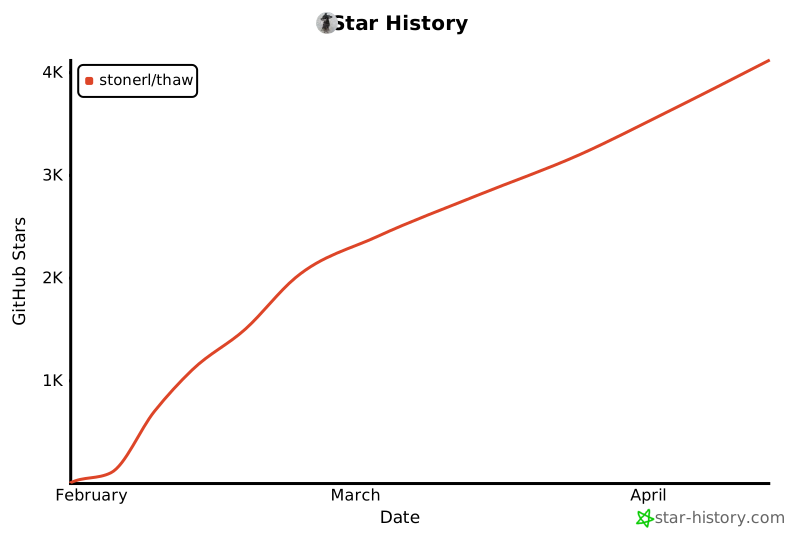
## Project Stats